

Quick Answer: 90% of MICO Live coin top-up failures stem from wrong UID or region mismatch. Your MICO UID is the numeric identifier under your profile nickname—not your username or display name. Before paying, verify your UID matches exactly what you entered. Most deliveries complete within 5 minutes, but wrong UID transfers are often irreversible.
Why MICO Coins Go Missing: The Wrong UID Problem
When MICO coins disappear after payment, most cases trace to user ID errors, not payment failures. Understanding account identifiers prevents costly mistakes that can result in permanent coin loss.
For delivery issues, platforms like MICO Live coins top up through BitTopup implement verification systems that reduce ID errors through automated checks before payment.
What Is MICO UID and Why It Matters
Your MICO UID is the permanent numeric identifier that routes coin deliveries. Unlike usernames or display names you can change, this ID stays constant. Third-party top-up services need only this MICO ID—no password required—making accurate entry the critical factor for successful delivery.
The system uses exact matching. When you purchase coins, the processor sends currency to the specified UID. If that number differs by even one digit, coins deliver to whoever owns that alternate UID—an irreversible transfer in most cases.
Statistics: 90% of Missing Coins Linked to UID Errors
Platform data shows 90% of coin top-up failures result from ID errors or region mismatches. This includes: entering usernames instead of numeric UIDs, copy-paste mistakes with hidden characters, manual typing errors, and confusion between multiple accounts.
Successful transactions timeline:
95% complete in under 5 minutes (card/wallet payments)
100% complete within 30 minutes (standard methods)
Crypto top-ups may take 30 minutes for blockchain confirmations
Wrong UID vs Payment Failures
Payment failures generate immediate error messages and prevent completion, leaving money in your account or triggering refunds. Wrong UID scenarios differ—payment processes successfully, confirmations arrive, transaction IDs generate normally. Coins deliver exactly as intended, just to the wrong recipient.
This matters for recovery. Payment failures resolve through standard refunds. Wrong UID transfers require MICO support intervention with comprehensive proof, and success depends on how quickly you identify the error and whether the recipient account remains active.
Understanding MICO User Identification System
MICO employs multiple identification layers serving different functions. Confusion between these accounts for most top-up errors.
MICO UID vs Username vs Display Name
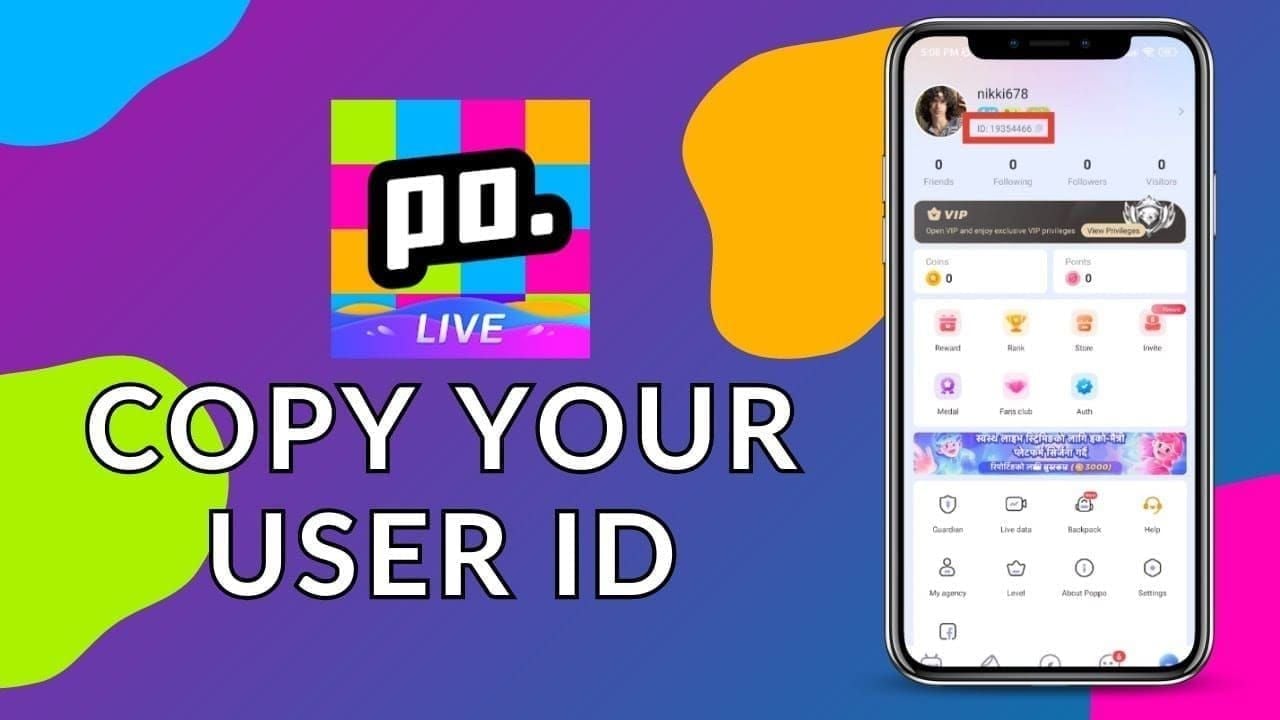
MICO UID: Permanent numeric string assigned at account creation. Appears under profile nickname, never changes. Used exclusively for financial transactions.
Username: Login credential and social identifier. Can be modified through settings, making it unsuitable for transaction routing.
Display name: How others see you in chats, streams, social interactions. Changes freely, no connection to payment infrastructure.
Third-party platforms request MICO ID specifically because numeric format prevents ambiguity. Two users might share similar usernames, but UIDs remain unique platform-wide.
Why Numeric UID for Transactions
Numeric identifiers eliminate character encoding issues plaguing text-based systems. Special characters, spaces, case sensitivity create mismatch opportunities. Purely numeric system reduces variables to ten digits (0-9), significantly lowering error probability.
Permanence provides additional security. When you bind payment methods or transaction history to a UID, that connection stays stable regardless of username changes, profile updates, or display name modifications.
Common Misconceptions
Many assume their username serves as account identifier for all purposes, leading them to enter text names in UID fields. Others believe email or phone number functions as transaction identifier since these enable login.
Some confuse MICO UID with device ID or installation ID, particularly when troubleshooting. These device-specific identifiers have no relationship to financial transaction routing.
Most problematic: assuming the platform will auto-detect and correct UID errors. The automated delivery system executes exactly what the order form specifies—human verification is the only safeguard.
How to Find and Verify Your MICO UID
Locating your correct UID takes under 30 seconds but prevents hours of recovery efforts and potential permanent loss.
Locating UID in MICO App
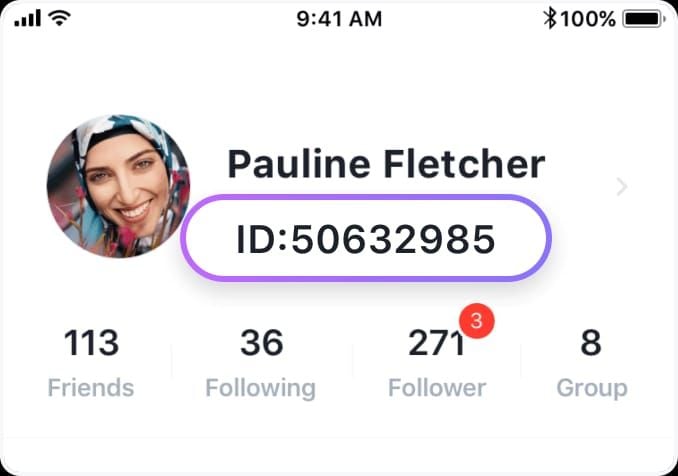
Open MICO Live app
Tap profile icon (bottom right corner)
Your numeric UID appears directly under your nickname
Number typically displays in distinct format/color
This location stays consistent across iOS and Android, though styling may vary between updates.
Copying UID Correctly: Avoiding Errors
Long-press to select entire UID, tap Copy. This captures exact numeric string without spaces, line breaks, or invisible characters manual typing might add.
After copying, paste into notes app to verify it displays as clean numeric string. Check for unexpected characters at beginning or end—some devices add formatting marks during copy operations.
Don't screenshot your UID and manually type what you see. Human transcription introduces significantly higher error rates than digital copy-paste, particularly with longer sequences containing similar digits (0 vs O, 1 vs l, 8 vs B).
Double-Check Before Payment
Before finalizing purchase, compare UID in payment form against UID in active MICO app session. Open both side-by-side if your device supports split-screen, or switch between apps for character-by-character matching.
For enhanced security, buy MICO coins recharge instant through BitTopup's platform, which displays the UID you entered alongside confirmation buttons, creating final checkpoint before processing.
Pay attention to digit count. If your actual UID contains 9 digits but payment form shows 8 or 10, you've missed digits or added extras.
Screenshot Method: Visual Verification
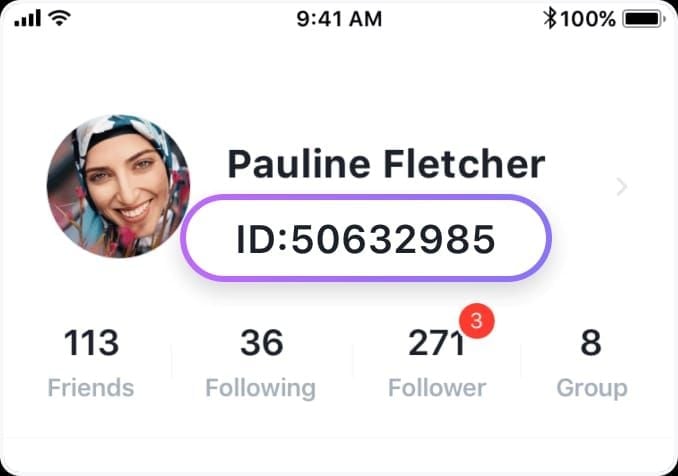
Before initiating top-up, capture screenshot showing MICO profile with UID clearly visible and timestamp. This provides:
Reference material while filling payment forms
Evidence for support tickets if issues arise
Proof of actual UID at transaction time
Store in dedicated folder for easy retrieval. If you maintain multiple accounts, label each screenshot with associated username to prevent cross-account confusion.
Top 7 UID Entry Mistakes That Cause Coin Loss
1. Entering Username Instead of Numeric UID
Most frequent error. Users accustomed to login processes naturally think of username as primary identifier, entering text names in UID fields. Payment systems accept this without error messages.
Coins then deliver to whichever account owns that numeric sequence—if username contains only numbers, it might coincidentally match a valid UID belonging to different user.
Prevention: Verify field contains only numeric digits. If you see letters, symbols, or spaces, you've entered wrong identifier type.
2. Copy-Paste Errors with Hidden Characters
Operating systems sometimes add invisible formatting characters during copy operations. These don't display in payment forms but alter the string the system processes.
Mobile keyboards may insert zero-width spaces, directional markers, or formatting codes that survive paste operations.
Prevention: After pasting UID, delete and paste again to clear potential formatting. Or paste into plain-text editor first, then copy from there.
3. Confusing Similar UIDs of Multiple Accounts
Users managing multiple MICO accounts sometimes mix up UIDs, particularly when numbers share similar digit patterns. Confusion intensifies when switching accounts frequently or when significant time passes between top-ups.
Prevention: Maintain secure document listing each account's UID alongside username and purpose. Before each top-up, verify which account you're logged into.
4. Manual Typing Errors in Long UID Numbers
Even careful users make transcription mistakes with 8-12 digit sequences. Transposed digits (1234 as 1243), skipped numbers, or doubled digits create UIDs belonging to other users.
Error rate increases with UID length and when users attempt to memorize ID. Fatigue, distraction, small mobile keyboards compound the problem.
Prevention: Never manually type UID when digital copy-paste exists. If you must type, verify each digit individually, reading number aloud or using finger to track position.
5. Region Mismatch Issues
Platform detects region through IP address, payment origin, verification documents. Initial assignments become permanent. If you've changed regions, log out and back in to update session.
6. Using Outdated UID Information
While UIDs don't change, using screenshots from old accounts or deleted profiles causes errors.
Prevention: Always copy UID from currently active session.
7. Not Verifying After Paste
Assuming paste operation succeeded without visual confirmation leads to incomplete or corrupted UID entries.
Prevention: Always review pasted UID before payment confirmation.
Pre-Payment Verification Checklist
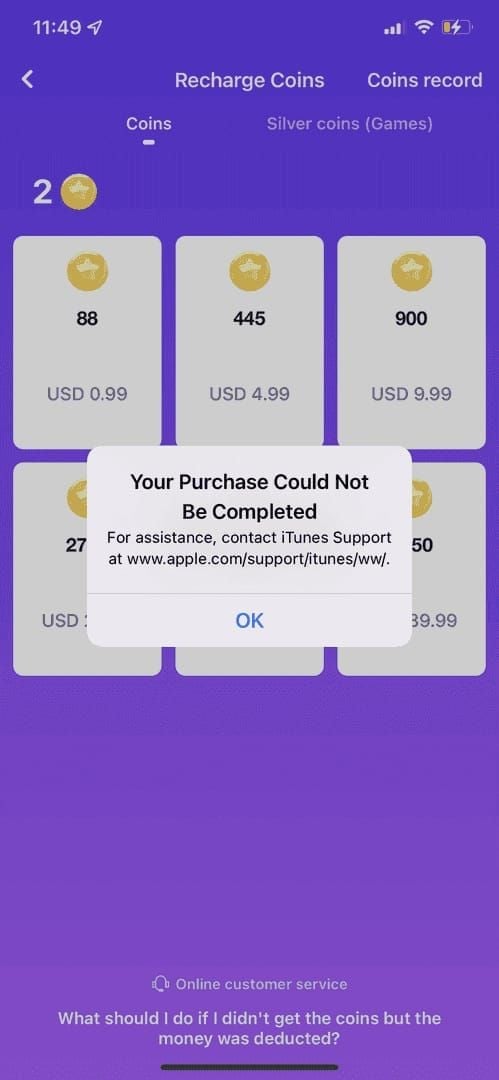
This 90-second routine eliminates vast majority of UID errors:
Step 1: Access MICO profile, long-press UID, tap Copy. Paste into notes to verify clean numeric string.
Step 2: Navigate to top-up platform, tap UID field, select Paste. Don't manually type any characters.
Step 3: Switch back to MICO app. Verify logged-in account matches account you intend to top up.
Step 4: Confirm current session matches intended recipient by checking follower counts, recent broadcasts, or wallet history.
Step 5: Compare payment form UID digit-by-digit against MICO profile, reading each number aloud.
Step 6: Screenshot both MICO profile showing UID and payment form showing entered UID. Store together.
Step 7: Review coin package amount, payment method, total cost before clicking final confirmation.
What to Do If MICO Coins Are Missing
Immediate Action: Check Transaction Status
Access email or payment platform to locate transaction confirmation. Verify payment processed successfully, note transaction ID, timestamp, exact amount charged.
Check payment method (card, PayPal, mobile wallet) to confirm charge appears in history. If payment failed or reversed, you're experiencing payment issue, not delivery problem.
Verify Payment Completed Successfully
Log into MICO app: Profile > Wallet > History. Successful deliveries appear with timestamps, coin amounts, transaction types. If no new entry corresponds to recent payment, coins haven't reached delivery system yet.
For third-party platform payments, allow full delivery window before assuming failure:
95% of deliveries within 5 minutes (card/wallet)
100% within 30 minutes (standard methods)
Up to 30 minutes for crypto (blockchain confirmations)
Confirm UID Entered Matches Your Account
Return to payment confirmation email or platform order history to view submitted UID. Compare against actual MICO UID in profile. If numbers differ by even one digit, you've sent coins to different account.
This requires immediate action since recovery options decrease over time. Document incorrect UID entered, correct UID, payment receipt, transaction timestamp before proceeding to recovery.
Normal Delivery Timeframes
Understanding typical speeds helps determine when to escalate:
Most successful top-ups complete within 5 minutes
Coins appear in wallet balance immediately upon delivery
App may require refresh—log out and back in to update display
If 15 minutes pass without delivery and you've confirmed payment success and correct UID, clear app cache and restart device. These resolve display issues where coins delivered but app hasn't updated.
Wait full 30-minute window with stable internet before contacting support. Peak periods (7-11 PM local) occasionally extend delivery times due to processing volume.
5-Step Recovery Process for Wrong UID
When coins delivered to incorrect UID, immediate action maximizes recovery chances.
Step 1: Gather Payment Receipt and Transaction ID
Compile proof of purchase:
Payment receipt showing amount charged
Transaction ID
Payment timestamp
Payment method used
Order confirmation from top-up platform showing UID entered, coin package, order number
Step 2: Identify Incorrect UID Entered
Document exact UID you mistakenly entered (appears in order confirmation or purchase history). Record precisely as it determines where coins delivered.
Step 3: Contact Payment Platform Support Immediately
For third-party platform purchases, contact their support first. Provide transaction ID, payment receipt, correct UID, incorrect UID, explanation of error.
Most support teams acknowledge tickets within 24 hours. BitTopup users access in-app chat: Me > Online, attaching all required proofs.
Step 4: Submit Recovery Request with Documentation
Prepare comprehensive support package:
Screenshot of MICO UID with visible timestamp
Payment receipt showing successful transaction
Screenshot of wallet history showing zero new coins
App version and device details
Incorrect UID entered
Order ID from top-up platform
Email MICO support at contact@micous.com with documentation and clear explanation. Include any case ID from top-up platform's support.
Step 5: Follow Up Timeline
Support teams typically respond within 24-48 hours with initial assessment. 90% of ID error cases with complete documentation resolve through support intervention when reported promptly.
Maintain communication records, follow up every 48 hours without updates. Provide additional information requested immediately.
When Coins Are Recoverable vs Permanent Loss
Recoverable Cases (Within 48 Hours)
Recovery succeeds most when:
Reported within 48 hours of transaction
Complete documentation proving mistake provided
Incorrect UID doesn't correspond to active account
Accidentally sent to your own alternate account (highest probability)
Third-party platform error (you entered correct UID but system processed incorrectly)
Non-Recoverable Situations
Coins delivered to active account owned by another user
Chargebacks through payment provider (triggers permanent account, ID, device bans)
Significant time passed (weeks/months) before noticing error
Receiving account spent the coins
MICO Support Limitations
Support teams can investigate transactions and verify what occurred, but cannot unilaterally reverse completed deliveries between active accounts. Authority extends to technical corrections (system errors), not user error remediation.
Platform treats wrong UID entries like sending money to wrong bank account—sender bears responsibility for accuracy.
Prevention > Recovery
Difficulty and uncertainty of recovery underscore why prevention deserves absolute priority. 90 seconds for thorough UID verification prevents days/weeks of recovery efforts with uncertain outcomes.
Coins are non-refundable post-delivery per platform terms. Once you confirm payment, you've authorized irreversible transfer depending entirely on accuracy of information provided.
How BitTopup Prevents Wrong UID Errors
Built-In UID Verification System
BitTopup implements automated verification checking UID format and validity before allowing payment confirmation. System flags UIDs not matching MICO's standard format patterns, prompting review before proceeding.
Pre-payment validation catches common errors: usernames, spaces/special characters, incomplete UID sequences. Adds minimal time while preventing majority of input errors.
User-Friendly Interface with Error Prevention
Design emphasizes clarity at each step, displaying entered UID prominently alongside confirmation buttons. Visual reinforcement creates natural checkpoints where users instinctively verify information.
Clear labeling distinguishes UID fields from other inputs. Helpful tooltips and examples guide users unfamiliar with UID concept, improving first-time success rates.
Instant Delivery Confirmation
Upon successful payment, BitTopup provides immediate confirmation showing UID that received coins, package amount, delivery timestamp. Transparency enables quick error detection.
Platform maintains detailed transaction histories accessible through user accounts, providing permanent records for support inquiries or financial tracking.
Safe and Secure Process
Security infrastructure protects payment information through encryption and international payment standards compliance. Platform requires only MICO ID for delivery—never password or login credentials.
Competitive pricing, fast delivery (95% under 5 minutes), responsive customer support combine with error prevention for comprehensive safe top-up environment.
Expert Tips to Never Lose MICO Coins Again
Save UID in Secure Notes
Create dedicated note in secure notes app or password manager containing MICO UID, username, account creation date. Label clearly, protect with device authentication.
Update immediately if creating additional accounts, maintaining separate entries with clear labels. Eliminates need to access app every top-up while ensuring current, accurate information.
Always Use Copy-Paste
Make digital copy-paste your exclusive UID input method. Error rate for copy-paste: fractions of percent vs manual typing's 5-10% for long numeric sequences.
When platforms restrict paste (rare), use device autofill if available, or carefully type while referencing saved UID note, verifying each digit.
Top Up Through Verified Platforms
Prioritize platforms implementing verification systems and maintaining strong customer support. These cost marginally more sometimes but provide error prevention worth far more than small price differences.
Research platform reputations through user reviews focusing on delivery accuracy and support responsiveness.
Regular Account Verification
Before first top-up and periodically thereafter, bind mobile number and set strong password through MICO's account security settings. Protects from unauthorized access, strengthens ownership claims if needing support intervention.
Verify account region matches actual location, as region mismatches cause delivery failures.
FAQ About MICO UID and Missing Coins
What is MICO UID and where can I find it?
Your MICO UID is the unique numeric identifier assigned to your account. Find it by opening MICO app, tapping profile icon (bottom right), looking directly under your nickname. This permanent number serves as your transaction identifier.
How long does coin delivery take?
95% complete within 5 minutes (card/wallet payments). All standard payments within 30 minutes. Crypto may take up to 30 minutes for blockchain confirmations. If coins haven't arrived after 30 minutes with stable internet, verify UID and contact support.
Can I get refund if I sent coins to wrong UID?
Coins are non-refundable once delivered per platform terms. Recovery depends on circumstances: if reported within 48 hours with complete documentation and incorrect UID belongs to inactive account, support may assist. Coins delivered to active accounts owned by others typically unrecoverable. Never attempt chargebacks—these trigger permanent bans.
What's the difference between username and UID?
Username is text-based identifier for login and social interactions, changeable through settings. UID is permanent numeric identifier for financial transactions, never changes. Always use numeric UID for top-ups, never username—payment system only recognizes UIDs.
How do I verify MICO ID before payment?
Copy UID from MICO profile, paste into payment form, compare pasted number digit-by-digit against profile while both visible. Screenshot both profile showing UID and payment form showing entered UID. Verify you're logged into intended account by checking username and recent activity before confirming payment.
What if coins missing after 24 hours?
Verify payment completed by checking payment method's transaction history. Confirm entered UID matches actual MICO UID by comparing payment confirmation against profile. Check Profile > Wallet > History for delivery records. If payment succeeded but coins went to wrong UID, immediately contact top-up platform support and MICO support at contact@micous.com with transaction ID, payment receipt, correct UID, incorrect UID, screenshots proving ownership.
Avoid UID mistakes—top up MICO coins safely with BitTopup's verified UID system. Get instant delivery with built-in error prevention. Start your secure top-up now!