

Master PUBG Mobile's competitive edge with proven no-recoil sensitivity codes and optimized 4-finger claw layouts for 2026. This guide delivers copy-paste codes including the core 1-7435-8846-3421-0303-0728 configuration, device-specific settings, and Dragunov DMR optimization following the November 6, 2025 v4.1 update that buffed DMR stability by 60%.
Understanding No-Recoil Sensitivity Codes in PUBG Mobile 2026
No-recoil sensitivity codes are pre-configured numerical strings that adjust camera, ADS (Aim Down Sight), and gyroscope settings to minimize weapon recoil patterns. These codes balance vertical and horizontal sensitivity values across different scope magnifications for smoother weapon handling.
The core difference between optimized sensitivity and cheating: sensitivity codes adjust legitimate in-game parameters accessible through Settings > Sensitivity, while prohibited tools inject code or modify game files. The core code 1-7435-8846-3421-0303-0728 pairs gyroscope at 400% for no-scope with cascading reductions to 80% for 8x scopes, creating natural recoil compensation through player input.
Enhance your gameplay through PUBG UC Recharge Online at BitTopup for secure transactions and instant delivery.
The Science Behind Recoil Compensation
Recoil control operates through three interconnected layers: camera movement, ADS precision, and gyroscope stabilization. When firing an M416 with Red Dot, the game applies your ADS sensitivity (typically 50-60%) to vertical climb while gyroscope at 400% allows micro-adjustments through device tilting.
The November 6, 2025 v4.1 update nerfed AR damage 10-15% beyond 100 meters while buffing DMR stability by 60%. This shift makes precision-focused sensitivity configurations more valuable, particularly for the Dragunov DMR with its 500-meter effective range and fixed 60 damage output.
Legal vs Illegal: Settings vs Cheating Software
Sensitivity optimization remains within PUBG Mobile's terms of service as it uses built-in features accessible to all players. The Settings > Sensitivity menu exists for customization, and importing codes through Cloud represents intended functionality.
Prohibited methods include third-party apps that automatically control recoil, scripts modifying game behavior, or tools providing unavailable information. The distinction: sensitivity codes require skill development and practice, while cheats eliminate skill requirements entirely.
Complete No-Recoil Sensitivity Code Values for 2026 Meta
Camera Sensitivity Settings (TPP and FPP)
Camera sensitivity controls view rotation speed when not aiming. For TPP, optimal settings range 120-150% for no-scope scenarios, enabling quick 180-degree turns. FPP players benefit from slightly lower 100-120% values for precision during aggressive pushes.
Camera Free Look at 150% with Lens set to High creates maximum peripheral awareness without sacrificing center-screen stability.
ADS Sensitivity for All Scope Types
ADS sensitivity determines crosshair movement speed while scoped, with each magnification requiring progressively lower values:
No Scope: 100-130% for hip-fire mobility
Red Dot/Holographic: 50-70% balancing tracking with control
2x Scope: 35% for mid-range engagements
3x Scope: 25% transitioning to precision fire
4x Scope: 20% for controlled bursts at 100+ meters
6x Scope: 15% for long-range single taps
8x Scope: 12% for maximum stability at extreme distances
M416 with Red Dot performs optimally at 50-60% ADS paired with 400% gyroscope. AKM's heavier recoil requires 55-65% ADS with reduced 280-300% gyroscope. Mini14 DMR benefits from 22-27% ADS at 4x with 160-200% gyroscope.
Gyroscope Sensitivity Configuration
Gyroscope enables device-tilt aiming, providing micro-adjustments that complement touch controls:
No Scope: 400% for aggressive hip-fire corrections
Red Dot/2x: 400% maintaining close-range responsiveness
3x/4x: 275% transitioning to precision adjustments
6x: 120% for controlled long-range tracking
8x: 80-90% for minimal movement at maximum zoom
Enable Gyroscope Always On and calibrate on a flat surface before each session. This proves particularly effective for Dragunov DMR, where 4x scope gyroscope at 275% allows rapid target transitions at 200-300 meter ranges.
Weapon-Specific Sensitivity Adjustments
Different weapon classes demand tailored approaches:
Assault Rifles (M416, AKM): Dominate 50-150 meter encounters, requiring higher ADS values (50-65%) with elevated gyroscope (280-400%).
DMRs (Dragunov, Mini14, SKS): Excel at 150-400 meter ranges where lower ADS (20-27% at 4x) enables precise shot placement. Dragunov's 7.62mm ammunition and all-scope compatibility makes it versatile post-buff, benefiting from 60% stability increase.
How to Import and Apply Sensitivity Codes

Step-by-Step Code Import Process
Launch PUBG Mobile and navigate to Settings
Select Sensitivity tab
Tap Cloud icon (upper-right corner)
Choose Enter Code
Paste your code (example: 1-7435-8846-3421-0303-0728)
Tap Confirm
Exit settings to save automatically
Android users may prefer 1-7462-2496-3022-3831-210 for device-specific optimization. iPad players benefit from 1-7478-5115-3389-3888-854 baseline configuration.
Backing Up Current Settings
Before importing new codes, preserve existing configuration through cloud backup. Navigate to Settings > Sensitivity > Cloud > Upload Current Settings, then assign a memorable name like Original Settings [Date].
This proves essential when experimenting with multiple configurations, allowing rapid switching between setups for different match types or weapon loadouts.
Testing in Training Mode
After importing codes, test immediately in Training Ground. Focus on 50-meter spray patterns using M416 with Red Dot—the most common engagement scenario.
Allocate 15-minute sessions with 5 minutes dedicated to M416 spray control at static targets. Evaluate vertical climb consistency, horizontal drift, and center-mass hit maintenance. The 4-finger claw layout code 7275-1794-4178-8556-303 pairs optimally with these sensitivity settings.
Perfect 4-Finger Claw Layout for Dragunov Dominance
Essential Button Placement
4-finger claw utilizes both index fingers and thumbs simultaneously, dramatically increasing input speed. The foundational layout code 7275-1794-4178-8556-303 positions:
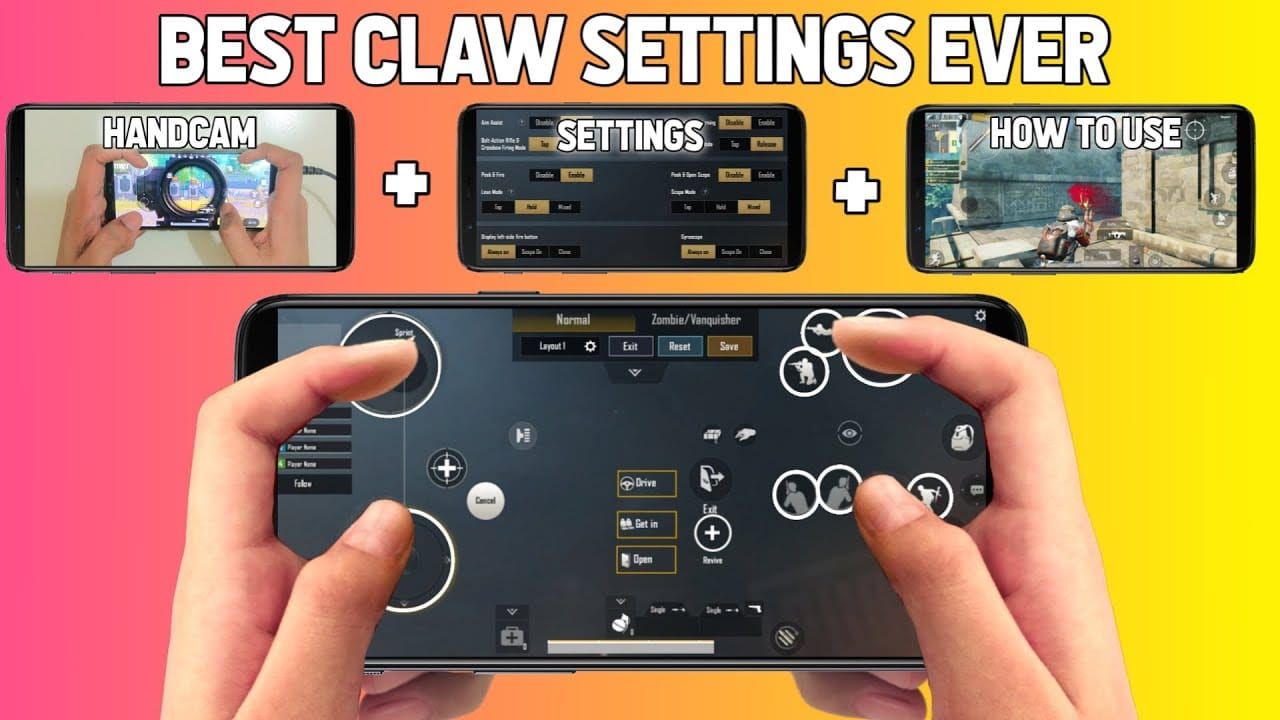
Left Index: Scope/ADS button (upper-left quadrant)
Right Index: Fire button (upper-right quadrant)
Left Thumb: Movement joystick and crouch/prone controls
Right Thumb: Camera control and utility buttons
Fire buttons should occupy 120-140% of default size with 15-25% spacing from screen edges. This enables ADS-crouch-shoot combinations essential for Dragunov engagements.
Device Size Considerations
Screen dimensions alter optimal button placement:
Medium-large phones (6.5-7 inch): 6974-6998-1946-2820-026
Tablets: 6960-4897-8808-0654-298 (requires 20-30% sensitivity increases)
6-finger claw (large screens): 6960-4887-1407-8797-709
Small phones (under 6 inch): 6916-3084-8580-4664-088 (starter 3-finger)
Custom HUD for DMR-Focused Gameplay
DMR strategies demand layouts prioritizing scope activation speed. The sniper-optimized 4-finger layout 6960-4897-8808-0564-299 enlarges scope button and repositions for instant index finger access.
Configure Scope Mode to Hold rather than Tap for sustained ADS during multi-target engagements. Enable Peek & Fire with Peek Mode set to Mixed for both left and right lean without releasing ADS.
Fire Button and Scope Optimization
Position primary fire button where right index finger naturally rests at 30-45 degree device angle, typically 20-25% from top-right corner. This reduces finger fatigue while maintaining instant activation.
The 5-finger claw layout 7275-2058-0453-0602-607 adds dedicated ADS-crouch-shoot button combining three actions, though most players achieve better results mastering standard 4-finger first.
Dragunov Buff Analysis and Optimal Settings
What Changed in the 2026 Buff
The November 6, 2025 v4.1 update transformed Dragunov through comprehensive stability improvements. The 60% DMR stability buff reduced vertical recoil climb and horizontal drift, enabling rapid follow-up shots.
This coincided with AR damage nerfs of 10-15% beyond 100 meters, creating a power vacuum in mid-to-long range that Dragunov now fills. Fixed 60 damage output remains unchanged, but improved stability increases practical DPS.
New Recoil Pattern and Damage Profile
Post-buff Dragunov follows tighter vertical pattern with minimal horizontal deviation. At 4x magnification with ADS at 20% and gyroscope at 275%, the weapon achieves near-zero horizontal drift during rapid fire, allowing 5-6 shot bursts at 200+ meters.
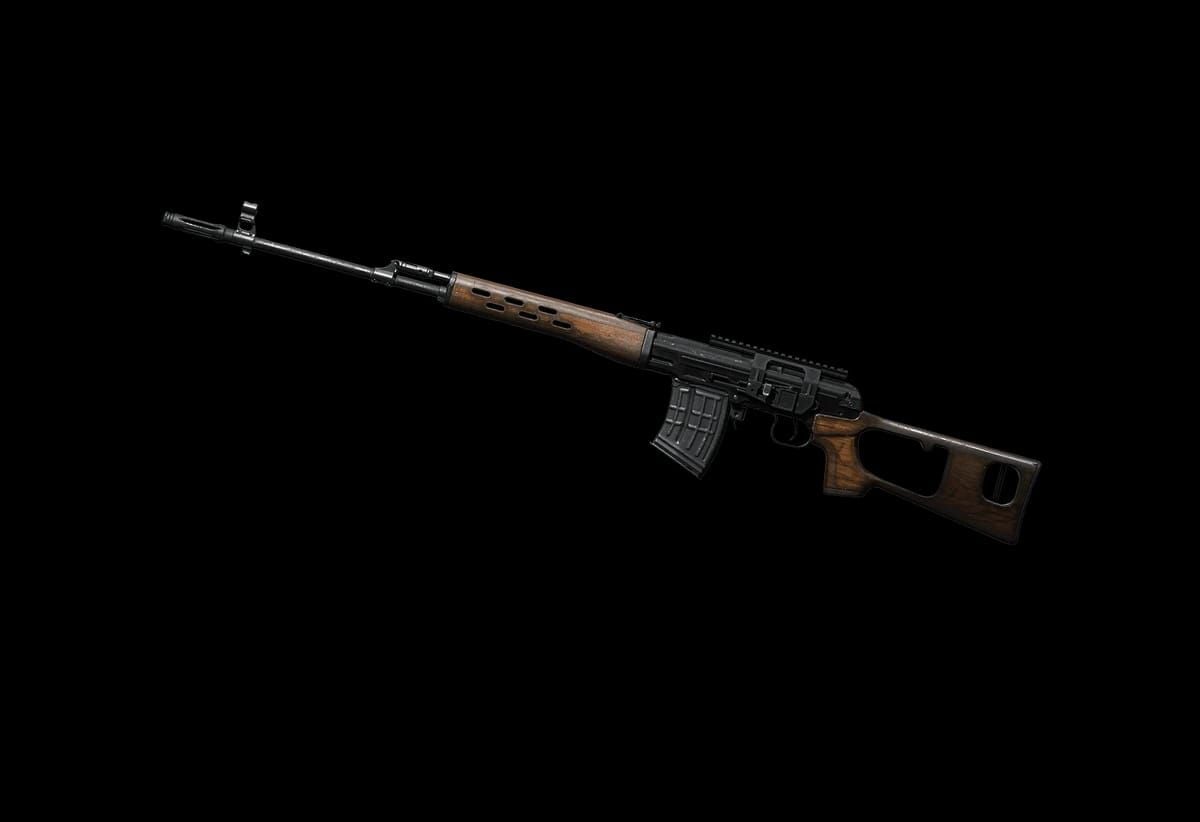
The 500-meter effective range paired with all-scope compatibility provides unprecedented versatility. Engage close-range at 50-100 meters using Red Dot, then transition to 6x or 8x for 300-500 meter eliminations without weapon switching.
Sensitivity Adjustments for Post-Buff Performance
Recommended Dragunov configuration:
4x Scope ADS: 22-27% for controlled bursts
4x Scope Gyroscope: 160-200% for target tracking
6x Scope ADS: 15% for long-range precision
8x Scope Gyroscope: 80-90% for minimal movement
These values leverage stability improvements by allowing slightly higher sensitivity than pre-buff, enabling faster transitions between multiple targets.
Best Attachments to Pair with Settings
Compensator: Reduces vertical recoil ~25%, stacking with 60% stability buff Vertical Grip: Additional 15% vertical recoil reduction Extended QuickDraw Mag: 20-round capacity with faster reload Tactical Stock: Reduces ADS time by 10%, complementing higher sensitivity
Advanced 4-Finger Claw Techniques
Finger Positioning and Movement Mechanics
Rest device against palm base with fingers curved naturally. Index fingers hover 2-3mm above fire and scope buttons. During spray control, right index applies consistent downward pressure while right thumb executes small downward swipes to counter vertical recoil.
This dual-input approach distributes recoil compensation across two contact points, reducing individual correction magnitude for smoother control.
Combining Gyroscope with 4-Finger Claw
Gyroscope integration creates three-axis control: thumb swipes for major adjustments, gyroscope tilt for micro-corrections, index fingers for action execution. When engaging at 150+ meters with Dragunov, initiate ADS with left index, fire with right index, and use subtle device tilts to track moving targets while right thumb handles vertical recoil.
This proves effective during vehicle pursuits where 400% gyroscope at Red Dot allows rapid horizontal tracking through device rotation.
Quick Scope Techniques for DMR Weapons
Using 4-finger claw layout 7275-1794-4178-8556-303, press scope with left index while positioning crosshair via right thumb. The moment scope animation completes, activate fire with right index for instant shot delivery.
Dragunov's improved stability makes quick-scoping more forgiving post-buff. Practice in Training Ground against moving targets at 100 meters, gradually increasing range.
Training Drills to Master New Settings
Training Ground Spray Control Exercises
Begin each 15-minute session with 5 minutes on M416 spray control at 50 meters using Red Dot. Fire full magazines at stationary targets, maintaining center-mass groupings without vertical climb exceeding head-height.
Progress to 100-meter sprays using 4x scope. Your 20% ADS and 275% gyroscope should enable 10-15 round bursts with acceptable accuracy. If groupings exceed shoulder-width, reduce gyroscope by 10-15% increments.
Moving Target Practice
Engage moving targets at 75-100 meters using Dragunov with 4x scope, landing 3+ consecutive shots per target pass. The 60% stability buff should enable this with 22-27% ADS and 160-200% gyroscope. If you consistently lead or lag targets, adjust camera sensitivity (TPP 120-150%) rather than ADS values.
Long-Range Accuracy Drills
Position at Training Ground's maximum range markers (300+ meters) and engage stationary targets using 6x or 8x scopes. Your 15% ADS at 6x and 12% at 8x should provide stable platforms for precise shot placement.
Focus on first-shot accuracy rather than rapid fire at extreme ranges. Successful long-range Dragunov use combines optimized sensitivity with environmental awareness—wind effects, target movement prediction, and scope zeroing.
Measuring Improvement with Key Metrics
Track quantifiable metrics:
Headshot percentage: Should increase with improved recoil control
Damage per match: Reflects overall accuracy improvements
Knockdown distance averages: Indicates effective range expansion
Survival time: Better control correlates with smarter positioning
Compare across 20+ matches for statistically significant trends. Optimal configurations typically show 15-25% improvement in damage dealt and 10-15% increases in average knockdown distances within two weeks.
Device Optimization for Maximum Performance
Graphics Settings for Smooth Gameplay
Competitive players should prioritize performance over visuals. Select Smooth graphics with frame rate set to Ultra (60 FPS) or Extreme (90 FPS).
Disable:
Anti-Aliasing: Minimal visual improvement with performance cost
Shadows: Obscures enemies
Auto-Adjust Graphics: Causes mid-match fluctuations
Enable Colorful style for enhanced color saturation, improving enemy visibility at 300+ meters.
iOS vs Android Performance Differences
iOS devices provide more consistent frame delivery and lower touch latency, allowing slightly higher sensitivity values (5-10% increase). High-end Android devices with 120Hz+ displays benefit from code 7182-2143-7949-4840-905, while iOS precision players should use 7120-0143-8549-4140-855.
Frame Rate and Touch Response Optimization
Achieving consistent 120 FPS requires graphics optimization and thermal management. Extended sessions cause heating that triggers throttling. Use external cooling or take 5-minute breaks every 45 minutes.
Sensitivity codes and 4-finger claw layouts perform optimally on 120+ FPS devices with 90Hz+ screens. Players on 60 FPS devices should reduce gyroscope by 10-15%.
Common Sensitivity Mistakes and How to Avoid Them
Over-Compensating with Too Low Sensitivity
Excessively low values (ADS below 40% for Red Dot, camera below 80%) prevent effective target tracking. Optimal sensitivity balances control with responsiveness—you should execute 180-degree turns within 1-1.5 seconds.
Test against moving Training Ground targets; if you consistently lose tracking, increase sensitivity incrementally.
Neglecting Gyroscope Settings
Many players disable gyroscope, eliminating a powerful control dimension. The cascading structure (400% no-scope to 80% 8x) provides precise corrections during sustained fire.
Calibrate on flat surface before each session. Within 20-30 training sessions, gyroscope corrections should become subconscious.
Not Testing in Real Match Conditions
Training Ground provides controlled environments, but real matches introduce variables revealing configuration weaknesses. After Training Ground validation, test in 5-10 Classic Mode matches before using in Ranked play.
Monitor performance during close-range building fights, mid-range open field engagements, and long-range sniper duels.
Copying Pro Settings Without Personal Adjustment
Pro codes provide excellent starting points, but individual differences in hand size, finger length, device grip, and reaction time mean optimal settings vary. The core code 1-7435-8846-3421-0303-0728 represents a balanced baseline requiring 10-20% adjustments.
Treat pro configurations as templates. Import base code, play 10-15 matches noting specific scenarios where control feels imprecise, then adjust only affected sensitivity categories.
Pro Tips and Advanced Customization
Creating Weapon-Class Specific Profiles
Maintain multiple sensitivity profiles for different loadouts:
AR-focused: Higher ADS (55-70%) for close-range tracking
DMR-sniper: Lower ADS (20-30%) prioritizing long-range precision
SMG-shotgun: Maximum camera (150%+) for aggressive building fights
PUBG Mobile's cloud system allows unlimited profiles. Switch based on weapon selection during pre-match lobby.
Seasonal Meta Adjustments
Major updates alter weapon balance, requiring sensitivity recalibration. The AR damage nerfs and DMR stability buffs shifted meta toward longer-range combat, favoring lower ADS configurations.
Monitor patch notes for weapon-specific changes. The Dragunov buff specifically benefits from 5-10% ADS sensitivity increases at 4x magnification.
Fine-Tune Based on Play Style
Aggressive players: Higher camera (140-150% TPP) and moderately elevated ADS (60-70% Red Dot) Defensive players: Lower camera (100-120%) with minimal ADS (45-55% Red Dot)
Analyze match statistics to identify natural tendencies. Players averaging 5+ kills per match suit aggressive configurations; those with lower kills but higher placement benefit from precision-focused settings.
Maintaining Consistency Across Updates
Game updates occasionally reset sensitivity settings. Upload optimized configuration to cloud after each refinement session, maintaining 2-3 backup versions with dates.
Screenshot complete sensitivity menu monthly for manual reconstruction if cloud backups fail.
Enhance Your PUBG Mobile Experience with BitTopup
Optimized sensitivity and 4-finger claw provide competitive advantages, but premium content unlocks additional strategic options. Buy PUBG Mobile UC through BitTopup's secure platform for exclusive weapon skins, Elite Royale Pass rewards, and limited-time cosmetics.
BitTopup offers competitive pricing with instant UC delivery, supporting players worldwide through multiple payment methods and 24/7 customer service. Premium weapon skins enhance visual feedback during spray control practice, making recoil patterns more visible and easier to analyze.
Frequently Asked Questions
What are no-recoil sensitivity codes in PUBG Mobile?
No-recoil sensitivity codes are numerical strings like 1-7435-8846-3421-0303-0728 that configure camera, ADS, and gyroscope settings to minimize weapon recoil through optimized input parameters. These adjust legitimate in-game settings accessible through Settings > Sensitivity > Cloud, providing improved spray control without external software.
How do I import sensitivity codes in PUBG Mobile 2026?
Navigate to Settings > Sensitivity > Cloud > Enter Code, paste your chosen code (such as 1-7435-8846-3421-0303-0728), and tap Confirm. Test new settings in Training Ground before using in ranked matches.
What is the best 4-finger claw layout for PUBG Mobile?
The optimal 4-finger claw layout code 7275-1794-4178-8556-303 positions scope/ADS on left index finger, fire on right index finger, movement on left thumb, and camera control on right thumb. This enables simultaneous aiming and shooting while maintaining full movement control.
Is using no-recoil sensitivity codes considered cheating?
No, sensitivity codes utilize built-in game features designed for player customization. PUBG Mobile's Settings menu and cloud import system exist specifically for configuration sharing. These codes require skill development and practice, unlike prohibited software that automates recoil control.
How does the Dragunov buff affect sensitivity settings?
The November 6, 2025 v4.1 update's 60% DMR stability buff allows slightly higher sensitivity values (5-10% increase) at 4x magnification while maintaining accuracy. Recommended Dragunov settings use 22-27% ADS with 160-200% gyroscope at 4x scope, leveraging improved stability for faster target transitions.
Should I use gyroscope for better recoil control?
Yes, gyroscope provides micro-adjustments impossible through touch input alone. Enable Gyroscope Always On with cascading sensitivity (400% no-scope to 80% 8x) for optimal recoil compensation. Calibrate on flat surface before each session and practice incorporating subtle device tilts into spray patterns for maximum effectiveness with weapons like Dragunov DMR.