

Delta Force controller support varies significantly across platforms in 2026. Mobile versions offer full gamepad integration with customizable settings, while PC players gained comprehensive controller functionality through Steam Input after Season 4. Console versions launched August 19, 2026, with native support. This guide covers optimal configurations, platform-specific limitations, and expert settings for competitive play.
Current Controller Support Across Platforms
PC version now supports controllers through Steam Input—Xbox controllers via 2.4GHz Bluetooth and wired connections, DualShock controllers wired only. Third-party controllers work through Steam's compatibility layer. For in-game currency, Delta Force top up online through BitTopup provides fast, secure transactions.
Mobile: Limited Controller Integration
Delta Force Mobile launched April 21, 2025, supporting only the Backbone One controller—a mobile-specific peripheral with physical Lightning or USB-C connection. Standard Bluetooth controllers from Xbox and PlayStation lack official support. This design prioritizes touch-optimized mechanics over controller adaptation.
PC: Full Support After Season 5
PC controller support evolved from partial to comprehensive after Season 4 Eclipse Vigil. Season 5 Break introduced full gamepad support across all modes. Earlier versions, including October 14, 2024 NEXT FEST build, lacked controller functionality entirely.
Current implementation requires keyboard for menu navigation despite gamepad support during gameplay. Partial aim assist activates with gamepad input, calibrated differently than console versions. Both Havoc Warfare and Hazard Operations modes now support controllers.
Mobile Controller Setup
Compatible Models
Backbone One: Primary officially supported controller. Connects via physical Lightning or USB-C ports, bypassing Bluetooth latency.
Unsupported: Standard Xbox and PlayStation Bluetooth controllers don't work on mobile Delta Force.
PC Connection Process
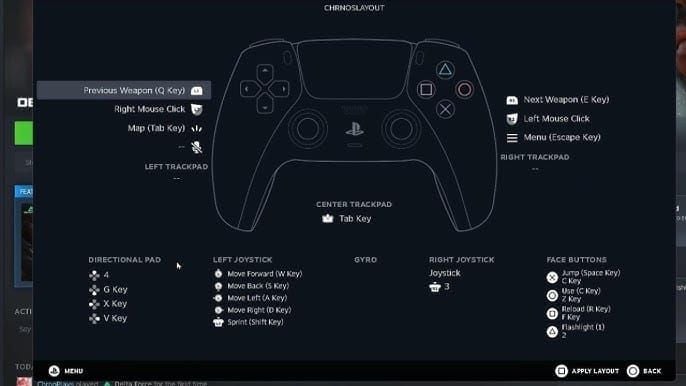
Connect controller via Bluetooth or USB to Steam Deck/PC
Open Delta Force in Steam Library (don't launch)
Click controller icon on right side
Select Enable Steam Input
Choose Keyboard and Mouse from Button Layouts
Apply controller modification preset from Community Templates
This converts gamepad inputs into keyboard/mouse commands. For premium content, buy Delta Force recharge instant through BitTopup ensures fast delivery.
Optimal Controller Settings
Sensitivity Calibration
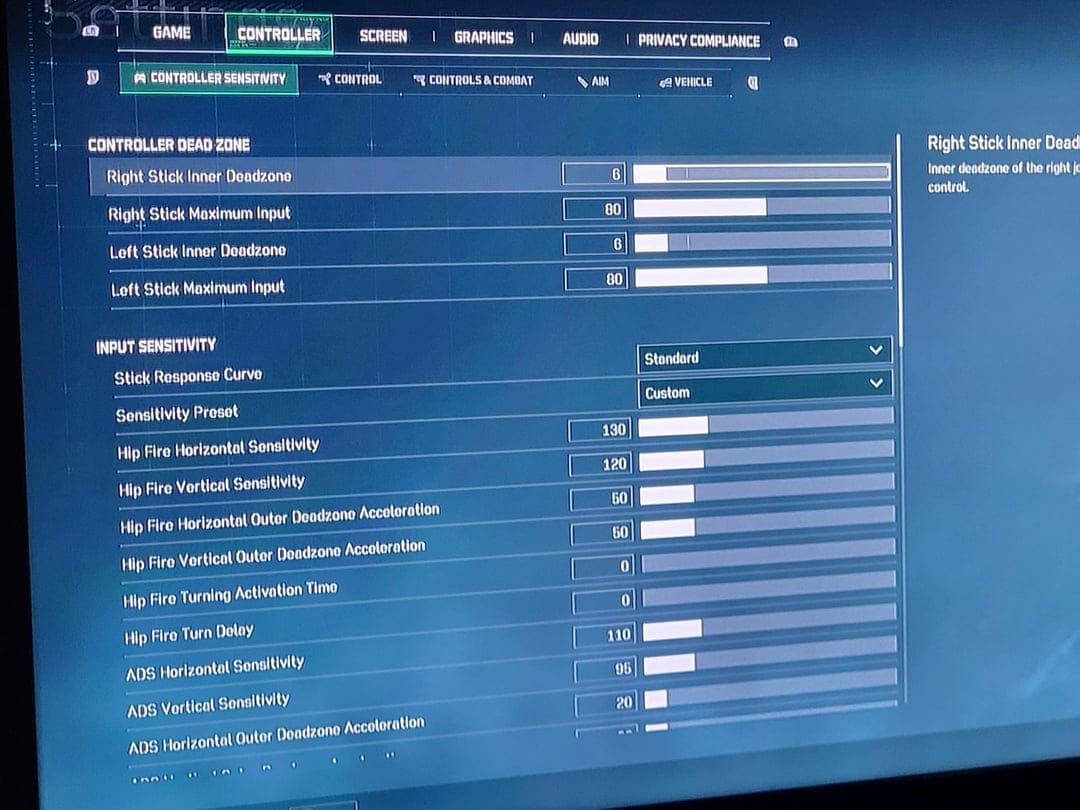
Hip Fire:
Horizontal: 450
Vertical: 300
3:2 ratio balances horizontal tracking with vertical recoil control
ADS (Aim Down Sights):
Horizontal: 200
Vertical: 150
Same 3:2 ratio, 55% slower than hip fire for precision
Vehicles:
Ground vehicle FP horizontal: 400
Aircraft FP horizontal: 400
Maintains situational awareness without compromising infantry combat
Deadzone Optimization
Right Stick:
Center deadzone: 10 (minimum threshold for max responsiveness)
Maximum input: 80 (prevents over-rotation)
Left Stick:
Center deadzone: 10
Maximum input: 80
Identical values ensure consistent feel across movement and aiming
Aim Assist Configuration
Aim Assist Switch: Enabled (provides targeting magnetism)
Stick Response Curve: Standard (balanced acceleration)
Sensitivity Preset: Custom (enables manual parameter control)
Hip Fire Horizontal Outer Deadzone Acceleration: 50 (moderate acceleration)
ADS Horizontal Outer Deadzone Acceleration: 20 (minimal acceleration for precision)
Advanced Competitive Techniques
Recoil Control
Apply 30-40% downward stick pressure for assault rifles. Release pressure between bursts to prevent overcorrection accumulation. Analog inputs enable smooth compensation matching weapon recoil patterns.
Movement Optimization
Analog sticks provide 360-degree directional input with variable speed—tactical advantage over keyboard's eight-directional digital input. Partial stick deflection enables silent approach speeds.
Strafe aiming: Combine left stick movement with right stick tracking for curved approach angles that complicate enemy targeting in close-quarters.
Troubleshooting
Controller Not Detected
Steam Input failures:
Exit game completely
Confirm Steam Input settings in library interface
Relaunch game
Bluetooth instability:
Switch to wired USB (eliminates interference, reduces latency 8-12ms)
Driver conflicts:
Update controller firmware through manufacturer software
Verify Steam recognizes device in Big Picture mode
Test button mapping in controller configuration interface
Input Lag Reduction
Wired connections: Eliminate wireless latency (10-15ms reduction)
USB polling rate: Increase to 1000Hz in Steam Input advanced settings (reduces interval from 8ms to 1ms)
V-Sync: Disable in graphics settings (reduces input-to-display latency 16-33ms, may introduce screen tearing)
Controller vs Mouse/Keyboard Performance
Accuracy Metrics
Long-range (50+ meters):
Mouse: 15-25% higher headshot percentage
Pixel-perfect positioning advantages sniper/marksman rifles
Medium-range (15-40 meters):
Controller aim assist reduces gap to 8-12%
Viable for assault rifle/SMG playstyles
Close-quarters (under 15 meters):
Minimal performance difference
Controller movement advantages nearly equalize mouse precision
Ranked Mode Viability
Warfare mode:
70% keyboard/mouse among top-ranked players
Reflects medium-to-long range engagement emphasis
Hazard Operations:
40% controller usage in high ranks
Close-quarters focus leverages analog movement strengths
Crossplay Balance
Input-based matchmaking preferences allow opting into mixed-input lobbies or same-input restriction. Aim assist strength remains static across all pools—no dynamic adjustment.
Future Controller Support
PC Support Timeline
Progression from Season 4's limited functionality to Season 5 Break's full gamepad support demonstrates ongoing commitment. Future updates will address menu navigation keyboard dependency.
Console launch August 19, 2025 established native gamepad integration foundation. PC implementation will likely match console feature parity through UI adaptation and input mapping refinement.
Community Feedback Impact
Player requests accelerated implementation timeline. Initial Q1 2025 target evolved into post-Season 4 rollout. Ongoing feedback regarding menu navigation and aim assist calibration shapes development roadmaps.
FAQ
Does Delta Force support controllers on PC in 2026?
Yes, through Steam Input as of Season 5 Break. Xbox controllers work wirelessly via Bluetooth or wired; DualShock requires wired connections. Enable Steam Input and apply community controller templates.
What are the best controller settings?
10/80 deadzone for both sticks, 450/300 hip fire sensitivity (horizontal/vertical), 200/150 ADS sensitivity, enabled aim assist, standard stick response curve. Balances responsiveness with control stability.
Why does mobile have limited controller support?
Supports only Backbone One controller due to touch-first design philosophy. Prioritizes optimized touch controls over broad gamepad compatibility.
How do I fix controller not detected on PC?
Enable Steam Input before launching: click controller icon in Steam Library, select Enable Steam Input, choose Keyboard and Mouse from Button Layouts, apply community template. Use wired connections.
Does Delta Force have aim assist for controllers?
Yes, partial aim assist on PC. Enable Aim Assist Switch in settings for targeting magnetism that compensates for analog stick precision limitations.
Will controller support improve?
Yes, support continues evolving. Full gamepad functionality added Season 5 Break. Console versions launched August 19, 2025 with native support. Future PC updates will address menu navigation and refine aim assist based on feedback.