

Blood Strike mobile players can extend gaming sessions up to 3x longer through targeted optimizations. This guide delivers proven techniques to reduce power consumption by 40-50%, covering graphics adjustments, system configurations, thermal management, and network efficiency. Implement these solutions to maintain stable 60 FPS gameplay while preserving battery health—particularly crucial if you're running mid-range devices with Snapdragon 6xx processors and 4-8GB RAM.
Understanding Blood Strike Battery Drain After December Update
Here's the thing about Blood Strike's multiplayer modes: they're absolute battery killers compared to singleplayer. The constant data exchange and higher CPU/network utilization create a perfect storm of power consumption. And that December patch? It made things worse.
The update introduced enhanced visual effects and networking protocols that intensified power draw, especially on devices running high refresh rate displays and maximum graphics presets. In practice, this means your phone's working overtime to deliver those crispy visuals and smooth online connections.
You'll know you've got excessive battery drain when you see rapid percentage drops during gameplay, device temperatures climbing past 40°C, unexpected shutdowns at 15-20% battery (that's the worst), and performance throttling after just 30-45 minutes of play.
What works best as a baseline? You should be getting 2.5-3.5 hours of continuous multiplayer on devices with 4500-5000mAh batteries at medium settings. If you're seeing less than 2 hours, something needs fixing immediately.
For uninterrupted competitive sessions, Recharge Blood Strike post-dec patch golds through BitTopup's secure platform to ensure your account stays competitive while implementing these battery optimization strategies.
Essential Blood Strike Mobile Optimization Settings
In-Game Graphics and Performance Settings
Let's cut to the chase: reducing graphics quality from high to low preset slashes GPU usage by approximately 50%. That's massive.
Configure Blood Strike graphics through these specific adjustments:
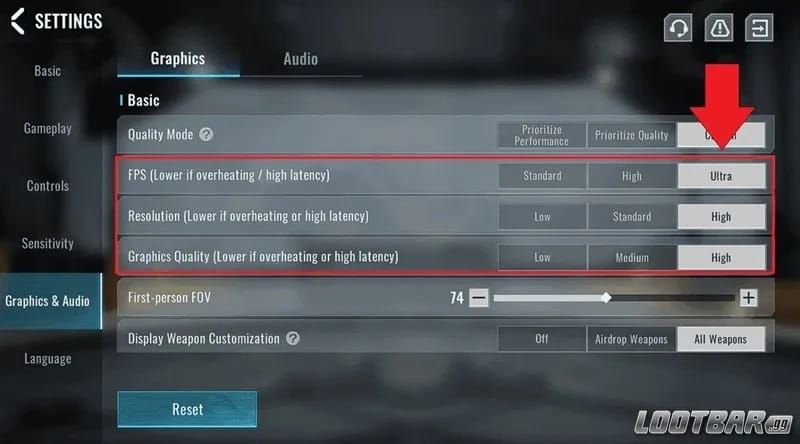
Resolution: Set to 1280x720 for a 30-40% FPS boost and proportional power savings
Render Scale: Reduce to 50-70% to cut GPU load in half while maintaining playability
Shadows: Disable completely—they consume disproportionate processing power for what they add visually
Anti-Aliasing: Turn off to eliminate unnecessary edge smoothing calculations
Post-Processing Effects: Disable bloom, motion blur, and ambient occlusion (you won't miss them in combat)
Texture Quality: Set to low or medium depending on your device's RAM capacity
Testing on Snapdragon 6xx+ devices shows low preset configurations enable stable 60 FPS with 40-50% less power consumption compared to high presets. That's not a tradeoff—it's a win-win.
Audio and Notification Adjustments
Audio processing contributes 5-10% to overall power consumption. Not huge, but it adds up. Turn off background music entirely and set sound effects to medium quality at 100% volume. This preserves essential gameplay audio cues (footsteps, gunfire, reloads) while eliminating unnecessary musical processing.
Disable haptic feedback completely through device settings. Those vibration motors drain battery rapidly during intense FPS action—every shot, every hit, every notification creates a power spike.
And here's something most players overlook: enable Do Not Disturb mode during gaming sessions. Notification-triggered screen wakes and background processing are silent battery killers.
Network and Connectivity Options
Wi-Fi connections consume substantially less power than cellular data due to lower radio transmission requirements. Always connect to stable 5GHz Wi-Fi networks when possible—you get faster data transfer with less retransmission overhead compared to congested 2.4GHz bands.
Disable automatic network switching in device settings. Constant scanning between Wi-Fi and cellular networks wastes power for zero benefit during gameplay.
For devices supporting selective 5G, here's the expert move: enable this feature only when signal strength exceeds -85dBm. Weak 5G signals force your device to boost transmission power dramatically, creating battery drain that outweighs any speed benefits. Sometimes 4G is actually the smarter choice.

Device-Level Power Management Configuration
System Battery Optimization Settings
Activate built-in battery saver modes to reduce background refresh rates, mail fetching, and automatic brightness adjustments. But—and this is important—disable power-saving mode specifically during Blood Strike sessions.
Why? CPU/GPU throttling causes performance lag that forces longer processing times and paradoxically increases total power consumption. Enable gaming mode or performance mode instead, which prioritizes resource allocation and delivers 10-15% FPS improvements.
Configure app sleeping features to restrict background activity for non-essential applications. Navigate to Settings > Battery > App Sleep and enable sleeping for social media, email, and productivity apps that otherwise consume resources during gameplay through background synchronization.
Background App Management
Background processes represent one of the largest sources of unnecessary battery drain. Experienced players know to close everything before launching Blood Strike:
Access device Settings > Apps > Running Services
Force stop social media applications, email clients, and cloud sync services
Disable automatic updates in Google Play Store or App Store
Restrict background data usage for apps not required during gameplay
Clear RAM through device maintenance tools to free processing resources
Devices with 4GB RAM particularly benefit from aggressive background app closure. Memory pressure forces constant swapping that drains battery through excessive storage access—it's like your phone is doing cardio while you're trying to game.
Display and Screen Optimization
Screen brightness and refresh rate constitute 30-40% of total battery consumption during mobile gaming. That's your biggest power draw right there.
Disable auto-brightness and manually set screen brightness to 60-70% for optimal visibility without excessive power draw. Your eyes will adjust within minutes.
Reduce dynamic screen refresh rates from 120Hz to 60Hz on supported devices through Settings > Display > Screen Refresh Rate. This single adjustment can extend battery life by 15-20% on
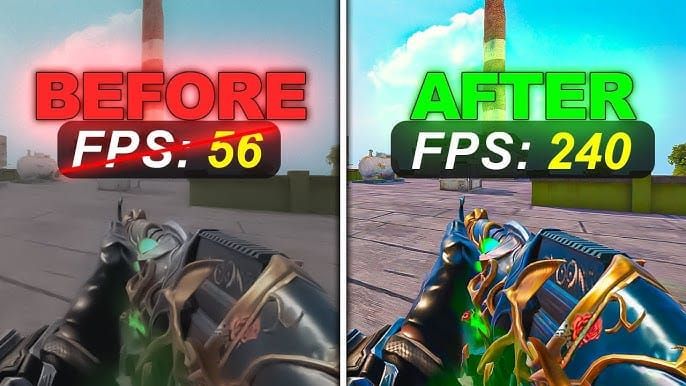
flagship devices. Blood Strike's mobile optimization targets 60 FPS performance anyway, making 120Hz refresh rates redundant and wasteful.
Advanced Battery Conservation Techniques
Thermal Management Strategies
Maintaining device temperatures below 40°C prevents thermal throttling that increases power consumption through inefficient processing cycles. Heat is the enemy of both performance and battery life.
Implement these thermal management practices:
Remove protective cases that trap heat against device chassis
Position device near air conditioning vents or fans for active cooling
Avoid direct sunlight exposure during outdoor gaming (seems obvious, but you'd be surprised)
Take 5-minute breaks every 45-60 minutes to allow thermal dissipation
Use external cooling accessories like clip-on fans for marathon sessions
Monitor device temperature through built-in diagnostic tools or third-party applications. Devices consistently exceeding 42°C require immediate cooling intervention or graphics settings reduction to prevent long-term battery degradation from heat-induced chemical reactions within lithium-ion cells.
Network Efficiency Optimization
Optimize network efficiency by closing bandwidth-intensive applications like streaming services, cloud backups, and file downloads that compete for connection resources. When these apps run in the background, they force Blood Strike to retransmit packets, wasting both bandwidth and battery.
Disable background location permissions for Blood Strike if not required for regional matchmaking. Constant GPS polling consumes significant power through satellite communication. Navigate to Settings > Apps > Blood Strike > Permissions > Location and select Deny or Only While Using App.
Use Airplane mode during offline training sessions to disable all radio communications—Wi-Fi, cellular, and Bluetooth. This extends battery life substantially when online connectivity isn't required.
Memory and Storage Impact
Maintain minimum 10GB free storage space to prevent I/O lag that indirectly wastes power through prolonged read/write operations. Near-capacity storage forces your device to work harder accessing fragmented files, creating processing delays that extend active power
draw periods.
Clear Blood Strike cache monthly through Settings > Apps > Blood Strike > Storage > Clear Cache to remove temporary files that accumulate during gameplay. Cache buildup can reach several gigabytes over time, slowing asset loading and forcing extended processing periods.
Monitoring and Measuring Battery Performance
Built-in Battery Usage Analytics
Access comprehensive battery statistics through Settings > Battery > Battery Usage to identify Blood Strike's power consumption relative to other applications. Healthy configurations show Blood Strike consuming 25-35% of total battery during active gameplay sessions, with screen display accounting for another 30-40%.
Excessive Blood Strike battery usage exceeding 45-50% of total consumption indicates suboptimal settings or background processes interfering with efficient operation.
Calculate battery drain rate using this formula: (Starting % - Ending %) / Session Duration in Hours = Drain Rate per Hour.
Devices achieving drain rates below 30% per hour demonstrate well-optimized configurations, while rates exceeding 40% per hour require immediate settings adjustments. Multiplayer modes typically consume 15-25% more power than equivalent singleplayer sessions due to continuous data exchange and higher CPU utilization.
Long-term Battery Health Tracking
Preserve lithium-ion battery health through strategic charging habits that extend overall lifespan. Charge devices between 20-80% rather than full 0-100% cycles—extreme charge states accelerate chemical degradation within battery cells.
Avoid gaming while charging to prevent heat-related battery damage from simultaneous high-current input and intensive processing output. The heat generated from both processes compounds exponentially.
Enable smart charging limits if available on your device, which restrict maximum charge to 80-85% during overnight charging sessions.
Competitive players requiring consistent in-game resources can buy Blood Strike mobile session golds instant through BitTopup's fast delivery system, ensuring account progression continues smoothly alongside battery optimization efforts.
Troubleshooting Common Battery Drain Issues
Post-Update Compatibility Problems
December patch compatibility issues may manifest as sudden battery drain increases despite unchanged settings. First step? Verify Blood Strike is fully updated through your device's app store, as initial patch releases sometimes contain power management bugs corrected in subsequent hotfixes.
Clear application data and reinstall Blood Strike if battery drain persists—navigate to Settings > Apps > Blood Strike > Storage > Clear Data, then uninstall and reinstall from official sources. It's annoying, but it works.
Check for conflicting system updates released simultaneously with Blood Strike patches. Operating system updates occasionally introduce power management regressions affecting gaming applications disproportionately.
Device-Specific Optimization Solutions
Low-end devices with Snapdragon 6xx processors and less than 4GB RAM require aggressive optimization:
Set all graphics to absolute minimum (720p, low preset, 50% render scale)
Close all background applications without exception
Enable gaming mode or performance mode
Disable haptics, notifications, and location services
Use Wi-Fi exclusively, never cellular data
Maintain device temperature below 38°C through active cooling
Limit continuous sessions to 45 minutes with 10-minute cooling breaks
Devices with 8GB+ RAM and Snapdragon 8xx processors can sustain medium graphics settings while maintaining 3+ hour battery life through balanced optimization, benefiting most from thermal management and network efficiency improvements.
Emergency Battery Preservation
When battery levels drop below 20% during critical gaming sessions, implement emergency preservation measures:
Immediately reduce graphics to absolute minimum settings
Lower screen brightness to 40-50%
Disable all audio except essential sound effects
Close Blood Strike between matches to reduce idle consumption
Enable battery saver mode despite performance impact
These emergency measures sacrifice optimal performance for maximum session extension, potentially delivering an additional 15-30 minutes of gameplay from the final 20% battery capacity. Not ideal, but sometimes you need to clutch that last match.
Extended Gaming Session Strategies
Session Planning and Break Optimization
Structure extended Blood Strike sessions around 45-60 minute gameplay blocks separated by 10-15 minute cooling breaks. This rhythm prevents thermal buildup that triggers throttling and excessive battery drain while providing mental recovery periods—your aim gets better after breaks anyway.
During breaks, close Blood Strike completely rather than leaving it running in the background. Idle application states still consume power through network maintenance, notification monitoring, and background processing.
Schedule intensive ranked matches during early session periods when battery levels exceed 60% and device temperatures remain optimal. Save casual modes for when your battery's running low.
Portable Charging Solutions
External battery packs rated 10,000-20,000mAh provide 2-4 full device charges for all-day gaming sessions. Select models supporting fast charging protocols compatible with your device to minimize charging downtime.
But here's the critical part: avoid gaming while connected to portable chargers. Simultaneous charging and intensive processing generates excessive heat that degrades both device and external battery longevity. Instead, charge during breaks or between gaming sessions.
Gaming Environment Setup
Optimize your physical gaming environment to support battery efficiency through ambient temperature control. Air-conditioned rooms maintain device temperatures 3-5°C cooler than outdoor environments, reducing thermal throttling and associated battery drain.
Position devices on hard, flat surfaces rather than soft materials like beds or couches that restrict airflow and trap heat.
Maintain ambient lighting that reduces need for maximum screen brightness—gaming in moderately lit environments allows 50-60% brightness settings that preserve visibility while minimizing display power consumption.
Device Compatibility and Hardware Considerations
Optimal Device Specifications for Blood Strike
Blood Strike mobile optimization targets devices meeting these specifications for efficient battery performance:
Processor: Snapdragon 6xx series minimum (Snapdragon 7xx/8xx recommended)
RAM: 4GB minimum (6-8GB recommended for extended sessions)
Battery: 4500mAh minimum (5000mAh+ recommended)
Display: 60Hz refresh rate (higher rates optional but power-intensive)
Storage: 64GB minimum with 10GB+ free space
Devices meeting recommended specifications achieve 3-4 hour battery life at medium settings, while minimum specification devices require low graphics presets to reach 2.5-3 hour sessions.
Aging Hardware Performance Impact
Batteries degrade 15-20% capacity over 2-3 years of daily use, reducing maximum gaming session duration proportionally. If your device is exhibiting sudden battery drain increases after months of stable performance, you likely need battery replacement rather than software optimization.
Thermal paste degradation in older devices reduces heat dissipation efficiency, causing earlier throttling onset and increased power consumption. Professional thermal paste replacement can restore 5-10% battery efficiency on devices exceeding 2 years of intensive use—something most players don't even consider.
Future-Proofing Your Gaming Setup
Invest in devices with 5000mAh+ batteries and efficient processors (Snapdragon 7 Gen series or equivalent) to ensure 2-3 years of optimal Blood Strike performance without battery anxiety. Larger battery capacities provide buffer against inevitable degradation while maintaining acceptable session durations.
Prioritize devices with active cooling systems or vapor chamber technology that manage thermals more efficiently than passive cooling alone. Superior thermal management directly translates to sustained performance and reduced battery drain across extended sessions.
Expert Tips for Maximum Battery Efficiency
Professional Mobile Gaming Practices
Competitive mobile gamers implement systematic optimization routines before each session. Develop a pre-game checklist:
Verify 10GB+ free storage space
Close all background applications
Enable gaming mode and disable power saver
Set screen brightness to 60-70% manually
Connect to stable 5GHz Wi-Fi network
Confirm device temperature below 35°C before starting
Disable haptics and unnecessary notifications
This disciplined approach eliminates variables that cause inconsistent battery performance, creating predictable session durations that support competitive play scheduling.
Community-Tested Optimization Methods
Blood Strike player communities have identified several non-obvious optimization techniques:
Render scale sweet spot: 65-70% provides optimal balance between visual clarity and power savings
Audio configuration: Disabling music saves 5-10% power while maintaining competitive audio cues
Network mode: 5GHz Wi-Fi with closed bandwidth apps reduces ping variance and power consumption
Thermal management: 5-minute breaks every 45 minutes prevent throttling more effectively than continuous play with cooling accessories
These community-validated methods complement official optimization guidelines with practical insights from thousands of player-hours across diverse device configurations.
Maintenance and Care Guidelines
Implement monthly maintenance routines to preserve optimal battery performance:
Clear application cache to remove accumulated temporary files
Verify operating system and Blood Strike updates are current
Inspect charging port for debris that reduces charging efficiency
Calibrate battery by full discharge to 5% followed by uninterrupted charge to 100% (quarterly only—don't overdo this)
Review battery usage statistics to identify new drain sources from recently installed applications
Regular maintenance prevents gradual performance degradation that accumulates unnoticed until battery life becomes unacceptably short.
Frequently Asked Questions
Why does Blood Strike drain battery faster after the December update?
The December patch introduced enhanced visual effects, improved networking protocols, and additional background processes that increase GPU, CPU, and network utilization by 20-30%. Reduce graphics to low preset and implement network optimizations to restore previous battery performance levels.
How long should Blood Strike battery last on mobile devices?
Devices with 4500-5000mAh batteries should deliver 2.5-3.5 hours of continuous multiplayer gameplay at medium settings. Low-end devices with aggressive optimization achieve 2-2.5 hours, while flagship devices with 5500mAh+ batteries can exceed 4 hours.
What are the best battery settings for Blood Strike mobile?
Optimal configuration: 720p resolution with low graphics preset, 50-70% render scale, disabled shadows and anti-aliasing, medium audio quality with music off, 60-70% manual screen brightness, 60Hz refresh rate, gaming mode enabled, all background apps closed, and stable 5GHz Wi-Fi connection. This reduces power consumption by 40-50% compared to default high settings.
Can Blood Strike damage phone battery health long-term?
Intensive gaming generates heat that accelerates battery degradation when temperatures exceed 40°C consistently. Proper thermal management, avoiding gaming while charging, and maintaining 20-80% charge cycles prevent damage. Blood Strike itself doesn't harm batteries—poor thermal conditions and charging habits during gameplay cause long-term capacity reduction.
How to prevent Blood Strike from draining battery during background operation?
Force close Blood Strike completely when not actively playing rather than leaving it suspended. Enable app sleeping features through device settings and disable background data access through Settings > Apps > Blood Strike > Mobile Data > Background Data to prevent network polling when application isn't active.
Which device settings most significantly affect Blood Strike battery life?
Screen brightness and refresh rate constitute 30-40% of total power consumption, making display optimization the highest-impact adjustment. Graphics settings account for 25-35% through GPU load, while network connectivity and background processes contribute 15-20% each. Prioritize display optimization, graphics reduction, and background app management for maximum battery extension.