

Getting hacked isn't just inconvenient—it can destroy your streaming career. I've seen streamers lose everything because they didn't know what to do in those critical first hours. Here's the thing: 95% of account breaches are completely preventable with proper two-factor authentication. But if you've already been compromised, your recovery success depends entirely on how you handle the next 24 hours. Miss the window, and your chances of getting your account back drop below 5%. This guide walks you through exactly what to do, step by step.
The First 24 Hours: Why Speed Matters More Than You Think
Let me be blunt—the first day after discovering a breach determines whether you recover your account or lose it forever.
Support typically responds within 24-48 hours, but here's what most streamers don't realize: only about 30% of cases get fully resolved through technical support. The difference between success and failure? Documentation. The streamers who meticulously document everything in those first hours are the ones who get their accounts back.
How to Tell If You've Actually Been Hacked
Some signs are obvious. Others? Not so much.
Check for these red flags: unauthorized transactions showing up in your gift history, devices you don't recognize in your login records, profile changes you didn't make (suddenly your bio or picture is different), logins from countries you've never visited. And here's a critical one—if you get a purchase notification, check your balance within three minutes. Seriously, set a timer.
Go to Settings > Account Security > Device Management right now. You'll see a complete 90-day history of every login—device types, IP addresses, locations, timestamps, the works. Look for anything weird: virtual machines, logins at 3 AM when you were asleep, access from foreign countries. Any of these mean someone's actively in your account and you need to act immediately.

For streamers managing significant coin balances, BitTopup offers buy Poppo VIP upgrade coins cheap Dec with secure transaction protocols that include purchase verification and balance monitoring—basically, an extra layer of protection.
Getting Help: How to Contact Support the Right Way
Email support@poppolive.com immediately. But don't just fire off a panicked message saying I got hacked!
Include these specifics: your User ID, transaction IDs for any unauthorized purchases, payment receipts, app activity logs, and timestamped screenshots showing both the before and after states. The quality of your documentation directly impacts that 30% technical resolution probability. Support teams prioritize cases with comprehensive evidence.
Your User ID looks like this: ID:63101690. Find it in the Me tab under your nickname. Take screenshots that clearly show timestamps, export your complete device management logs, and write detailed descriptions of every unauthorized change you've noticed.
Damage Control: What to Do Right Now
Don't wait. Execute these steps within the first hour:
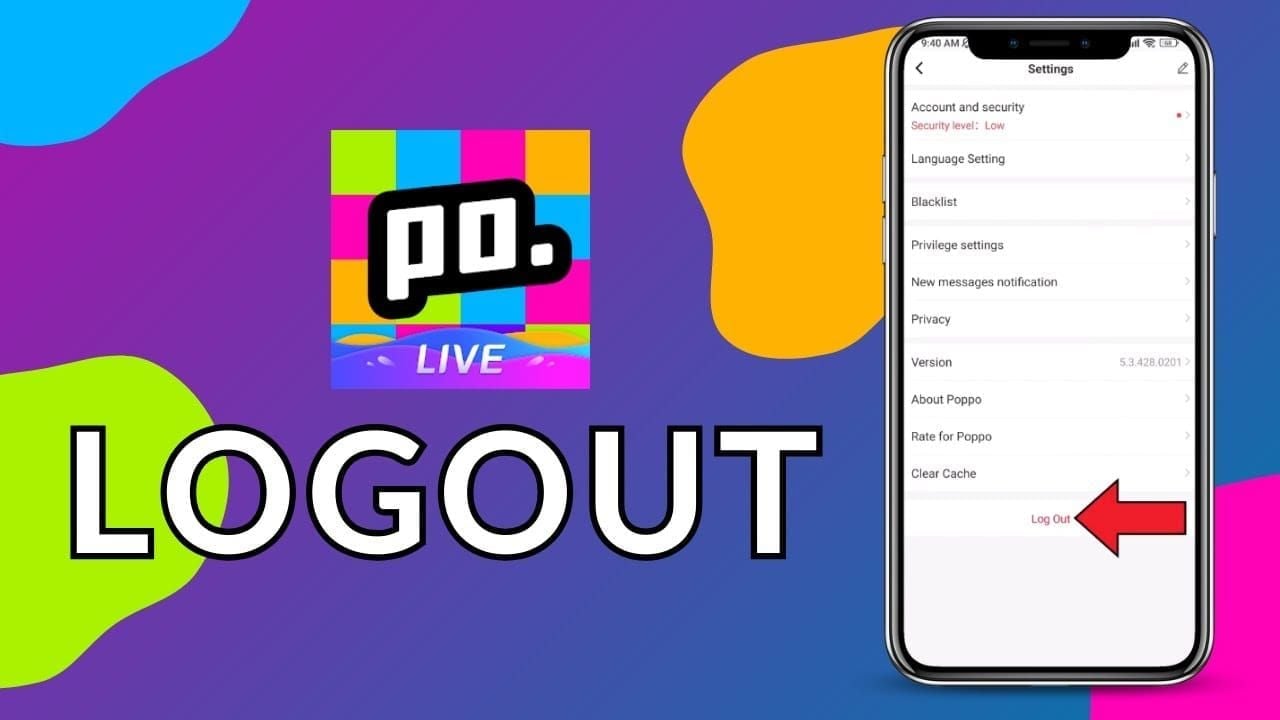
Log out all sessions: Go to Settings > Account Security > Device Management, select all devices, and hit Log Out. This immediately terminates the attacker's access.
Change your password: Create a strong 12-16 character password using a password manager. Don't use dictionary words or predictable substitutions like @ for a.
Reconfigure 2FA: Navigate to Settings > Account Security > Two-Factor Authentication. Use an authenticator app, not SMS—SIM swapping is a real vulnerability.
Screenshot everything: Capture images of unauthorized devices, transactions, profile changes, and all communications before the platform removes the evidence (and they will).
Secure your payment methods: Contact your credit card company or PayPal to flag unauthorized charges. Chargeback success rates for fraud hit about 70%.
Here's something crucial: as of January 2025, Poppo's policy results in 100% permanent bans for unauthorized activities like off-platform recharges or chargeback fraud. Documented user losses exceed $150,000. If your account gets flagged for policy violations, recovery success drops below 5%. This isn't a game.
The Recovery Process: Your Complete Roadmap
Proper recovery protocols preserve everything—your streaming content, follower relationships, analytics, the whole package. Unlike deletion requests (which risk permanent data loss), structured verification keeps your stream history intact.
What You'll Need to Prove It's Your Account
Essential evidence includes: your User ID with digit-by-digit verification, transaction IDs from the 90 days before the breach, payment confirmations from your credit card or PayPal, app activity logs from Settings, and pre-breach screenshots.
Hold onto these records for 1-2 years, even though the platform only keeps data for 90 days. Extended documentation significantly improves your resolution rates. And here's a nasty surprise: three months of inactivity triggers automatic balance wipes for accounts holding $10 or more.
The Verification Process, Step by Step
Email support@poppolive.com with the subject line: Urgent: Account Security Breach Recovery - [Your User ID]
Account Identification: Include your User ID, registered email, phone number, and account creation date.
Breach Description: When you discovered it, what unauthorized actions occurred (transactions, profile changes, device logins), and the current status.
Evidence Attachment: Attach timestamped screenshots, device logs, transaction histories, and payment confirmations as clearly-labeled files.
Recovery Request: Explicitly state you want recovery without deletion to preserve your stream history and viewer relationships.
Verification takes 24-48 hours for the initial response. Support prioritizes complete documentation packages with clear evidence of unauthorized access.
What to Expect Timeline-Wise
Standard cases with full documentation? 48-72 hours. Complex cases involving multiple unauthorized transactions or significant modifications? 5-7 days.
Your account may experience temporary restrictions during recovery. Communicate with your viewers through alternative channels about the security incident, but don't share sensitive details that could compromise the recovery process.
Protecting Your Stream History During Recovery
For established broadcasters, stream history preservation is everything. Improper recovery or deletion requests permanently erase your streaming content, analytics, and follower relationships. Years of work, gone.
How to Back Up Your Data
The platform maintains stream history through recovery processes that avoid complete resets. The 90-day retention covers device histories and transactions, but your stream content and follower data persist through proper continuity-preserving protocols.
Preservation strategies that actually work:
Document your activity: Screenshot follower counts, milestones, and top viewers monthly.
Keep transaction records: Export or photograph coin purchases and gift receipts immediately.
Maintain content calendars: Track your streaming schedule, events, and collaboration dates externally.
Log viewer relationships: Document top supporters, regulars, and moderators in external spreadsheets.
Protecting Your Content the Right Way
Recovery through official support channels preserves your historical data while restoring access credentials and security settings. Support teams have backend access that maintains data integrity.
Avoid these mistakes—I've seen them destroy accounts:
Never request deletion during recovery. It permanently erases streams, followers, and analytics.
Don't create duplicate accounts. This violates policies and complicates recovery.
Avoid third-party recovery services. They violate terms and risk permanent bans.
Don't delay documentation. Evidence degrades as those 90-day logs cycle out.
BitTopup provides top up Poppo stream history secure coins with transaction verification that creates additional documentation supporting legitimate ownership—basically, a paper trail proving the account is yours.
Talking to Your Viewers
Craft a brief statement: acknowledge the security incident, confirm you're working with official support, provide an estimated timeline, and thank viewers for their patience.
Post through alternative social channels if you've lost account access. But don't share specific security details like compromised authentication methods or exact breach timelines—that information could help attackers.
Advanced Security: Fortress-Level Protection After Recovery
Two-factor authentication blocks 95% of unauthorized access attempts. It's not optional—it's foundational.
Setting Up 2FA the Right Way
Navigate to Settings > Account Security > Two-Factor Authentication immediately after regaining access. Choose authenticator app methods, not SMS (because of SIM swapping vulnerabilities).
Configuration steps:
Choose an authenticator app: Select app-based authentication.
Scan the QR code: Use Google Authenticator, Authy, or Microsoft Authenticator.
Enter the verification code: Input the 6-digit code to confirm setup.
Save backup codes: Store those 10-12 codes offline—they enable recovery if you lose authenticator access.
Test immediately: Log out and back in to verify functionality.
Schedule monthly tests: Set calendar reminders to check functionality and backup code accessibility.
Password Management That Actually Works
Create 12-16 character passwords using password managers for unique random generation. Avoid dictionary words or predictable substitutions like @ for a or 3 for e.
Protocols that matter:
Never reuse passwords across platforms. Ever.
Change every 90 days and immediately after security incidents.
Use password managers like 1Password, Bitwarden, or LastPass.
Don't share passwords—use the platform's permission systems instead.
Execute changes via Settings > Account Security > Password immediately after recovery.
Monitoring for Suspicious Activity
Enable geographic alerts in Device Management for unfamiliar location logins. This gives you early warning before attackers modify settings or execute transactions.
Monitoring routines that work:
Daily gift monitoring: Review gift history each streaming day.
Weekly activity scans: Check device logs every seven days for unrecognized access.
Monthly device reviews: Audit connected devices and remove unrecognized entries.
Post-update audits: Review security settings after app updates.
Monitor your balance within three minutes of purchase notifications for rapid response to unauthorized transactions.
Common Mistakes That Cost You Everything
Recovery success below 5% for policy violations stems from preventable mistakes made in the first 24-48 hours.
Rushing Without Documentation
Panic-driven attempts without documentation create incomplete evidence trails that support can't verify. Changing your password before documenting unauthorized devices loses critical forensic evidence.
Take measured steps:
Document first: Spend 15-30 minutes capturing screenshots before making any changes.
Preserve evidence: Screenshot device logs, transactions, and profiles before they disappear.
Organize systematically: Create a timestamped folder showing breach progression.
Write timelines: Note discovery time, unauthorized changes, and actions taken.
Documentation discipline correlates directly with that 30% technical resolution rate. Comprehensive evidence receives priority processing.
Incomplete Security Audits
Recovering access without thorough audits leaves vulnerabilities that enable repeat breaches. Changing your password but ignoring device management or skipping 2FA reconfiguration? You'll get hit again within weeks.
Complete post-recovery audit:
Review connected devices: Remove unrecognized entries from the 90-day history.
Update authentication: Change password, reconfigure 2FA, verify backup codes.
Check privacy settings: Limit profile visibility to contacts, restrict discoverability and messaging.
Audit payment methods: Verify credit cards and PayPal, remove outdated options.
Review app permissions: Check third-party access and revoke unnecessary permissions.
Enable security features: Activate geographic alerts, login notifications, and transaction confirmations.
Consider using separate accounts for streaming versus personal use to reduce exposure.
Poor Communication Strategies
Delayed or absent viewer communication damages community trust and follower retention. Streamers who disappear without explanation lose significant audience to competitors.
Best practices:
Notify within 24 hours: Post brief updates through alternative channels.
Provide realistic timelines: Share estimated recovery (24-48 hours minimum).
Maintain updates: Post progress every 48 hours even without status changes.
Thank supporters: Acknowledge viewer patience throughout recovery.
Announce return clearly: Provide specific streaming resumption dates.
Balance transparency about the general situation with discretion about specific vulnerabilities.
Post-Recovery Security Audit: Your Complete Checklist
Systematic audits establish fortress-level protection against future breaches. Don't skip this.
Account Settings Review
Settings > Account Security > Two-Factor Authentication
Verify authenticator app connection functions
Test backup codes accessibility and storage security
Confirm SMS backup is disabled
Schedule monthly functionality tests
Settings > Account Security > Device Management
Review 90-day login history for suspicious entries
Remove unrecognized devices (virtual machines, foreign locations)
Log out all sessions, forcing fresh authentication
Enable geographic alerts for new location logins
Set weekly device log review reminders
Settings > Account Security > Password
Confirm 12-16 character complexity
Verify password manager storage
Set 90-day change reminder
Ensure no password reuse
Privacy Optimization
Limit your attack surface:
Profile visibility: Restrict to contacts only
Gift visibility: Limit viewers to prevent wealth-based targeting
Discoverability: Reduce search visibility
Messaging permissions: Restrict to contacts or disable entirely
Location sharing: Disable geographic information in streams and profiles
Payment Security Verification
Check HTTPS/SSL/TLS 1.3: Ensure secure connection indicators
Verify PCI DSS compliance: Confirm payment card industry standards
Use credit cards or PayPal: 70% chargeback success for unauthorized transactions
Monitor balances immediately: Check within three minutes of purchases
Review transaction histories: Audit for unauthorized charges
Hold receipts and confirmations for 1-2 years for future disputes.
Long-Term Prevention: Building a Security Fortress
Sustainable security requires ongoing maintenance. Systematic protocols prevent 95% of the breaches that proper authentication blocks.
Regular Security Maintenance
Daily Monitoring
Review gift history for unauthorized transactions
Check balance after purchase notifications
Monitor viewer interactions for suspicious patterns or impersonation
Weekly Scans
Review device logs for new unrecognized access
Check for unexpected profile or bio changes
Verify follower counts and top supporter lists
Monthly Reviews
Comprehensive device management audits
Test 2FA functionality
Change passwords approaching 90-day rotation
Review privacy settings for unauthorized modifications
Audit payment methods and remove outdated options
Post-Update Audits
Review security settings after app updates
Verify 2FA remains enabled and functional
Check privacy configurations persist
Test login procedures
Advanced Protection Tools
Password Managers: Generate and store unique 12-16 character passwords, eliminating reuse vulnerabilities.
Authenticator Apps: Maintain on multiple devices to prevent lockout. Store backup codes offline separately.
Geographic Alerts: Enable location-based login notifications that flag unfamiliar access for rapid response.
Transaction Notifications: Activate immediate alerts for purchases, gifts, and balance changes, enabling three-minute response windows.
Emergency Preparedness Planning
Document your User ID: Store in multiple secure locations
Maintain external records: Keep offline copies of follower counts, milestones, and top supporters
Establish alternative channels: Build separate social media for viewer communication during outages
Create support templates: Pre-write emails for support@poppolive.com with User ID and documentation requests
Schedule quarterly reviews: Set calendar reminders for comprehensive audits every three months
Remember: January 2025 policy means 100% permanent bans for violations, with recovery success below 5% for compromised accounts involved in unauthorized activities. Documented user losses exceed $150,000. The stakes for inadequate security are real.
FAQ
How long does account recovery actually take?
Initial response: 24-48 hours. Full restoration with complete documentation: 48-72 hours. Complex cases can take 5-7 days. Submit comprehensive evidence (User ID, timestamped screenshots, device logs, transaction histories) to support@poppolive.com for the fastest resolution within that 30% technical success rate.
Can I recover deleted stream history?
Stream history persists through proper recovery that avoids deletion. Never request deletion—it permanently erases content, followers, and analytics. Official support restores access while preserving historical data through backend systems. The 90-day retention covers device logs and transactions, but stream content remains through continuity-preserving protocols.
What information do I need for recovery?
Your User ID (found in Me tab: ID:########), transaction IDs from the past 90 days, payment receipts (credit card or PayPal), app activity logs from Settings, timestamped screenshots (pre and post-breach), device management logs showing unauthorized access, and detailed descriptions of unauthorized changes. Hold records for 1-2 years despite the platform's 90-day retention.
How do I know if my account's been hacked?
Check for unrecognized devices in Settings > Account Security > Device Management (virtual machines, foreign logins), unexpected gift history transactions, unauthorized profile changes (bio or picture), geographic inconsistencies (unfamiliar locations), and balance discrepancies. Review device logs for 90-day access history and monitor gifts daily for detection within that critical first 24 hours.
How can I prevent future breaches?
Implement 2FA through Settings > Account Security using authenticator apps (not SMS)—this blocks 95% of unauthorized access. Create unique 12-16 character passwords with managers and change every 90 days. Enable geographic alerts, conduct weekly device reviews, perform monthly comprehensive audits, limit privacy to contacts only, and monitor balances within three minutes of purchases. Layered protocols prevent repeat breaches.
What should I do immediately after discovering a hack?
Within the first hour: Log out all sessions (Settings > Account Security > Device Management), change your password using a manager for 12-16 characters, reconfigure 2FA preferring authenticator apps, document everything with timestamped screenshots of unauthorized devices and transactions, and contact support@poppolive.com with your User ID and evidence package. That first 24-hour response determines success within the 30% technical resolution rate.