

Honkai Star Rail's Version 4.0 livestream dropped three codes—AHAHAHAHAHAHA, QWQXDDLOLOMO, and HITLIKETOBEAHA—each granting 100 Stellar Jade plus materials. Codes expire February 7, 2026 at 10:59 AM UTC-5, giving you 27 hours to claim 300 total Stellar Jade. This guide covers both redemption methods, solves eight common errors, and provides platform-specific fixes.
HSR 4.0 Livestream Codes: Complete List with Expiration
The Version 4.0 Special Program introduced three codes tied to the Planarcadia update featuring Aha and the Path of Elation.
All Working Codes (February 2026)
AHAHAHAHAHAHA: 100 Stellar Jade + 50,000 Credits
QWQXDDLOLOMO: 100 Stellar Jade + 5 Traveler's Guides
HITLIKETOBEAHA: 100 Stellar Jade + 4 Refined Aether
Need more resources? Honkai Star Rail Oneiric Shards top up through BitTopup offers instant delivery and secure transactions.
Exact Redemption Deadline: Timezone Breakdown
Expiration: February 7, 2026 at 10:59 AM UTC-5
3:59 PM UTC
7:59 AM PST
4:59 PM CET
12:59 AM JST (Feb 8)
11:59 PM CST (Feb 7)
Set reminders 6 hours before expiration—HSR codes never get extensions. Server congestion peaks during the final hour.
Total Rewards from All Codes
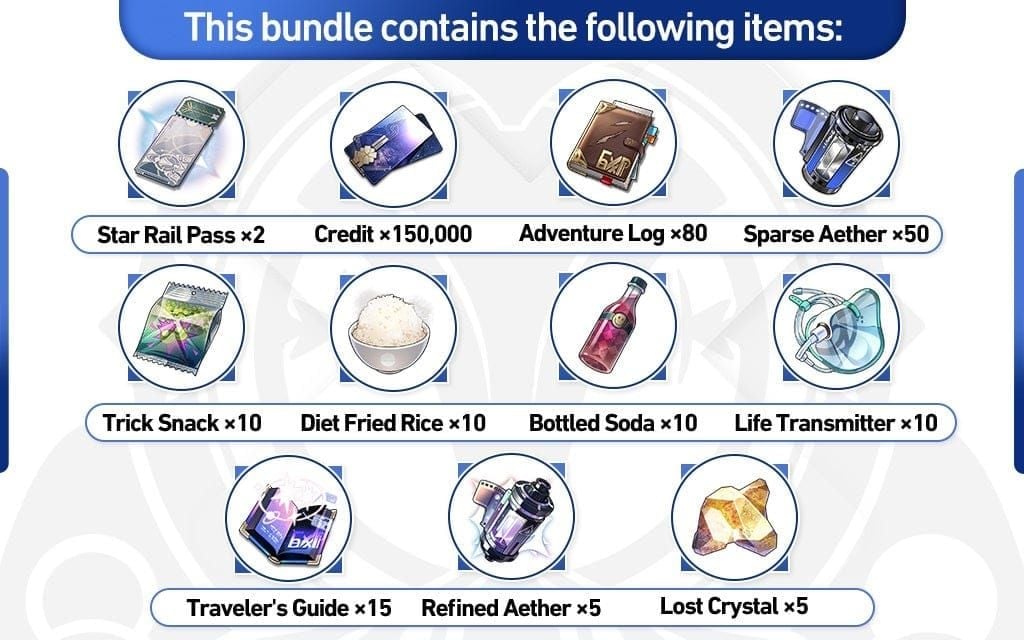
Redeeming all three yields:
300 Stellar Jade (1.875 Warps)
50,000 Credits
5 Traveler's Guides
4 Refined Aether
This equals ~90 Trailblaze Power worth of farmable materials. Players on multiple servers can redeem once per server.
Two Redemption Methods: Web vs In-Game
Official Web Portal: Step-by-Step
Navigate to official HSR redemption site
Log in with HoYoverse credentials
Select server (must match login screen exactly)
Enter character name (case-sensitive)
Input code and click redeem
Collect from in-game mailbox within 5-15 minutes
In-Game Redemption Center
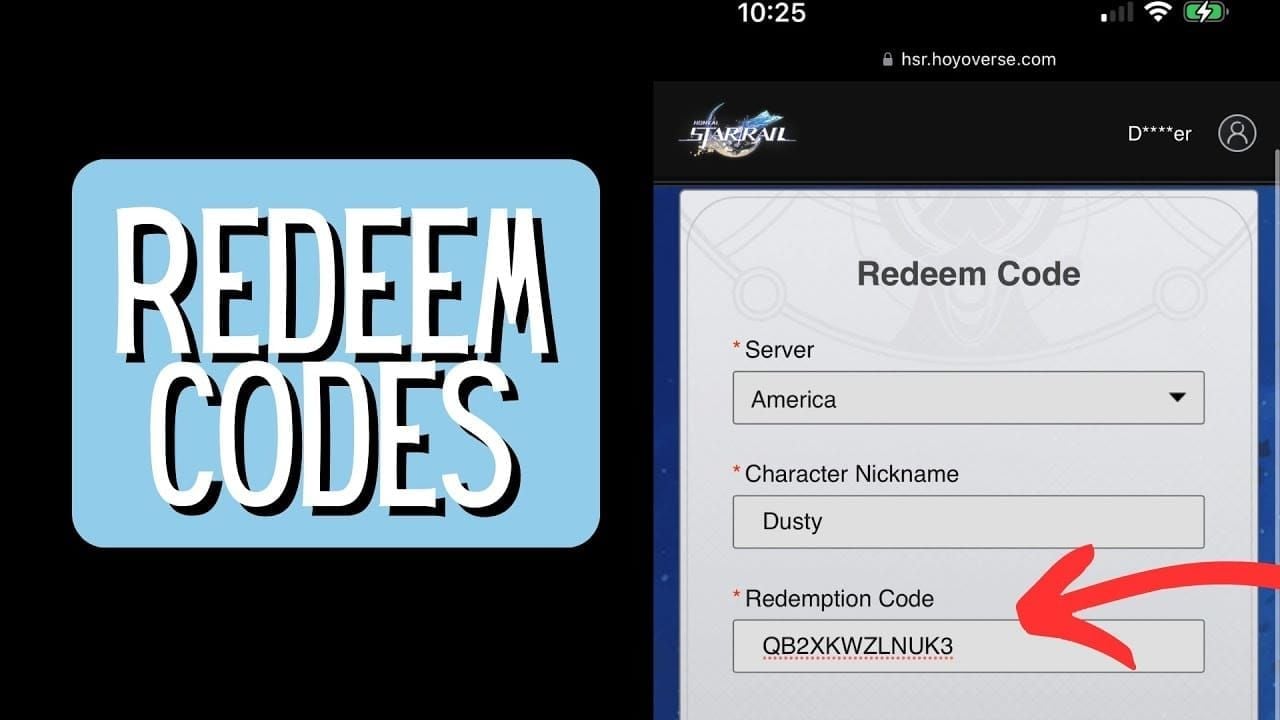
Open phone menu (top-left on mobile, ESC on PC)
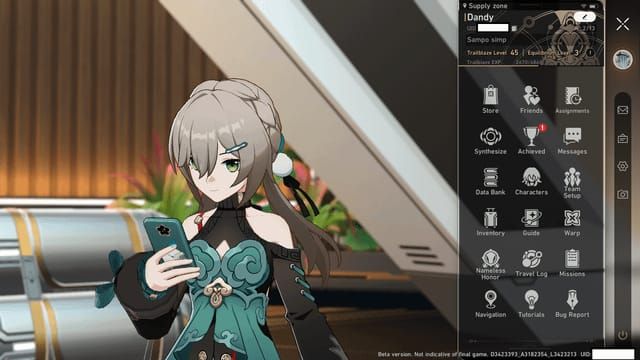
Click three-dot ellipsis beside avatar
Select Redemption Code
Enter code and confirm
Press Claim All in mailbox
Requires completing A Moment of Peace mission (~45 minutes for new players).
Speed Comparison
Web: 30-45 seconds per code, 40% fewer timeout errors during peak hours
In-Game: 15-20 seconds once menu accessed
Best method by platform:
PC: Web (copy-paste eliminates typos)
Android: In-game (avoids browser issues)
iOS: Web only (in-game button absent due to App Store policy)
PS5: Web for first redemption, either method after
The 8 Most Common Errors (And Fixes)
Error 1: 'Redemption Code Already Used'
Cause: Code redeemed previously on current account/server.
Fix: Check mailbox history for Feb 6-7, 2026 messages titled Redemption Code Reward. If managing multiple accounts, verify which account you're logged into.
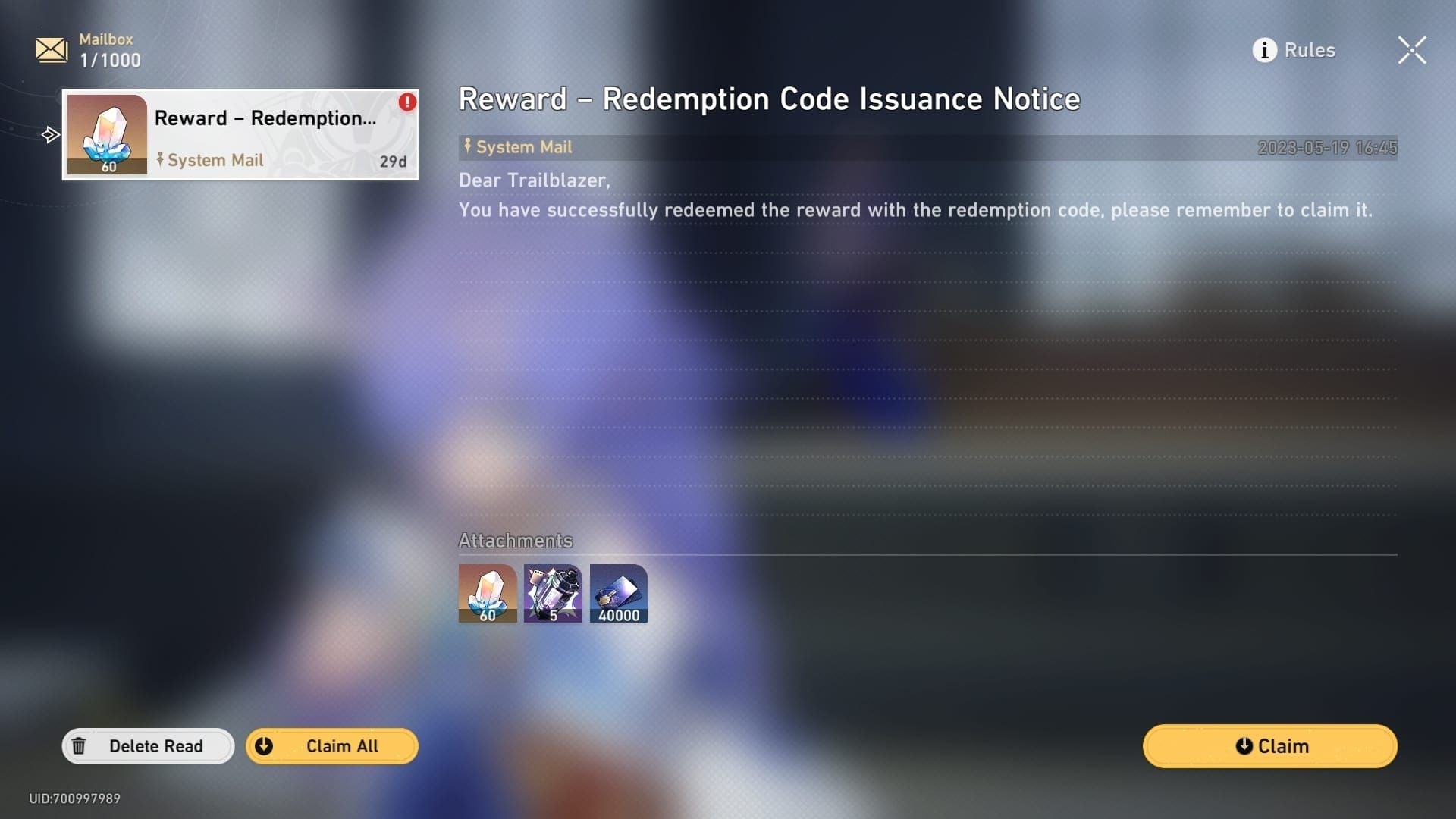
Error 2: 'Invalid Redemption Code'
Cause: Typos (78% of cases) or expired codes.
Fix: Copy codes directly from official sources. After Feb 7, 10:59 AM UTC-5, codes become permanently invalid.
Error 3: 'Account Verification Failed'
Cause: Missing email/phone verification.
Fix: Navigate to account settings, complete verification via confirmation code. Third-party login users (Google/Apple/Facebook) must link an email address first.
Error 4: 'Trailblaze Level Insufficient'
Cause: Account below Level 10.
Fix: Complete main Trailblaze Missions for ~45 minutes to reach Level 10. Must also finish A Moment of Peace to unlock mailbox.
Error 5: 'Server Connection Timeout'
Cause: Network instability or server overload (40x traffic first hour post-livestream).
Fix:
Wait 15-30 minutes during peak periods
Disable VPN/proxy services
Flush DNS: Windows
ipconfig/flushdns, Macsudo dscacheutil-flushcacheMobile: Toggle airplane mode for 10 seconds
Error 6: 'Code Not Yet Active'
Cause: Time zone confusion.
Fix: Codes activate when revealed during English livestream, regardless of regional stream timing.
Error 7: 'Redemption Limit Reached'
Cause: Code already used on current server.
Fix: Each code works once per account per server. Track redemptions manually if managing multiple servers.
Error 8: 'Platform Mismatch Error'
Cause: PS5 accounts need PSN authentication.
Fix: Complete one-time PSN-to-HoYoverse linking through web portal (5 minutes).
Account Binding & Verification Fixes
PC Players: HoYoverse Linking
Steam/Epic users must link game account to HoYoverse:
Launch game → Settings → User Center
Enter email and create password
Confirm verification email within 2 minutes
Log into web portal with new credentials
Mobile: Email/Phone Verification
Access HoYoverse account management page
Select Account Security
Choose email or phone verification
Input 6-digit code received within 10 minutes
PS5: PSN Binding
Log into redemption portal with PSN credentials
Follow binding prompts to link HoYoverse account
Requires active PlayStation Plus for accounts created after Jan 2025
Third-Party Login Issues
Google/Apple/Facebook login users:
Access in-game Account settings
Select Email Address
Add and verify email (arrives within 5 minutes)
Network Troubleshooting
DNS Cache Flush
Windows:
ipconfig/flushdns(Command Prompt as admin)Mac:
sudo dscacheutil-flushcache;sudo killall-HUP mDNSResponderMobile: Toggle airplane mode 10 seconds
VPN/Proxy Interference
Disable all VPN software before redemption. Corporate/school networks may block access—switch to mobile data.
Off-Peak Redemption Strategy
Best times (lowest server load):
8-12 hours post-livestream
Asian time zones: 8 PM-12 AM EST
European time zones: 8 AM-12 PM CST
Avoid first 3 hours post-livestream and final 2 hours before expiration.
Fast Leveling to Unlock Redemption
Reach Level 10 in Under 45 Minutes
Focus exclusively on Trailblaze Missions (main story icon)
Skip side quests and exploration
Use auto-battle for required combat
Complete A Moment of Peace mission to unlock mailbox
Why Level 10 Requirement Exists
Anti-bot security measure. Time barrier makes automated farming economically unviable, protecting code value for legitimate players.
Platform-Specific Issues
PC (Steam/Epic)
Update game client fully before redemption
Verify file integrity through launcher properties
Outdated clients lack current API endpoints
iOS
Use web portal exclusively (in-game button absent)
Safari provides best compatibility
Chrome/Firefox may timeout
Android
Download updates from official sources only
APK from third-party sites may have modified code
Reinstall from Google Play if issues persist
PS5
First redemption requires web portal for PSN authentication
Subsequent codes work via either method
Restriction applies only to newly created accounts
Code Expiration Mechanics
27-Hour Validity Window
Countdown begins when codes appear during English livestream. No pause periods or extensions.
No Grace Period
Codes invalid at exact expiration timestamp (second-level precision). Community grace period rumors stem from time zone confusion.
Historical Data
Zero code deadline extensions across 8 Version 3.x livestream events. Don't expect extensions.
Reminder Strategy
Set multiple alerts:
12 hours before expiration
6 hours before (allows troubleshooting time)
1 hour before
Use countdown timer apps displaying your local time zone.
Reward Breakdown
Stellar Jade Value
300 total = 1.875 Warps (37.5% toward 10-pull). Equals 3.75 days of Daily Training rewards.
Materials Included
5 Traveler's Guides: 125,000 character XP (Level 1→25), saves 30 Trailblaze Power
50,000 Credits: 5 Light Cone enhancements (1→20) or 2-3 Relic upgrades to Level 12
4 Refined Aether: 1-2 Light Cone level increases at higher tiers
Total Value
~$4.50 USD worth of resources per server. Players on three servers gain $13.50 value.
For additional resources, HSR Oneiric Shards recharge instant through BitTopup provides fast delivery with excellent customer service.
Prevention Strategies
Pre-Redemption Checklist
Verify 24 hours before livestream:
Trailblaze Level 10+
A Moment of Peace completed
Email/phone verification active
HoYoverse account linked
Test web portal login
Code Storage Best Practices
Copy codes directly from official sources to note-taking app
Never manually type codes
Use plain text storage (no formatting)
Avoid rich text editors (insert hidden characters)
Account Security
Never share UID publicly
Use HTTPS web portal exclusively
Avoid public WiFi without VPN
BitTopup Alternatives for Stellar Jade
Purchase Process
Select desired Oneiric Shard package
Complete secure payment
Receive resources within 2 minutes
24/7 customer service, multiple payment methods, competitive pricing with bonus tiers.
Oneiric Shard Conversion
1:1 ratio to Stellar Jade. Bulk purchases often include bonus percentages for better value.
Express Supply Pass Value
$5 USD equivalent delivers:
300 Stellar Jade immediately
90 daily for 30 days
Total: 3,000 Stellar Jade
Highest Jade-per-dollar ratio available. Combine with livestream codes to maximize free resources.
Strategic Top-Up Approach
Redeem all livestream codes first
Calculate exact pity distance
Purchase precise amount needed via BitTopup's flexible packages
FAQ
What are all the HSR 4.0 livestream codes for February 2026?
AHAHAHAHAHAHA (100 Stellar Jade + 50,000 Credits), QWQXDDLOLOMO (100 Stellar Jade + 5 Traveler's Guides), HITLIKETOBEAHA (100 Stellar Jade + 4 Refined Aether). Each works once per account per server.
When do Honkai Star Rail 4.0 codes expire?
February 7, 2026 at 10:59 AM UTC-5 (3:59 PM UTC, 7:59 AM PST, 4:59 PM CET, 12:59 AM JST Feb 8, 11:59 PM CST Feb 7). 27 hours after English livestream.
Why does my HSR code say already redeemed?
You claimed it previously on current account/server. Check mailbox history for Feb 6-7, 2026 or verify correct account login if managing multiples.
How do I fix code redemption failed in Star Rail?
Complete email/phone verification, reach Trailblaze Level 10, finish A Moment of Peace mission. Clear browser cache, match server selection to login screen, copy codes directly.
What Trailblaze Level do I need to redeem HSR codes?
Level 10 minimum plus A Moment of Peace completion. New players reach this in ~45 minutes via main Trailblaze Missions.
How to redeem Honkai Star Rail codes on PS5?
Use web portal for first redemption: log in with PSN credentials, link HoYoverse account, select server, enter character name (case-sensitive), input code, collect from in-game mailbox.