

Permanently deleting your Bigo Live account erases your profile, videos, messages, followers, Beans, Diamonds, and all data irreversibly. Two methods exist: in-app deletion (30-day removal) or customer support (7 working days). This guide covers complete deletion including Facebook/Google OAuth unbinding.
Understanding Permanent Bigo Live Account Deletion
Permanent deletion removes everything: profile, content, messages, props, gifts, currency, followers, and privileges. Unlike temporary deactivation, it's irreversible once the waiting period ends. Your account deactivates immediately after confirmation, then permanently deletes after 30 days (in-app) or 7 working days (support method) without login.
Deletion differs from uninstalling the app. Bigo Live erases all server data including your BIGO ID (under profile picture), broadcast history, viewer interactions, and financial records. Users registered via Facebook or Google OAuth must also remove third-party bindings for complete data removal.
Before deletion, maximize remaining account value at BitTopup with secure Bigo Live Diamonds recharge at competitive rates.
What Permanent Deletion Removes
Profile Data: Username, bio, profile picture, verification status disappear from search results and directories.
Content: Livestream recordings, videos, photos, stories become permanently inaccessible.
Social Connections: Followers, following lists, blocked users, friend relationships deleted.
Financial Assets: Beans (broadcaster earnings) and Diamonds (viewer currency) forfeited without recovery. Purchases including effects, gifts, premium features lost with no refunds.
Communications: All direct messages, group chats, comments, interaction records permanently erased.
Permanent Deletion vs Temporary Deactivation
Bigo Live doesn't offer temporary deactivation—only permanent deletion. After confirmation, your account enters immediate deactivation while data remains on servers for 30 days (in-app) or 7 working days (support method).
During this grace period, logging in cancels the in-app deletion request. This is your only safety mechanism. Once the period expires without login, deletion becomes absolute. No support intervention or legal request can restore the account.
Timeline differences matter: in-app deletion offers 30 days to reconsider; support method completes in 7 working days for faster privacy protection but less reversal opportunity.
Why Users Delete Accounts
Privacy Concerns: Users registered via Facebook/Google OAuth want to revoke data sharing between platforms. Deletion comprehensively severs these connections.
Platform Dissatisfaction: Broadcasters facing declining viewership, harassment, or poor monetization rates choose deletion. Viewers dissatisfied with content or excessive purchase pressure leave similarly.
Digital Footprint Reduction: Growing data collection awareness drives users to minimize online presence. Bigo Live accumulates substantial personal data—viewing habits, spending patterns, social connections—making deletion essential for digital cleanup.
Prerequisites Before Deleting Your Account
Proper preparation prevents permanent asset loss and complications.
Backing Up Content and Data
Download all videos before deletion—Bigo Live provides no post-deletion retrieval. Navigate to your profile, access video library, download each recording. Ensure sufficient device storage (iCloud/local for iOS, SD card/internal for Android).
Screenshot achievements, follower milestones, memorable interactions. These visual records capture your platform journey.
Download financial records: transaction history, earnings reports, purchase receipts. These serve as proof for tax purposes or dispute resolution.
Withdrawing Beans and Diamonds
Diamonds: Consume all Diamonds before deletion—they represent real money with no refunds post-deletion. Use them for gifts, supporting broadcasters, or premium features.
Beans: Withdraw all Beans to your linked bank account or payment method. Navigate to wallet/earnings section, initiate withdrawal, confirm completion. Processing takes several business days.
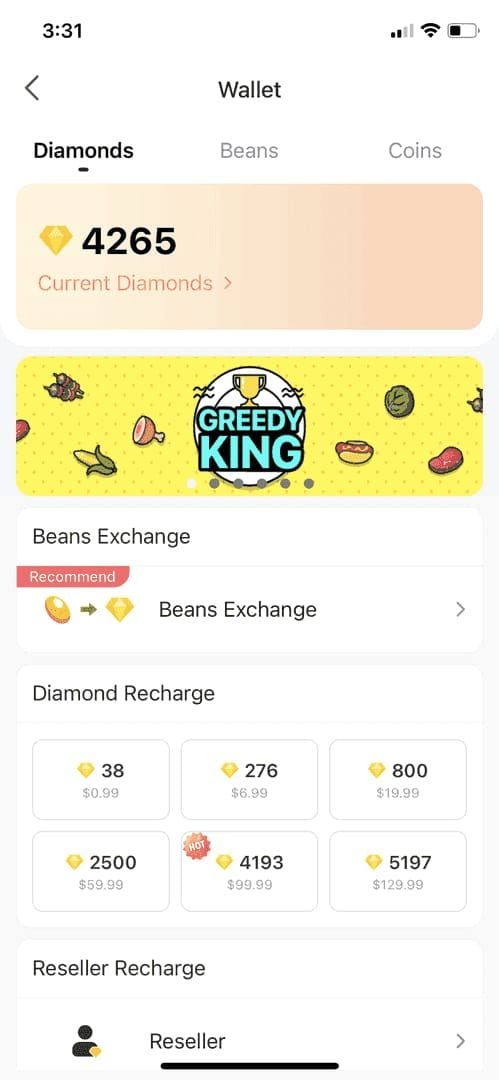
Small visual currency amounts (daily bonuses, event rewards) can't be withdrawn and will be forfeited.
For final account maximization, top up Bigo Live cheap at BitTopup with competitive rates and secure transactions.
Settling Payments and Subscriptions
Cancel all active subscriptions (VIP memberships, broadcaster programs, premium features) before deletion. They continue charging even after account deletion unless explicitly canceled.
Withdraw all broadcaster wallet funds. Some earnings have minimum thresholds or holding periods—plan deletion timing accordingly.
Relinquish family head or leader status. Transfer leadership or disband groups to prevent community disruption.
Informing Your Community
Notify followers about your departure if you've built meaningful connections. Provide alternative contact methods or platform migration info.
Document important contacts—export usernames, contact info, social media handles. You'll lose all communication channels permanently.
Complete outstanding commitments: collaborations, gift exchanges, content deliveries.
Step-by-Step: In-App Deletion
The in-app method offers straightforward deletion with a 30-day grace period.
Accessing Account Settings
Open Bigo Live app, log into the account you're deleting
Tap profile icon (bottom-right corner)
Tap gear icon (upper-right corner) to access settings
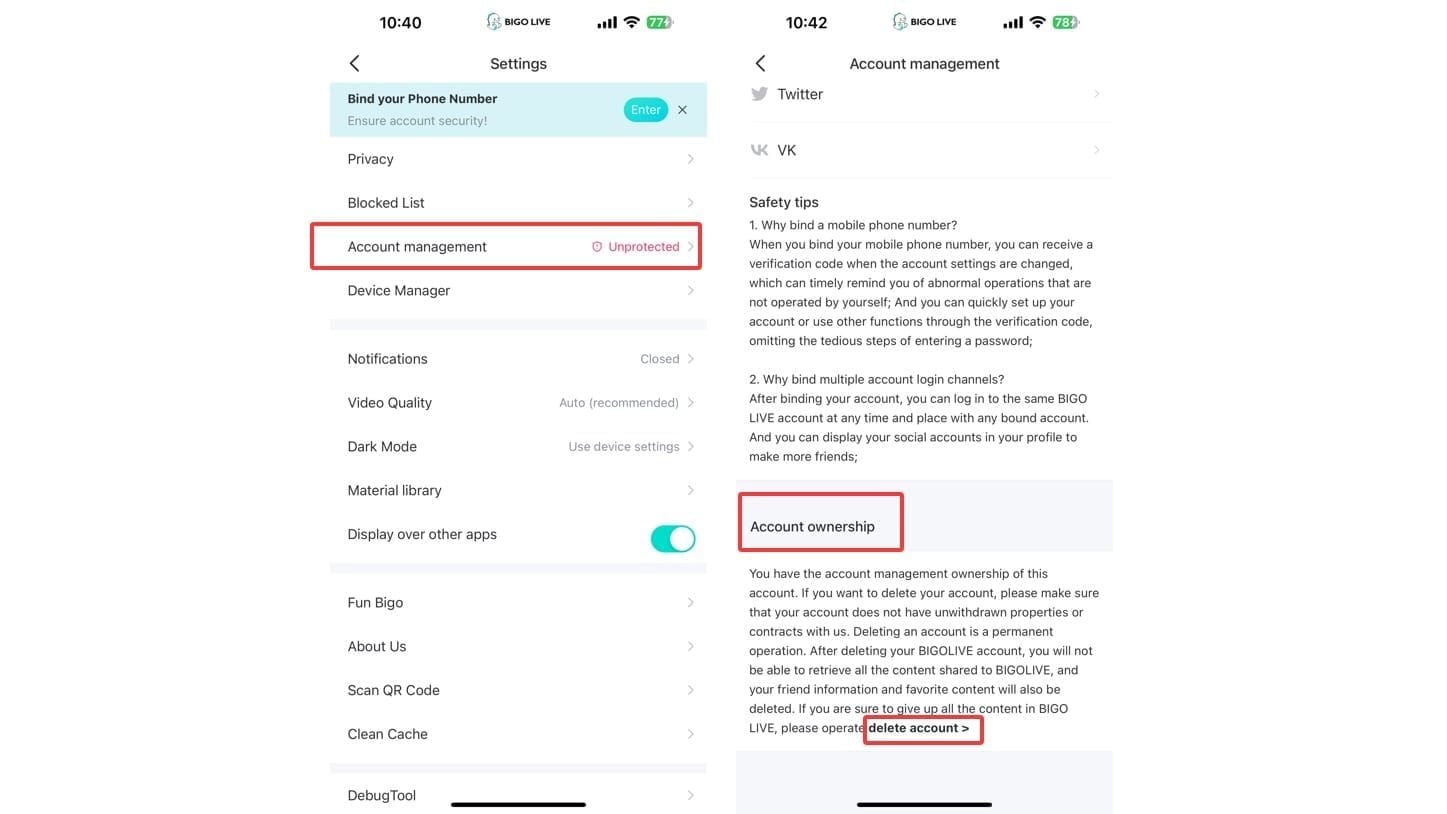
Navigate to Account Management or Account & Security
Finding Deletion Option
Tap Account Management or Account & Security
Select Delete Account (may be labeled Close Account or Deactivate Account)
Read terms explaining deletion consequences
Review the comprehensive list: profile data, content, followers, financial assets, purchases all lost
Confirming Deletion
Enter verification code or password when prompted
Check email for confirmation message (including spam folder)
Complete two-factor authentication if enabled
Tap final confirmation button
This triggers immediate deactivation and starts the 30-day waiting period.
Understanding the 30-Day Period
Logging in during these 30 days cancels deletion and restores full access. Avoid login if you want permanent deletion—each attempt resets the process.
After 30 days without login, Bigo Live permanently removes your account and data. This becomes absolute and irreversible.
Verifying Removal
After 30 days, attempt login with previous credentials. Error messages indicating non-existent account confirm successful deletion.
Check third-party platforms (Facebook Apps and Websites, Google Permissions) to verify Bigo Live no longer appears.
Search for your username/BIGO ID using a different account. No results confirm complete deletion.
Alternative: Customer Support Deletion
Contact support for faster removal or if in-app deletion fails.
Email Deletion Request
Email feedback@bigo.tv or cs@bigo.tv with:
Subject: Account Deletion Request
Username, registered email, BIGO ID (under profile picture)
Brief deletion reason
Use your registered email address for verification. If registered via Facebook/Google without direct email, mention this and provide alternative verification.
Support responds within 1-2 business days. Deletion completes within 7 working days, with final confirmation sent.
Advantages and Disadvantages
Advantages: 7-day timeline offers faster removal for urgent privacy/safety concerns.
Disadvantages: Less opportunity to recover assets or reconsider. Reversal becomes significantly harder once initiated.
When to Use: Essential when in-app deletion is unavailable due to technical issues, account restrictions, or app incompatibilities.
Removing Facebook Integration
Facebook OAuth creates data-sharing connections that persist even after Bigo Live deletion. Complete removal requires addressing both platforms.
Unbind Facebook from Bigo Live
Access Bigo Live account settings > linked accounts
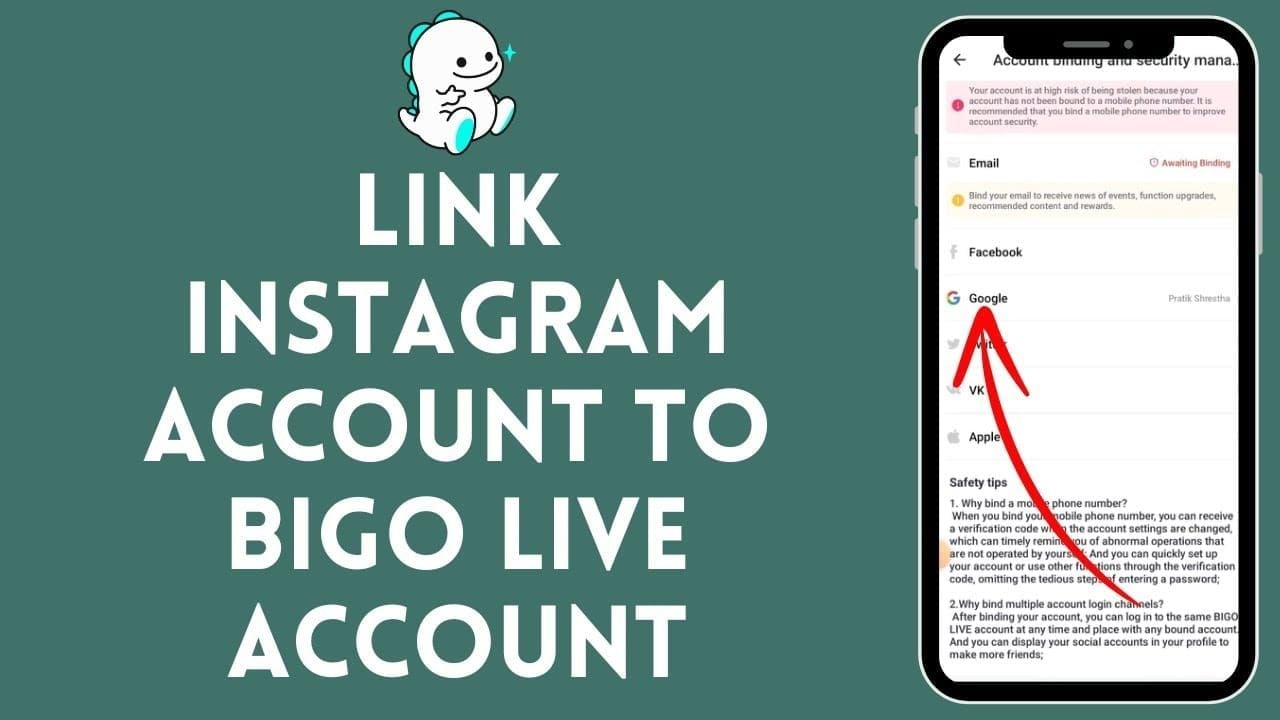
Locate Facebook connection showing your profile name
Tap unbind/disconnect/remove
Confirm (ensure alternative login method exists first to prevent lockout)
Verify Facebook no longer appears in linked accounts
You can unbind before or after Bigo Live deletion—both achieve the same privacy outcome.
Remove from Facebook Connected Apps
Log into Facebook (web or mobile)
Navigate to Settings > Settings & Privacy > Settings
Select Apps and Websites
Find Bigo Live in connected applications list
Click Bigo Live to view permissions
Click Remove and confirm
Verify Bigo Live no longer appears in list
Revoke OAuth Permissions Completely
After removal, refresh Apps and Websites to confirm Bigo Live is absent from active and expired lists.
Check Facebook activity log for Bigo Live-related posts/shares. Delete manually if desired.
Review Apps, Websites and Games settings to prevent future third-party integrations. Enable stricter controls for automatic data sharing.
Troubleshooting Unbinding
If Bigo Live persists after removal, clear browser cache/cookies (web) or force-close and restart Facebook app (mobile). Refresh the page.
For persistent failures, log out of both platforms, log back into Facebook, attempt removal again.
Contact Facebook support if issues continue. Provide Facebook user ID, application name (Bigo Live), issue description for manual backend revocation.
Disconnecting Google Account
Google OAuth requires similar disconnection procedures.
Unbind Google from Bigo Live
Access Bigo Live settings > linked accounts
Locate Google connection showing Gmail/profile name
Tap unbind/disconnect/remove
Verify alternative login method exists
Confirm unbinding
Verify Google no longer appears in linked accounts
Remove from Google Account Settings
Visit myaccount.google.com, sign in
Navigate to Security section
Scroll to Third-party apps with account access
Click Manage third-party access
Locate Bigo Live in list
Click Bigo Live to view permissions
Click Remove Access
Managing OAuth Permissions
After removal, refresh third-party apps list to confirm Bigo Live is absent.
Review specific permissions Bigo Live previously held (email, profile info, additional permissions).
Enable two-factor authentication, review app permissions carefully, periodically audit connected applications.
Common Disconnection Issues
Users registered exclusively via Google without alternative credentials must add email/password authentication before unbinding to prevent lockout.
If Bigo Live persists, sign out of Google completely, clear cache/cookies, sign back in, check list again.
Contact Google support for persistent issues. Provide Google account email, application name, problem description for manual revocation.
Post-Deletion Consequences
Data Removal Timeline
Immediate: Account deactivates upon confirmation. Profile becomes invisible, content disappears, login access lost.
Grace Period: Data remains on servers for 30 days (in-app) or 7 working days (support), allowing recovery if you change your mind.
Complete Removal: After grace period expires without login, automated systems permanently erase data. Residual data in backup systems undergoes gradual deletion per retention policies.
What Bigo Live Retains
Legal Requirements: Transaction records, payment info, financial documentation for tax reporting, fraud prevention, regulatory compliance.
Anonymized Data: De-identified usage statistics for analytics and research—can't be traced to your identity.
Violation Reports: Content involved in harassment investigations, copyright disputes, legal matters may be retained until resolution.
Impact on Content and Followers
All videos, photos, livestreams permanently deleted. Followers lose access to your profile. Comments may be deleted or show deleted user.
Engagement history (likes, shares, gifts sent) completely erased, affecting your records and others' statistics.
Family groups/communities lose your membership. Leadership roles transfer or become vacant.
Impossibility of Recovery
After the waiting period, no recovery method exists. Customer support can't reverse deletion, even with identity proof.
Creating new accounts with same email/phone/username doesn't restore previous data. New accounts start fresh with no history transfer.
Legal action or data protection requests can't force restoration after voluntary deletion.
Troubleshooting Deletion Issues
Why Deletion Fails
Outstanding Obligations: Pending payments, unresolved disputes, negative balances block deletion. Settle all financial matters first.
Active Subscriptions: Cancel all subscriptions and wait for current billing cycle completion.
Administrative Roles: Transfer family/group leadership or disband groups before deletion.
Resolving 'Pending Transactions' Errors
Check transaction history for incomplete purchases, pending withdrawals, processing payments. Contact support if transactions are stuck.
Withdraw all broadcaster wallet funds. Wait for holding periods on recent earnings to expire.
Resolve payment disputes, chargebacks, refund requests before deletion.
Third-Party Binding Conflicts
Try removing connections from third-party platform first (Facebook/Google side), then unbind from Bigo Live.
Users registered exclusively via OAuth must add email/password authentication before unbinding to prevent lockout.
Clear app cache/data (Android: Settings > Apps > Bigo Live > Storage > Clear Cache & Data; iOS: uninstall/reinstall).
Unavailable Deletion Option
Update Bigo Live to latest version. Older versions may lack deletion features.
If still unavailable, use customer support method: email feedback@bigo.tv or cs@bigo.tv.
Regional restrictions may apply. Contact support for region-specific requirements.
Alternatives to Deletion
Privacy Settings
Adjust profile to private mode, restricting visibility to followers only or hiding from search.
Disable notifications (push, email, in-app) to reduce engagement without deletion.
Restrict data sharing with third-party apps through privacy settings.
Temporary Absence
Stop using the app without formal deletion. Bigo Live maintains dormant accounts indefinitely.
Uninstall the app to eliminate temptation while keeping account data on servers.
Change password to random string, store securely, log out. Creates barrier to impulsive login while maintaining recovery capability.
Blocking Users
Block individuals causing harassment or unwanted interactions instead of deleting entire account.
Report policy violators to moderation team for warnings, suspensions, or bans.
Adjust who can contact you, comment, or view profile through granular privacy controls.
Adjusting Permissions
Revoke unnecessary device permissions (camera, microphone, location, contacts) in phone settings.
Unbind third-party accounts without deleting Bigo Live. Set up email/password login for access.
Disable data sharing features within Bigo Live settings.
Post-Deletion Security
Verify Complete Removal
Check Facebook Apps and Websites and Google third-party apps to confirm Bigo Live is absent.
Search for previous username/content on search engines. Request cached page removal through search engine tools.
Monitor email for Bigo Live communications. Continued messages indicate incomplete deletion or unauthorized recreation attempts.
Monitor Unauthorized Recreation
Set up alerts for email/phone number to detect unauthorized account creation.
Periodically search for previous username/BIGO ID to detect impersonation attempts.
Review email spam folder for Bigo Live verification emails indicating unauthorized activity.
Manage Digital Footprint
Update social media profiles, bios, directories to remove Bigo Live references.
Request content removal from third-party websites that featured your streams.
Implement broader privacy measures: audit third-party permissions across all services, strengthen privacy settings.
Secure Contact Information
Change email/phone number for absolute certainty against future sign-ups.
Enable two-factor authentication on email to prevent unauthorized access.
Create email filters to automatically delete future Bigo Live communications.
FAQ
How long does permanent deletion take? In-app method: immediate deactivation, permanent removal after 30 days without login. Support method (feedback@bigo.tv or cs@bigo.tv): 7 working days.
Can I recover my account after deletion? No. After the waiting period expires, recovery is impossible. Bigo Live permanently erases all data. Support can't restore accounts even with ownership proof.
What happens to Beans and Diamonds? Permanently forfeited with no refunds. Withdraw all Beans and consume all Diamonds before deletion. Remaining currency is irretrievably lost.
How do I unbind Facebook before deleting? Bigo Live settings > linked accounts > unbind Facebook. Then Facebook Settings > Apps and Websites > locate Bigo Live > Remove. Complete both steps.
Does deleting Bigo Live remove data from Facebook/Google? No. Manually remove Bigo Live from Facebook Apps and Websites and Google third-party apps to revoke OAuth permissions.
Will livestream videos be deleted? Yes. All videos, photos, recordings permanently deleted. Backup content by downloading before deletion—post-deletion recovery is impossible.