

PUBG Mobile's Ban Pan 3.0 issues 10-year HWID bans (3,650 days) primarily for third-party plugin detection, with 71% of bans targeting cheating violations. False positives occur frequently with emulators like GameLoop and BlueStacks since April 2025. Appeal through in-game File Claim or email PUBGMOBILE_CS@tencentgames.com with UID, gameplay videos, system logs, and anti-virus reports. Clear false positives get responses in 24-48 hours; complex cases take 1-2 weeks.
Understanding Ban Pan 3.0: What Changed
Ban Pan 3.0 uses aggressive signature detection scanning third-party software at device level. Unlike previous systems relying on player reports, it monitors running processes, memory modifications, and network traffic—catching 90% of cheaters since September 2025.
Trade-off: increased false positives. Since April 2025, legitimate emulator users face wrongful 10-year bans from misidentified processes. The system aggressively scans background apps, overlays, and gaming utilities modifying display/network settings.
For players using PUBG Mobile UC top up through BitTopup, understanding triggers protects investments during appeals.
Evolution from Previous Systems
March 17, 2022 update shifted from reactive to proactive detection. Earlier systems issued 3-30 day temporary bans; Ban Pan 3.0 immediately imposes 10-year HWID bans locking specific device identifiers, not just accounts.
December 2024 ban wave removed 2,127,454 accounts—22% Bronze rank players, showing the system targets all skill levels.
Detection Mechanisms
Three primary methods:
Signature matching: Scans processes against known cheat database
Behavioral analysis: Monitors for impossible actions (perfect recoil, wallbangs without visual contact)
Device fingerprinting: Creates unique identifiers combining hardware, OS, and software profiles
Why False Positives Increased
April 2025 expanded suspicious software definitions beyond traditional cheats. Now triggers: screen recorders, RGB lighting software, macro keyboards, VPN clients. System can't distinguish malicious memory injection from legitimate overlays.
Network optimization tools modify packets (technique cheats use), triggering bans. Regional server switching creates patterns resembling account sharing/boosting (4% of bans).
What is a 10-Year Ban
HWID ban locks device identifier for 3,650 days. Creating new accounts or reinstalling won't bypass it—targets hardware signature, not credentials.
Severity reflects zero-tolerance toward plugins. 10-year duration effectively removes violators for game's lifespan.
Ban Types Compared
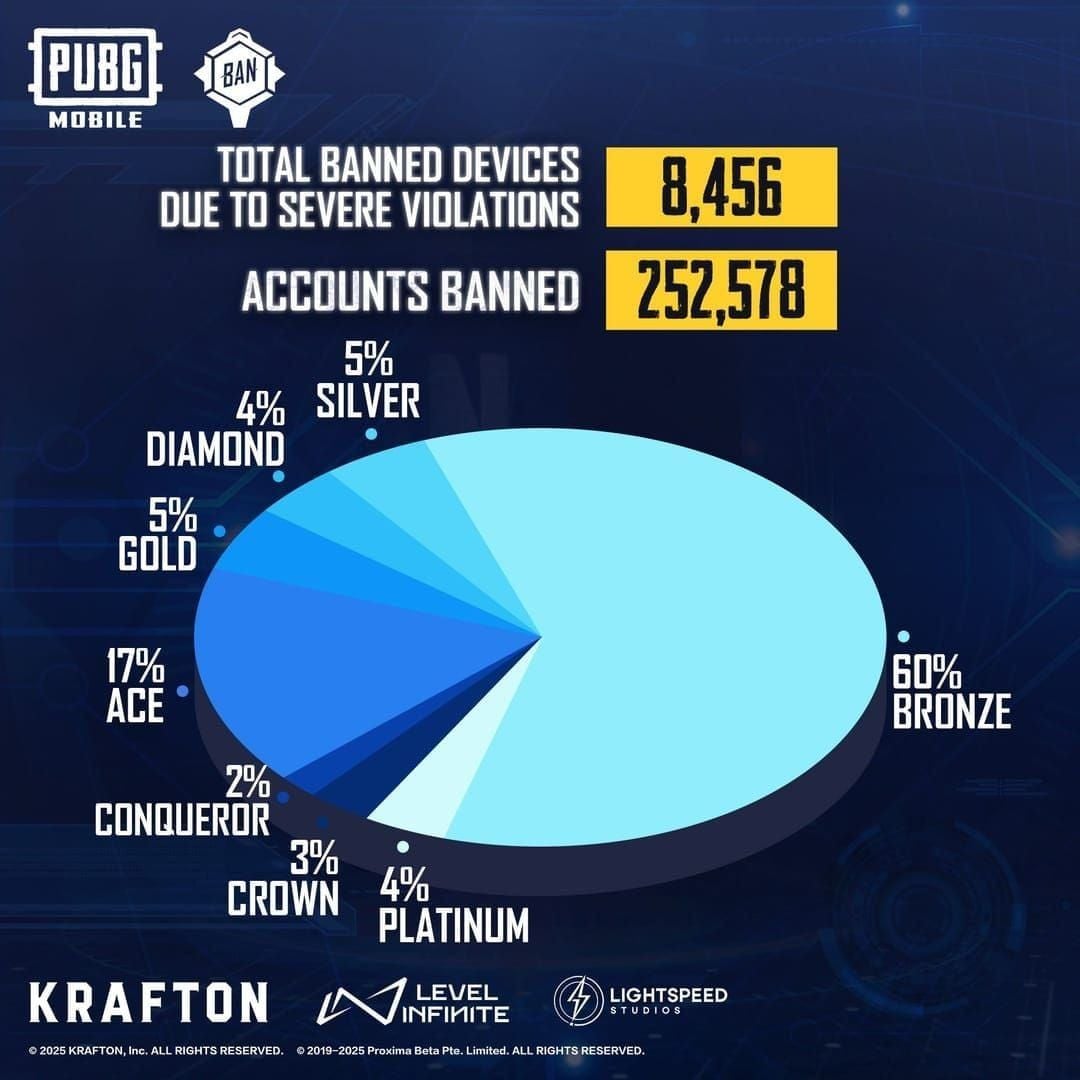
Temporary (3-30 days): Minor violations like toxicity (9% of bans), offensive nicknames. Auto-expire.
Permanent IP bans: Repeat offenders, severe cheating. Blocks all accounts from IP addresses.
10-year HWID: Middle ground—severe but reversible through appeals.
Common Triggers
Confirmed:
Jailbreak/root detection tools
Memory editors (GameGuardian, Cheat Engine)
Auto-aim assistants
Recoil control scripts
Wallhack overlays
Speed modifiers
False positive triggers:
Emulator background processes (GameLoop, BlueStacks since April 2025)
Accessibility features for disabled players
FPS counters, hardware monitors
Discord overlay, voice chat apps
Real-time antivirus scanning
Impact on Account
Account locked but not deleted. All UC, skins, weapons, seasonal rewards remain tied to account. Successful appeal restores everything immediately.
But: seasonal passes expire, event rewards become unavailable, ranked progress resets. Players who buy PUBG Mobile UC cheap via BitTopup for seasonal content risk losses if appeals exceed event deadlines.
Account compromise (13% of bans) requires proving unauthorized access through login locations, IP changes, unusual purchases.
Common False Positive Causes
VPN and Network Tools
VPNs modify routing/encrypt traffic, creating patterns resembling location-hiding cheats. Ban Pan 3.0 can't distinguish privacy VPN from malicious manipulation.
Ping reducers/connection stabilizers inject into network stack, mirroring cheat techniques for intercepting server communications.
Unstable internet regions face higher risks—disconnections, packet loss, latency spikes create irregular patterns interpreted as manipulation.
Screen Recording/Streaming
OBS Studio, Streamlabs use screen capture APIs and overlays Ban Pan 3.0 identifies as wallhacks. Programs inject display layers showing chat/alerts—same technique wallhacks use.
Built-in iOS/Android recording avoids detection (OS-level). Third-party apps with real-time editing/filters trigger alerts.
Emulator Settings
April 2025 wave targeted GameLoop/BlueStacks users enabling virtualization, multi-instance managers, custom keymapping. These require elevated permissions interpreted as cheating infrastructure.
Macro recording triggers detection if system identifies inhuman timing or impossible inputs.
Device-Level Apps
RGB lighting (MSI Afterburner, NZXT CAM, Razer Synapse), fan controllers, hardware monitors access low-level functions overlapping with cheat capabilities.
Accessibility features (screen magnifiers, color filters, alternative inputs) occasionally trigger detection by modifying display/intercepting commands.
Regional Server Switching
Frequent server changes for international friends/lower latency create patterns resembling account sharing/boosting. System tracks login locations, devices, session timing.
Disproportionately affects travelers, military, international students legitimately accessing from different countries.
How to Appeal: Step-by-Step
Immediate Actions
Screenshot ban notification showing reason, duration, error codes
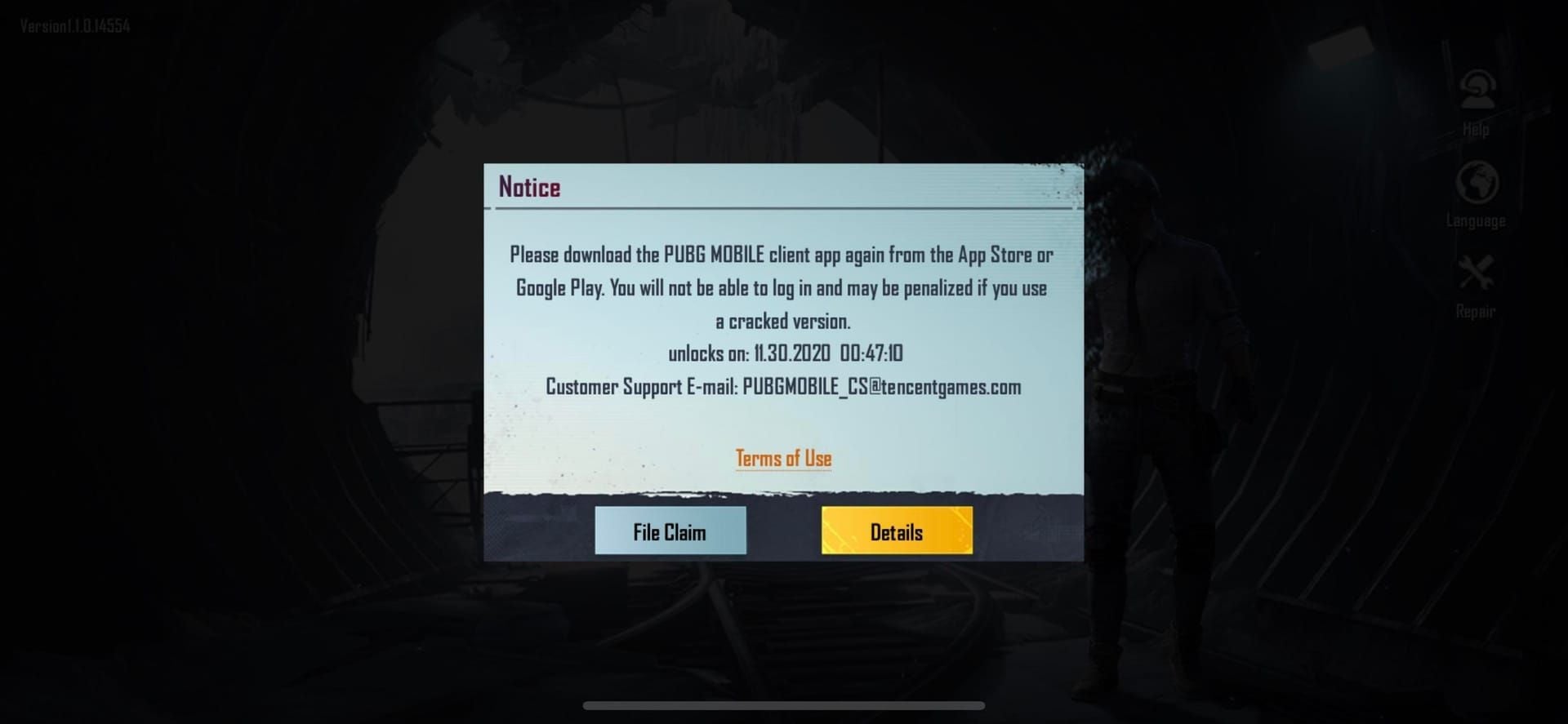
Note exact date/time received
Uninstall all third-party apps (VPNs, recorders, emulator tools, anything installed 48hrs before ban)
List removed software with versions and install dates
Run antivirus scans for clean system reports with timestamps
Locating Appeal Channel
In-game: Settings > Customer Service > File Claim (fastest for straightforward cases)
Email: PUBGMOBILE_CS@tencentgames.com Subject: Ban Appeal - UID [Your UID]
Alternatives:
service@pubgmobile.com (general support)
grievanceofficer@proximabeta.com (escalations after 2 weeks no response)
Filling Form Correctly
Required: nickname, Character ID (below username on profile), UID
Description: Professional tone, state false positive belief, specify legitimate software used, no emotional language/accusations/threats.
Include: game mode played, match times, unusual events (crashes, connection errors) before ban.
Writing Effective Statement
Structure:
Summary: Appealing 10-year HWID ban issued [date] believed to be false positive from legitimate software.
Evidence list:
dxdiag/msinfo32 system logs
Antivirus reports
Uninstalled app screenshots with timestamps
Purchase receipts
Gameplay recordings
2FA screenshots
Request: Requesting thorough review of detection logs and evidence to overturn false positive and restore access.
Submission
Attach files (JPG, PNG, PDF, MP4). Compress to <25MB.
Save confirmation email ticket number. No confirmation in 24hrs? Resubmit via alternative email.
Critical Evidence Required
System Logs
Windows: Run dxdiag (DirectX Diagnostic Tool), save full report. Run msinfo32, export as NFO, convert to PDF. Lists hardware, drivers, processes, installed apps, startup programs.
Mobile: Screenshot installed apps list. Android: Settings > Apps (scrolling screenshots). iOS: App library alphabetically.
Gameplay Recording
10-15 minutes continuous POV showing normal play—missed shots, mistakes, lost gunfights (inconsistent with cheats). Display device status bar/overlay proving actual gameplay.
Match history screenshots: K/D ratio, average damage, survival time showing consistent performance, not sudden improvements.
Purchase Receipts
All UC receipts (app store or third-party). Proves financial investment making cheating illogical.
Inventory screenshots: skins, weapons, seasonal passes. Expensive cosmetics demonstrate long-term investment.
Account creation date, total playtime establishing legitimate engagement history.
Third-Party App Documentation
For each app possibly triggering false positive: official website links, app store listings, user reviews proving legitimate use.
Authorized emulator (GameLoop): version number, settings screenshots, default configuration without custom mods.
Install/uninstall timestamps relative to ban date.
Network Configuration
IP history if server switching suspected. ISP screenshots showing consistent location (not account sharing).
2FA screenshots proving account security (reduces compromise suspicion—13% of bans).
Travelers: itineraries, work assignments, student visas explaining geographic login variations.
Appeal Timeline
Response Times
24-48 hours: Clear false positives with complete documentation
3-5 days: Simple cases, straightforward evidence
1-2 weeks: Complex cases needing detailed log analysis, multiple consultations
Tracking Status
Use ticket number for status checks. Email Status Check - Ticket #[Number] to PUBGMOBILE_CS@tencentgames.com if no response within expected timeframe.
Don't submit multiple appeals simultaneously—creates duplicate tickets causing rejections.
Multiple Requests
Additional info requests mean complex case under active investigation (positive sign). Respond within 48hrs with exactly what's requested.
Serious Consideration Signs
Detailed questions about specific sessions, requests for match IDs, inquiries about particular software = thorough review.
Generic/automated responses = hasn't reached manual review yet.
Maximizing Success
Professional Communication
Respectful, factual language. Frame as requesting secondary review of potentially erroneous detection, not system is broken.
Use technical terms: signature detection false positive, legitimate emulator background processes.
Clear paragraphs, bullet lists, numbered steps for easy extraction.
Avoiding Mistakes
Don't claim never installed anything if you use legitimate software—reviewers access installation logs. Acknowledge legitimate use, emphasize non-cheating purpose.
Don't rush submissions without evidence—get auto-rejected, subsequent appeals face increased scrutiny.
Don't threaten legal action/chargebacks/negative reviews—triggers defensive responses.
Follow-Up Timing
Wait 5 business days (simple appeals) or 10 days (complex) before status inquiries.
New evidence after submission: single follow-up Additional Evidence - Ticket #[Number] to same thread, don't create new appeal.
Escalation
Rejection without explanation: request specific details about insufficient evidence to same ticket.
One escalation opportunity to grievanceofficer@proximabeta.com with complete history, rejection reasoning, new evidence addressing concerns.
Escalation needs genuinely new info, not restated arguments.
If Appeal Rejected
Understanding Reasons
Common rejections:
Insufficient evidence proving no cheats
Can't explain suspicious gameplay/statistics
Conflicting info between statement and logs
Known cheat signatures detected
Previous ban history
Confirmed third-party plugins rejection: request specifics on which software detected and when.
Secondary Options
Provide expert technical analysis of detected software explaining how legitimate software produces detected signatures.
Account compromise: evidence of unauthorized access (unusual logins, IP changes, gameplay during provable non-play times).
Community Support
Research similar false positives in same timeframe. Widespread patterns (April 2025 emulator crisis) sometimes result in mass approvals.
Document case, share in forums identifying others with identical situations. Collective evidence strengthens appeals.
Legal Considerations
Substantial investment accounts: consult consumer protection regulations. Some regions provide recourse for digital content denial without ToS violations.
Document receipts, investment totals, appeal timeline for payment processor/consumer protection disputes.
Preventing Future False Positives
Safe Apps
Close VPNs, recorders, RGB utilities, performance monitors before launching game.
Use built-in device features over third-party alternatives.
Emulators: official GameLoop only, default settings, no plugins/macros/custom keymapping.
Security Practices
Enable 2FA (account + email). Use authenticator apps, not SMS.
Strong passwords: 12+ characters, mixed case/numbers/symbols. Update every 3-6 months. No reuse.
No account sharing—creates login anomalies triggering boosting detection (4% of bans).
Regular Audits
Monthly login history review for unauthorized access. Flag unfamiliar locations/devices, change password immediately.
Remove unused apps. Outdated software has vulnerabilities exploited for compromise (13% of bans).
Keep OS and PUBG Mobile updated—patches reduce false positives.
Merit System
Maintain high merit avoiding toxicity, offensive communication, team-killing. Low merit increases scrutiny, reduces appeal success.
Report cheaters through proper channels, don't use third-party detection tools (trigger same alerts).
Recovering Account Value
Verify Restoration
Check UC balance, inventory, seasonal pass progress immediately. All purchased content should match pre-ban state.
Missing items: screenshot, contact support with receipts. Usually database sync errors resolved quickly.
Verify rank, statistics, achievements restored without penalties.
Replenishing UC
BitTopup offers secure PUBG Mobile UC top-up: competitive pricing, instant delivery, 24/7 support, high ratings, secure processing. Use official channels only—unauthorized sources trigger new violations.
Rebuilding Merit
Focus on positive gameplay 30 days post-restoration. Complete dailies, play cooperatively, avoid reportable behaviors.
Communicate constructively, share resources, demonstrate sportsmanship for positive teammate reports accelerating merit recovery.
FAQ
How long does appeal processing take?
24-48 hours for clear false positives with complete evidence. Simple cases: 3-5 days. Complex investigations: 1-2 weeks. Depends on evidence quality and complexity, not submission order.
What evidence is needed?
UID, Character ID, dxdiag/msinfo32 logs, antivirus reports, gameplay recordings, purchase receipts, third-party software documentation. Include 2FA screenshots and IP history if relevant.
Can I recover UC after false ban?
Yes. All UC and items remain during ban. Successful appeals restore complete access with purchases intact. Time-limited seasonal content may expire during lengthy appeals—submit immediately.
Why 10-year ban without cheating?
False positives from legitimate software triggering detection: emulator processes (especially since April 2025), VPNs, recorders, RGB utilities, accessibility features. System can't always distinguish legitimate from actual cheats.
Does VPN trigger Ban Pan 3.0?
Yes. VPNs modify traffic patterns similar to location-hiding cheats. Disconnect before launching game. Document VPN use in appeals if suspected cause.
What happens to skins during ban?
All skins, weapons, passes, items stored with account. Nothing deleted. Successful appeals restore immediate access. Active passes count down during bans—may waste time-limited content if appeals exceed season end.
Account restored? Replenish UC safely at BitTopup—trusted platform for PUBG Mobile players. Secure transactions, instant delivery, 24/7 support. Start topping up now!