

Quick Answer: Bigo Live freezes accounts after top-ups when automated fraud systems flag transactions over $50 on new accounts, VPN usage, multiple payment methods within 48 hours, or rapid purchases. Recovery requires submitting verification to feedback@bigo.tv with User ID, transaction receipts, and payment proof. Processing takes 7-14 days by region. Prevention: start with $5-10 recharges, space transactions 24-48 hours apart, complete verification, use trusted platforms providing official records.
Why Accounts Freeze After Top-Up
Bigo's real-time fraud detection monitors every diamond purchase, flagging abnormal patterns. Specific triggers:
Recharges over $50 on accounts under 30 days old enter automatic review
$100+ on new accounts = mandatory 14-day freeze
Multiple purchases within 24 hours trigger immediate freeze
VPN usage during any transaction = instant freeze
Switching payment methods within 48 hours raises fraud flags
Payment holds from banks cascade to Bigo wallet freezes
Refund requests lock diamonds and beans until investigation completes
Trust Score System: Accounts 90+ days old with 5+ successful transactions receive 60-70% reduced scrutiny. Full verification (phone, email, ID) cuts freeze risk 60-70%. Phone verification alone reduces risk 30-40%.
Regional Processing Times:
Southeast Asia: 7 days average
Middle East: 10-14 days
Europe/America: 5-7 days
Platforms like BitTopup offer Bigo Live top up through verified channels that maintain security-compliant payment patterns.
Frozen vs Banned: Critical Differences
Frozen Account Indicators:
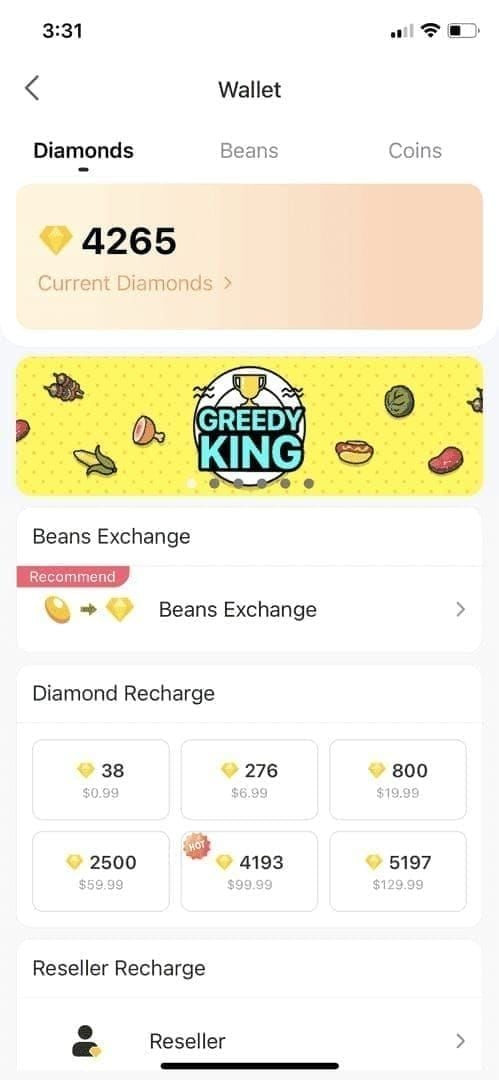
Lock icon beside diamond count
Frozen Balance labels in transaction history
Grayed-out wallet numbers (viewable but unspendable)
Automatic analysis: 24-48 hours
Manual review: days 4-7
Final clearance: days 8-14
Permanent Ban Signs:
Account suspended or access permanently restricted messages
Login errors instead of balance restrictions
No recovery options
Chargeback Consequences: 20-30% fund recovery success but 43% trigger permanent bans. 89% result in negative outcomes including total asset loss. You lose the account plus all legitimately purchased diamonds, beans, VIP status, and broadcaster connections.
Suspension Tiers:
First offense: 7-day freeze, automatic restoration (85% success rate)
Second offense: 14-day freeze, manual review required
Third offense/serious violations: permanent ban, no appeals
Check Status: Settings > Account Security > Account Status shows restrictions. Transaction History displays Completed, Under Review, or Frozen per purchase.
The Chargeback Trap
Disputing payments = account destruction. When your bank processes a chargeback, Bigo flags you for fraud—you got diamonds, used them, then claimed unauthorized transaction.
What Happens:
Instant permanent ban in most cases
Complete asset forfeiture
Payment method and email blacklisting
Dispute info shared across platforms
No exceptions for account value or history
Real Impact: Users who charged back $50-100 lost accounts containing $500+ in legitimate diamonds. Verified broadcasters with established audiences lost everything after single chargeback attempts.
Alternative: Submit appeals through official channels with complete documentation. Wait the full 7-14 days. If you used BitTopup, contact their support first—authorized resellers have direct Bigo communication channels and transaction records that strengthen appeals.
Receipt Documentation: Your Recovery Lifeline
Essential Elements:
User ID (8-12 digits from Settings > Account Information)
Transaction ID (15-25 characters)
Transaction date, exact amount, payment method
Payment confirmation from processor
Bank statement showing charge
Screenshot Best Practices:
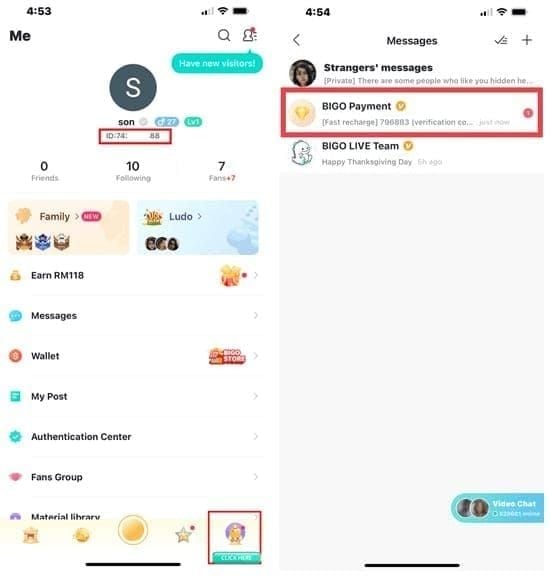
Full-screen captures including browser/app headers
Device status bar with date/time visible
Frozen wallet showing lock icon and grayed balance
Bank statements with account holder name (redact full account numbers, keep last 4 digits)
Storage Strategy:
Cloud sync (Google Drive/iCloud) for cross-device access
Email yourself confirmations immediately (timestamped third-party verification)
Physical printouts as backup
Filename format: BigoLive[Date][Amount]_[TransactionID].png
BitTopup provides official transaction records that Bigo's verification team recognizes as legitimate purchase proof.
Fast Recovery Steps
First 24 Hours:
Don't attempt new purchases or logins from different devices
Screenshot frozen wallet immediately
Capture transaction history showing Under Review status
Gather all payment documentation within first hour
Method 1: In-App Appeal (Simple Cases)
Settings > Feedback > Account Issues
Select Frozen Balance > Unfreeze My Account
Fill User ID, email, phone
Upload: frozen wallet screenshot, transaction confirmation, payment proof
Note case number
Method 2: Email Appeal (Complex Cases)
To: feedback@bigo.tv Subject: Frozen Diamond Balance - [User ID]
Body must include:
User ID (8-12 digits)
Registered email and phone
Transaction date (MM/DD/YYYY)
Exact amount in USD/local currency
Payment method (last 4 digits/PayPal email/wallet name)
Freeze discovery date
Transaction ID (15-25 characters)
Attach:
Payment confirmation (PDF/screenshot)
Bank statement (redact sensitive info)
Frozen wallet screenshot
Government ID (for $100+ freezes)
Required Documents:
Mandatory (All Cases):
Frozen wallet screenshot with lock icon
Transaction confirmation with Transaction ID
Payment proof from bank/wallet
User ID and contact info
Additional ($100+ Cases):
Government photo ID matching registration name
Selfie holding ID
Previous transaction history
Login history from Settings > Security
Follow-Up Timeline:
Wait 5-7 business days before first follow-up
Reference original case number
Phone: +65 63519330 (GMT+8, 9 AM-6 PM, Mon-Fri)
Check in-app status: Settings > Feedback (shows Received, Under Review, Resolved)
Effective Support Communication
Email Structure:
Subject: Account Freeze Appeal - User ID [number] - Transaction [date]
Opening: My account (User ID: [number]) froze on [date] following a legitimate $[amount] diamond purchase on [date]. Submitting complete documentation for verification and balance restoration.
Body:
Paragraph 2: Transaction details with exact info
Paragraph 3: Payment method confirmation and statement verification
Paragraph 4: Attached documentation list
Close: I request review and restoration. I understand processing requires 7-14 business days. Contact me at [email]/[phone] for additional information.
Escalation (7+ Days No Response): Subject: Follow-Up: Case [number] - User ID [ID] Reference original submission date, request status update.
Escalation (10+ Days): Add Escalation Request to subject. Summarize timeline: submission date, follow-ups, lack of response. Stay professional.
Escalation (14+ Days): My case exceeded the stated 14-day processing period. I request immediate supervisor review and resolution timeline.
Prevention: 8 Ways to Avoid Freezes
1. Start Small, Build Trust Begin with $5-10 on new accounts. Complete 3-5 small transactions over 7-10 days before large purchases. Space transactions 24-48 hours apart.
2. Complete Full Verification Settings > Account Security: email confirmation, phone verification, government ID. Reduces freeze risk 60-70%.
3. Consistent Payment Methods Use same method for all purchases during first 90 days. If changing methods, wait 7 days after last purchase, start with small test transaction.
4. Disable VPN Before Transactions Turn off all VPN, proxy, location masking. Use standard home/mobile network.
5. Enable Two-Factor Authentication Settings > Security > Two-Factor Authentication. Signals security consciousness, lowers risk scores.
6. Establish Login Patterns Maintain 7-10 days consistent daily logins before large purchases. Regular activity from same device/location builds legitimacy.
7. Use Verified Platforms BitTopup processes through established merchant accounts with proven legitimacy, reducing fraud flags on individual payments.
8. Monitor Account Age Accounts 90+ days with 5+ transactions get significantly reduced scrutiny. Plan large purchases after crossing 90-day threshold.
Why BitTopup Protects Your Account
Verified Transaction Security:
Authorized reseller with established merchant relationships
Transactions appear from verified high-volume merchant account, not individual user
Pre-verified channels that passed Bigo's merchant vetting
Low-risk classification matching official in-app purchases
Freeze Prevention:
Consistent merchant transaction patterns recognized as legitimate business
Payment method diversity doesn't trigger individual account flags
Geographic consistency through merchant's established location
Eliminates location-mismatch triggers
Transaction Transparency:
Instant official receipts with all verification elements
Detailed records: order number, timestamp, delivery confirmation, Bigo Transaction ID
Downloadable PDFs for permanent storage
Direct merchant services communication for faster resolution
Delivery confirmation within minutes
Cost: Competitive pricing with promotions often matching/beating in-app prices. Added security and documentation provide value beyond base cost.
Common Mistakes to Avoid
Multiple Payment Methods (48 Hours) Switching credit card to PayPal within 48 hours signals fraud testing. Solution: Use one method exclusively for 30 days. If changing, wait 7 days, make small test transaction, wait 48 hours before larger purchases.
VPN During Purchases Location mismatch = account compromise signal. Solution: Disable VPN completely, wait 5 minutes for true IP registration before accessing payment page.
Unusual Spending Patterns First purchase of $200 on 3-day account mirrors fraud. Solution: Build natural progression: $5-10 first purchase, $20-30 after week, $50+ after 30 days regular activity.
Sharing Account Access Friend logins create multiple-location patterns. Solution: Never share credentials. Use official gifting or platform redemption codes.
2026 Security Checklist
Monthly Monitoring:
Review transaction history first day of month (Settings > Wallet > Transaction History)
Check login history (Settings > Security > Login History) for unfamiliar devices/locations
Update contact info if email/phone changes
Verify current info in Settings > Account Information
Payment Method Management:
Remove expired/unused methods (Settings > Payment Methods)
Verify primary method validity before purchases
Check card expiration dates, PayPal status, wallet funds
Transaction Limit Awareness:
New accounts: $50 max without review
Established (90+ days, 5+ transactions): reduced scrutiny
Avoid sudden spending spikes
Increase gradually: $50/month → $75 → $100
Long-Term Protection:
Daily logins, watch streams, send small gifts, participate in chat
Plan significant purchases after 90-day threshold
180-day mark provides additional trust for very large transactions
Document every transaction permanently in dedicated email folder/cloud storage
FAQ
Why did my account freeze after top-up? Automated fraud detection flagged purchases over $50 on new accounts, VPN usage, multiple payment methods within 48 hours, or rapid transactions within 24 hours.
How long to unfreeze? 7-14 days by region. Simple cases: 5-7 days. Southeast Asia: 7 days. Europe/America: 5-7 days. Middle East: 10-14 days. Automatic analysis: 24-48 hours. Manual review: days 4-7. Final clearance: days 8-14.
Can chargebacks ban my account? Yes. 43% trigger permanent bans. 89% result in negative outcomes including asset loss. Even successful chargebacks typically cause permanent closure and loss of all diamonds/beans.
What receipts needed? Transaction ID (15-25 characters), bank statement showing charge, frozen wallet screenshot with lock icon, User ID (8-12 digits), government ID for $100+ balances. All must show matching dates, amounts, payment methods.
How to contact support? Email feedback@bigo.tv with subject Frozen Diamond Balance - [User ID] plus all transaction details/documentation. In-app: Settings > Feedback > Account Issues > Frozen Balance. Phone: +65 63519330 (GMT+8 business hours) for status checks only.
How to prevent freezes? Start with $5-10 purchases, complete 3-5 transactions over 7-10 days before large purchases. Complete full verification (60-70% risk reduction), disable VPN, use consistent payment methods, enable 2FA, maintain 7-10 days regular logins. Accounts 90+ days with 5+ transactions get significantly reduced scrutiny.
Protect your account with BitTopup's secure, verified diamond top-up. Instant delivery, official receipts, zero freeze risk. Top up safely now!