

Losing your Bigo Live account to hackers when you've also lost your linked phone number creates a dual-layer security challenge. This guide provides verified recovery methods using alternative verification processes, exact documentation requirements, and step-by-step procedures to navigate the 2-3 working day recovery timeline when standard 2FA isn't available.
Understanding the Recovery Challenge
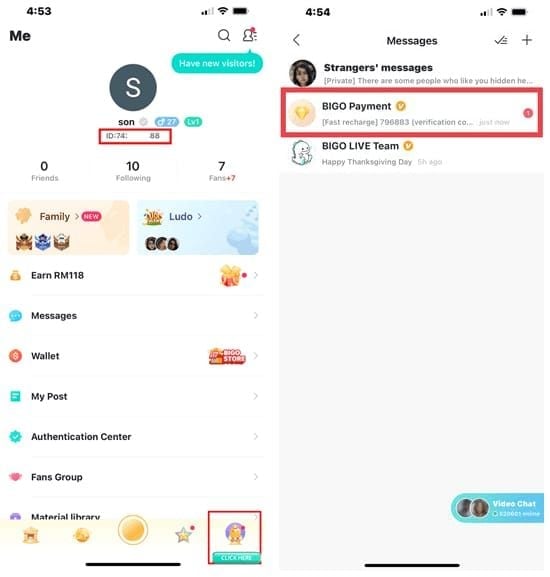
When your account gets hacked and you can't access your linked phone, two-factor authentication becomes the barrier preventing legitimate recovery. Your BIGO ID (permanent numerical identifier under your profile picture starting with 'ID:') becomes your primary recovery credential. Unlike passwords or phone numbers, your BIGO ID never changes, making it the foundation of alternative verification.
For users needing to replenish balance after recovery, Bigo Live Diamonds recharge through BitTopup offers secure transactions with competitive pricing and fast delivery.
Why 2FA Complicates Recovery
2FA requires both password and phone access. When hackers change your password and you've lost your phone, you can't complete either verification step through standard channels. The SMS system sends codes to your registered number—impossible to retrieve if you've changed carriers, lost your SIM, or the number's been reassigned.
Common Lockout Scenarios
Hackers gain access through phishing, reused passwords from breached databases, or social engineering. Once inside, they immediately change recovery information including email and phone, locking you out while maintaining access to your broadcaster account and Bigo Beans.
Lost phone scenarios compound this when you've switched carriers without updating security settings, traveled internationally and lost your device, or experienced theft.
Hacked vs Locked Accounts
Hacked accounts show:
Unfamiliar broadcasts
Changed profile information
Suspicious gift transactions
Messages you didn't send
Login sessions from unfamiliar locations
Locked accounts result from security measures triggered by suspicious login attempts, policy violations, or multiple failed password entries.
Immediate Actions After Discovery
Stop All Login Attempts
Repeated failed attempts trigger security systems, adding temporary bans to your challenges. Each failed attempt extends lockout and complicates support's ability to distinguish your legitimate access from hacker activity. Document exact error messages instead—they provide valuable information about account security status.
Document Ownership Evidence
Gather before contacting support:
BIGO ID
Registered email addresses (even if inaccessible)
Approximate account creation date
Linked social media accounts
Profile screenshots from other users' perspectives
Purchase receipts from Bigo Beans/Diamonds transactions
Email confirmations, payment processor records, or bank statements showing Bigo Live transactions carry significant verification weight.
Secure Connected Accounts
Hackers often access Bigo Live through compromised email or social media. Immediately:
Change passwords on primary email, Facebook, Twitter, Instagram
Enable 2FA using authenticator apps (not SMS)
Review recent login activity for suspicious patterns
Document unauthorized login timestamps and locations
Alert Followers
Notify your audience through other platforms to prevent interaction with the hacker, protect them from scams, and establish public record of the hack's timing. Request followers report suspicious activity to Bigo Live support.
Step-by-Step Recovery Process
Alternative verification bypasses standard 2FA through manual review by support teams. Process takes 2-3 working days with 24/7 support availability.
Step 1: Access Support
Send recovery request to cs@bigo.tv with subject line: Emergency Account Recovery - Hacked Account Without Phone Access - [Your BIGO ID].
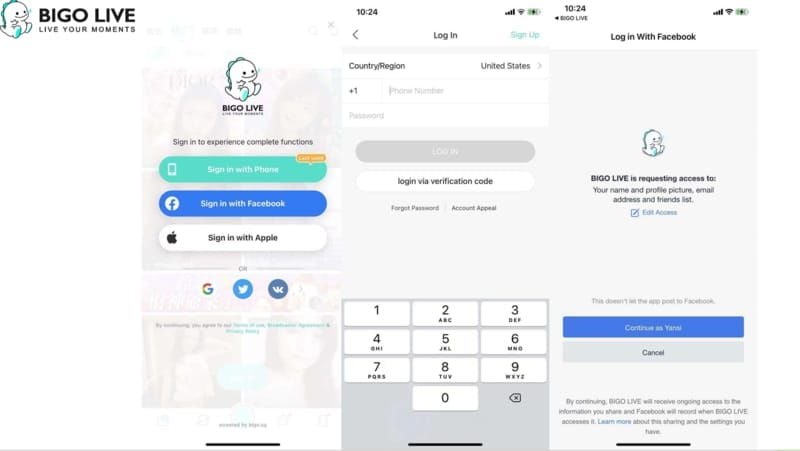
If accessing the website, navigate to Help Center > Contact Us. Some users see Recover Account Now button below password field on login screen.
Step 2: Submit Emergency Request
Include these elements:
Subject Line: Emergency Account Recovery - Hacked Account - BIGO ID [your number]
Required Information:
Full legal name (matching government ID)
BIGO ID
Registered email address (even if inaccessible)
Registered phone number (original, even if lost)
Date you lost access
Hack circumstances description
Alternative contact information (current email/phone)
Step 3: Prepare ID Verification
Government-issued photo ID is cornerstone of alternative authentication. Accepted: passports, national ID cards, driver's licenses, state-issued IDs.
Photo requirements:
Good lighting, plain background
All text legible, corners visible, no glare
Hold ID next to face for selfie showing both
Include handwritten note: I am [Full Name] requesting recovery of BIGO ID [Number] on [Current Date]
Step 4: Provide Activity History
Demonstrate account knowledge only legitimate owner possesses:
Most frequent broadcast times
Typical viewer counts
Memorable broadcasts/events
Regular viewers/gifters names
Approximate purchase dates
Payment methods used
Transaction amounts
Withdrawal dates/amounts
For broadcasters who regularly top up Bigo Diamonds, BitTopup transaction records serve as excellent ownership proof.
Step 5: Complete Verification Challenges
Support may send additional questions based on account history:
Security questions from registration
Profile change details
Specific broadcast information
Respond within 24 hours. Set up email notifications to avoid missing critical communications.
Step 6: Follow Up
After 48 hours without response, send polite follow-up referencing original ticket number. Don't create multiple tickets—this fragments your case and delays resolution.
Provide additional information in single comprehensive responses, not multiple partial messages.
Alternative Verification Methods
Email Verification
If you still access registered email, this becomes strongest verification. Support sends verification links/codes to confirm control.
Even without access, providing exact email address demonstrates account knowledge. Support may ask you to recover email access first, then use it for Bigo Live verification.
Government ID Verification
Photo ID must match name registered on Bigo Live account. Discrepancies complicate verification, though you can explain legitimate name changes.
Verification photo must show you holding ID next to face with handwritten note visible in same frame. Take multiple angles to ensure clarity. Poor photo quality is most common delay reason.
Transaction History
Purchase receipts provide irrefutable ownership evidence connecting financial identity to account. Valid proof includes:
Email receipts
Payment processor transaction IDs
Bank statements showing Bigo Live payments
Provide at least three transactions spanning different dates. Include dates, amounts, payment method details.
Social Media Linking
If you linked Facebook, Twitter, Instagram to Bigo Live, attempt login through these platforms. Navigate to login screen and select social media option.
Even if social login fails, proving ownership of linked accounts adds verification weight. Provide profile links and offer to post verification messages.
Required Documentation
Accepted Identity Documents
Valid identification includes government-issued documents with photograph, full legal name, and unique ID number. Passports offer strongest verification. National ID cards, driver's licenses, state-issued IDs also qualify.
Student IDs, employee badges, membership cards don't qualify as primary identification but serve as supplementary proof.
Document Photography
Use phone camera in well-lit conditions (natural daylight near window). Avoid overhead lighting creating glare. Place ID on dark, plain surface for contrast.
Capture entire document with all corners visible. Hold phone parallel to document to prevent distortion. Take multiple photos at different distances.
For selfie with ID, use front camera or ask someone to photograph you. Hold ID at chest level, angled toward camera so information remains legible.
Account History Information
Compile detailed history:
Account creation date (approximate if unknown)
Original username and changes
Profile picture history
Bio information
Follower count milestones
Memorable broadcasts/achievements
Typical broadcast schedule
Content themes
Regular viewers
Official broadcaster status
Agency affiliations
Payment Records
Search email for Bigo Live transaction confirmations using terms: Bigo, Beans, Diamonds, receipt. Check spam folders.
Review bank/credit card statements for Bigo Live charges. Screenshot or download statements highlighting relevant transactions. Payment processors like PayPal maintain exportable transaction histories.
Common Mistakes That Delay Recovery
Submitting Incomplete Information
Partial submissions missing BIGO ID, registered email, or ID documents require follow-up adding days to timeline. Each communication cycle extends process by 24-48 hours.
Checklist before submission:
BIGO ID confirmed
Government ID photographed clearly
Selfie with ID and note completed
Transaction history compiled
Account history documented
Alternative contact info provided
Hack circumstances explained
Using Different Personal Details
Providing current name when registered under previous name creates mismatches. If name changed since registration, explain clearly and provide documentation (marriage certificate, court order).
Always provide original registered email even if inaccessible, then separately provide current contact email.
Creating Multiple Tickets
Multiple tickets fragment your case across different agents, creating confusion and duplicating effort. Submit one comprehensive ticket, wait full 2-3 working days, then follow up by replying to original email thread.
Attempting Unauthorized Recovery
Third-party services claiming to hack/recover accounts violate terms of service and often result in permanent bans. These services may steal personal/financial information while providing no actual help.
Use only official channels: cs@bigo.tv email, in-app Help Center, or corporate contact at +65 63519330.
While Waiting for Approval
Monitor Ticket Status
Check provided email twice daily for responses. Support typically responds within hours, but responses may arrive outside normal hours due to time zones.
Set up phone email notifications. Create folder/label for Bigo Live support emails. Save all correspondence.
Communicate with Audience
Use other platforms to inform followers without sharing sensitive details: My Bigo Live account was compromised and I'm working with support to recover it. Please report suspicious activity and don't respond to unusual messages.
This prevents audience abandonment and creates community support for reporting hacker activity.
Protect Personal Information
Audit all online accounts for vulnerabilities. Change passwords on accounts using same/similar passwords. Enable 2FA using authenticator apps on all platforms.
Review email security settings for forwarding rules/filters hackers may have created. Check authorized apps/devices and revoke unrecognized access.
Plan Security Strategy
Design comprehensive security plan for post-recovery:
Set up new 2FA with multiple backup options
Create strong unique password using password manager
Document security information in secure location
Establish regular security audit schedule
Recovering Beans and Diamonds After Restoration
Verify Account Balance
Check current Bigo Beans/Diamonds balance. Compare to last known balance before hack. Screenshot current balance and recent transaction history showing unauthorized activities.
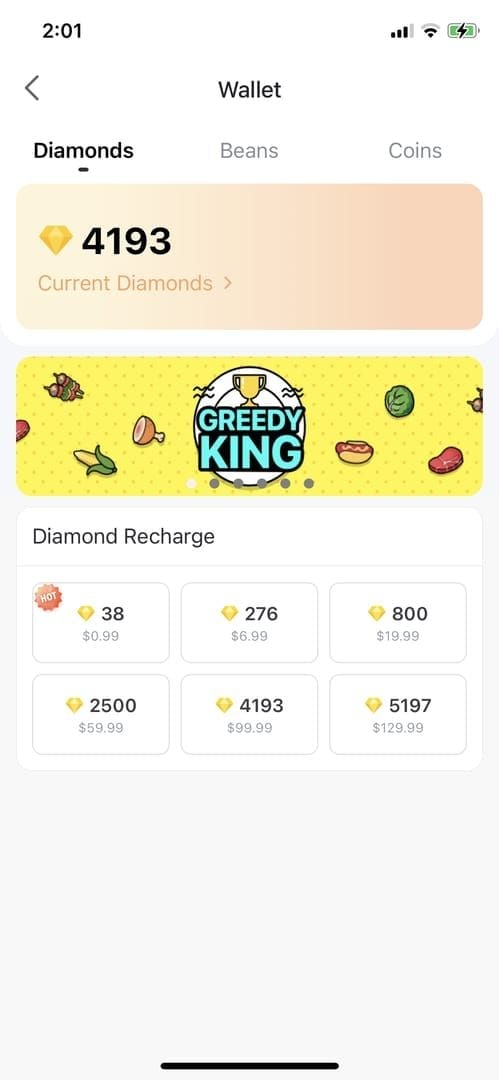
Review transaction history for lockout period. Look for unauthorized gifts sent, Beans withdrawn, Diamonds used. Document each suspicious transaction with screenshots showing dates, amounts, recipients.
Report Missing Balance
If unauthorized transactions or missing balance discovered, report immediately to feedback@bigo.tv with:
BIGO ID
Date range of unauthorized activity
Specific transaction details
Transaction history screenshots
Pre-hack balance records
Safely Replenish Through BitTopup
After securing account, replenish balance through BitTopup for secure Bigo Live top-ups with competitive pricing, fast delivery, and verified transaction systems. The platform's excellent customer service and high ratings make it trusted for broadcasters recovering from compromises.
Set Up Transaction Alerts
Enable all notification settings for account transactions. Configure email/in-app alerts for:
Beans purchases
Diamonds usage
Gifts sent
Withdrawals
Review transaction history weekly. Familiarity with normal patterns makes anomalies immediately obvious.
Securing Account After Recovery
Set Up New 2FA
Navigate to Settings > Account and Security immediately. Enable 2FA using current phone, but add backup methods. Link secondary email and consider authenticator app if supported.
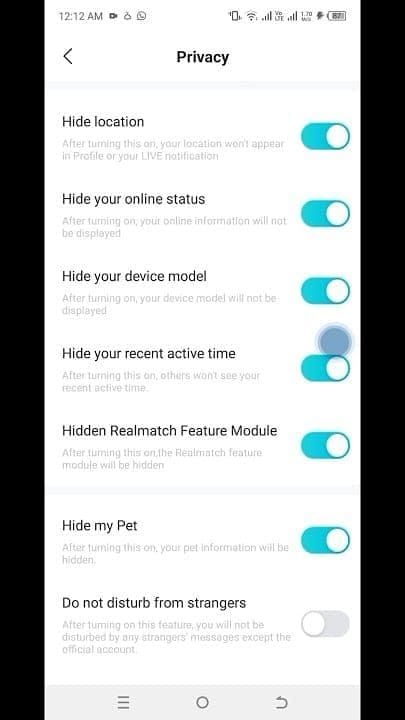
Document all security information in secure location separate from devices. Include BIGO ID, registered emails, phone numbers, security answers, backup codes.
Create Strong Password
Generate new password using password manager's random generator. Aim for 16+ characters combining uppercase, lowercase, numbers, symbols. Avoid personal information, dictionary words, patterns.
Never reuse this password on other platforms.
Enable All Security Features
Review every security setting. Enable:
Login notifications for new devices/locations
Session management to view/terminate active logins
Private account setting if not actively broadcasting
Regular Security Audit
Monthly review routine:
Review login activity for unfamiliar locations/devices
Verify linked emails/phones are current
Check transaction history for unauthorized activity
Update password if 90+ days old
Revoke unused third-party app access
Verify backup contact info accessibility
Test recovery process
Prevention Strategies
Recognize Phishing Attempts
Phishing messages impersonate Bigo Live support claiming policy violations, promising free Beans/Diamonds, or requesting verification. Legitimate support never asks for passwords, sends unsolicited verification requests, or offers free currency.
Examine sender addresses carefully. Hover over links to preview actual URL. Legitimate links always direct to official bigo.tv domains.
Phone/Email Management
Maintain active control over registered phone/email. Update Bigo Live security settings before changing carriers or numbers.
Keep registered email highly secure with strong unique password and 2FA.
Update Security Information
Update immediately when changing phone, email, or personal information. Don't wait until recovery needed to discover outdated contact info.
Review security settings quarterly even without changes.
Create Recovery Plan
Document while you have full access:
BIGO ID
Registered email/phone
Account creation date
Linked social media
Typical transaction patterns
Maintain folder of transaction receipts and account screenshots. Store securely separate from devices.
FAQ
How long does recovery take without phone access? 2-3 working days from complete documentation submission. Support responds within hours to acknowledge requests. Incomplete submissions requiring follow-up extend timeline by 24-48 hours per cycle.
What documents do I need? Government-issued photo ID, selfie holding ID with handwritten verification note, transaction receipts from purchases, detailed account history including BIGO ID, registered email/phone. Additional helpful: profile screenshots, linked social media accounts, support correspondence.
Can I recover if I lost both phone and email? Yes, through government ID verification and transaction history proof. Provide BIGO ID, demonstrate account knowledge through detailed history, submit clear ID photos with verification selfie, provide purchase receipts or bank statements. Process takes longer without email but 2-3 day timeline remains typical.
Will I lose my Bigo Beans if hacked? Depends on whether hacker made unauthorized transactions. After recovery, check transaction history for unauthorized gifts, withdrawals, purchases. Document suspicious activity with screenshots and report to feedback@bigo.tv. Reimbursement evaluated case-by-case.
How do I prove ownership without phone? Combine BIGO ID with government photo ID matching registered name, transaction receipts showing payment information, detailed account history knowledge, linked social media you can verify, screenshots showing broadcaster activity and follower interactions.
How can I contact support for emergency recovery? Email cs@bigo.tv for hacked account recovery or feedback@bigo.tv for general support. Include BIGO ID, detailed explanation, all required documentation in initial email. For urgent cases, call +65 63519330. 24/7 support with response times typically within hours.
Secure your recovered account with a fresh start! Replenish Bigo Beans and Diamonds safely through BitTopup—trusted platform for fast, secure top-ups. Protect your investment with verified transactions, competitive pricing, and excellent customer service. Visit BitTopup now!