Blood Strike's Peak Mode employs sophisticated anti-cheat systems that flag devices and ban accounts for violations. The September 4, 2025 update introduced Peak Legend tier above Legend sub-tiers (4-1), intensifying competitive scrutiny. Players face 10-year cross-platform bans for cheating, device blacklisting for repeat violations, and strict fair play enforcement.
Understanding Blood Strike's Device Flag System in Peak Mode 2025
Here's what most players don't realize: Blood Strike's anti-cheat engine isn't just scanning for obvious hacks anymore. It's building a complete behavioral fingerprint of your device – tracking everything from hardware signatures to how long you typically play in a session.
The system creates baseline profiles by monitoring device consistency, login patterns, and even subtle behavioral metrics. Think of it as a digital detective that learns your habits, then flags anything that doesn't fit the pattern.
Blood Strike golds buy safe from bans through BitTopup ensures secure transactions complying with official policies while supporting rank progression.
How the Anti-Cheat Engine Monitors Competitive Play
The moment you enter Peak Mode, you're under a microscope. The system actively scans for unauthorized client modifications, data extraction attempts, and any signs of reverse-engineering. Get caught? You're looking at an immediate 10-year ban across Android, iOS, and PC platforms.
That zero-tolerance policy they rolled out on January 31, 2024? It's not just for show. I've seen Legend players lose accounts they'd spent months building because they thought they could slip something past the system.
What's particularly brutal is how monitoring intensifies in Legend and Peak Legend tiers. The higher you climb, the more scrutiny you face – because that's where competitive integrity matters most.
Types of Device Flags: Soft, Hard, and Permanent Classifications
Not all flags are created equal, and understanding the difference could save your account.
Soft flags are your warning shots. You'll get these for suspicious activity patterns, but here's the key – you can still course-correct. The system is essentially saying we're watching you.
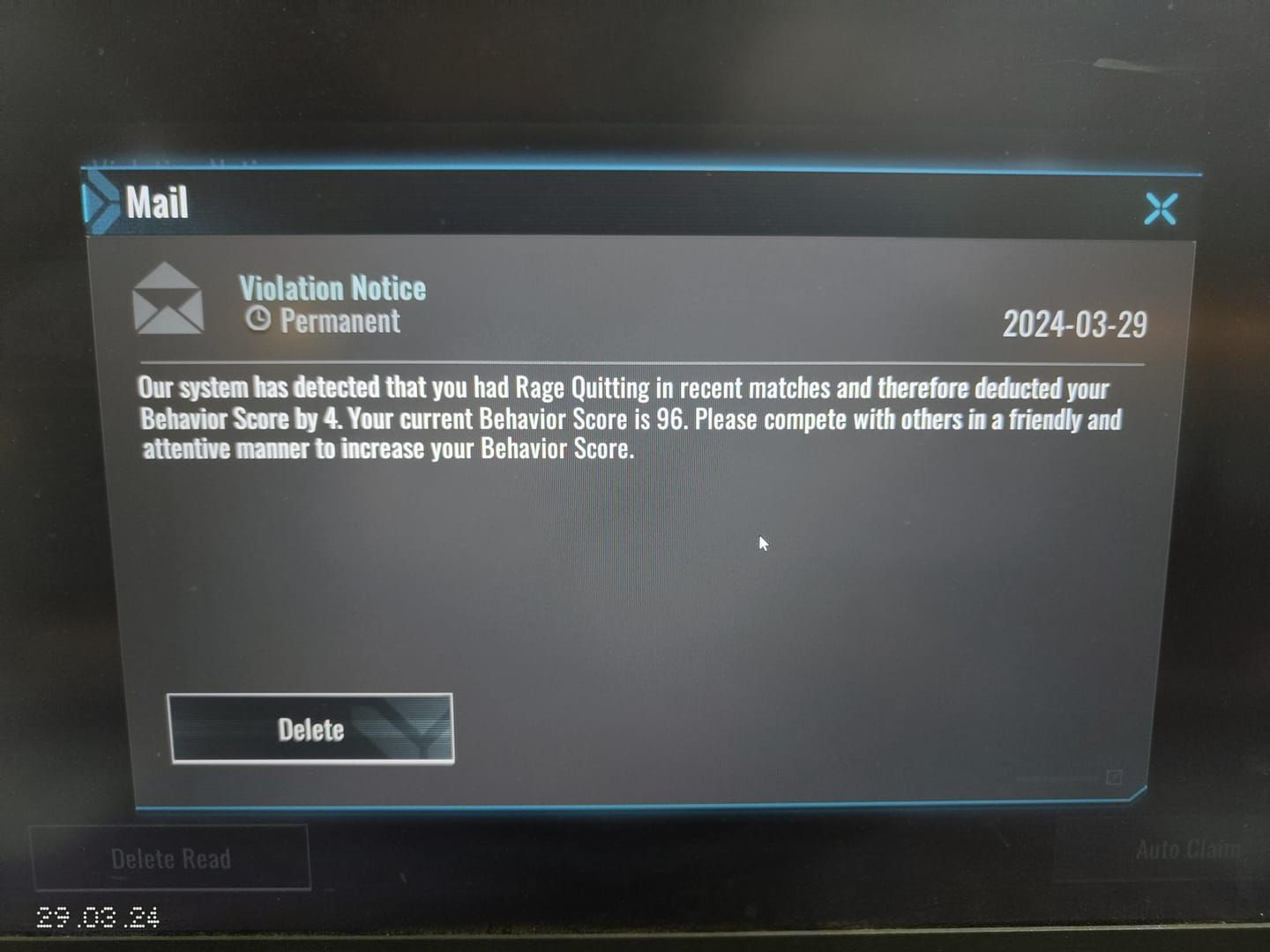
Hard flags mean you're in trouble. Expect restricted game features or temporary suspensions while they investigate. This is your last chance to prove you're playing clean.
Permanent device blacklisting? Game over. Your hardware is burned, and you can't create new accounts on that device. This typically follows repeat violations and comes with that infamous 10-year account ban protocol.
Why Legend Rank Players Face Stricter Device Scrutiny
The introduction of Peak Legend above the subdivided Legend ranks (Legend 4-1) changed everything. Higher stakes mean higher match point consumption, and that competitive pressure correlates directly with more aggressive anti-cheat monitoring.
But there's another factor at play. Legend players deal with hidden MMR systems that create incredibly challenging lobbies. When someone suddenly starts dominating these matches, the system takes notice. Suspicious performance patterns trigger automated reviews faster than you'd think.
Common Causes of Device Flags in Peak Mode
Unauthorized Third-Party Applications and Overlays
This is where most players accidentally trip up. That innocent-looking game overlay or performance monitoring tool? It's injecting code into game processes, and the anti-cheat system doesn't care about your intentions.
Screen recording software with real-time editing capabilities, macro programs for your gaming peripherals, even system optimization utilities that alter game priority – they all look suspicious to the monitoring system. I've seen players get flagged for running legitimate streaming software simply because it modified memory allocation during gameplay.
The frustrating part? Even legitimate gaming software can trigger false positives when it modifies system-level processes.
Modified Game Clients and APK Tampering
Let me be crystal clear about this: any alteration to official game files results in immediate permanent bans and device blacklisting. No exceptions.
Those modified APK files promising better performance? Custom texture packs that enhance graphics? Unofficial patches claiming to fix bugs? They all trigger cryptographic verification failures the moment the system detects them.
Players downloading from unofficial sources are essentially playing Russian roulette with their accounts. The risk simply isn't worth it.
Suspicious Network Behavior and Connection Patterns
Your network behavior tells a story, and the anti-cheat system is reading every chapter. Rapid IP changes, unusual geographic shifts, inconsistent latency patterns – they all contribute to device flags.
Now, VPN usage doesn't automatically trigger bans, but here's what happens: sudden network behavior changes combined with performance anomalies create suspicious profiles. If you're using legitimate network tools, maintain consistent usage patterns. The system needs to see predictable behavior.
Multiple Account Access from Single Devices
Account sharing violations are more common than you'd think. When multiple players access different accounts from the same device within short timeframes, the system notices. It tracks login patterns and behavioral signatures to identify when different users are operating accounts.
This extends to family sharing scenarios too. Even legitimate shared device usage can trigger flags if the behavioral patterns are too different.
How to Check Your Device Flag Status
In-Game Account Health Indicators
Your account health shows up in subtle ways before any official notifications. Extended matchmaking queue delays in Legend ranks? That's often your first sign of preliminary flag status.

Watch for gold balance irregularities, delayed Battle Pass progression, and restricted access to premium features. These signal that your account is under review.
Warning Signs Before Official Flags
The system gives you hints before dropping the hammer. Increased login loading times, frequent connection verification prompts, and repeated security challenges all indicate heightened scrutiny.
Performance inconsistencies like sudden frame rate drops, unusual lag patterns, and delayed input registration? That's often the anti-cheat system interfering with your processes.
Proven Prevention Strategies from Legend Rank Veterans
Recharge Blood Strike legend rank boosts through BitTopup provides legitimate resources enhancing competitive performance without compromising account security.
Device Hygiene Best Practices for Competitive Players
Experienced players know that device cleanliness isn't just about performance – it's about survival. Regular software audits, selective application installation, and systematic background process monitoring are non-negotiable.
Establish dedicated gaming profiles that minimize software conflicts. Create restore points before major changes, and maintain regular system scans. It sounds tedious, but it's what separates players who keep their accounts from those who lose them.
Network Security Configuration for Peak Mode
Consistency is everything. Use the same internet connection, avoid public WiFi during competitive sessions, and maintain steady geographic locations. The system needs to see reliable behavioral profiles.
Router firmware updates, DNS optimization, and network adapter maintenance all support consistent connection patterns that the anti-cheat system recognizes as legitimate.
Safe Multi-Device Usage Guidelines
If you play across multiple devices, establish clear usage patterns. Consistent login timing, device-specific settings, and gradual device transitions demonstrate legitimate access rather than account sharing.
Avoid simultaneous logins at all costs. Maintain device-specific friend lists and use consistent input methods for each device type.
The Truth About VPNs, Emulators, and Device Restrictions
Debunking Common Misconceptions About VPN Usage
Here's what the community gets wrong about VPNs: they don't automatically trigger bans. But – and this is crucial – the network behavior changes they create can build suspicious patterns when combined with other factors.
If you're using VPNs for legitimate reasons, maintain consistent server selections. Avoid rapid location changes during sessions, and monitor your performance metrics for unusual patterns that might raise flags.
Official Stance on Emulator Play in Ranked Modes
Emulator usage isn't explicitly prohibited, but modified execution environments trigger anti-cheat concerns in competitive modes. Those emulator-specific optimizations and custom key mappings? They can appear suspicious to the monitoring system.
Stick to official emulator versions, avoid modification tools, and maintain conservative settings. It's not worth the risk.
Fair Play Policy Compliance Checklist
Account Verification and Linking Requirements
Complete verification through official channels. Link your social media accounts, verify email addresses, and provide accurate personal information. This establishes legitimate ownership that supports any future appeal processes.
Keep your contact information current and never share login credentials. These basics can save your account if issues arise.
Acceptable Device and Software Configurations
Use official game clients exclusively. Maintain updated operating systems and avoid unauthorized modifications of any kind.
Document your hardware and software configurations. Maintain installation records from official sources and preserve legitimate software licenses. This documentation becomes crucial if you need to prove compliance.
Immediate Actions If You Receive a Device Flag Warning
First 24 Hours: Critical Response Steps
Stop playing immediately. Document any recent device changes, software installations, and network modifications. Contact support through Discord Anti-cheat Bot#0919 or bloodstrike@global.netease.com with comprehensive evidence.
Don't make additional device changes, and maintain detailed communication logs. These first 24 hours are critical for your appeal chances.
Documenting Your Device and Play History
Include everything: hardware specifications, software installation records, network configurations, and gameplay history. Purchase receipts for legitimate software, hardware upgrade documentation, and network service provider information all help distinguish legitimate configurations from suspicious modifications.
Advanced Account Protection for High-Rank Competitors
Session Management for Tournament Players
Establish dedicated gaming environments that minimize software conflicts and maintain consistent performance profiles. Systematic pre-session preparation – including background process management and network optimization – supports consistent performance while reducing anti-cheat concerns.
Device Consistency Strategies During Rank Pushes
Maintain consistent device configurations during intensive ranking periods. The system needs to see stable behavioral profiles, so plan device maintenance and software updates during off-seasons. Avoid changes during active rank pushes to reduce the likelihood of automated reviews.
Real Cases: How Legend Players Lost and Recovered Accounts
Case Study: False Positive from Network Switching
A Legend player received device flags after switching from WiFi to mobile hotspot during extended sessions. The rapid network changes combined with consistent high performance triggered automated reviews.
The successful appeal included network service documentation, explanation of mobility requirements, and demonstration of consistent gameplay patterns. It took three weeks to resolve, but proper documentation saved the account.
Case Study: Permanent Ban from Repeated Violations
A competitive player faced permanent device blacklisting after multiple violations involving modified clients and unauthorized enhancement tools. Despite claims of ignorance, repeated infractions resulted in irreversible consequences.
This case demonstrates the zero-tolerance enforcement – there are no exceptions for repeat offenders.
Maintaining Peak Performance While Staying Compliant
Performance Optimization Without Risky Software
Focus on hardware optimization, official driver updates, and system configuration tuning rather than unauthorized modifications. Regular hardware maintenance, systematic driver updates, and conservative overclocking provide performance benefits without triggering anti-cheat concerns.
How to Support Your Gameplay with BitTopup Resources
BitTopup provides secure, policy-compliant resources that enhance competitive performance without compromising account security. The platform offers competitive pricing, fast delivery, and excellent customer service for Legend players seeking legitimate advancement support.
Using official top-up channels prevents gold balance issues, account suspensions, and device flags associated with unauthorized payment methods. It's the smart way to support your competitive journey.
Frequently Asked Questions
What causes device flags in Blood Strike Peak Mode? Unauthorized game modifications, suspicious network patterns, multiple account access violations, and repeat cheating infractions. The system monitors hardware fingerprints, software configurations, and behavioral metrics comprehensively.
How long do device flags last? Soft flags may resolve with compliant behavior, hard flags last weeks or months, and permanent blacklisting for repeat violations is irreversible.
Can you get banned for using VPN in Peak Mode? VPN usage alone doesn't cause bans, but the network behavior changes can trigger flags when combined with other suspicious factors.
How does Blood Strike detect unauthorized devices? Through hardware fingerprints, software configurations, network patterns, and behavioral metrics. The system analyzes file integrity, process injection, and system-level changes continuously.
What's the difference between device flags and bans? Flags are preliminary warnings that allow correction opportunities, while bans are formal penalties including 10-year suspensions and permanent device blacklisting.
How do Legend players protect accounts from flags? Maintain clean device environments, use consistent network configurations, avoid unauthorized software, document gaming setups thoroughly, and follow official policies strictly.