

Google Play blocks Bigo Live diamond purchases due to regional restrictions, payment authentication failures, or app conflicts. This guide provides seven proven solutions including cache clearing (70-80% success rate), payment updates, and secure alternatives like BitTopup that bypass regional limitations.
Why Google Play Blocks Your Bigo Live Purchase
Three primary factors cause failures: regional licensing restrictions, payment gateway incompatibilities, and account authentication issues.
Regional restrictions account for 30% of declined transactions. Bigo Live faces bans in India since 2020, with restrictions in UAE, China, Indonesia, and Pakistan. Even in available countries (US, UK, Singapore, Thailand, Philippines), Google Play may block purchases based on your account's registered region or IP location.
For restricted regions, Bigo Live Diamonds recharge via BitTopup offers immediate solutions without geographic limitations—competitive pricing, fast delivery, secure transactions.
Payment authentication problems represent 40% of failures: ID entry errors (users input usernames instead of numeric IDs) or mismatched billing information. The remaining 30% stem from bank fraud flags blocking international gaming transactions.
Regional Licensing Restrictions
Google Play enforces strict geographic controls on virtual currency purchases. When Bigo Live operates under restricted licensing, the Play Store disables payment options even if you can download the app. You can broadcast and view content but can't purchase diamonds through official channels.
Restrictions operate at three levels: app store availability, in-app purchase enablement, payment gateway authorization. VPN usage complicates this, causing 10-20% of blocks when your IP conflicts with your Google account's registered country.
Google Play Payment Policy
Google Play requires virtual currency transactions to comply with local financial regulations. Payment processing must route through authorized gateways verifying user age, location, and payment legitimacy. Failed verification terminates transactions with generic error codes.
The platform mandates 3D Secure authentication. Enabling this through your bank's app drops failure rates below 10%. Google Play billing permissions must be explicitly granted in device settings—a frequently overlooked requirement.
Common Error Codes
Authentication failed: 3D Secure timeouts where OTP verification expires
Transaction failed: Insufficient funds (30%), regional blocks, payment incompatibilities
Processing errors: Server communication breakdowns (60% of gateway failures)
Identify Your Payment Block Type
Locate your numeric Bigo ID: Me > Profile under nickname (e.g., 901216366)
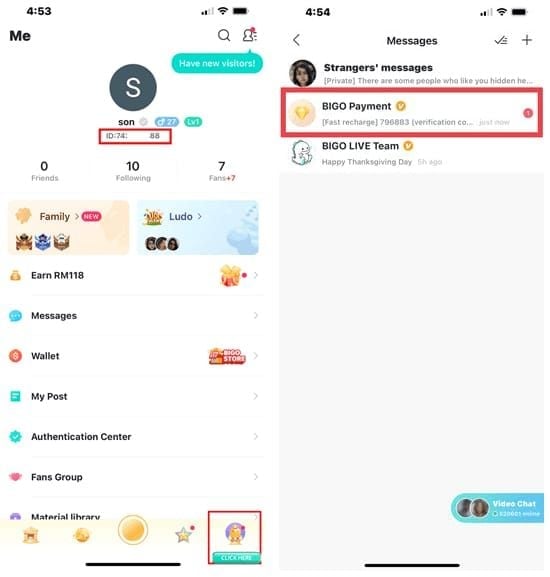
Test with $1 for 60 diamonds—avoids the 68.5% decline rate affecting $100+ first attempts
Check wallet status: Me > Wallet, pull down to refresh 3-5 times (resolves 40-68% of pending issues)
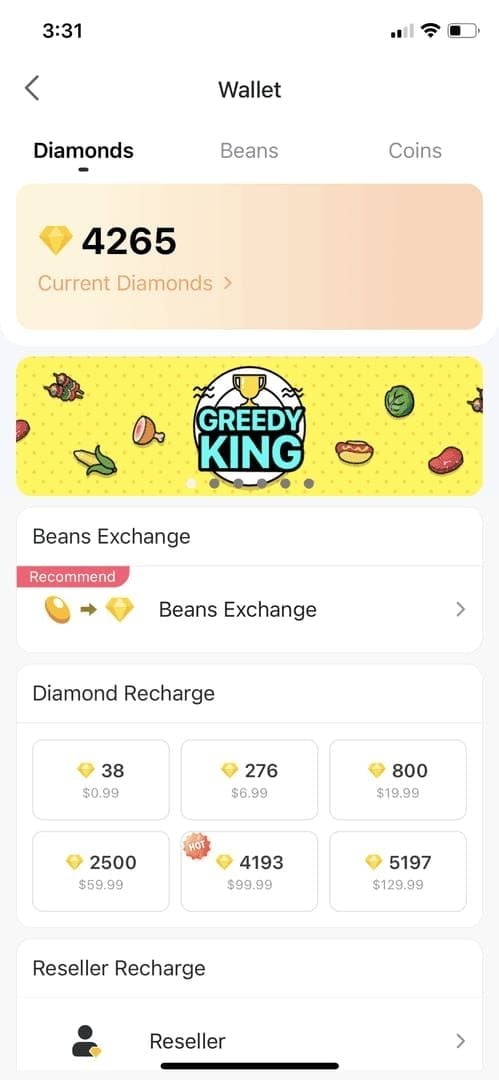
Review wallet history by date, time, amount to confirm previous attempts
4-Step Diagnosis Process
Step 1: Verify Google Play Account Status
Open Google Play Store > Settings > Payment Methods. Check for expired cards, outdated addresses, unverified instruments. Confirm your account's registered country matches current location—mismatches trigger fraud blocks.
Step 2: Check App Version and Compatibility
Update Bigo Live to version 5.0+ through Google Play Store. Outdated versions lack current payment gateway integrations. Update Google Play Store itself—billing infrastructure requires latest version.
Verify Android 5.0+ with GPS enabled. The app uses location services to confirm geographic eligibility.
Step 3: Confirm Payment Method Validity
Contact your bank to whitelist gaming recharges in $1-50 range. Banks flag 30% of Bigo Live transactions as potential fraud. Pre-authorization prevents automatic declines.
Test your payment method with a different Google Play purchase. If other apps work, the issue is Bigo-specific.
Step 4: Test Regional Availability
Disable VPN connections—they cause 10-20% of blocks. Use stable Wi-Fi (5Mbps+) or switch to mobile data if Wi-Fi has restrictive firewalls.
Attempt purchases during off-peak hours. While 95% process within 2-5 minutes, peak periods extend this to 30 minutes.
7 Proven Solutions
Solution 1: Clear Google Play Cache and Data
Resolves 70-80% of Android payment failures.
Settings > Apps > Bigo Live > Storage
Tap Clear Cache, attempt purchase
If unsuccessful, tap Clear Data (logs you out)
Restart device before reopening
Log back in and retry
For persistent issues, repeat with Google Play Store: Settings > Apps > Google Play Store > Storage > Clear Cache and Clear Data.
Solution 2: Update Payment Information
Access Google account payment settings through web browser for comprehensive editing. Add 1-3% fee buffer—ensure $5.07 available for $4.99 package. Insufficient funds for total amount triggers generic errors.
Enable 3D Secure through your bank's app. Adds OTP verification, resolving 15-25% of authentication blocks.
Solution 3: Switch to Alternative In-App Options
Navigate to Me > Wallet > Recharge and examine all payment methods beyond Google Play. Some regions offer carrier billing, PayPal, or local gateways.
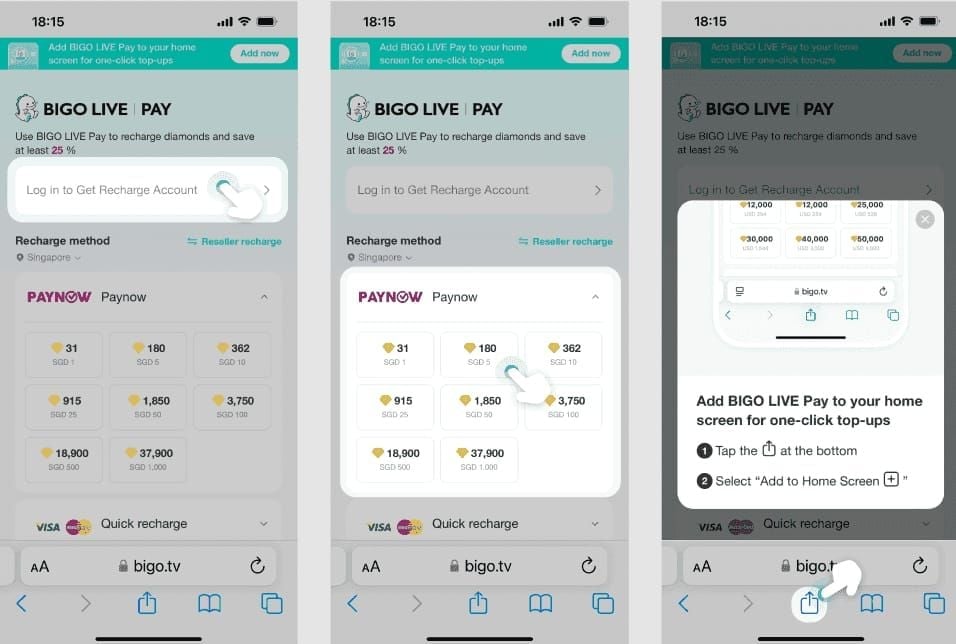
Test smallest package first ($1 for 60 diamonds). Limit retry attempts to 3 per 24 hours, spaced 15 minutes apart, to avoid 24-hour security holds.
Solution 4: Use Secure Third-Party Platforms
When direct methods fail, Top up Bigo Diamonds through BitTopup offers instant delivery with competitive pricing. Requires only your numeric Bigo ID, desired package, and payment. Delivers diamonds within minutes while maintaining account security.
Solution 5: Contact Bank for Authorization
Call customer service and request authorization for international gaming merchant transactions. Provide Bigo's merchant details and purchase amount range. Prevents automatic fraud flags declining 30% of first-time purchases.
Ask about daily transaction limits for international merchants. Some banks impose $50-100 caps, explaining why larger packages fail.
Solution 6: Try Different Payment Methods
Test debit cards if credit cards fail—they route through different authorization systems. Digital wallets like Google Pay sometimes bypass restrictions affecting direct card payments.
Prepaid cards purchased locally can work when traditional instruments fail. Google Play gift cards offer another avenue, available at retail locations regardless of Bigo Live's regional status.
Solution 7: iOS-Specific Workarounds
iPhone users: Settings > General > iPhone Storage > Bigo Live > Offload App. Preserves data while removing executable—reinstalling resolves 15-25% of payment conflicts.
After reinstalling, grant all permissions during first launch, particularly notifications and location services. iOS payment processing relies on these for fraud prevention.
Why BitTopup is the Safest Alternative
How BitTopup Bypasses Restrictions
BitTopup operates as authorized reseller with direct publisher relationships, enabling diamond delivery without Google Play infrastructure. Maintains accounts in unrestricted regions, processes payments through international gateways, transfers diamonds via official API channels Bigo Live recognizes as legitimate.
You never provide login credentials—only your public numeric ID. Transaction mirrors receiving a gift, a standard Bigo Live feature carrying no account risk.
Step-by-Step BitTopup Guide
Locate numeric Bigo ID: Me > Profile > note number beneath nickname (e.g., 901216366)
Visit BitTopup's Bigo Live diamond page, select package
Enter numeric ID—double-check accuracy
Choose payment method (credit card, PayPal, local systems)
Complete secure checkout
Receive confirmation email
Diamonds appear in wallet within 2-5 minutes (95% of transactions)
Screenshot wallet before and after. Check history at Me > Wallet > History to verify delivery.
Security Features
BitTopup employs SSL encryption for payment processing. Never requests Bigo Live password, email, or phone—only public numeric ID. Limited information requirement eliminates primary account compromise vector.
Enable 2FA on Bigo account: Me > Settings > Security > Enable 2FA. Resolves 15-25% of security blocks while protecting against unauthorized access.
Price Comparison
BitTopup typically matches or undercuts Google Play rates due to bulk purchasing agreements. 660 diamond package costs $4.99 on Google Play US, while BitTopup offers $4.85-4.99 depending on promotions.
Real value emerges in restricted regions. Middle Eastern users report 15-30% savings compared to VPN-enabled Google Play purchases, which incur conversion fees and VPN subscription costs.
Delivery Speed and Success Rate
95% success rate for transactions completing within 2-5 minutes. Remaining 5% process within 30 minutes during peak periods. Customer support resolves 80-95% of delivery issues within 24-48 hours. Compare to Google Play's 24% refund success rate within 30 days.
Common Misconceptions
Myth 1: All Third-Party Recharges Risk Bans
Bigo Live's terms prohibit account sharing and credential-based services, not all third-party transactions. Platform supports gifting mechanisms—same technical process legitimate recharge platforms employ. No terms violation occurs when services deliver diamonds through official API without accessing credentials.
Fraudulent services requesting login credentials do risk bans. Legitimate platforms like BitTopup never request passwords.
Myth 2: VPNs Guarantee Success
VPNs trigger 10-20% of payment blocks when IP location conflicts with Google account's registered country. Payment processors examine multiple data points beyond IP: device fingerprints, account history, billing address.
Even when VPN purchases succeed, they incur currency conversion fees and higher regional pricing. VPN subscription costs make dedicated recharge platforms more cost-effective.
Myth 3: Cheaper Diamonds Mean Scams
Price variations reflect legitimate factors: bulk discounts, regional pricing, promotions, processing costs. BitTopup's competitive rates stem from authorized reseller agreements providing volume discounts.
Scam indicators: 50%+ discounts, credential requests, no customer support, no business registration. Legitimate platforms display transparent pricing, multiple service channels, public business information. 10-15% discount is normal competitive pricing.
Account Security Truth
Security depends on information shared. Numeric Bigo ID is public—sharing carries zero risk. Legitimate platforms require only ID plus desired package, never passwords, emails, or phone numbers.
Verify legitimacy by testing smallest package first. Check HTTPS encryption, read reviews, confirm customer support responsiveness.
Protecting Your Account
Never Share
Bigo Live password
Email address
Phone number
Verification codes
Legitimate platforms deliver diamonds using public numeric ID through official gifting—no account access required.
Verify Your Bigo ID Correctly
Me > Profile > numeric ID beneath display name (8-9 digits like 901216366). Never changes, uniquely identifies your account.
Enter only numbers—no spaces, letters, special characters. Double-check before confirming. Screenshot profile showing ID and username for support reference.
Red Flags
Poor website quality, no contact information
Non-reversible payment methods only (cryptocurrency, wire transfers)
Countdown timers, pressure tactics
Demands for immediate action
Legitimate services allow research and purchase at your convenience.
Post-Purchase Verification
Check wallet immediately: Me > Wallet > pull down to refresh. Diamonds appear within 2-5 minutes (95% of transactions). If exceeds 30 minutes, check Me > Wallet > History.
Screenshot wallet before and after. Note timestamp, diamond amount, balance. Save payment confirmation email and transaction ID.
Regional Restrictions 2025
Affected Countries
Complete bans: India (since 2020)
Partial restrictions: UAE, China, Indonesia, Pakistan—app available but payments limited/blocked
Unrestricted: US, UK, Singapore, Thailand, Philippines—full functionality
Why Certain Countries Face Limitations
Regulatory frameworks governing virtual currency and live streaming vary. Countries with strict content moderation or transaction reporting may restrict payments while allowing app usage.
Financial regulations limit international payment processing for virtual goods to prevent money laundering. When Bigo's processors can't comply with local reporting, they disable payments.
Alternative Access Methods
Middle Eastern users: Singapore-based VPN + new Google accounts registered to Singapore addresses works for app access but triggers payment blocks.
Southeast Asian users: Thai or Philippine Google accounts enable app store access but require valid payment methods from those regions. Third-party platforms provide most practical solution.
Troubleshooting Error Codes
Authentication Failed
OTP verification window expires before completion. Banks allow 60-120 seconds for entry. Enable 3D Secure through bank's app before purchasing.
If failures persist despite correct OTP, contact bank to verify international gaming merchants are authorized.
Transaction Failed
Verify balance exceeds purchase amount plus 1-3% fees. $4.99 package may require $5.07.
If balance sufficient, error indicates regional restrictions or payment incompatibility. Test different payment method or smaller package.
Processing Error
Server communication breakdowns between Google Play, bank, and Bigo's processor. Affect 60% of gateway failures. Wait 15 minutes between retries.
If persists beyond 24 hours, clear Google Play cache/data, update apps, verify stable 5Mbps+ internet without VPN.
When to Contact Support
Bigo Live support (feedback@bigo.tv or cs_bigoamerica@bigo.sg): Diamonds don't appear after successful payment. Provide numeric ID, amount, payment method, error code, timestamp. Resolves 80-95% within 24-48 hours.
Google Play support: Payment method problems, account verification, errors across multiple apps.
Neither can resolve: Regional restrictions—require alternative recharge methods.
Cost Optimization
Exchange Rate Impact
Google Play charges in registered currency, converts to payment method currency. Double conversion adds 3-7% hidden fees. Check bank statement for actual charge.
BitTopup processes payments in local currency directly. Displayed price matches final charge—no hidden conversion fees.
Timing with Bonus Events
Bigo Live offers bonus diamond promotions during holidays, anniversaries, major events. Follow official social media for alerts.
BitTopup runs independent promotions stacking with Bigo's bonuses—10-20% additional diamonds.
Bulk Purchase Discounts
Larger packages offer better per-diamond pricing. BitTopup's volume discounts often exceed Google Play's, particularly for 3,000+ diamond packages.
Calculate per-diamond cost: package price ÷ diamond quantity. Compare across sizes and platforms. One large package costs 15-25% less than multiple small packages totaling same quantity.
Hidden Fees
Payment processing: credit cards 2-3%, PayPal 3-5%. Some platforms absorb fees, others add at checkout. Review final charge before confirming.
Currency conversion: banks apply rates 2-5% worse than market. Use payment methods in same currency as platform pricing.
Prevention Guide
Maintain Payment Validity
Update Google Play payment info immediately when cards expire or addresses change. Set calendar reminders for expiration dates.
Maintain backup payment method—Google Play automatically attempts secondary if primary declines.
Stay Updated on Policy Changes
Follow Bigo Live's in-app notifications and social media. Regional changes receive advance notice. Join user communities sharing real-time information.
Subscribe to BitTopup service updates for changes in delivery times, supported regions, payment methods.
Setup Backup Methods
Establish accounts with multiple platforms before urgently needing diamonds. Test during non-critical periods. Save verified numeric ID and preferred packages.
Maintain payment methods across categories: credit card, debit card, digital wallet, prepaid. Diversification proves valuable in restricted regions.
Monthly Health Checks
Review Bigo wallet history monthly for unauthorized transactions. Check Google Play purchase history simultaneously.
Verify security settings: confirm 2FA enabled, review authorized devices, check login locations. Update password every 90 days with unique combination.
FAQ
Why does Google Play block Bigo Live purchases in my country?
Regional licensing restrictions, local virtual currency regulations, or content policy issues. India faces complete bans since 2020; UAE, China, Indonesia, Pakistan have partial restrictions. Individual failures occur from bank fraud flags (30%), ID errors (40%), VPN usage (10-20%). BitTopup bypasses geographic limitations by processing through unrestricted regions.
How can I recharge if Google Play doesn't work?
Use BitTopup—delivers diamonds to your numeric Bigo ID without Google Play. Locate ID at Me > Profile, select package, complete payment, receive diamonds within 2-5 minutes (95% of transactions). Alternatively, clear Google Play cache (resolves 70-80% of failures) or enable 3D Secure (reduces authentication failures below 10%).
Is it safe to use third-party platforms?
Legitimate platforms like BitTopup are safe when requiring only public numeric ID, never credentials. Deliver through official gifting mechanisms—no ban risk. Verify HTTPS encryption, transparent pricing, buyer protection, responsive support. Avoid services requesting password, email, phone. BitTopup maintains 95% delivery success within 2-5 minutes.
What does transaction failed mean?
Insufficient funds including 1-3% fees (30%), regional restrictions (30%), payment incompatibility (40%). Verify balance exceeds displayed price plus fees. Test with $1 package. Contact bank to whitelist gaming recharges and enable 3D Secure. If troubleshooting fails, indicates geographic restrictions requiring alternatives like BitTopup.
Can I get a refund if purchase fails?
Google Play refunds succeed in only 24% of cases within 30 days. Contact Google Play support with transaction details. If diamonds don't appear after confirmed payment, contact Bigo support (feedback@bigo.tv) with numeric ID, amount, method, error code, timestamp—resolves 80-95% within 24-48 hours. BitTopup handles delivery issues with higher resolution rates.
How long does BitTopup take to deliver?
2-5 minutes for 95% of transactions. Remaining 5% within 30 minutes during peak periods. Check Me > Wallet > pull down to refresh. If exceeds 30 minutes, verify ID entered correctly and check wallet history. Contact BitTopup support with transaction ID—resolves within 24-48 hours.
Skip Google Play errors entirely. BitTopup delivers Bigo diamonds in minutes—no regional restrictions, no payment failures. Get your diamonds now with instant delivery and 24/7 support!