

TNG Reload Pins carry a validity window shorter than most users expect. Officially, TNG states up to 6 months from purchase — but community experience consistently points to 60 days as the real safe limit. If you're holding an unredeemed PIN right now, 60 days is the number that matters. Miss it, and the value is gone with no automatic refund.
What Is a TNG Reload Pin and Why Does Validity Matter?
A TNG Reload Pin is a 10-digit prepaid code that loads credit directly into your Touch 'n Go eWallet. Available in denominations of RM10, RM20, RM30, RM50, RM100, RM150, RM200, and RM500 (corporate variants run RM1–RM8,000), these PINs are single-use and region-locked to Malaysian TNG accounts.
An expired PIN is worthless. There's no grace period, no rollover, and no warning before the deadline hits — you only find out when redemption fails. By then, your options are limited.
No official policy revision has been announced for 2026. The terms remain as they were post-July 2023, when TNG restructured Reload PIN rules around account verification tiers and fund transferability.
Validity Timeframes: The Honest Answer
There's a documented conflict between official policy and real-world experience. Plan around the stricter figure.
The 60-day community limit comes from multiple independent users who attempted redemption between the 60-day and 6-month marks and received invalid errors. This isn't a fringe report — it's the dominant pattern across Malaysian TNG communities. Treat 60 days as your hard deadline.
Does Denomination Affect Expiry?
No confirmed differences. A RM10 PIN and a RM500 PIN operate under the same window. What does differ: promotional PINs carry a 60-day post-redemption expiry on the credited funds themselves, separate from the PIN's pre-redemption window.
Example: the Iberet Folic 500 promotion (1 February–31 March 2026) issued RM5 Reload PINs (up to 4 per customer). Once redeemed, the credited balance had its own 60-day expiry clock.
Physical vs Digital: Same Rules
Both formats follow identical validity rules — the clock starts at purchase/issue date, not first use. A digital PIN bought today and left unredeemed for 65 days carries the same expiry risk as a physical card in a drawer.
Practical difference: digital PINs come with a clear purchase timestamp, making the 60-day window easier to track. Physical cards may show only MM/YYYY — if that's all you have, assume expiry falls on the first day of that month, not the last.
How to Check Your TNG Reload Pin Expiry
Blunt truth: there's no pre-redemption validity checker in the TNG eWallet app. You can't enter a PIN and ask is this still valid? without actually attempting redemption. Here's how experienced users work around it.
Method 1: Check the Physical Card
Look for a printed expiry date (MM/YYYY) on the card back. When only month and year are shown, assume the first of that month as your deadline.
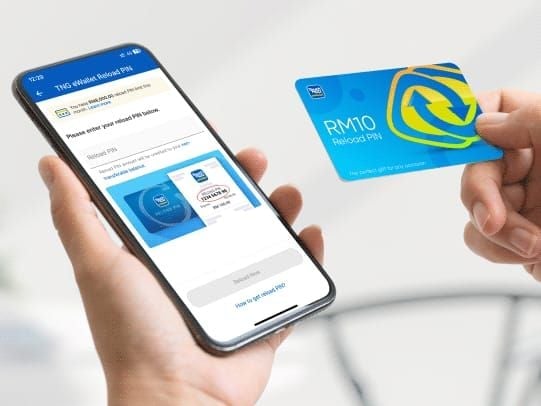
Method 2: Attempt Redemption Off-Peak
Since there's no passive check, try redemption during 7–9am weekdays or after 9pm. Two reasons: credits process faster off-peak (minutes vs up to 2 hours during peak), and failed attempts are less likely to be confused with system delays.
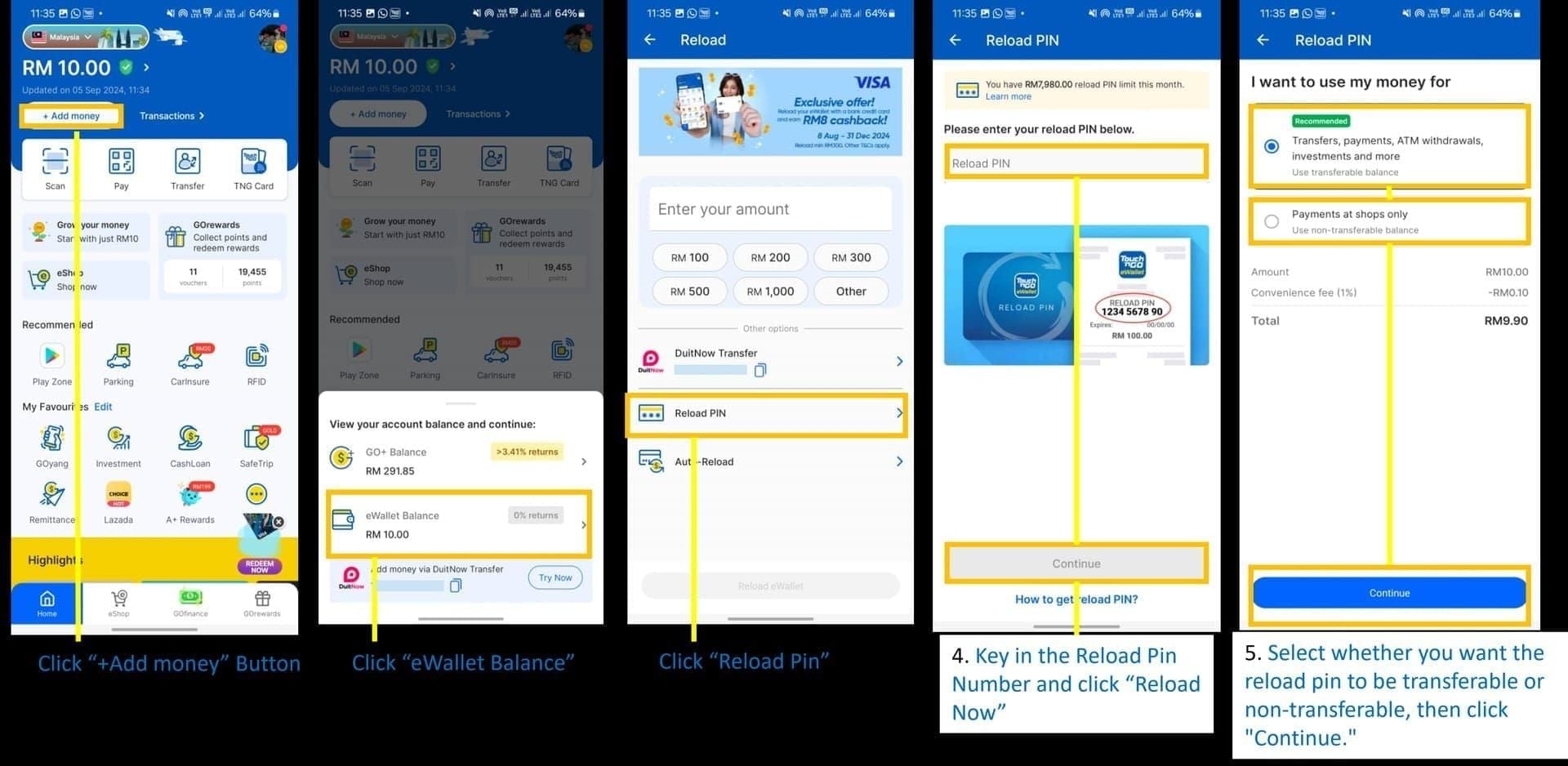
Critical: Multiple failed attempts trigger a 72-hour account lock. Wait at least 1 minute between retries. If you get an invalid error on the first attempt, stop and contact support instead.
Method 3: Call TNG Support
Call +603-5022 3888 (7am–10pm daily) with your purchase receipt. Support can verify whether a PIN has been used, is still valid, or has expired — without you risking a redemption attempt. No receipt means limited ability to assist.
Invalid vs Expired — Not the Same Error
Invalid PIN — Code doesn't match any record. Usually a typo (most often a missing leading zero — always confirm your PIN is exactly 10 digits), a region mismatch, or an already-used code.
Expired PIN — Code existed but the validity window has passed.
If you're seeing invalid on a PIN you're confident is unused, check the digit count first. A 9-digit entry missing the leading zero is the single most common cause — and it's entirely fixable.
What Happens When a TNG Reload Pin Expires?
Redemption fails. The value doesn't return to the seller, doesn't sit in a pending state — it's simply inaccessible through normal channels.
TNG has no published automatic refund policy for expired PINs. Your best path: contact support at +603-5022 3888 with your original purchase receipt and request a manual review. Some users report successful replacements when they can prove the PIN was never redeemed; others don't. Documentation is everything. Act quickly.
Don't attempt repeated redemptions on a PIN you suspect is expired — each failed attempt counts toward the lock threshold.
Can You Extend the Expiry Date?
No. There's no official extension mechanism, and no community-verified workaround exists. Any third-party claiming to reactivate expired PINs is running a scam.
The only legitimate move if you're approaching the window: redeem immediately. Once credit is in your eWallet, it's no longer subject to PIN expiry rules (promo-linked credits may still carry post-redemption conditions).
This is why the consistent community advice is: don't stockpile unredeemed PINs. Redeem first, plan spending later.
Common Reasons PINs Expire Unused
These aren't edge cases — they're recurring patterns in community discussions.
Buying in bulk without a redemption plan. Each PIN starts its 60-day clock at purchase. Buy five RM100 PINs and only need one per month, and the last two are at serious risk.
Receiving PINs as gifts. The recipient often doesn't know the purchase date, meaning the window may already be partially elapsed. Redeem gifted PINs the same day you receive them.
Storing PINs for emergencies. Valid strategy — but only if you're actively tracking the purchase date. Set a calendar reminder for day 45 as a prompt to redeem or use.
Festive season delays. Chinese New Year, Hari Raya, and year-end periods see slower processing and higher error rates. Pre-load PINs 3–5 days before peak periods.
If you top up Touch n Go wallet with reload pin regularly, building a habit of immediate redemption after purchase eliminates virtually all expiry risk.
Account Limits That Affect Your Strategy
Validity isn't the only constraint. Monthly Reload PIN limits are tied to your verification status:
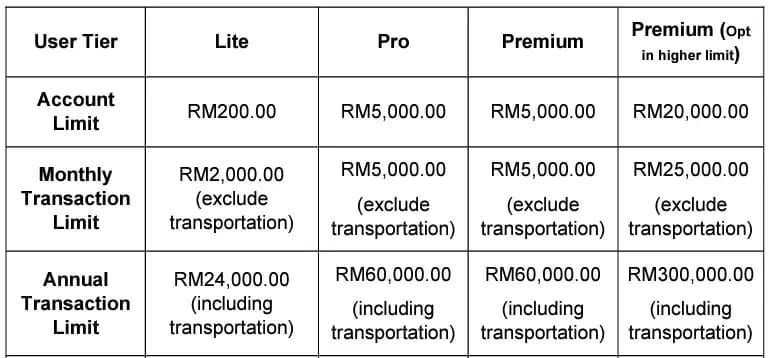
The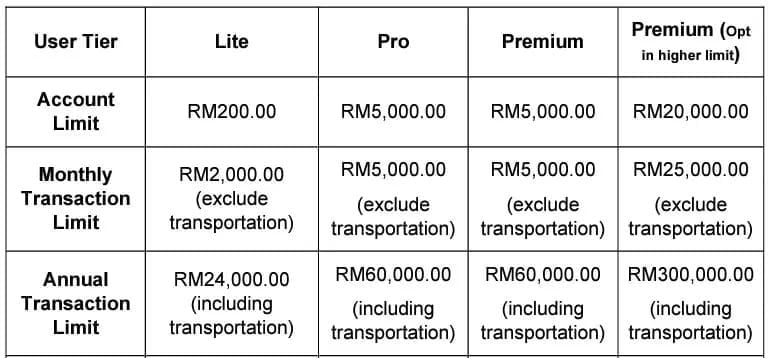 file > Scan MyKad in the TNG eWallet app. Takes minutes, unlocks the RM8,000 ceiling.
One more rule from July 2023: funds loaded via Reload PINs cannot be transferred to other accounts, banks, or GO+. Spendable within the eWallet ecosystem only. Factor this in if you were planning to move funds out.
Troubleshooting: When Redemption Fails
Even valid, unexpired PINs sometimes fail. Run through this sequence:
Check digit count. Confirm the PIN is exactly 10 digits. Add a leading zero if it appears shorter.
Try off-peak. Peak-hour system load causes delays and occasional false errors.
Clear app cache (Android). Settings > Apps > TNG eWallet > Clear Cache, then retry.
Force-close and refresh (iOS). Swipe the app closed, reopen, attempt again.
Wait between retries. Minimum 1 minute to avoid triggering the 72-hour lock.
Contact support if it persists. Call +603-5022 3888 with your receipt. Don't keep retrying a consistently failing PIN.
Successful redemptions appear within minutes off-peak. During peak hours, allow up to 2 hours before escalating.
How to Buy PINs That Are Guaranteed Valid
Buying from unverified sellers — informal marketplaces, social media resellers — risks receiving pre-expired or already-used PINs. By the time you discover the problem, the seller may be unreachable and your receipt (if you got one) may not satisfy TNG support.
The safest approach: platforms that provide a clear purchase timestamp and instant delivery, so your 60-day window starts the moment you receive the PIN — not days earlier from a reseller's aged stock.
For a fresh PIN with a clean validity window, you can buy TNG reload pin online instant delivery through BitTopup. Redeem immediately on receipt and you have the full window ahead of you with no uncertainty about prior use.
When evaluating any seller: look for verifiable purchase receipts, instant or near-instant delivery, and clear support channels if a PIN fails.
FAQ: TNG Reload Pin Validity 2026
How long is a TNG Reload Pin valid in Malaysia? Officially up to 6 months from purchase. In practice, treat 60 days as your hard deadline — multiple users have reported invalid errors when redeeming between the 60-day and 6-month marks.
How do I check if my TNG Reload Pin has expired? Three options: (1) check the printed expiry on a physical card, (2) attempt redemption off-peak and observe the result, or (3) call TNG support at +603-5022 3888 with your purchase receipt for manual verification.
What happens if my TNG Reload Pin expires before I use it? Redemption fails and the value isn't automatically refunded. Contact TNG support with proof of purchase for a manual review — documented cases with receipts have the best chance of resolution, but it's not guaranteed.
Can I extend the expiry date of my TNG Reload Pin? No. No official mechanism exists, and no community workaround has been verified. Redeem before expiry — that's the only reliable option.
Will TNG replace or refund an expired Reload Pin? No published automatic refund policy exists. Support reviews cases individually when you provide a purchase receipt. Don't rely on this as a safety net.
Does a digital TNG Reload Pin expire faster than a physical one? No. Both follow the same rules, with the clock starting at purchase/issue date. Digital PINs have the advantage of a clear timestamp — but the expiry timeline is identical.
Does the invalid PIN error always mean the PIN has expired? Not necessarily. Invalid most often means a digit error (missing leading zero is the top culprit), an already-used PIN, or a region mismatch. Expired is a distinct error. If you see invalid on a PIN you're confident is unused and correctly entered, contact support before retrying — don't risk the 72-hour account lock.
Track your purchase date, treat 60 days as your deadline, redeem immediately when possible, and keep your receipt. Those four habits eliminate virtually all TNG Reload Pin expiry problems before they start.