

TNG Reload Pins expire 6 months from the purchase date — not from activation or redemption. But the number you should actually live by is 60 days: community testing consistently shows pins failing around that mark. Once a pin expires, the value is gone permanently. No refund, no grace period.
What Is a TNG Reload Pin?
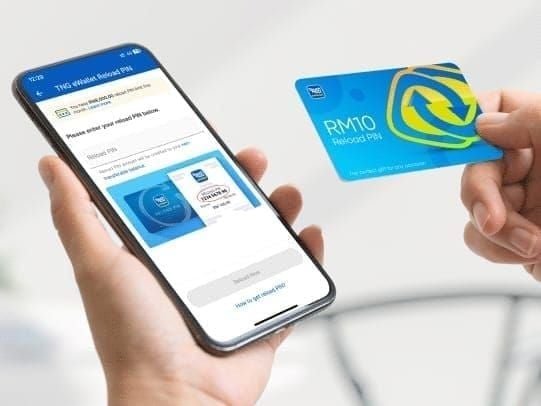
A TNG Reload PIN is a 10-digit prepaid code — single-use, region-locked to Malaysian TNG eWallet accounts — that loads a fixed cash value directly into your balance. It's not a voucher. It either works or it doesn't, and expired means gone.
Two Expiry Systems You Must Separate
Most users conflate these, and it costs them money:
Pin code expiry — The 10-digit code becomes invalid after the validity window. This is what this guide covers.
eWallet balance expiry — Once redeemed, loaded funds follow separate rules. They don't expire on the same timeline as the pin.
The dangerous mistake: holding an unredeemed pin for 3 months thinking the money is already mine. It isn't — not until you redeem it. Someone who redeems on day 55 is fine. Someone who waits until day 90 loses everything.
Official Expiry Rules (2026)
Official validity: 6 months from purchase date. Applies equally to physical cards and digital pins — no distinction between formats.
The clock starts the moment the pin is purchased, not when you receive it. A digital pin bought January 1 expires around July 1, even if you never opened the email. For gifted pins, this is a real trap — a pin bought two months before your birthday may arrive with only weeks of validity left.
Denominations and Expiry
All standard denominations share identical rules. No tier gets extra time.
One exception: Promotional pins expire 60 days post-redemption, not from purchase. That's the reverse of standard pins — redeem quickly, but you have more breathing room after redemption.
Finding Your Expiry Date
There's no expiry checker in the TNG app. Your options:
Physical card: Look for MM/YYYY on the card or packaging. Treat the 1st of that month as expiry.
Digital pin: Find the purchase confirmation email timestamp. Count 60 days (safe limit) or 6 months (official maximum) forward.
TNG support: +603-5022 3888, 7am–10pm daily. Have your receipt ready.
eWallet Balance After Redemption
Once you redeem a pin, the loaded balance follows separate rules — it doesn't expire on the pin's timeline. But don't treat a successful redemption as money stored forever.
If your TNG eWallet account goes dormant, dormancy policies can affect your funds. Keep your account active after loading.
KYC Verification and Balance Caps
Your verification status directly controls how much you can load:
The RM200 cap on unverified accounts is a silent killer for high-denomination pins. Try to redeem an RM500 pin into an unverified account holding RM100, and the redemption fails — while the pin keeps expiring. Verify via eKYC before any high-denomination reload. It takes minutes in the app.
Also worth knowing: since 1 November 2023, a 1% admin fee applies to monthly balances exceeding RM1,000. Doesn't affect expiry, but it's a real cost if you're holding large balances.
What Happens When a TNG Reload Pin Expires?
The value is permanently lost. Official TNG policy — not a community assumption.
Can Support Recover an Expired Pin?
Sometimes. Community experience suggests support may manually review recently expired pins if you contact them promptly with a purchase receipt and timestamp. The key word is may — it's not guaranteed, and it depends heavily on:
How recently the pin expired
Whether you have clear proof of purchase
Expired yesterday, have receipt is recoverable. Expired three months ago, no proof is essentially a dead end. If you find an expired pin, call +603-5022 3888 immediately — don't retry the code repeatedly first.
Expired Error vs Invalid Error
These are different problems requiring different responses:
Invalid error: Could be wrong digit count, already-used pin, or region mismatch. Check if your code is 9 digits — add a leading zero. Stop after one or two attempts.
Expired error: Past the validity window. Contact support immediately with your receipt.
Multiple rapid failed attempts trigger a 72-hour account lock. Wait at least 1 minute between retries. If the first attempt fails, call support rather than hammering the code.
How to Redeem Your TNG Reload Pin
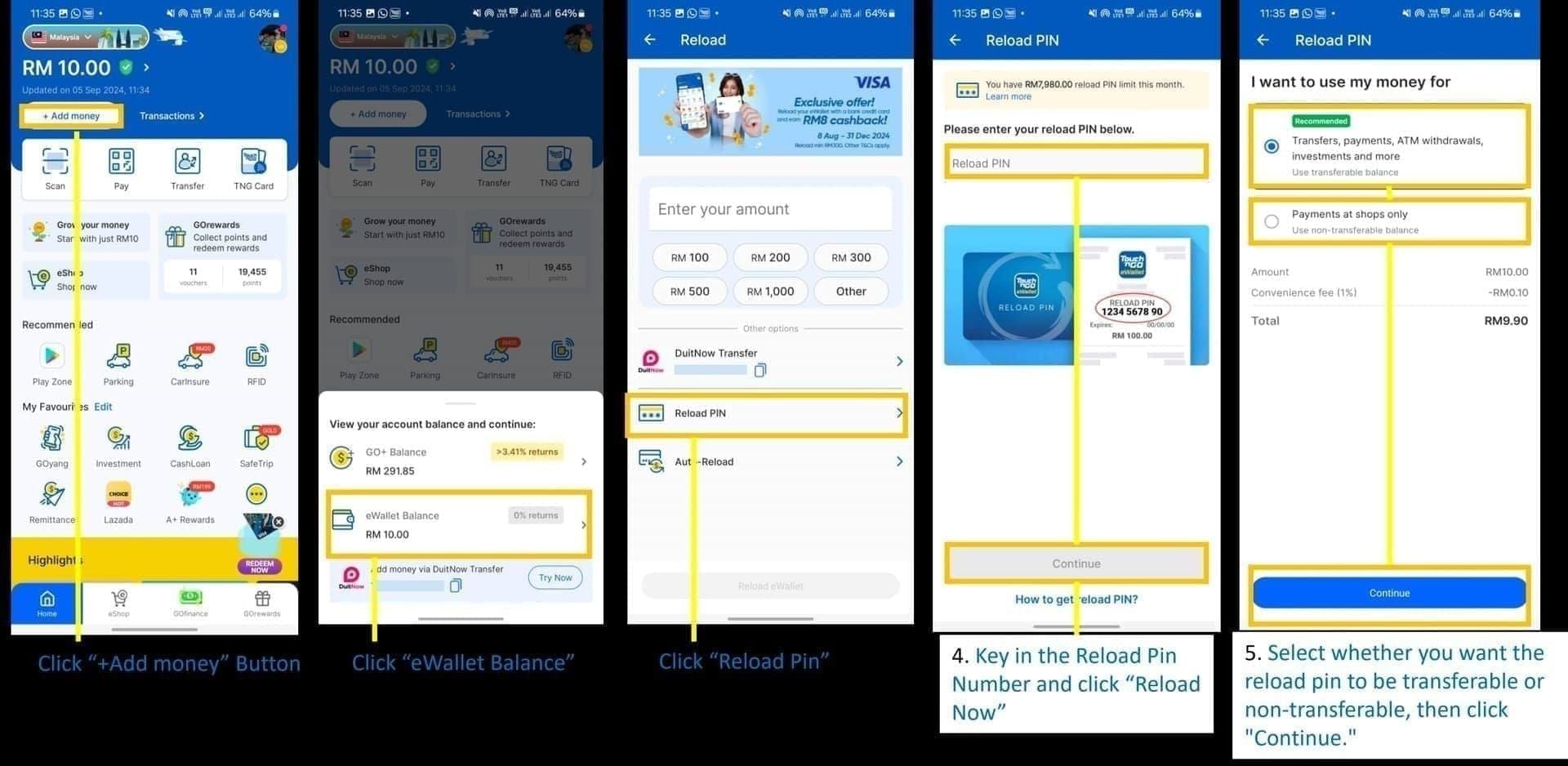
Open the TNG eWallet app (iOS or Android)
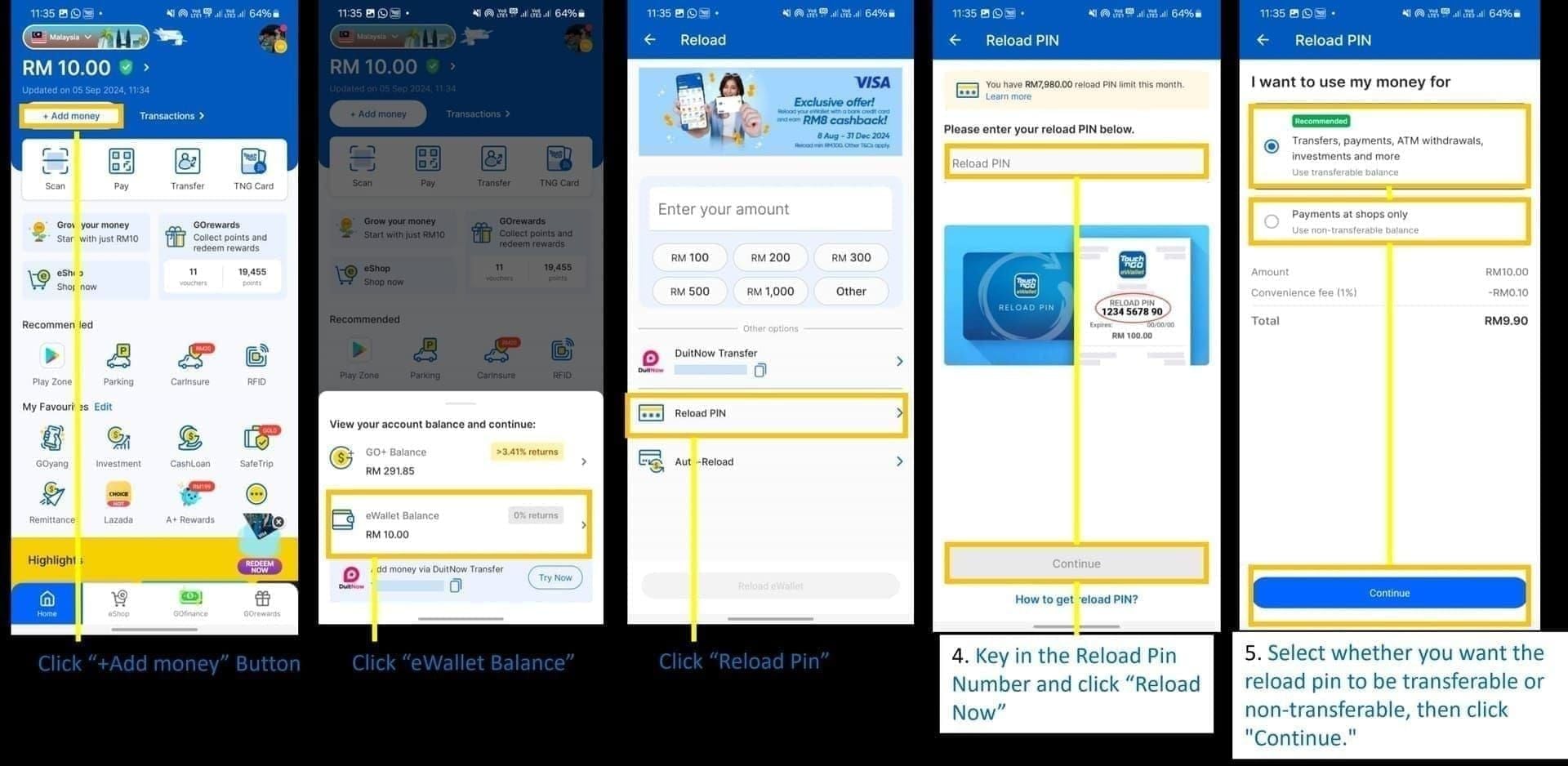
Tap +Reload on the home screen
Select TNG eWallet Reload PIN
Enter your 10-digit code — add a leading zero if it appears to be 9 digits
Tap Reload Now
Confirm the balance update on your dashboard or transaction history
Redeem Off-Peak
Weekday 7–9am or after 9pm processes in minutes. Peak hours — evenings, weekends — can take up to 2 hours to reflect. If you need the balance immediately for a game top-up, timing matters.
If Redemption Fails Before Expiry
Confirm exactly 10 digits (add leading zero if needed)
Try off-peak hours
Clear app cache (Android) or force-close and reopen (iOS)
Still failing? Contact TNG support — don't keep retrying
If you need to top up TNG eWallet with reload pin and want a clean starting point, sourcing from a reputable platform with clear purchase timestamps means you know exactly when your 6-month clock begins.
Found an Old TNG Reload Pin? Do This Now
Time is critical. Work through this sequence fast:
Step 1 — Find the purchase date. Check the physical card for MM/YYYY, or locate the original purchase email. No proof? Call TNG support with whatever you have.
Step 2 — Calculate remaining validity. Count 60 days (practical safe limit) and 6 months (official maximum) from purchase. Within 60 days: redeem immediately. Between 60 days and 6 months: redeem right now.
Step 3 — Check your account status. Confirm your account isn't dormant and your balance cap won't block the redemption. Verify via eKYC if you haven't.
Step 4 — Redeem off-peak. Follow the walkthrough above. Confirm balance update before closing the app.
Step 5 — If expired, call support fast. +603-5022 3888. The sooner after expiry you call, the better. Long-expired pins with no receipt have essentially zero recovery path.
Step 6 — Use the balance. Don't let a successful redemption turn into a dormant account situation.
Gamers: The Double-Expiry Risk Nobody Talks About
Malaysian mobile gamers are one of the heaviest TNG Reload Pin user segments, and there's a specific timing risk almost no guide covers.
Here's the scenario: you hold an unredeemed pin for 50 days, redeem it, then let the eWallet balance sit another month before topping up your game. The pin is fine — you redeemed in time. But some in-game currencies carry their own expiry timers. You've dodged one expiry only to hit another.
Best practice: redeem your pin the same day you intend to use it. The sequence should be receive pin → redeem to eWallet → top up game → done. No idle time at either stage.
For gamers who regularly fund in-game purchases, you can buy TNG reload pin online instant delivery through BitTopup — immediate digital delivery means the purchase timestamp is known and you can redeem the same session.
Common Mistakes That Lose Users Real Money
Bulk buying without a redemption plan. Each pin starts its own expiry clock at purchase. Buy 10 pins in January and redeem gradually through August — the later ones expire before you reach them. Buy what you'll use within 60 days.
Gifting pins weeks in advance. Buying a pin two months before the occasion burns most of the practical validity window before the recipient even has it. Gift closer to the occasion, or tell the recipient the purchase date immediately so they know their clock.
Skipping eKYC before high-denomination reloads. An unverified account caps balance at RM200. A RM500 pin into a near-full unverified account fails — and the pin keeps expiring while you sort out verification.
Assuming the app will warn you. It won't. TNG sends no expiry reminders for unredeemed pins. Set a calendar reminder at day 45 post-purchase — that's a 2-week buffer before the 60-day practical limit.
Buying from unauthorized sources. Discounts exceeding 5–10% from unofficial channels are a red flag. Higher risk of pre-used or already-expired pins, and no proper receipt means no recovery path with TNG support if something goes wrong.
2026 Policy Context
No structural changes to TNG Reload Pin expiry rules have been announced for 2026. The 6-month validity period remains in place. But if you're working from guides written before mid-2023, the monthly limits and transfer rules they describe are outdated. Current confirmed policy:
Non-transferability (effective 27 July 2023): Funds loaded via Reload PIN cannot be transferred to other accounts, banks, or GO+.
Revised monthly limits (post-July 2023): RM1,500/month unverified, RM8,000/month verified — down from the previous RM5,000 unified limit.
1% admin fee on balances over RM1,000 (effective 1 November 2023).
Transparency note: The 6-month official validity is confirmed from TNG's official terms. The 60-day practical safe limit comes from community consensus across multiple independent testing sources — widely observed but not officially documented by TNG. Both figures are presented here because the gap between them is a genuine conflict in available information. Treating 60 days as your personal deadline is the conservative, safer call.
Frequently Asked Questions
How long is a TNG Reload Pin valid? Officially 6 months from purchase date. Community testing shows failures around 60 days — treat that as your real deadline. Clock starts at purchase, not receipt or redemption.
What happens if I don't redeem before expiry? The pin becomes permanently invalid and the value is lost. No automatic refund or grace period. Contact TNG support (+603-5022 3888) immediately with proof of purchase — recovery is possible but not guaranteed, and depends on how recently it expired.
Does my eWallet balance expire after redemption? No — redeemed balance follows separate rules and doesn't expire on the pin's timeline. But dormant account policies can affect funds if your account is inactive for an extended period.
Can I extend a pin's validity? No. There's no official mechanism. The only way to secure the value is to redeem before expiry.
I received an expired pin as a gift. What now? Call +603-5022 3888 immediately with any proof available — the original purchase receipt or email from whoever gifted it. Support may review recently expired pins. Without a receipt, recovery is extremely unlikely.
Can I use a TNG Reload Pin directly for game top-ups? No — you must redeem it to your eWallet balance first, then use that balance for game purchases. Redeem and top up in the same session to eliminate idle time risk on both ends.
How do I contact TNG support about an expired pin? Call +603-5022 3888, available 7am–10pm daily. Have your purchase receipt, pin code, and purchase timestamp ready before you call.
The 6-month official window is real, but 60 days is the number to live by. Redeem immediately, verify your account before high-denomination loads, and never hold unredeemed pins as a savings strategy. The moment a TNG Reload Pin is purchased, the clock is running — whether you know it or not.