

Recharge Likee diamonds using only your 10-digit User ID (UID)—no login credentials needed. Learn to locate your UID, complete secure top-ups on BitTopup, avoid the 60-70% failure rate from wrong IDs, and troubleshoot delays. Standard processing: 5-30 minutes; first-time purchases: 24-48 hours verification.
What Is UID-Based Likee Diamond Recharge?
UID recharge lets you purchase Likee diamonds using your unique 10-digit ID without exposing passwords. This permanent identifier appears below your profile name and processes transactions directly to your account.
Unlike login-based methods requiring username/password on third-party sites, UID recharge only needs this number. Your Likee ID stays constant even when you change usernames, making it reliable for all transactions.
Top up Likee diamonds without login on BitTopup by entering your verified UID at checkout.
Likee UID vs Username
UID: 10-digit numerical code assigned permanently at account creation. Never changes.
Username: Display name you can modify anytime in settings.
This matters critically—entering a username instead of UID causes immediate failure, accounting for most recharge errors. UIDs appear in specific app locations, always exactly 10 digits without letters or symbols.
Why UID Recharge Skips Login
When you enter a valid UID on recharge platforms, the system queries Likee's servers to verify the account exists and credits diamonds directly. This bypasses authentication entirely.
Key advantages:
Never expose passwords to third-party platforms
Gift diamonds using only public UIDs
Eliminate credential theft risks
Security comes through payment verification, not account access.
Benefits of No-Login Top-Ups
Security: Reduces vulnerability to credential theft, phishing, and unauthorized access. Especially valuable on public devices where keyloggers might capture logins.
Speed: Complete transactions in under 2 minutes without login screens, password recovery, or 2FA delays.
Efficiency: 80% of transactions finish within 24 hours. Off-peak recharges often credit in 1-2 seconds to 5-10 minutes.
How to Find Your Likee UID (3 Methods)
Method 1: Profile Settings
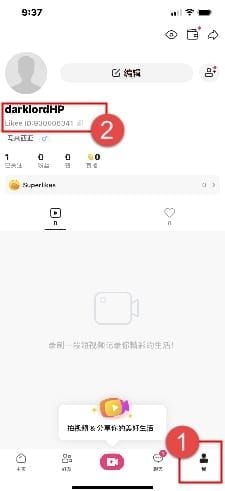
Launch Likee, tap profile icon (top-left)
Tap View or Edit Profile below profile picture
Find Likee ID field showing 10-digit UID below username
Screenshot immediately for reference
Method 2: Profile Picture Interface
Tap bottom-right avatar icon to open profile
Tap your profile picture at top
Popup shows Likee ID under nickname
Works well on newer app versions (iOS 12.0+, Android 6.0+)
Method 3: Gift Top-Ups
Ask recipient to screenshot their Likee ID using methods above
Verify exactly 10 digits, no letters/spaces/symbols
Cross-reference UID with username
Confirm first 3 and last 3 digits verbally to catch transmission errors
Step-by-Step: Top Up Likee Diamonds Without Login
Step 1: Access BitTopup
Navigate to BitTopup with stable internet (1-2 Mbps minimum). Disable VPNs—they interfere with payment processing.
Requirements: iOS 12.0+ or Android 6.0+ with 1GB free storage.
Step 2: Select Diamond Package
Review denominations from starter to bulk purchases. Each shows exact quantity, price, and bonus diamonds.
Check for promotions offering 10-20% bonus diamonds during special periods.
Step 3: Enter Correct UID
Critical step: Retrieve your UID screenshot and transcribe all 10 digits.
Double-check each digit individually—don't verify the whole number at once. This catches transposition errors (reversed adjacent digits).
For Likee UID recharge wrong ID fix, BitTopup's verification confirms format before payment.
Step 4: Choose Payment
Select from credit cards, digital wallets, or regional systems. Each displays processing times and fees.
Verify billing info matches bank records exactly—mismatches trigger fraud prevention delays.
Review final summary: UID, diamond quantity, total cost.
Step 5: Complete Payment
Process payment and save transaction ID immediately.
Timing:
First purchase: 24-48 hours verification
Repeat purchases: 5-30 minutes
Peak hours (6-10 PM): 50-100% longer processing
Step 6: Verify Delivery
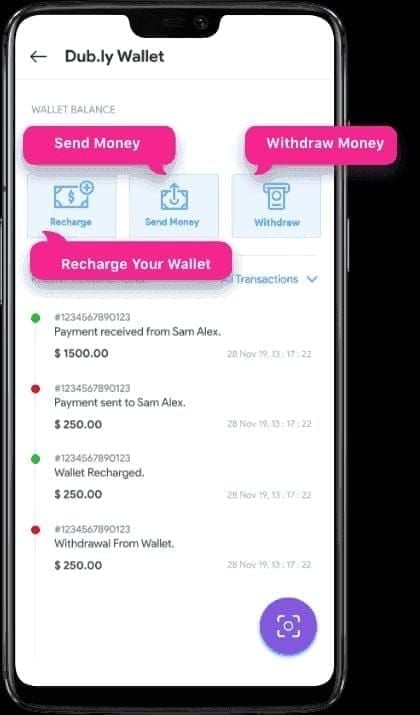
Open Likee > Profile > Wallet > Transaction Log. Look for green checkmark (completed) or clock icon (pending).
Pull down to manually refresh—wallet syncs every 15-30 minutes automatically.
Wait full 30 minutes before troubleshooting. 80% deliver within 24 hours.
Avoid Wrong ID Mistakes: 5 Verification Steps
Wrong IDs cause 60-70% of failures. Systematic checks eliminate preventable errors.
1. Check Format and Count
Count digits: exactly 10, no more or less
Verify only numbers 0-9, no letters/spaces/hyphens/symbols
Compare against screenshot character-by-character left to right
2. Cross-Reference Username
After entering UID, check the Likee profile showing that UID matches the intended username.
For gifts, ask recipient to confirm their current username matches what you see.
3. Use BitTopup Verification
Automated validation checks format before payment. Flags incorrect digit counts, non-numeric characters, or invalid formats.
Confirms UID corresponds to active Likee account. Inactive/deleted accounts trigger warnings.
4. Screenshot Before Payment
Capture clear image showing complete 10-digit Likee ID. Ensure good lighting—each digit distinct without blur.
Store in dedicated folder for future reference. Include username in frame when possible.
5. Confirm Server/Region Match
Likee operates separate servers by region. Verify your account's registered region matches recharge platform selection.
Check: Me > Settings > Profile for registered country/region.
Mismatched regions credit diamonds to wrong server instance, making them inaccessible.
Common Wrong ID Mistakes
Mistake #1: Confusing UID with Username/Email
Users enter Likee username or email instead of numerical UID. Usernames appear more prominently, creating false familiarity.
Prevention: Always verify you're entering exactly 10 digits, not text.
Mistake #2: Copying Extra Characters
Copying from screenshots/messages captures partial numbers or surrounding text like ID: 1234567890 with prefix included.
Formatted text introduces invisible characters (line breaks, spaces).
Prevention: Manually type UID instead of copy-paste. Forces character-by-character verification.
Mistake #3: Wrong Server Region
International users select current physical location instead of account's registered region.
Account region is set during registration and stays fixed. GPS/IP doesn't affect server hosting.
Prevention: Check Settings > Account > Region before every purchase.
Mistake #4: Outdated UID Info
Saved UIDs from initial setup confusion perpetuate original mistakes. Friend UIDs shared months ago get confused with other contacts.
Prevention: Request fresh UID confirmation for every transaction, even frequent recharges.
UID vs Login-Based Recharge
Security
UID: Never exposes password to third-parties. Credentials stay between you and Likee's servers.
Login: Requires entering username/password on recharge platform. Transmits credentials through additional systems.
For high-value accounts or elevated cybersecurity risk regions, UID provides better protection.
Convenience
UID: Faster—eliminates authentication steps, 2FA delays, password recovery (saves 2-5 minutes).
Works on public devices without logging into Likee account.
Login: Offers familiarity for users who struggle to locate UID. Some platforms store credentials for repeat purchases (security trade-off).
Gift Capabilities
UID: Only need recipient's public UID—no account access required. Enables surprise gifts.
Login: Would require password sharing (violates security practices).
When to Use Each
Choose UID for: Gift purchases, shared devices, forgotten passwords, maximum security priority. Works universally.
Consider login only when: Platform doesn't support UID, already logged in for other purposes, specific promo codes tied to login.
Troubleshooting Delayed Diamonds
Delivery delays occur in ~20% of transactions, most resolve automatically.
Standard Delivery Times
Established accounts: 5-30 minutes
First-time purchases: 24-48 hours
Peak hours (6-10 PM): 50-100% longer (45-60 minutes)
Off-peak (2-6 AM): 1-2 seconds to 5-10 minutes
Check Transaction Status
Log into BitTopup > Transaction History. Locate purchase using transaction ID.
Status meanings:
Payment Received: Initial confirmation
Processing: Currently delivering
Completed: Finished (if no diamonds, check UID)
Pending Verification: Normal for first purchase (24-48 hours)
Processing over 30 minutes off-peak warrants support inquiry.
Verify Correct UID
Go to Likee > Me > Settings > Profile. Compare current UID digit-by-digit against BitTopup transaction record.
Mismatch = delivery failure cause. Contact support immediately with transaction ID and correct UID. Many platforms redirect pending transactions if caught early.
Fixes 60-70% of delivery failures.
Contact Support
Gather before contacting:
Transaction ID
Payment confirmation
UID screenshot
Current timestamp
BitTopup offers 24/7 support via live chat (2-5 min response), email, tickets.
Concise format: Transaction ID [number] completed [X] hours ago, diamonds not received, verified UID [number] is correct.
Why BitTopup for Likee UID Recharge
Advanced UID Verification
Multi-layer validation checks format, digit count, character types, database matching before payment.
Cross-references UIDs against Likee's active account database real-time. Inactive/suspended/non-existent UIDs trigger immediate warnings.
Reduces failed transactions by ~85% vs platforms without automated checking. Adds only 2-3 seconds.
Secure Payment Processing
Bank-grade encryption for all payment data. Payment credentials never stored on servers.
PCI DSS compliant—payment card industry's highest security standard. Regular third-party audits.
Tokenization references purchases without storing actual payment details.
24/7 Customer Support
Continuous operation across all time zones. Staff trained in UID recharge troubleshooting.
Direct communication channels with Likee's systems for expedited resolution.
Average response: under 5 minutes (live chat), under 2 hours (email).
Transparent History
Detailed receipts show exact UID, diamond quantity, payment amount, transaction ID, timestamp.
Filter by date/amount/status. Export CSV for personal finance software.
No hidden fees—checkout price matches final payment exactly.
Expert Tips
Save Verified UIDs
After successful transaction, save verified UID in password manager or encrypted notes. Label with username and last transaction date.
Reduces transaction time by 30-40%. Eliminates repeated Likee navigation.
For multiple accounts or regular gifting, create dedicated UID reference document.
Use Bonus Promotions
BitTopup offers promotional periods with 10-20% bonus diamonds. Typical 1000-diamond package gets extra 100-200 diamonds.
Major promotions align with holidays, Likee events, platform anniversaries (6-8 times annually).
Bulk purchases during 15% bonus events: 5000 diamonds gets 750 free—equivalent to skipping a month's purchase.
Set Recharge Reminders
Monthly or bi-weekly alerts ensure you never run out during critical moments.
First-of-month reminders catch new bonus offers before regular purchases.
Prevents emergency purchases during peak hours with extended processing.
Gifting Best Practices
Request recipient's UID 24 hours before needed—accommodates verification delays.
Confirm preferred notification method (surprise vs advance notice).
Time purchases during recipient's active hours for immediate gratification and real-time confirmation.
FAQ
Can I recharge any Likee account using just the UID?
Yes. Top up any active account using only its 10-digit UID without login credentials. Enables gift purchases—obtain recipient's UID from their profile and complete transaction. Verify UID corresponds to active account through BitTopup's validation before payment.
Is there a minimum or maximum diamond amount?
Packages range from 50-100 diamonds (minimum) to 10,000+ diamonds (maximum single transaction). Larger purchases offer better per-diamond pricing. UID recharge works identically across all quantities.
Will the recipient know who topped up their account?
No. Likee doesn't automatically reveal purchaser identity. Diamonds appear in balance with timestamp only. Notify recipient separately if you want them to know. Allows surprise gifts and privacy.
What payment methods does BitTopup accept?
Major credit cards (Visa, Mastercard, Amex), digital wallets, region-specific systems. Available methods vary by location. Each displays processing times and fees at checkout. First-time payment method: 24-48 hours verification; established methods: 5-30 minutes.
How do I verify my UID is correct before payment?
Navigate to Likee profile > View or Edit Profile to display 10-digit UID. Screenshot. When entering on BitTopup, transcribe each digit individually while comparing against screenshot. Use BitTopup's verification feature. Cross-reference UID with username. Prevents 60-70% of failures from wrong IDs.
What if diamonds haven't arrived after 48 hours?
Verify correct UID by comparing transaction record against current Likee profile UID. Check Likee wallet transaction log for pending entries. Clear app cache (Settings > Apps > Likee > Storage > Clear Cache on Android; Settings > General > iPhone Storage > Likee > Offload App on iOS), force close, restart. Still missing? Contact BitTopup support with transaction ID, payment confirmation, verified UID. 24/7 team investigates server issues and expedites delivery or processes refunds.
Ready to top up Likee diamonds safely without logging in? Visit BitTopup now to recharge using your UID with instant delivery, secure payment, and 24/7 support. Our advanced verification system prevents wrong-ID mistakes. Experience competitive pricing and no-login convenience today.