

BIGO LIVE gift cards are region-locked—your account region must match the card's designated region for redemption. This guide shows how to check your account region via your BIGO ID (7-10 digits), verify compatibility, and avoid error 4301 (region mismatch). With 400M+ users worldwide, understanding these restrictions prevents wasted purchases and ensures diamonds credit within 2-3 minutes.
Understanding BIGO LIVE Gift Card Region Locks
What Are Region-Locked Gift Cards?
Region-locked gift cards work exclusively in specific territories. The platform uses three-layer verification: your account's registered region (set by phone country code or registration IP), current IP location, and the card's regional identifier.
Restricted territories: Turkey, Cyprus, India, most European countries, US, UK, Canada. Complete list: AT, BE, BG, CY, CZ, DE, DK, EE, ES, FI, FR, GR, HR, HU, IE, IT, LT, LU, LV, MT, NL, PL, PT, RO, SE, SI, SK, US, CA, CN.
For region-verified cards, BitTopup displays specific country availability upfront, eliminating guesswork.
Why Regional Restrictions Exist
Three reasons drive regional locks:
Tax compliance: Countries impose varying digital goods taxation (0-20%+ VAT). Segregated markets ensure proper tax remittance per jurisdiction.
Currency protection: Prevents arbitrage where low-value country cards redeem in high-value regions, destabilizing platform economy.
Licensing agreements: Local payment processors require exclusivity clauses limiting redemption locations.
Strictest Region Lock Policies
EU countries: Most stringent due to GDPR and consumer protection laws. All 30 restricted European countries can't access standard gift cards.
World Wide cards: Work exclusively in Middle East—Oman, Bahrain, Egypt, Kuwait, Qatar, Saudi Arabia, Turkey, UAE. Despite the name, they're geographically limited.
North America: US, Canadian, Mexican accounts can't redeem any gift card variant due to state-level virtual currency regulations. Direct payment only.
Singapore: BIGO SG cards work exclusively within Singaporean accounts under separate licensing.
Gift Cards vs Direct Top-Up
Gift cards:
Pre-purchase from retailers
Fixed denominations: 10, 25, 40, 50, 80, 100, 150, 160, 200, 240, 250, 400, 500, 1000, 1600, 2000, 2400, 4000, 5000, 8000, 10000 diamonds
Expire in 6 days to 3 months
Manual code entry with 2FA within 120 seconds
Anonymous—no credit card details shared
Holiday bonuses: 10-20% extra diamonds
Direct top-ups:
Immediate processing
Exact diamond amounts (no rounding)
No expiration
One-click with saved payment
Requires sharing payment info
How to Check Your Account Region
Android (5 Steps)
Launch BIGO LIVE, log in
Tap profile icon (bottom right)
Locate BIGO ID under username (ID:123456789 format)
Go to Me > Wallet > Recharge
Check pre-selected country in dropdown—this is your account region
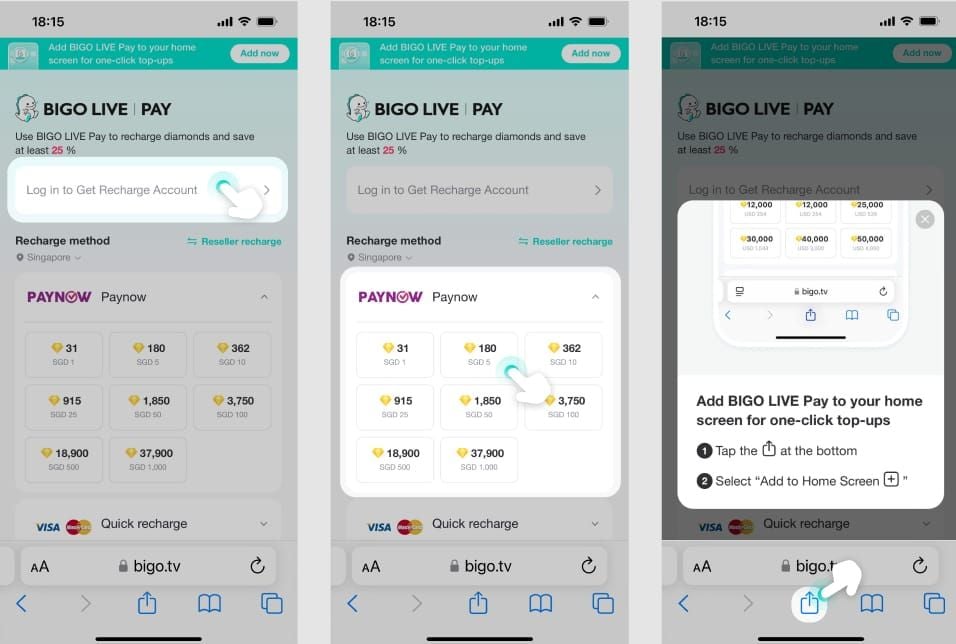
Android 5.0+ requires GPS permissions for 95%+ accurate IP geolocation verification.
iOS (5 Steps)
Open app, view main feed
Tap profile picture (top-left)
View BIGO ID beneath display name
Access Settings > Account Information
Review registered country/region field (locked)
iOS 11+ needs location services permission (Settings > Privacy > Location Services). Without it, error 4302 may trigger.
For cross-platform verification, BitTopup's tools confirm compatibility before purchase.
Profile Settings Verification
Navigate to profile > Edit > Country/Region. This field appears grayed out—it was permanently set during registration. The displayed country determines compatible gift card variants.
Discrepancies occur when: Accounts created via VPN or while traveling abroad. Registration IP permanently stamps your region regardless of later location changes. A Thailand vacation registration creates a Thai account even after returning to Australia.
Currency symbols confirm region:
$ (USD) - North America, no gift cards
€ (EUR) - Europe, restricted
£ (GBP) - UK, no access
د.إ (AED) - UAE, World Wide compatible
﷼ (SAR) - Saudi, World Wide accepted
₹ (INR) - India, unavailable
BIGO ID and Location Code
Your BIGO ID is a 7-10 digit numeric code under your username. Enter only digits during redemption—no ID: prefix, letters, or spaces.
The invisible location code gets assigned during registration based on phone country code (+971 for UAE = UAE code) or registration IP if using email. This determines gift card compatibility.
High-value transactions (5000+ diamonds) may require government ID verification, taking 30-60 seconds (standard) or 24-48 hours (complex cases).
Locating Region Information
Settings Menu Access
From main feed, tap three lines (top-left) > Settings (gear icon) > Account Settings/Account Information. Exact labels vary between app versions 4.x and 5.x.
Some versions hide regional info under Profile > Settings > Privacy > Location. The Hide Location toggle affects only what others see, not your actual account region.
Account Information Section
Displays:
BIGO ID (top)
Registration date
Linked social accounts
Regional designation (Country/Region/Registered Location)
Phone-bound accounts show country code prefix (+1, +44, +971). Email-only accounts display region based on registration IP in Registered From field.
Linked Facebook/Google/Apple IDs don't alter region—original registration location remains permanent.
Currency Symbol Identification
Navigate to Me > Wallet to view diamond/beans balance. Currency symbol indicates regional market:
$ (USD) - North America, no gift cards
€ (EUR) - Europe, restricted
£ (GBP) - UK, no access
د.إ (AED) - UAE, World Wide compatible
﷼ (SAR) - Saudi, World Wide works
₹ (INR) - India, unavailable
At bigo.tv recharge center, the country dropdown pre-populates with your registered region. This can't be manually changed—selecting different countries triggers validation errors.
Region Code Compatibility
Region codes use whitelist systems checking three parameters: account's registered region, current IP location, gift card's regional identifier.
Error codes:
4301: Account region ≠ gift card region (e.g., World Wide card on Southeast Asian account)
4302: Current IP ≠ account region + card region (common with VPNs)
4303: Payment method origin conflicts (rare for gift cards, affects direct purchases)
Gift Card ID and PIN System
Gift Card ID Number
Alphanumeric strings with 12-20 characters, including dashes. Format varies by region:
Middle East World Wide: 16 characters, three dashes (XXXX-XXXX-XXXX-XXXX)
Southeast Asia: 14 characters, two dashes
ID encodes: Issuing region, denomination, batch number, expiration date.
Prefix meanings:
BGME - Middle East
BGSG - Singapore
BGSA - Southeast Asia
Digital purchases show codes in account dashboards under My Cards. Physical cards require scratching—photograph immediately. Codes are case-sensitive.
PIN Code Security
6-digit numeric codes provide secondary authentication. Digital purchases send PINs via email/SMS; physical cards print under separate scratch panels.
Redemption process: Enter BIGO ID + country at https://mobile.bigo.tv/live/bigolivepay/index.html → input gift card ID → receive 6-digit 2FA code (120-second expiration) → enter PIN.
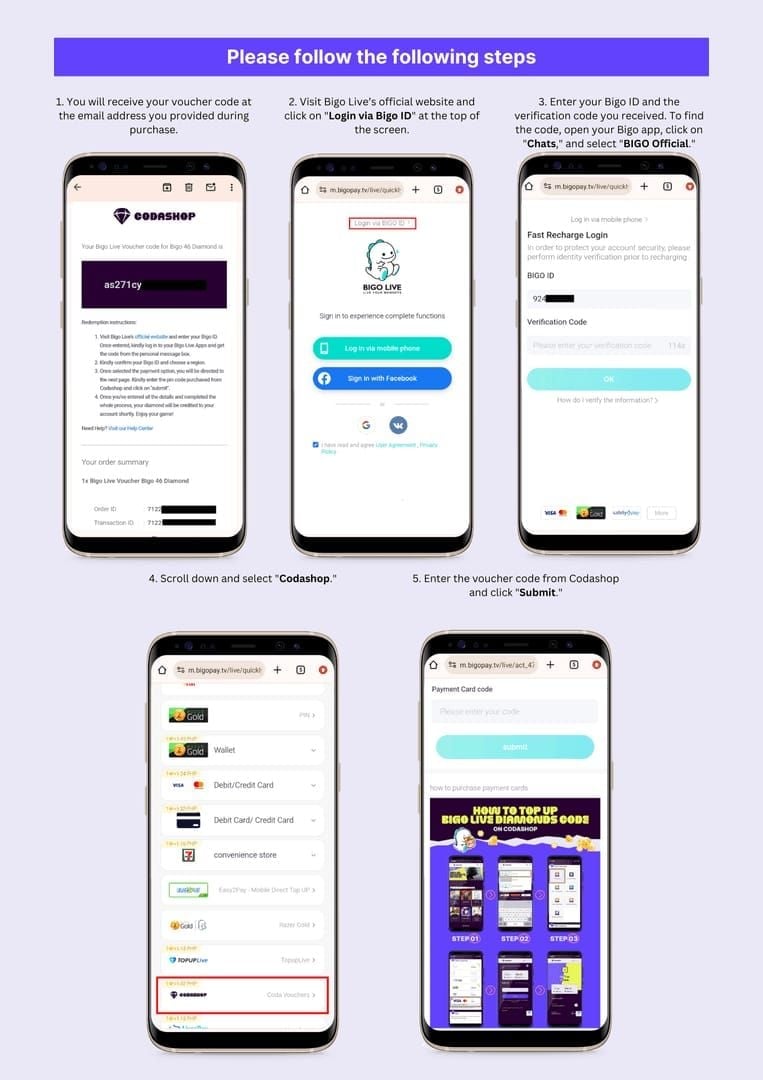
Security limits: Three PIN attempts per session before 24-hour card lock. Enter dashes and special characters exactly as displayed.
Region Encoding in ID+PIN
Gift card ID contains regional metadata cross-referenced with your account region. When you enter your BIGO ID, the system retrieves your account's regional code and compares against the card ID's prefix. Mismatches halt before PIN entry, displaying error 4301.
PINs don't contain regional data—they're security tokens. PINs and IDs pair cryptographically; a valid PIN from Card A won't work with Card B's ID.
The 120-second 2FA window ensures real-time user presence, preventing automated bot attacks.
Validating Authenticity
Security features:
Holographic logos (physical cards)
Unique serial numbers matching receipts
Retailer-specific watermarks (digital codes)
Pre-redemption checks:
Verify denomination matches purchase
Test regional designation at official redemption site before PIN entry
Check if your region appears available
Legitimate sellers provide clear regional specs. Vague terms like Global or International indicate mislabeled/fraudulent products.
Common Region Mismatch Errors
Error 4301: Account Region Mismatch
Appears when account region ≠ gift card region. Detected during initial validation, before PIN entry.
Message: This gift card is not valid in your region. Please check your account region and gift card compatibility.
No diamonds deducted; card remains unused. Failed attempt counts toward daily limit (max 10 vouchers per wallet).
Resolution: Obtain region-matched card or use compatible account. Account region can't be changed post-registration.
Error 4302: Current Location Restrictions
Triggers when current IP location conflicts with account region + gift card region. Common with VPNs, international travel, or mobile roaming.
System detects VPN usage through database cross-referencing (95%+ accuracy). Example: UAE account with World Wide card via US VPN triggers 4302.
Resolution:
Disable VPN
Switch to local Wi-Fi
Wait until returning to registered country
Enable GPS location services (Android 5.0+, iOS 11+)
Error 4303: Payment Method Origin Conflicts
Primarily affects direct purchases but occasionally appears during high-value gift card transactions requiring verification. Flags mismatches between payment method's issuing country and account region.
Example: Thai account buying gift card with European credit card may trigger 4303 during redemption.
Resolution: Upload government ID matching account region. Verification takes 30-60 seconds (straightforward) or 24-48 hours (manual review).
Interpreting Error Messages
Error text specifies failed verification layer:
Account region mismatch = 4301
Location verification failed = 4302
Payment verification required = 4303
Some errors suggest actions: Please verify your account region in Settings or Disable VPN and try again.
Screenshot errors immediately with timestamp + BIGO ID. Include gift card ID (never PIN) in support tickets.
Pre-Purchase Checklist
Essential Information to Confirm
Document before purchasing:
BIGO ID (7-10 digits)
Account region (Settings > Account Information)
Current IP location (device settings or IP checker)
Verify seller's regional specs match your account exactly. Look for Compatible with [Country] accounts or Valid in [Region]. Avoid Global, International, Multi-region—these indicate confusion or mislabeling.
Check denomination against needs. Cards expire in 6 days to 3 months. Calculate monthly diamond consumption. Platform limits: 10 vouchers per wallet.
Matching Account with Gift Card Region
Compatibility matrix:
Middle East accounts (Oman, Bahrain, Egypt, Kuwait, Qatar, Saudi Arabia, Turkey, UAE) → World Wide cards
Singapore accounts → BIGO SG cards only
Southeast Asia (excluding restricted) → Region-specific variants
Restricted list (Turkey, Cyprus, India, most Europe, US, UK, Canada) → No gift cards, direct payment only
Document compatibility in notes app or screenshot for future reference.
Verifying Seller Specifications
Reputable sellers display compatibility prominently: World Wide Card - Valid in UAE, Saudi Arabia, Oman, Bahrain, Egypt, Kuwait, Qatar, Turkey only vs vague Works in Middle East.
Check reviews for wrong region, couldn't redeem, error 4301 complaints. Successful redemption confirmations validate accuracy.
BitTopup implements automatic region verification during checkout, detecting your account region and displaying only compatible options.
Documentation to Screenshot
Capture:
Account region settings (Settings > Account Information)
BIGO ID (profile page)
Wallet currency symbol (Me > Wallet)
Seller's product description (regional specs, price, denomination)
Purchase confirmation (transaction date, card ID without PIN, stated region)
Complete gift card code before redemption
Store securely—codes function like cash.
Regional Compatibility Scenarios
US Account + US Gift Card = Incompatible
US accounts can't redeem any gift card variant. US appears on restricted list. Cards labeled US Region or North America trigger error 4301.
Restriction stems from state-level regulations classifying redeemable gift cards as potential gambling instruments. US users must use in-app recharge (Me > Wallet > Recharge) with credit cards, PayPal, or mobile payments.
Same restriction applies to Canadian accounts.
European Account + Asian Gift Card = Incompatible
Europe appears on restricted list + Asian cards specify Southeast Asian regions. German account (+49 phone) attempting Southeast Asian card encounters error 4301 from both restrictions.
Even if European restrictions lifted, regional mismatch persists. Southeast Asian cards encode identifiers for Thailand, Vietnam, Philippines, Indonesia.
Exception: Thai student in Germany maintains Thai account region (compatible with Southeast Asian cards) but may face IP verification (error 4302) when redeeming from European IP.
Multi-Region Accounts
Each account's region remains fixed to registration location. Content creator with UAE + Singapore accounts needs World Wide cards (UAE) and BIGO SG cards (Singapore)—not interchangeable.
Account sharing across regions: UAE user sharing credentials with Indian friend maintains UAE registration (World Wide compatible) regardless of who accesses it. IP verification may trigger error 4302 for Indian user.
Business accounts managed by agencies spanning regions should document each account's region and maintain separate gift card inventories.
Real User Experiences
Case 1: UAE user bought Global card from unauthorized reseller. Error 4301 appeared—card was Southeast Asian variant mislabeled. Seller refused refund. Complete loss.
Case 2: Singapore user purchased BIGO SG cards while traveling in Malaysia. Error 4302 triggered due to Malaysian IP. Resolved by waiting until returning to Singapore.
Case 3: Creator accidentally redeemed World Wide card on European account. European account couldn't process due to restrictions. Card's single-use nature prevented re-redemption on UAE account.
Expert Tips to Avoid Mistakes
Always Verify Account Region First
Three-step verification (60 seconds):
Check BIGO ID location in Settings
Verify currency symbol in wallet
Note pre-selected country in recharge dropdown
Create checklist: My BIGO ID: [number], My Region: [country], Compatible Cards: [type].
If you've changed phone numbers or relocated, recheck region. Users sometimes forget secondary accounts created while traveling.
Double-Check Seller Specifications
Read complete descriptions, not just titles. Legitimate sellers list specific countries vs vague regional terms.
Contact sellers before purchasing: Will this card work with a [your country] account? Reputable sellers provide definitive yes/no answers.
Compare specs across multiple sellers. Specific, limited country lists indicate accuracy; expansive claims suggest misunderstanding.
Keep Screenshots
Maintain folder with:
Account region
BIGO ID
Registration date
Linked phone number
Recharge page (pre-selected country, available payment methods)
Update quarterly or after account changes. Date screenshots using device timestamps. Proves account's regional status at purchase time.
Understanding Refund Policies
Most digital goods follow no refund once codes revealed. Region mismatch sometimes qualifies for exceptions with proof of seller misrepresentation.
BitTopup offers region verification guarantees—if their system approves incompatible purchase, customer service provides replacement/refund.
Payment disputes (credit card chargebacks, PayPal) succeed with product not as described evidence: account region screenshots, seller's description, error message.
When to Contact Support
Contact BIGO LIVE support if account region appears ambiguous (registered while traveling). Support definitively states regional designation.
Reach out to sellers before high-value purchases (1000+ diamonds): I have [country] account with BIGO ID [number]. Will your [card type] work?
If you've encountered redemption errors, contact support before additional purchases. Persistent errors might indicate account-level issues beyond regional mismatches.
Alternative Solutions for Wrong-Region Cards
Can You Change Account Region?
No. Account region permanently fixed to registration location. No official method exists post-registration. Country/region field appears grayed out.
VPN workarounds trigger error 4302 rather than enabling changes. System's three-layer verification—registered region, current IP, gift card region—must align completely.
Creating new account in desired region is only option but means abandoning existing account's level, followers, purchase history. No transfer capabilities between regions.
Trading Wrong-Region Cards
Peer-to-peer trading communities exist (social media, forums, dedicated platforms). Significant risks: scammers collect cards without providing exchanges, no dispute resolution.
If trading:
Use escrow services or trusted intermediaries
Never send code first unless other party has verified reputation
Request proof of card validity (screenshot showing denomination without full code)
Document all communications
Region-Free Top-Up Methods
Direct purchases: In-app recharge (Me > Wallet > Recharge) bypasses regional restrictions. Select credit cards, PayPal, mobile payments, carrier billing. Immediate crediting, exact denominations, no expiration. Trade-off: sharing payment info.
Third-party platforms: BitTopup processes direct top-ups after you provide BIGO ID, eliminating gift card compatibility concerns. Competitive pricing, 2-3 minute delivery, secure transactions. Reliable for restricted regions or hassle-free purchases.
Prevention Strategies
Establish pre-purchase routine (5 minutes):
Verify account region
Confirm seller specifications
Check reviews for region complaints
Screenshot documentation
Bookmark trusted sellers/platforms with proven accuracy. BitTopup maintains updated regional compatibility databases, automatically filtering incompatible options.
Set quarterly calendar reminders to recheck account region, especially if traveling frequently or using VPNs regularly.
Safe Purchase: Choosing the Right Platform
Why BitTopup Offers Region-Verified Cards
Automated region verification during browsing/checkout. Enter BIGO ID → system queries account region → displays only compatible options. Eliminates manual checking.
Comprehensive regional compatibility databases updated within 24-48 hours of BIGO LIVE policy changes.
Customer service trained on regional restrictions, understands error codes 4301, 4302, 4303. Provides targeted troubleshooting.
How BitTopup Displays Regional Information
Each listing includes Compatible Regions section specifying exact countries. World Wide cards list all eight Middle Eastern countries individually vs ambiguous Middle East.
Product titles incorporate regional identifiers: BIGO LIVE World Wide Gift Card (UAE, Saudi Arabia, Oman, Bahrain, Egypt, Kuwait, Qatar, Turkey) vs generic BIGO LIVE Gift Card.
Checkout includes final confirmation: This card is compatible with your [country] account before payment.
Automatic Region Matching
BIGO ID verification tool (pre-cart) analyzes account and recommends compatible products. Enter 7-10 digit ID → system displays account region + curated list of working options.
Inventory filtering automatically hides incompatible products based on detected region. European IP access removes gift card listings, shows direct top-up options.
For multiple accounts, save multiple BIGO IDs with associated regions. Switch between profiles to view region-specific products.
24/7 Support
Real-time assistance for compatibility questions. Before purchasing, chat with BIGO ID: Which gift cards work with my account? Representatives verify region and recommend products within minutes.
Post-purchase support addresses redemption issues. If errors occur despite verified purchase, support investigates account-level issues, provides redemption guidance, or processes replacements.
Knowledge base maintains regional restriction updates, policy changes, compatibility matrices. Documentation updates synchronously with BIGO LIVE announcements.
FAQ
Are BIGO LIVE gift cards region-locked in 2026?
Yes. Account's registered region (phone country code or registration IP) must match gift card's designated region. Unavailable in Turkey, Cyprus, India, 30 European countries (AT, BE, BG, CY, CZ, DE, DK, EE, ES, FI, FR, GR, HR, HU, IE, IT, LT, LU, LV, MT, NL, PL, PT, RO, SE, SI, SK), US, UK, Canada, China. World Wide cards work exclusively in Middle East (Oman, Bahrain, Egypt, Kuwait, Qatar, Saudi Arabia, Turkey, UAE). BIGO SG cards function only in Singapore.
How do I check my account region?
Three methods: (1) Settings > Account Information shows registered country/region, (2) Me > Wallet > Recharge displays pre-selected country, (3) Wallet currency symbol—USD (North America), EUR (Europe), AED (Middle East). BIGO ID (7-10 digits under username) + these settings determine compatibility. Region was permanently set during registration and can't be changed.
What happens if I buy wrong-region card?
Error 4301 (account region mismatch) appears. No diamonds deducted; card remains unused but can't transfer to compatible account. Most sellers enforce no refund for revealed codes, resulting in complete loss unless you prove seller misrepresentation. BitTopup offers region verification guarantees—replacements/refunds if their system approves incompatible purchase.
Can I change account region to match gift card?
No. Region permanently locked to registration location (phone country code or IP during account creation). Country/region field appears grayed out. VPNs don't enable changes—they trigger error 4302 (location verification failed). Creating new account in desired region is only option but means abandoning existing account's level, followers, purchase history without transfer.
Where's my BIGO ID and region info?
BIGO ID (7-10 digits) appears under username on profile. Access via profile icon (bottom right on Android, top-left on iOS). For region: Settings > Account Information or Me > Wallet > Recharge—pre-selected country indicates region. Currency symbol confirms: $ (North America), € (Europe), د.إ (UAE), ﷼ (Saudi Arabia).
How long does redemption take with correct region?
2-3 minutes. Process: Enter BIGO ID at https://mobile.bigo.tv/live/bigolivepay/index.html → select country → input gift card code → receive 6-digit 2FA code (120-second validity) → enter PIN. Verification takes 30-60 seconds (standard), 24-48 hours (high-value requiring government ID). Diamonds appear immediately in wallet after verification.
Ready for region-compatible BIGO LIVE gift cards? Visit BitTopup for instant verification, clear regional labeling, and 24/7 support. Get region-matched cards in seconds—no redemption errors!