

The Season 3 discount — a 20% bonus running through early 2026 — expired February 28. March is a transitional window before April resets the promotional calendar. If you gift Diamonds to streamers regularly, the window to act is narrow.
Bulk packages currently yield up to 65 Diamonds per USD versus 59 for small bundles. Layer in VIP multipliers and referral discounts, and that gap compounds fast.
Transparency note: Pricing data here is based on community-observed rates. Where official Uplive announcements differ, those are flagged. March 2026 event details reflect community consensus — treat specific bonus percentages as directional, not guaranteed.
What's Happening to Uplive Diamond Prices in March 2026?
The Season 3 promotional discount ended February 28. March isn't dead — Uplive typically runs a follow-up event — but the stacked discount environment is gone. The next confirmed quarterly cycle is June 2026.
Think of it simply: February was the peak. March is the transition. April onward is the new baseline until June.
Which Tiers Are Affected
All tiers lost something when Season 3 ended, but not equally. Small bundles (60–600 Diamonds) were already yielding the worst rate at ~59 D/USD — the discount amplified their value less. Large bundles (6,000+) at ~65 D/USD had the most to lose, because a 20% bonus on a $100+ purchase compounds significantly.
Confirmed vs. Community-Observed
Uplive hasn't published a formal press release detailing per-Diamond rate changes for April. What the community has confirmed: a consistent quarterly promotional cycle, the Season 3 close on February 28, and a next quarterly event in June 2026. The price change framing reflects bonus windows opening and closing — not necessarily a change to base USD bundle prices.
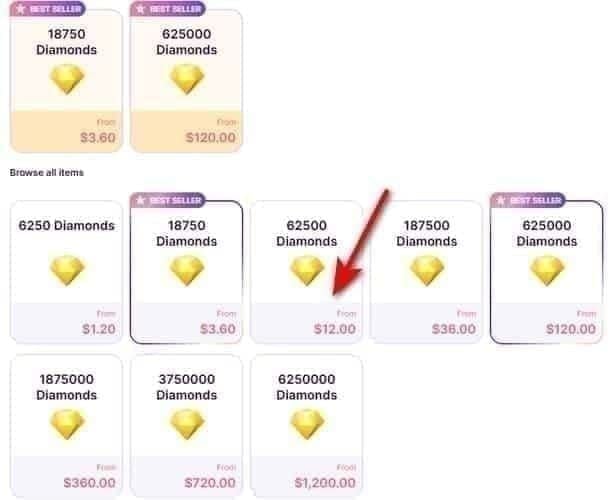
Current Uplive Diamond Bundle Value (March 2026)
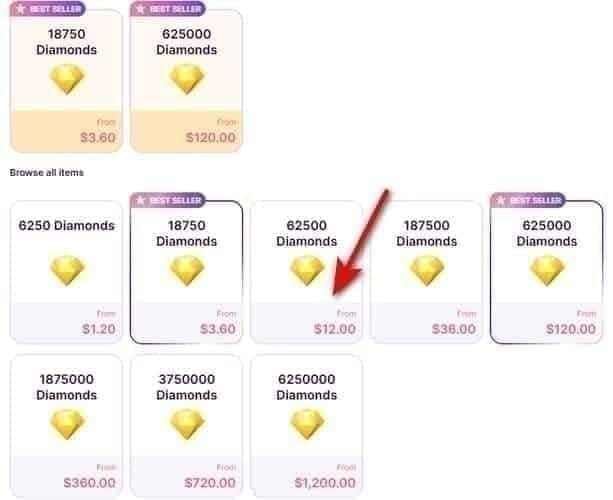
At current rates, bundles range from ~59 to 65 Diamonds per USD — an 11% efficiency gap that experienced supporters never ignore.
Community-observed rates. Actual rates vary by region and active promotions.
Small bundles (60–300 Diamonds) are entry points, not value plays. Use them once — for a first-recharge bonus trigger — then move up. Staying in this tier long-term is the most common mistake community members flag.
Mid-tier (1,160–2,900 Diamonds) is where most regular supporters should operate. The 2,900 Diamond package at ~$49–50 is particularly strategic: it sits at the Bronze VIP threshold, so one purchase can push you into multiplier territory. Community testing shows a $50 spend on entry packages yields ~2,950 Diamonds; bulk-optimized at the same spend yields ~3,250. That 300-Diamond difference adds up fast.
Large bundles (12,000–31,500 Diamonds) are where efficiency peaks. The 12,000 Diamond package is the strategic standout for spring 2026 — it hits Professional VIP in a single purchase, immediately unlocking the 5x gift multiplier.
Strategy 1 — Time Your Bulk Purchase Before the April Cutoff
Buy large, buy now. The single most impactful move is purchasing the largest bundle your budget allows before April resets — and stockpiling is completely safe.
Do Diamonds Expire?
No. Community consensus confirms Uplive Diamond balances don't expire. You can buy 31,500 Diamonds today and gift them over the next six months with zero penalty. No documented maximum balance limit exists either. This makes pre-April stockpiling genuinely viable, not just theoretical.
Recommended Bundle Sizes by Budget
Under $20/month: 300–1,160 Diamond packages. Don't over-commit if your gifting patterns are irregular.
$20–$50/month: Target the 2,900 Diamond package — best per-Diamond value at this level, accelerates Bronze VIP progression.
$50+/month: Go straight to 6,000+. The 12,000 Diamond package is the single best purchase in the current environment — Professional VIP in one shot, maximum multipliers immediately.
Strategy 2 — Activate First-Recharge and Referral Bonuses
If your account has never made a purchase, the first-recharge bonus is free value that stacks directly on top of any active March promotional rates. The mechanic is consistent: Uplive rewards new buyers with bonus Diamonds on that first transaction. The exact percentage varies by region, but the strategic implication is clear — trigger this bonus during an active event window, on the largest package you're comfortable with. Using your first-recharge bonus on a 60-Diamond test purchase is the most expensive mistake a new supporter can make.
Referral Discounts That Stack With March Promotions
1 referral: 8% discount, capped at $5 savings
5 referrals: 12% discount, capped at $20 savings
These apply at checkout and combine with active event rates. Coordinate referrals before a bulk purchase — not after.
How to Trigger Your First Recharge Bonus
Open Uplive and log in
Tap the profile avatar (bottom-right corner)
Copy your Up ID — the 8–10 digit number under your profile picture
Go to your chosen top-up platform, paste your Up ID at checkout
Select the largest package your budget supports
Check your wallet after 15 minutes; restart the app if Diamonds don't appear
Strategy 3 — Align Your Recharge With Active Promotional Events
March 2026 has a community-observed promotional event window. Timing your recharge to coincide with it is the difference between standard rates and compounded bonus value.
How to Find the Current Event Calendar
Open the app, navigate to the Diamond recharge section, and look for any banner or badge indicating a bonus event. Uplive has a commercial interest in making these visible — they're not subtle.
Recurring Event Types
Reload bonus events: Extra Diamonds on specific bundles, often tiered (larger bundles get higher bonus percentages)
Seasonal events: Flat bonus rates across all tiers, tied to platform milestones
Streamer-specific events: Bonus Diamonds when gifting to featured streamers during event periods
How Stacking Works
Event bonus + bulk package efficiency (65 vs. 59 D/USD) + referral discount (up to 12%) + VIP multiplier (up to 5x) — none of these are mutually exclusive. A power supporter executing all four simultaneously during a March event window is operating at a fundamentally different value level than someone buying a 60-Diamond package outside an event.
For supporters looking to capture competitive rates during these windows, buy Uplive Diamonds online cheap via BitTopup can help you avoid regional pricing friction on time-sensitive purchases.
Community recommendation: complete top-ups by end of March, with a practical buffer of a few days before any stated deadline.
Strategy 4 — Leverage VIP Status and Loyalty Tiers
VIP status mathematically transforms the value of every Diamond you spend. Gold and Professional tiers reduce effective Diamond cost by up to 80%.
The multiplier applies to gifts sent to streamers — a 100-Diamond gift at Gold VIP registers as 300–500 Diamonds toward streamer rankings. Community analysis shows the 5x multiplier reduces effective Diamond cost from ~$0.017 to ~$0.0034 per Diamond in gifting impact. That's not a rounding error.
Two Thresholds Worth Hitting Before April
2,900 Diamonds — Bronze VIP ceiling. If you're at 2,800 cumulative, buying 100 more keeps you positioned for Silver entry on your next purchase. Buying 2,800 when 2,900 was the target means losing the threshold benefit entirely.
12,000 Diamonds — Professional VIP. One package gets you there in a single transaction, and the 5x multiplier kicks in immediately. For supporters spending $50+/month, the math is unambiguous: at $50/month, Bronze yields 2,900 Diamonds of gifting impact (1x), Silver yields 7,250 (2.5x), Gold yields 14,500 (5x). Hitting a higher tier before April means every stockpiled Diamond works harder from day one.
Strategy 5 — Use Regional Pricing and Third-Party Top-Up Platforms Wisely
Regional pricing differences exist on Uplive. The USD ranges in this article reflect the most commonly observed rates — some regions see slightly lower or higher effective rates depending on local currency conversion. If you're purchasing in a non-USD currency, check whether your regional pricing is above or below the USD baseline before committing to a large purchase.
Recharging via BitTopup
BitTopup supports Uplive Diamond recharges with competitive pricing, fast delivery, and secure transactions — useful when you need to execute a time-sensitive bulk purchase before a March event window closes. Top-ups process directly to your Uplive account using your Up ID; no account login required on their end.
Fraud warning: Any offer claiming more than 65 Diamonds per USD outside a documented event is a red flag. That's the community-observed ceiling. Anything above it from an unofficial source should be treated as fraudulent.
Step-by-Step: Recharging via BitTopup
Open Uplive, tap your profile avatar, copy your Up ID (8–10 digit number)
Go to top up Uplive Diamonds instant delivery on BitTopup
Select your bundle (6,000+ recommended for maximum efficiency)
Paste your Up ID at checkout — double-check this; wrong IDs can't be reversed
Complete payment, check your Uplive wallet within 15 minutes
If Diamonds don't appear, restart the app before contacting support
March 2026 vs. Post-April: The Actual Math
Post-April estimates based on community-observed standard rates without active promotional bonuses.
The break-even math is simple. If post-April rates drop to ~59 D/USD and current bulk rates are 65 D/USD, you're capturing 6 extra Diamonds per dollar right now. On a $200 purchase, that's 1,200 Diamonds you'd otherwise pay for later. Since Diamonds don't expire, any amount you can comfortably stockpile at current rates is a net positive.
FAQ
Do Uplive Diamonds expire if I stockpile them? No. Diamond balances don't expire. Purchase now, use months later — no penalty.
Can I transfer Diamonds between accounts? No. Diamonds are tied to the account identified by Up ID at purchase. Always verify your Up ID before any top-up.
Will the price change affect all regions equally? No. Regional pricing variations exist. Check your in-app Diamond store for your specific rates before a large purchase.
What happens to Diamonds I already own after April? Nothing. Existing balances are unaffected. Only new purchases reflect updated rates.
Is it safe to recharge through BitTopup? Yes — top-ups process via your Up ID, no account password required. Verify your Up ID carefully before checkout; incorrect IDs can't be reversed after processing.
Are offers above 65 Diamonds per USD legitimate? No. The community-observed ceiling is 65 D/USD on the largest bulk packages during active events. Higher claims from unofficial sources are fraudulent.
Your Action Plan Before April 2026
Now through mid-March:
Check your VIP tier and calculate Diamonds needed for the next threshold
Verify whether a March promotional event is active in your app
Collect referral codes (up to 5 for 12% discount)
Mid-March:
Execute your primary bulk purchase — 6,000+ Diamonds if budget allows, 2,900 minimum for Bronze VIP positioning
First-time buyers: trigger the first-recharge bonus on the largest package you can afford
By March 25:
Complete remaining top-ups with a processing buffer before month-end
Confirm Diamonds appear within 15 minutes; restart app if needed
April onward:
Monitor in-app banners for the next promotional event
Mark June 2026 for the next confirmed quarterly cycle
Priority Order for All 5 Strategies
VIP threshold check — know your target before spending anything
Referral codes — collect before checkout, not after
Event timing — only buy during an active March event window
Bundle size — always the largest your budget supports
Platform selection — use instant delivery so you don't miss event deadlines
The compounding effect of executing all five simultaneously is significant. A power supporter hitting Professional VIP via a 12,000 Diamond bulk purchase during a March event, with referral discounts applied, is operating at a fundamentally different value level than someone buying 300 Diamonds whenever they feel like it. The math is unambiguous — and the window is closing.
Pricing data reflects community-observed rates as of early March 2026. Verify current rates in the Uplive app before any purchase. This article will be updated in early April 2026 to reflect post-transition pricing.