Here's what most players get wrong about PUBG Mobile sensitivity: they're still using one-size-fits-all codes in 2025. The reality? You need separate settings for close spray, mid-range beaming, and sniping. After testing hundreds of configurations, the sweet spot is Red Dot at 50-70% with 400% gyro for close combat, 3x/4x scopes at 20-35% ADS for mid-range, and 8x at 12% with 80-90% gyro for sniping. Start with universal code 1-7435-8846-3421-0303-0728, but range-specific optimization delivers 30-40% faster target acquisition and 70%+ accuracy improvements.
Why Universal Sensitivity Codes Don't Cut It Anymore
Let's be honest – universal sensitivity codes are a relic from 2019. They simply can't handle the demands of modern PUBG Mobile combat.
Think about it: close-quarters spray control against a rushing enemy requires completely different muscle memory than tracking a distant target with an 8x scope. The November 6, 2025 update (version 4.1) made this even more critical by nerfing assault rifle damage at range by 10-15%. What worked before? Doesn't work now.
Combat breaks down into three distinct ranges, and each demands its own approach. Close-range spray (0-50m) is all about aggression – high sensitivity for rapid target acquisition and controlling that M416 recoil when someone's pushing your building. Mid-range beam (50-150m) needs that Goldilocks zone of balanced sensitivity for sustained fire. Long-range sniping (150m+) is pure precision territory.
Professional players figured this out years ago. Asian pros typically run higher sensitivity values (300-400% gyroscope) compared to Western players, but they all use separate profiles for each range. There's a reason for that.
Different weapons have their own personalities too. The M416 feels smooth with Red Dot sensitivity at 50-60%, but the AKM? That beast demands 55-65% because of its notorious right drift after the first 5 bullets. DMRs like the Mini14 want 4x scope sensitivity between 22-27% with gyroscope at 160-200% for effective mid-range work.
For those looking to enhance their weapon customization options, pubg mobile uc recharge for weapon finish upgrades through BitTopup provides access to premium weapon skins and attachments that complement optimized sensitivity settings.
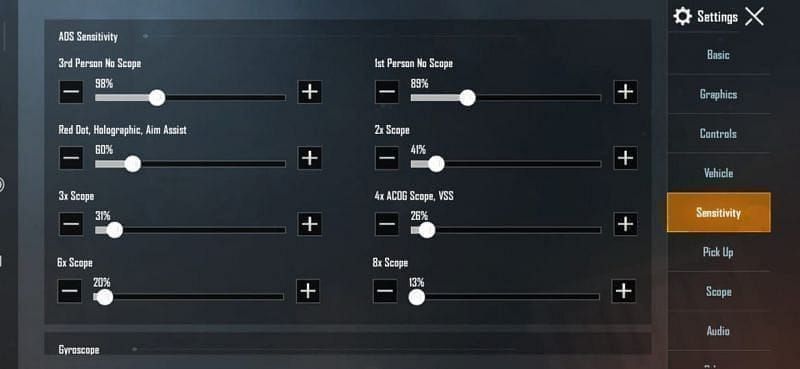
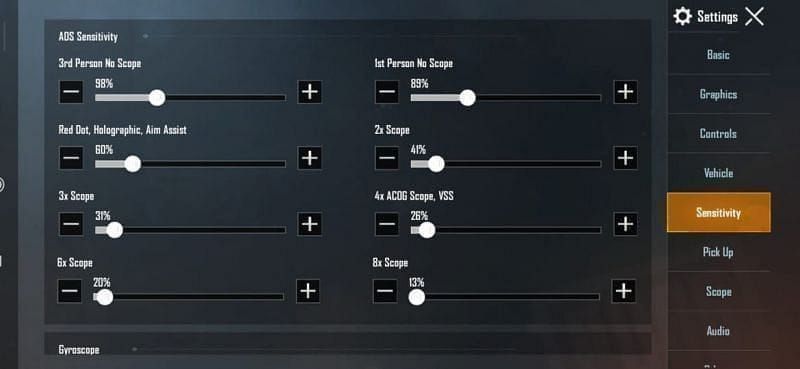
Here's the golden rule: scope magnification and sensitivity have an inverse relationship. Higher magnification amplifies every tiny movement, so you need proportionally lower sensitivity. The cascade goes: No-scope 100-130%, Red Dot 50-70%, 2x 35%, 3x 25%, 4x 20%, 6x 15%, and 8x 12%.
Breaking Down PUBG Mobile's Sensitivity System
PUBG Mobile's sensitivity system operates through three main categories, and understanding each one is crucial for optimization.
Camera sensitivity controls your free-look movement and general view adjustment. Most aggressive players run this between 120-150%, while conservative players stick to 95-100%. It's really about your playstyle – are you constantly checking corners and scanning for third parties, or do you prefer methodical, controlled movement?
ADS (Aim Down Sight) sensitivity is where the magic happens for recoil control. This follows that inverse magnification cascade I mentioned earlier.
PUBG Mobile gives you individual sensitivity slots for each scope type. Here's how to access them: Settings > Sensitivity, then configure each one:
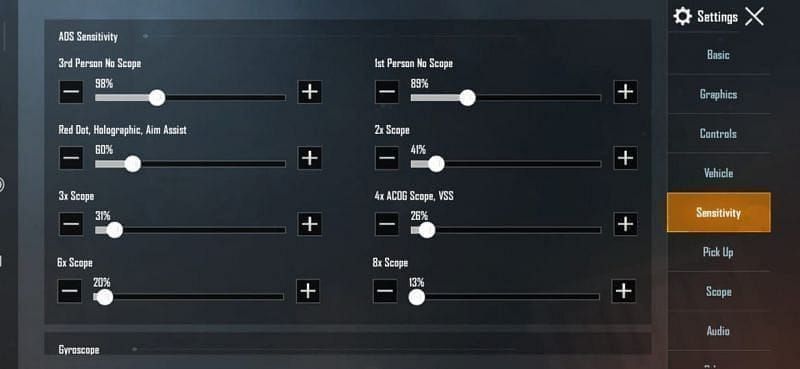
No Scope: 100-130% for hipfire situations
Red Dot/Holographic: 50-70% for close-range fights
2x Scope: 35% for versatile mid-range
3x Scope: 25% for sustained mid-range fire
4x Scope: 20% for precise mid-to-long range
6x Scope: 15% for DMR work
8x Scope: 12% for bolt-action precision
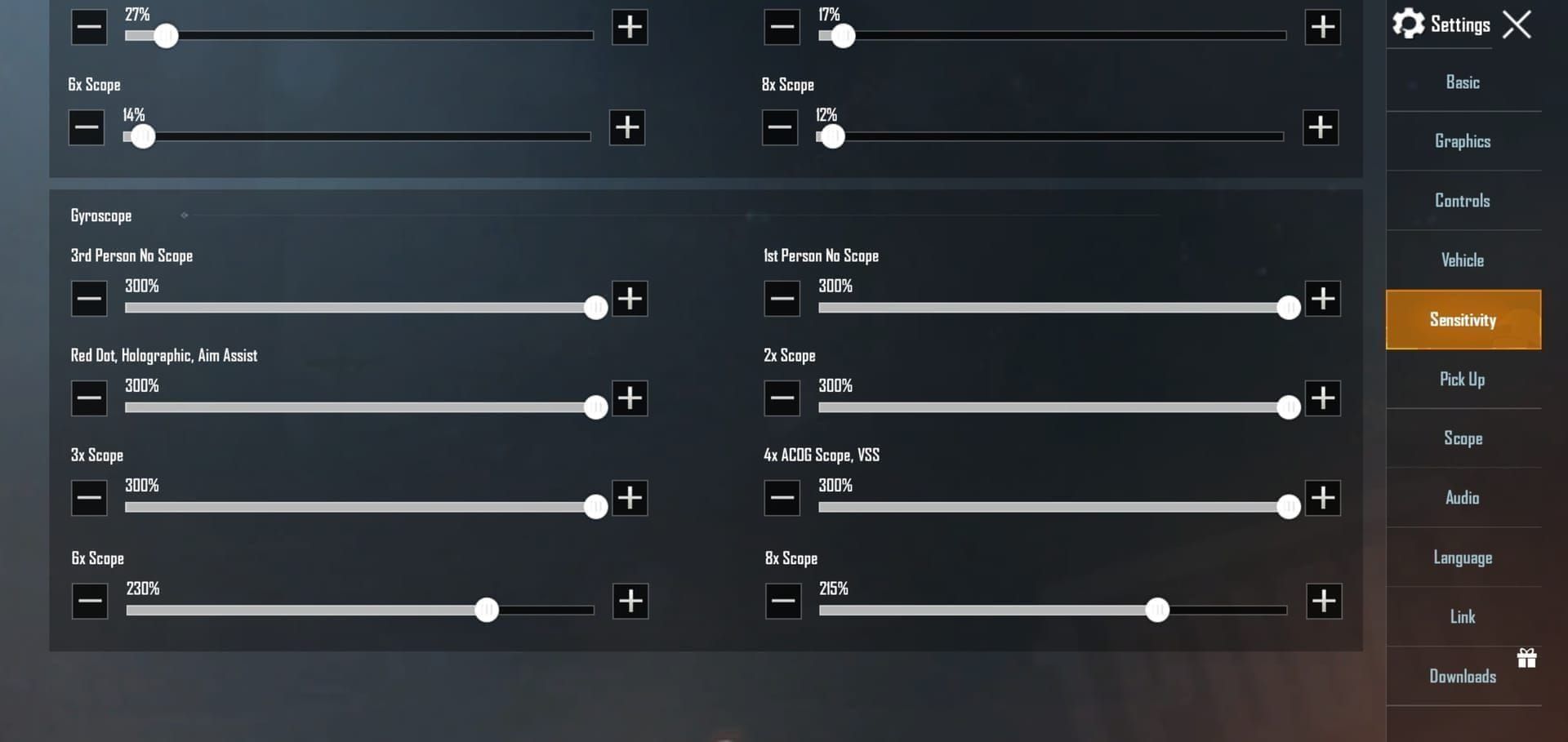
Gyroscope settings follow their own logic. Close-range benefits from 400% on Red Dot and 2x scopes – you want that aggressive tracking ability. Mid-range engagements use 275% on 3x/4x scopes for controlled beaming. Long-range sniping drops to 80-90% on 8x scopes for micro-adjustments.
Pro tip: Always enable Always On gyroscope mode and calibrate weekly on a flat surface. Your phone's gyroscope drifts over time.
Close-Range Spray Mastery (0-50m Combat)
Close-range is where fights are won or lost in seconds. Your Red Dot and Holographic sight settings need to be dialed in perfectly.
ADS sensitivity between 50-70% is the sweet spot. Android devices with 90Hz+ refresh rates can handle the higher end of this range – that smooth display makes a real difference. iOS devices typically perform well at 60-70%. Start with universal code 1-7435-8846-3421-0303-0728, then fine-tune from there.
Gyroscope sensitivity should be cranked to 400% for both Red Dot and Holographic sights. This might feel overwhelming at first, but stick with it. The ability to make micro-adjustments while spraying is game-changing.
No scope sensitivity needs higher values – 100-130% – because you're dealing with rapid target switching in tight spaces. Your TPP camera sensitivity should complement this at 120-150% if you're an aggressive player. You need to check those corners fast.
Weapon-specific tuning makes a huge difference. The M416 achieves optimal spray control with Red Dot sensitivity at 50-60%. The AKM requires 55-65% due to its increased horizontal recoil pattern. Post-update testing shows M416 spray density reaches 58% at 100 meters when using optimized sensitivity on 120 FPS devices.
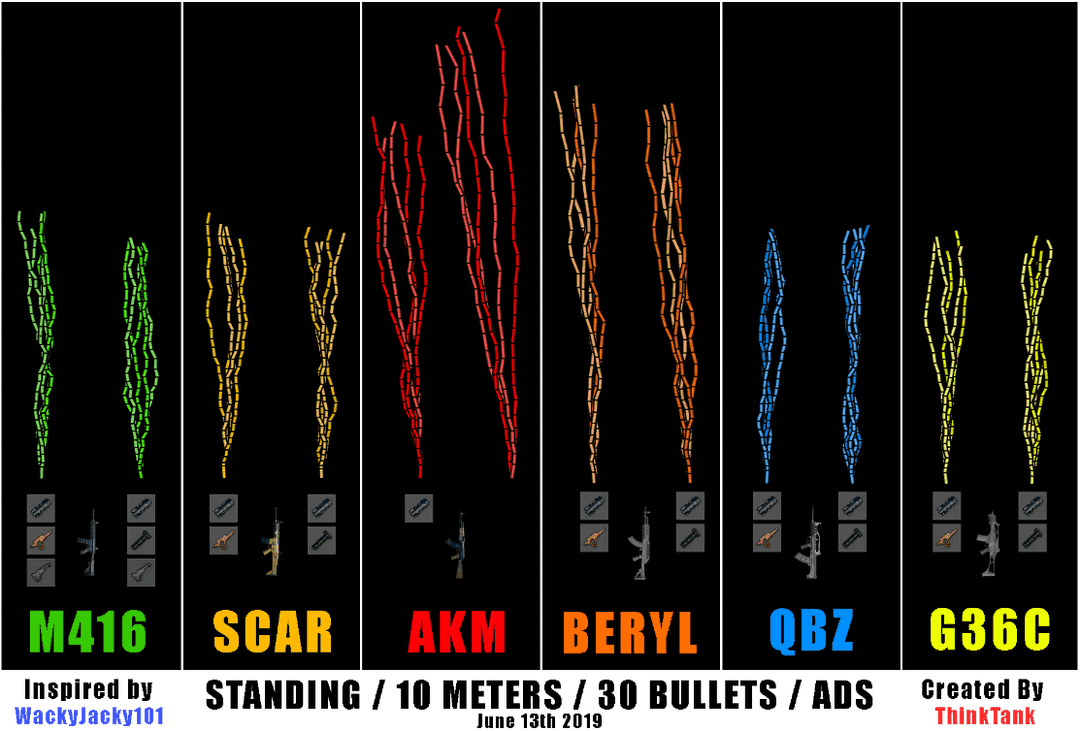
SMGs need special attention. UMP45 performs best with Red Dot sensitivity at 60-70% and gyroscope no-scope at 300-400%. Bump hipfire sensitivity to 80-100% to maximize that 470 DPS potential in close quarters. The Vector? Similar settings, but you can push the sensitivity slightly higher due to its faster fire rate.
Mid-Range Beam Settings (50-150m Engagements)
Mid-range is where most fights actually happen, and it's where proper sensitivity settings separate good players from great ones.
The 3x scope is your bread and butter here. Set ADS sensitivity at 25% for most assault rifles, and drop gyroscope to 275% for finer control during those sustained fire sequences. Professional players like Jonathan run 3x ADS gyroscope at 236% with camera sensitivity between 120-150%.
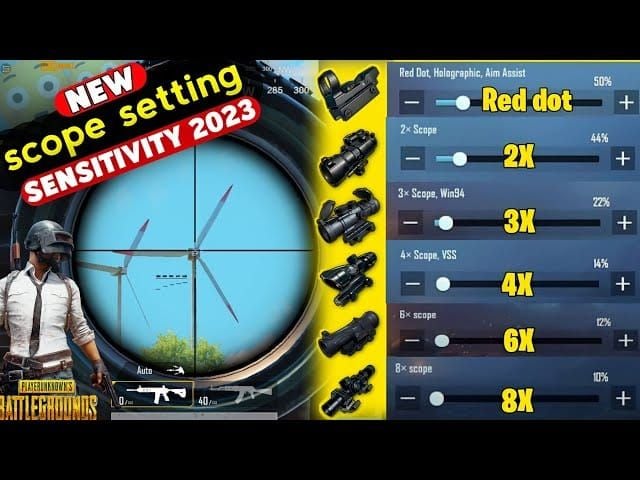
The 4x scope needs ADS sensitivity at 20% with gyroscope at 275%. This is where DMRs really shine. The Mini14 hits its sweet spot with 4x sensitivity at 22-27% and gyroscope at 160-200%. The SLR wants 20-25% ADS with 140-180% gyroscope – it's got more kick than the Mini14.
For players seeking to enhance their training efficiency, pubg mobile uc top up for adjustable aim training skins through BitTopup provides access to premium training resources and customizable practice environments.
Attachments play a huge role in mid-range performance. Vertical grips reduce recoil by 15%, while compensators decrease horizontal recoil by 25%. These attachments let you run 5-10% higher sensitivity while maintaining spray control.
Moving target tracking at mid-range requires balanced camera sensitivity between 95-120%. Map matters too – Sanhok's dense vegetation benefits from higher camera sensitivity (120-150%) for quick target acquisition, while Miramar's open terrain works better with conservative settings (95-100%). Set Free Look sensitivity to 150% regardless of map.
Sniping Precision for Long-Range Dominance
Sniping is a completely different beast. It's all about precision over speed.
The 6x scope performs optimally with ADS sensitivity at 15% and gyroscope at 120%. The 8x scope needs 12% ADS with 80-90% gyroscope for maximum precision. These values enable precise bullet placement at distances exceeding 200 meters – and that's where snipers earn their keep.
Bolt-action rifles like the AWM and M24 benefit from slightly lower gyroscope settings (50-120%) compared to semi-automatic snipers. Quick scoping requires balance between precision and acquisition speed. The AWM performs well with 8x sensitivity at 10-15%, while the M24 can handle 12-15%.
DMRs require higher sensitivity values compared to bolt-action rifles due to their semi-automatic nature. The Mini14 performs optimally with 6x sensitivity at 18-22%, while bolt-action rifles use 15% for the same scope. Lower sensitivity provides the precision necessary for bullet drop compensation at extreme ranges.
Complete Configuration Guide
Time to put it all together. Navigate to Settings > Sensitivity to access the complete configuration menu. Always backup your current settings using the Share function before implementing new codes – trust me on this one.
Import sensitivity codes through Settings > Sensitivity > Use Layout/Cloud. Then configure each scope type individually: select the specific scope category, input the corresponding ADS sensitivity value, configure gyroscope sensitivity, test in Training Ground, and make incremental adjustments (±5-10%) based on performance.
Android Devices (90Hz+, 8GB+ RAM):
Universal code: 1-7462-2496-3022-3831-210
Red Dot ADS: 60-70%
3x ADS: 25-30%
8x ADS: 12-15%
Gyroscope: +20-30% above baseline values
iOS Devices (iPhone 12-15):
Universal code: 1-7478-5115-3389-3888-855
Red Dot ADS: 55-65%
3x ADS: 20-25%
8x ADS: 10-12%
iPad/Tablets:
Universal code: 1-7478-5115-3389-3888-854
Apply +20-30% overall adjustments for larger screens
Increase gyroscope to 400% up to 4x scope
Cross-platform sensitivity conversion requires ±5-10% adjustments when switching between Android and iOS devices. Android devices typically need slightly higher values due to different touch sampling rates.
Testing and Refining Your Settings
Here's a structured 15-minute daily training routine that actually works:

3 minutes aim warm-up
5 minutes M416 spray control at 50-meter targets
3 minutes scope transition practice
2 minutes single-shot precision
2 minutes moving target tracking
Focus on full magazine sprays at walls positioned 25, 50, and 100 meters away. This gives you real data on your spray patterns.
Monitor these specific benchmarks: 70%+ burst accuracy at 50 meters, <1 second target acquisition time, <2 meters spray deviation at 50 meters, headshot percentage tracking, and K/D ratio trends. Document these metrics weekly – you'll be surprised how much the data reveals.
Common indicators that require sensitivity adjustment: Overshoot symptoms – reduce gyroscope by 50-100 points and ADS by 5-10% Under-sensitivity – increase sensitivity in 5-10% increments over 3-7 days Inconsistent sprays – verify gyroscope calibration and reduce sensitivity by 10-15%
Implement new sensitivity settings for minimum 3 days before making additional adjustments. Muscle memory requires 3-4 days for basic proficiency and 7-10 days for mastery. Limit adjustments to 5-10% increments – patience pays off here.
Advanced Optimization Techniques
Hybrid control systems are becoming increasingly popular among top players. They utilize moderate gyroscope sensitivity (200-300%) combined with optimized touch sensitivity (80-100%) to provide versatility across different engagement types. This approach enables effective performance without the steep learning curve associated with full gyroscope control.
High refresh rate devices enable more aggressive sensitivity settings. 90Hz+ Android devices can utilize +20-30% higher camera sensitivity and maximum ADS/gyroscope values while maintaining control precision. Make sure to enable gaming mode and ensure 2GB+ free storage for optimal performance.
Analysis of PMGC 2025 reveals interesting patterns:
Jonathan (4-finger claw): TPP 120-150%, Red Dot 60-70%, 3x ADS gyroscope 236%
ScoutOP (thumb+gyroscope): Camera 85-95%, Red Dot 55-60%, 3x 30-35%
Asian professionals: Generally favor gyroscope 300-400%
Advanced players maintain separate sensitivity profiles for different roles:
Aggressive rushing: TPP no-scope 95-100%, Red Dot 50-55%
Support role: 2x 30-35%, 3x 20-25%
Sniper role: 6x/8x 10-13%
Arena/TDM: +10-20% across all settings
Common Mistakes and Troubleshooting
The biggest mistake? Copying professional player settings without considering your own setup. Pro settings are optimized for specific devices, playstyles, and team roles. Direct copying without adaptation often results in worse performance, not better.
Over-sensitivity indicators: Consistent target overshoot, shaky aim during sustained fire, difficulty with precise shots, erratic spray patterns.
Under-sensitivity indicators: Slow target acquisition, inability to track fast-moving targets, poor close-range performance, delayed reaction times.
Device-specific considerations matter:
Low-end Android devices: Reduce sensitivity by 5-10%, use Smooth graphics settings
iOS devices: Generally handle higher sensitivity values better
Tablets: Reduce camera sensitivity by 15-20%, increase gyroscope settings for larger screen compensation
Monitor device temperature and maintain <40°C during extended sessions. Overheating affects touch sensitivity and gyroscope accuracy.
Game updates frequently affect weapon recoil patterns and sensitivity responsiveness. The November 6, 2025 update required 5-10% sensitivity increases due to AR damage nerfs. Always maintain backup configurations and test settings immediately after updates.
Maximizing Performance with BitTopup
UC enables access to premium training modes, extended practice sessions, and exclusive content that accelerates sensitivity optimization. Elite Pass progression provides additional training opportunities and performance tracking tools that help identify areas requiring sensitivity adjustment.
BitTopup offers competitive pricing and instant delivery for UC purchases, ensuring uninterrupted access to training resources. The platform's security measures and customer support make it the preferred choice for millions of PUBG Mobile players worldwide.
Elite Pass missions provide structured challenges that complement sensitivity training routines. Premium tiers offer exclusive training grounds and performance analytics. Regular Elite Pass participation keeps you engaged with current meta trends and weapon balance changes – crucial for staying competitive.
Frequently Asked Questions
What's the best sensitivity for close range spray in PUBG Mobile? Close-range spray control performs optimally with Red Dot sensitivity at 50-70% and gyroscope at 400%. Android 90Hz+ devices can handle 60-70% while iOS devices perform well at 55-65%. The key is finding your device's sweet spot within this range.
How do I set different sensitivities for different scopes? Access Settings > Sensitivity and configure each scope individually. Set No Scope at 100-130%, Red Dot at 50-70%, 3x at 25%, 4x at 20%, 6x at 15%, and 8x at 12%. Import universal code 1-7435-8846-3421-0303-0728 as your starting point, then fine-tune from there.
Why do pro players use separate sensitivity codes for sniping? Sniping requires precision over speed, demanding lower sensitivity values for micro-adjustments. Pro players use 8x sensitivity at 10-15% with 80-90% gyroscope to enable precise bullet placement at 200+ meter ranges. It's a completely different skill set from close-range combat.
What sensitivity do PUBG Mobile pros use for mid-range combat? Professional players typically use 3x scope sensitivity at 20-25% with gyroscope at 275%. Jonathan uses 3x ADS gyroscope at 236%, while ScoutOP employs 3x sensitivity at 30-35%. The exact values depend on their device and playstyle.
How does gyroscope sensitivity affect close range fights? Gyroscope at 400% for close-range provides 30-40% faster target acquisition compared to touch-only controls. It enables simultaneous aim adjustment and movement, which is crucial for building fights where rapid target switching determines who wins the engagement.