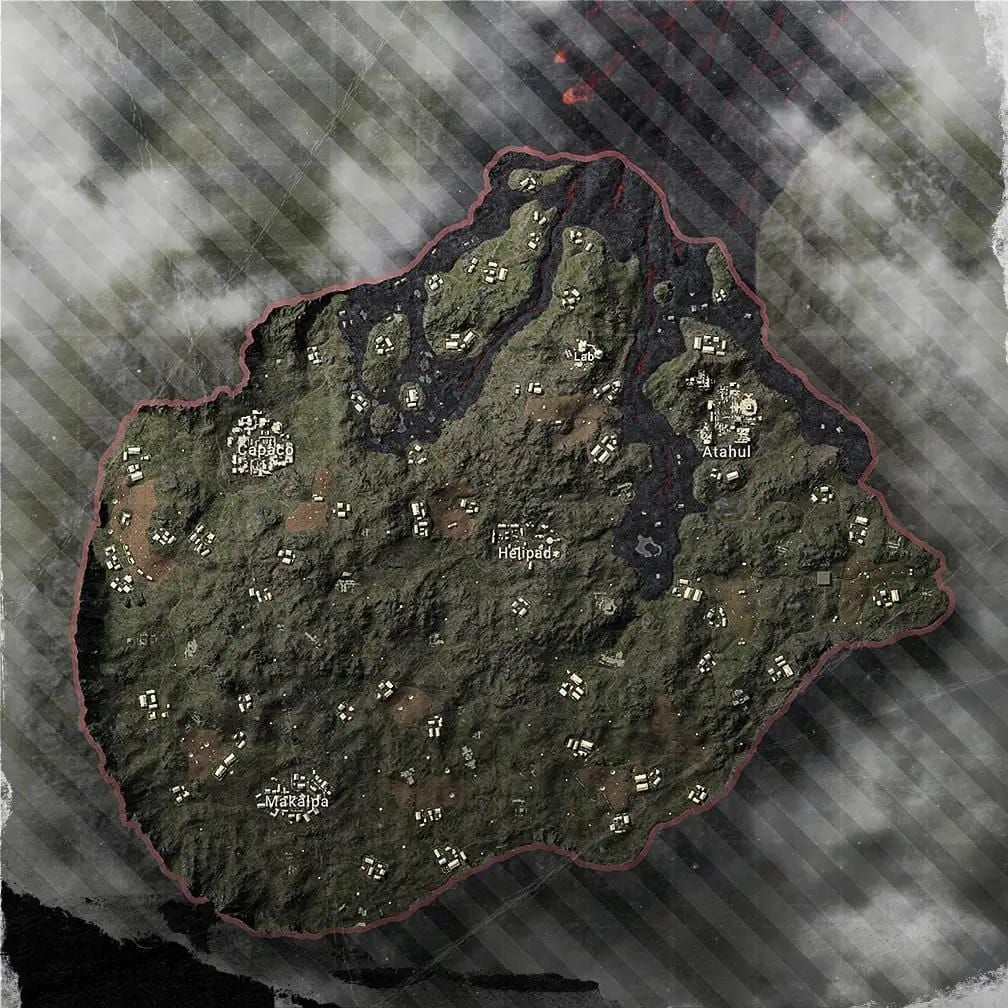
PUBG Mobile 4.2 Beta dropped December 4, 2025, giving players early access to the Rondo map and some pretty significant weapon balance changes ahead of the 2026 Season. Beta testing can give you a real competitive edge through early meta adaptation—but it's not without risks. We're talking game instability, hefty 8-10GB storage requirements, and some account safety considerations you'll want to think through. Here's our complete breakdown of installation pros and cons, UC spending recommendations, and safety protocols to help you make an informed decision about beta participation.
What is PUBG Mobile 4.2 Beta? Understanding the 2026 Season Test Environment
Think of PUBG Mobile 4.2 Beta as your sneak peek into what's coming for the 2026 Season. Released December 4, 2025, this 1.18 GB APK works on Android 5.0+ and has already racked up 24.5 million downloads with a solid 4.4/5 rating from 5,000 reviews.
Here's what you need to know upfront: beta runs on completely separate servers from your regular gameplay. That means none of your progress transfers to the main game—it's essentially a sandbox for testing new features. For players considering pubg mobile uc recharge for upcoming 2026 season, BitTopup provides secure transactions that'll protect your main account investments while you explore beta features.
Beta Server vs Live Server: Key Differences
The differences are pretty stark once you start playing. Beta servers prioritize feature testing over smooth performance, so expect 2-5 minute queue times compared to the usual 30-60 seconds on live servers—smaller player pools will do that. But you get exclusive access to the Rondo map, weapon balance adjustments, and experimental modes that are constantly being tweaked.

Performance expectations? Set them differently. Beta intentionally pushes boundaries, which means frame rate fluctuations and occasional crashes are part of the deal. Live servers prioritize stability; beta servers prioritize innovation.
Who Should Install 4.2 Beta
Competitive players, this one's for you. Early meta adaptation is huge—we're seeing 70% DMR stability improvements and 10-15% AR damage nerfs past 100 meters. Understanding these shifts before official release? That's a significant advantage right there.
Content creators will find value in exclusive footage and early feature coverage. Nothing drives engagement like being first to showcase new content. And if you're someone who genuinely wants to influence development through feedback—bug reports, balance suggestions—your input directly impacts what millions of players experience when updates go live.
Beta Timeline and Release Expectations
The 4.2 Beta follows PUBG's established testing cycles. It launched after the November 6, 2025 4.1 update and November 26 PMGC finals. Historical patterns show 3-4 week testing periods, so we're looking at an official 4.2 launch in early-mid January 2026. Current 4.2.1 is the first major build—expect 4.2.2 and 4.2.3 versions before the stable release.
PUBG Mobile 4.2 Beta Installation: Pros You Need to Know
Early Access to New Content
Getting familiar with the Rondo map before everyone else means learning terrain, loot spawns, and strategic positions while the competitive community is still catching up. The DMR buffs are substantial—we're talking 70% stability improvements that make the Mini-14 genuinely viable with 48 damage and 990 m/s velocity.

SKS and SLR both gain 58 damage with 840 m/s velocity, increasing their viability by about 60% compared to previous versions. Plus, those experimental modes often become permanent fixtures, so you're essentially getting a preview of the game's future.
Competitive Advantage: Master Meta Changes
Professional players recognize beta testing as essential preparation—and for good reason. AR dominance is dropping from 85% picks in 4.1 to a projected 60-65% in 4.2. That means understanding DMR/SMG hybrid loadouts isn't just helpful; it's necessary.
In practice, daily 15-20 minute training drills yield 15-20% win rate improvements within 2-3 weeks. Training Grounds room code 7307-1085-6780-4282-435 provides optimal practice conditions. PMGC statistics show professionals averaging 1.72 K/D ratios and 402 damage per match using optimized loadouts—numbers you can start working toward now.
Exclusive Rewards and Development Influence
Beta participants typically receive exclusive rewards: unique titles, avatar frames, and in-game currency bonuses for active testing. But beyond the rewards, there's something satisfying about having your feedback connect directly with development teams. The structured feedback system lets you report bugs, suggest balance changes, and propose feature improvements that influence millions of players' experiences.
The Cons and Risks of Installing PUBG Mobile 4.2 Beta
Game Instability Issues
Let's be honest about what you're signing up for. Beta versions cause frequent technical problems: frame rate drops during combat, crashes when accessing new features, and inconsistent hit registration that can absolutely ruin competitive gameplay.
Graphics optimization remains incomplete, causing overheating on mid-range devices and 20-30% higher battery drain than live servers. Network connectivity problems occur frequently, with packet loss spikes during peak testing hours. It's frustrating when you're trying to practice and the game decides to hiccup at the worst possible moment.
Storage and Performance Requirements
Here's where things get demanding. Installing 4.2 Beta means maintaining both versions simultaneously—that's 8-10 GB total storage. The 1.18 GB APK expands significantly and requires 4GB minimum free space during installation. Regular beta updates compound storage issues since each iteration needs additional space during the update process.
If you're running a budget device with 32GB or less internal storage, this might compromise your device's overall functionality. Something to consider before diving in.
Limited Player Pool and Progress Isolation
Beta servers maintain smaller populations, resulting in those 2-5 minute queue times and repetitive opponent encounters. Regional variations make this worse—some areas experience 5-10 minute waits for specific modes.
And here's the kicker: all beta progress including rank advancement, achievements, and cosmetics remains isolated from your main account. Time invested doesn't contribute to your primary competitive standing. For players considering secure pubg mobile uc purchase for account safe upgrades, BitTopup ensures your main account investments remain protected during beta exploration.
Account Safety Analysis: Can You Get Banned for Using Beta?
Official vs Unofficial APK Risks
Official beta programs carry minimal ban risk—they operate under developer oversight with established safety protocols. Unofficial APK sources? That's where things get risky. We're talking modified game files, injected malware, and unauthorized modifications that trigger anti-cheat systems.
The post-September 4 PUBG 4.0 update introduced kernel-level monitoring that detects unauthorized modifications with 90% accuracy. This actually makes legitimate beta participation safer than ever—the system can distinguish between official beta features and sketchy modifications.
Account Protection Measures
The safest approach? Use guest accounts for beta testing rather than linking your primary account. This protects your main progress, purchases, and ranking from potential beta issues while maintaining access to core features.
If you do link your main account, enable two-factor authentication, use unique passwords (rotate them quarterly), and monitor account activity closely during beta participation. Basic security stuff, but worth emphasizing.
Common Ban Triggers and Prevention
Current statistics show 71% of bans result from cheating violations, with 31% specifically from ESP, aimbots, and wallhacks. Beta environments face increased scrutiny due to experimental features potentially triggering false positives.
Avoid third-party software, macros, or peripheral modifications. Maintain consistent geographic login patterns, avoid VPN usage when possible, use ethernet connections, and limit account sharing during beta participation. Pretty standard advice, but beta testing isn't the time to get creative with your setup.
UC Spending in PUBG Mobile 4.2 Beta: Expert Recommendations
Beta UC Purchase Analysis
Here's the thing about UC purchases in beta—they carry significant limitations. No content transfers to live servers, meaning beta spending provides zero lasting value to your main account. However, small test purchases of 60 UC ($0.99) can verify transaction security before making major live server investments.
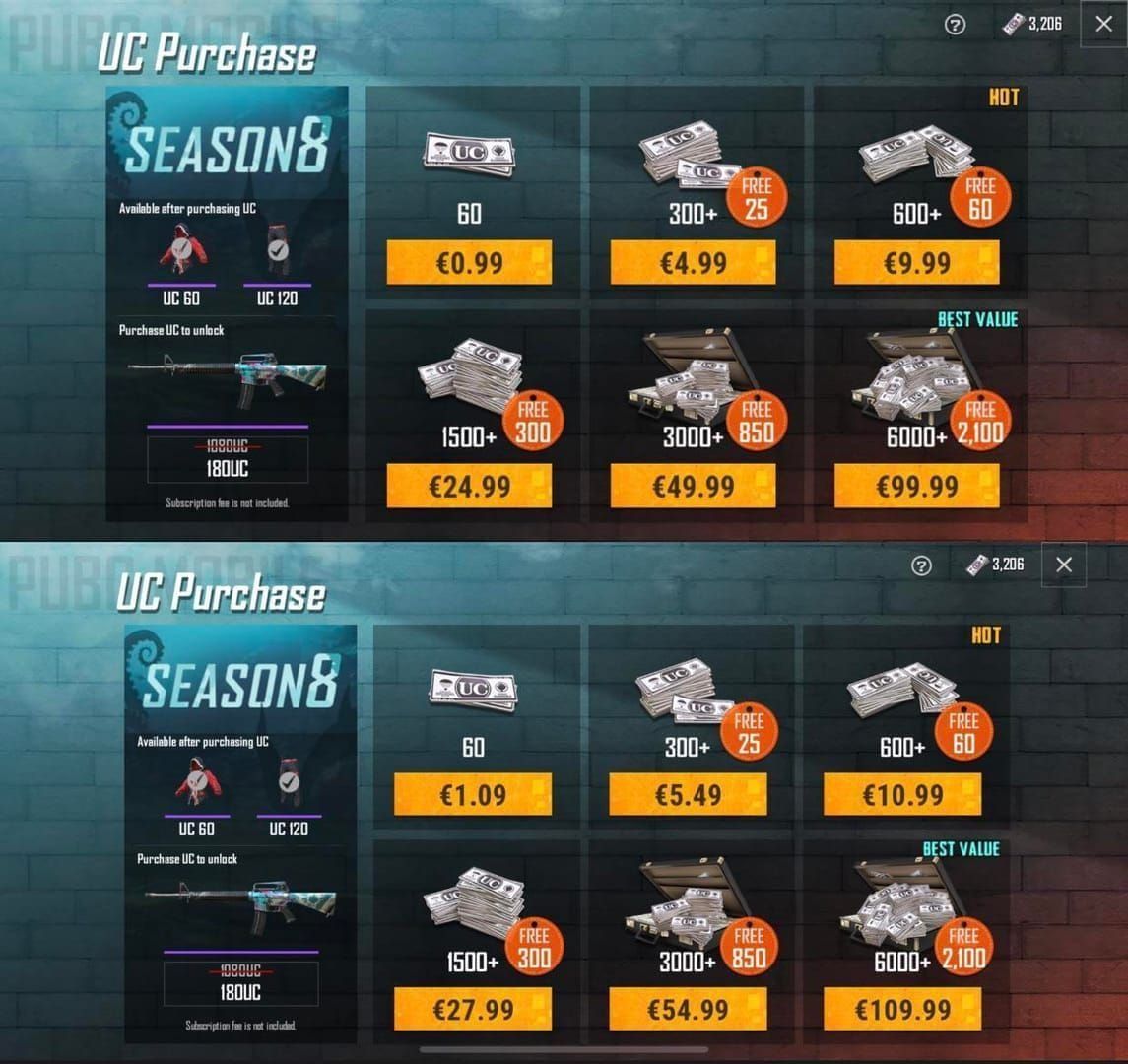
The beta environment does let you evaluate new UC opportunities like upcoming battle passes before committing to live server purchases with permanent value. Think of it as a preview, not an investment.
Smart UC Strategy for Live Servers
For actual live server needs, BitTopup offers secure transactions with competitive pricing and instant delivery. PCI-compliant payment processing and official API integration ensure zero ban risk, plus excellent customer service when you need it.
Available packages include 60 UC ($0.99), 660+60 bonus UC ($9.99), and 6,000+2,100 bonus UC ($99.99) offering up to 35% bonus value. Time your purchases around major updates when bonus offers maximize value—that's just smart spending.
Safe Installation Guide: Step-by-Step Process
System Requirements and Preparation
First, verify you're running Android 5.0+ with 4GB free internal storage. Recommended specs: 8GB RAM, Snapdragon 660 equivalent or better, stable internet connectivity.
Clear device storage, remove unnecessary files, and restart your device before installation. This optimizes memory allocation and reduces potential conflicts during the installation process.
Official Download and Installation
Access beta through verified channels only—avoid modified APKs like the plague. The legitimate 4.2.1 Beta SHA256 is: f03c950d072793131d90d613805b35068770fd056ce97d8ed607005647af6d93.
Enable installation from unknown sources temporarily, then disable it after successful installation. Use guest account login initially to protect your main account from potential issues.
Optimal Performance Settings
Configure Smooth graphics with High frame rate for optimal performance. Adjust sensitivity for beta weapon changes: 160-200% gyro sensitivity for DMRs, 300% for Vector usage.
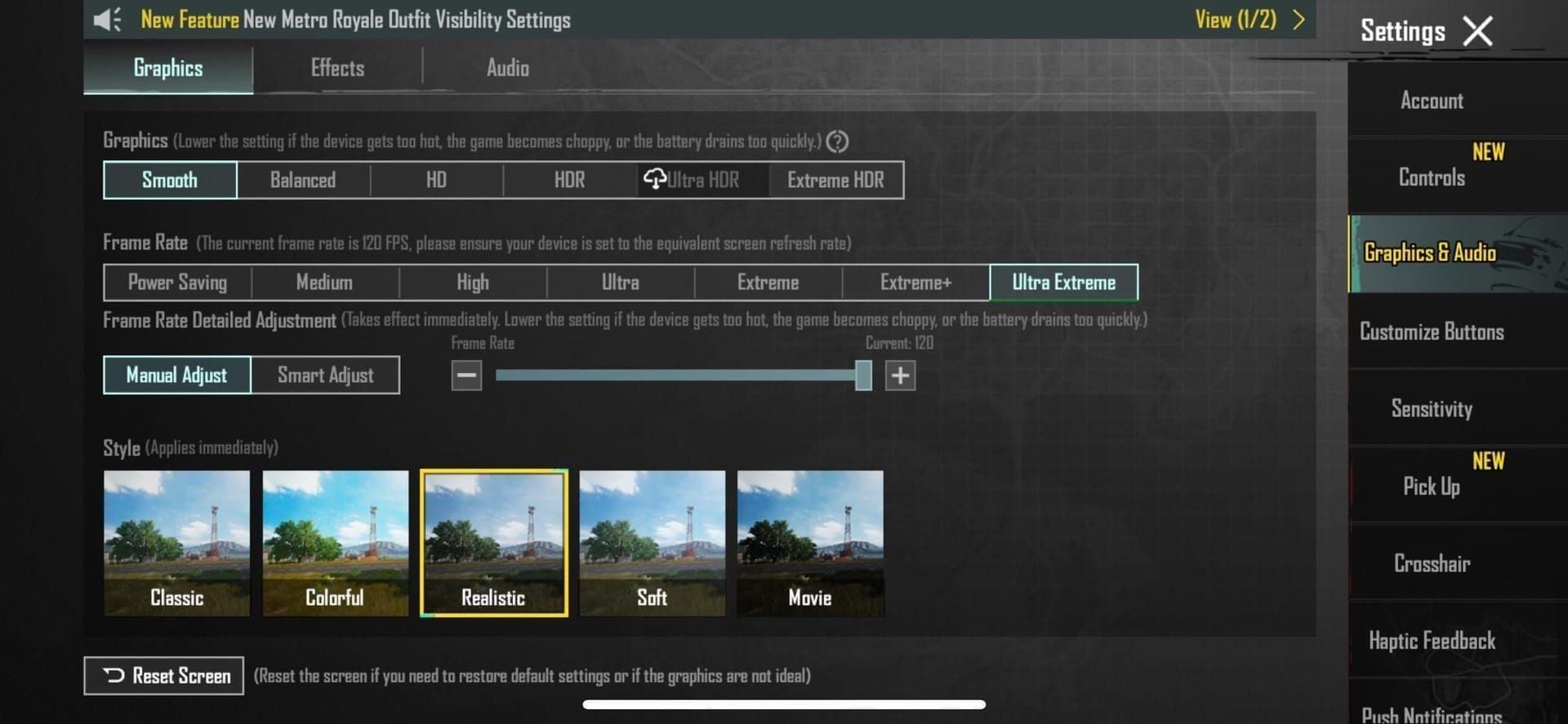
Enable performance monitoring to track frame rates, temperature, and battery usage. This prevents device damage during extended sessions—trust me, overheating isn't worth the practice time.
PUBG Mobile 4.2 Beta New Features and Changes
Confirmed New Features
The Rondo map supports classic solo, duos, and squad modes with genuinely interesting terrain layouts and strategic positions. Enhanced graphics optimizations improve visual quality while maintaining performance across different device ranges.
New experimental game modes test innovative concepts that influence future updates based on player reception. Some of these become permanent fixtures, so you're essentially beta testing the future of PUBG Mobile.
Weapon Balance and Meta Shifts
DMR weapons receive those substantial 70% stability improvements, making them viable AR alternatives for the first time in a while. The Mini-14 delivers 48 damage with 990 m/s velocity, achieving 70%+ burst accuracy at 50-100 meters.

AR nerfs include 10-15% damage and velocity reductions past 100 meters, shifting the meta away from AR dominance. The M416 maintains 41 damage and 482 DPS but suffers reduced long-range effectiveness. Professional DMR adoption is projected to increase from 40% to 60-80%—that's a massive shift.
Map and Environmental Updates
Existing maps receive environmental improvements including optimized loot spawns and enhanced visual effects. Erangel's Boatyard shows 28% increased loot density, 64% more assault rifles, and 177% more sniper rifles, making it optimal for hybrid loadout practice.
Advanced rendering techniques improve visual quality while optimizing performance, particularly benefiting mid-range devices. The improvements are noticeable once you start playing.
Decision Framework: Should YOU Install Beta?
For Competitive Players
Beta participation provides substantial ranking advantages through early meta adaptation. Those 15-20% win rate improvements through dedicated practice justify the time investment for serious competitors. Understanding weapon changes before official release translates directly into ranked success when updates go live.
If you're serious about climbing ranks, this isn't optional—it's preparation.
For Casual Players and Content Creators
Casual players should honestly assess their tolerance for instability and storage limitations. Bugs will frustrate those seeking relaxed experiences, so consider whether the early access is worth the technical headaches.
Content creators gain substantial value through exclusive footage and early coverage. Higher engagement and establishing thought leadership in the community—that's valuable for building your audience.
Final Recommendation
Install if you're competitive and seeking advantages, creating content that needs exclusive footage, or genuinely enthusiastic about influencing development. Avoid if you prioritize stability, have limited storage, or prefer polished experiences without technical issues.
It's really that straightforward.
Frequently Asked Questions
Is PUBG Mobile 4.2 Beta safe to install? Yes, the official 4.2 Beta is safe to run alongside regular PUBG Mobile. Use guest account login to protect your main progress since beta and live servers operate independently.
Will I get banned for using beta? No, official beta participation carries minimal ban risk. It operates under developer oversight with the same security standards as live servers.
Can I transfer UC from beta to live server? No, UC and purchases remain isolated between servers. This prevents economic exploitation while maintaining game balance.
What are the key new features? Rondo map, 70% DMR stability improvements, 10-15% AR damage nerfs past 100 meters, graphics enhancements, and experimental modes that significantly shift the weapon meta.
How much storage is required? 1.18 GB APK plus 4GB minimum free space, totaling 8-10 GB when maintaining both beta and live versions.
Do I get rewards for testing? Beta testers often receive exclusive titles, avatar frames, and recognition for feedback contributions, though specific 4.2 rewards haven't been announced yet.