

PUBG Mobile 4.2 PrimeWood Genesis beta launched December 4, 2026, transforming Erangel with Guardian Flowers, Scorpion mounts, and weapon buffs. The 1.18GB Android APK requires SHA256 verification (f03c950d072793131d90d613805b35068770fd056ce97d8ed607005647af6d93) to avoid malware. Beta progress runs on isolated servers—nothing transfers to the stable release on January 6, 2026.
What You Need to Know About 4.2 Beta
Released December 4, 2026, this beta transforms Pochinki and Yasnaya Polyana into botanical battlegrounds. Guardian Flowers attack within 30m, Bramblewood Scorpions hit 72 km/h in burrow mode, and AKM/M762/ACE32/Honey Badger/Mk47 gain +2 damage. Beta 2 dropped December 11, 2026, cutting input lag from 45-50ms (90 FPS) to 28-35ms (120 FPS).
Beta servers are completely separate—your ranks, cosmetics, and stats won't carry over. This protects the main economy while letting devs test radical changes. Current queue times: 2-5 minutes across 24.6 million downloads.
Timeline and Release Date
Beta testing runs until early January 2026. Version 4.1's themed mode ends January 5, 2026—one day before the stable 4.2 release on January 6, 2026. Tencent typically runs 2-3 beta iterations: Beta 1 tested core mechanics, Beta 2 optimized performance.
Why Official Downloads Matter
Fake APKs are the #1 attack vector for account theft. Modified clients harvest credentials, inject keyloggers, and install backdoors using your device's 35 permissions (contacts, storage, network). Even non-malicious fakes trigger permanent bans—Tencent's anti-cheat detects modified signatures instantly.
The official APK's SHA256 hash confirms file integrity. Modified versions promising free UC or early features deliver malware instead. Once installed, they access everything: payment data, messages, account details.
Beta vs Stable Release
Beta builds prioritize testing over polish. Expect visual glitches, placeholder textures, and incomplete translations. The 1.18GB beta uses compressed assets vs the final 20GB+ stable release with high-res textures.
PrimeWood Genesis dominates beta testing, but the stable version adds content not in beta. Some experimental features may not reach final release based on feedback. Beta servers use different matchmaking and region restrictions than global stable servers.
Official Download Links (Verified Only)
Android beta uses package com.tencent.igce (different from production's com.tencent.ig), allowing simultaneous installation. Supports armeabi-v7a and arm64-v8a architectures.
Minimum specs: Android 5.0+, but Android 8.0+ with 4GB RAM recommended for Smooth graphics. 6GB RAM handles Balanced, 8GB+ needed for Ultra HD.
Regional priority: Southeast Asia, North America, Europe get first access. Other regions may need official testing program registration.
Android Installation Steps
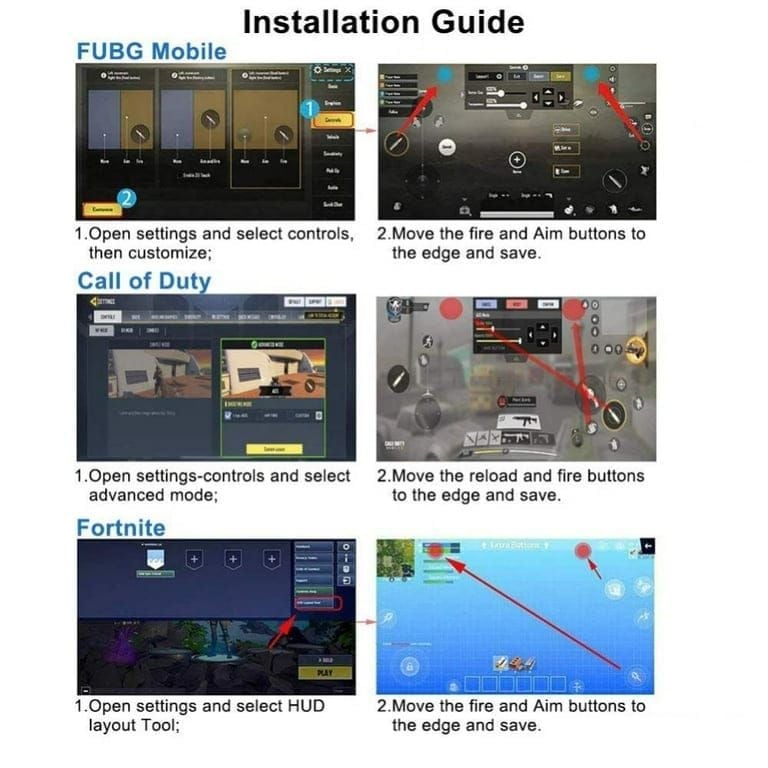
Download APK: Get the verified 1.18GB file with SHA256 hash f03c950d072793131d90d613805b35068770fd056ce97d8ed607005647af6d93
Enable Unknown Sources: Settings > Security > Install Unknown Apps > select your browser/file manager > toggle on
Verify File: Confirm 1.18GB size and com.tencent.igce package name before installing
Install: Tap APK, grant the 35 required permissions (storage, network, device state, audio only)
Launch: Select server region, use guest account initially to protect main account
Verify Version: Check Settings > About for December 4 or December 11, 2025 build number
Server Selection Guide
North America/Europe: <50ms ping, 2-3 min queues, competitive players Southeast Asia: Serves India/Indonesia/Thailand, similar performance Cross-region play: Adds 100-200ms latency—avoid unless necessary
Your beta server choice doesn't affect main account assignment after January 6, 2026 stable release.
File Verification Checkpoints
Size: Exactly 1.18GB (under 1GB = stripped assets, over 1.3GB = injected malware) Version format: 4.2.x.xxxxx (Dec 4 = 4.2.0.xxxxx, Dec 11 = 4.2.1.xxxxx) Package name: Must be com.tencent.igce (not com.tencent.ig or variations)
Identifying Fake APKs: Red Flag Checklist
Fake APKs exploit urgency and exclusivity promises. Visual inspection reveals inconsistencies in certificates, permissions, and metadata.
Visual Red Flags

Icons: Pixelated, wrong colors, outdated branding
File names: PUBGUNLIMITEDUCHACK.apk or EARLYACCESS_VIP.apk
Developer: Shows Unknown instead of verified Tencent
Permissions preview: Requests beyond standard 35 categories
Dangerous Permission Requests
Legitimate needs: Storage (game data), network (multiplayer), microphone (voice chat), location (anti-cheat)
Red flags:
SMS read/send (premium scams, 2FA bypass)
Call logs (contact harvesting)
Always allow location (background tracking)
Device administrator (locks device, prevents uninstall)
Certificate Verification
Official beta certificate contains Tencent's verified developer info. Check via file manager APK analysis or signature tools. SHA256 hash must match exactly—even one character difference = tampered file.
Certificate expiration dates should be years in future. Expired/soon-to-expire = outdated or fake credentials.
Technical Verification Tools
APK Signature Checkers
Apps from official stores extract certificates and compare against known values automatically. Manual method via ADB:adb shell pmdump[package_name] shows signatures, permissions, metadata.
Online analyzers generate reports but introduce privacy risks—never upload APKs with personal data.
SHA-256 Hash Comparison
Official hash: f03c950d072793131d90d613805b35068770fd056ce97d8ed607005647af6d93
Generate hash locally via file manager tools (takes ~1 min for 1.18GB). Compare character-by-character—any difference = modified file. Hash immediately after download, before installation.
Package Name Verification
Check Settings > Apps > [App Name] > Advanced > App Details for exact package identifier. Must match com.tencent.igce for beta, com.tencent.ig for production. Similar names like com.tencent.pubgmobile or com.pubg.mobile are fakes.
Risks of Unofficial Versions
Malware Threats
Keyloggers capture passwords and messages. Screen recorders harvest account details. Network interceptors expose session tokens and friend lists. Backdoors survive app uninstallation—require factory reset.
Data exfiltration happens gradually during normal gameplay to avoid detection. Attackers maintain access for weeks, stealing credentials and payment info.
For secure UC purchases, use PUBG Mobile UC top up on BitTopup with verified payment processing.
Account Bans
Anti-cheat detects modified clients through:
Signature checks: Compare app hash vs legitimate values at login
Behavioral analysis: Identify impossible actions (aim assist, wallhacks, speed hacks)
Penalty: 10-year ban on first offense = permanent loss. Appeals rarely succeed. No beta access justifies this risk.
Compromise Case Studies
Common pattern: Early access APKs drain accounts of UC/items within 24 hours. Stolen credentials get tested across gaming platforms, social media, email (credential stuffing).
Recovery takes weeks/months. Must prove ownership via receipts, device info, login history. Spent UC and deleted items rarely restored.
Installation Guide
Pre-Installation Checklist
Storage: 20GB+ free (1.18GB APK expands during install)
Battery: 50%+ charge or connect to power
Network: Wi-Fi for reliable 1.18GB download
Backup: Save important device data before beta install
Common Installation Errors
App not installed: Insufficient storage, conflicting packages, or corrupted APK. Clear 20GB space, uninstall existing beta versions, re-download if needed.
Permission denial: Enable Settings > Security > Install Unknown Apps for your file manager.
Signature verification failure: APK doesn't match Tencent certificates. Delete file, get verified copy—never bypass this check.
First Launch Setup
Server: Choose closest region for best latency Graphics: Smooth + Extreme frame rate = 120 FPS. Disable Anti-Aliasing/Shadows. Brightness 125-150%. Enable Vulkan API, restart app. Controls: Spend 10-15 min in training mode adjusting sensitivity and button placement
PrimeWood Genesis Features
Map Changes
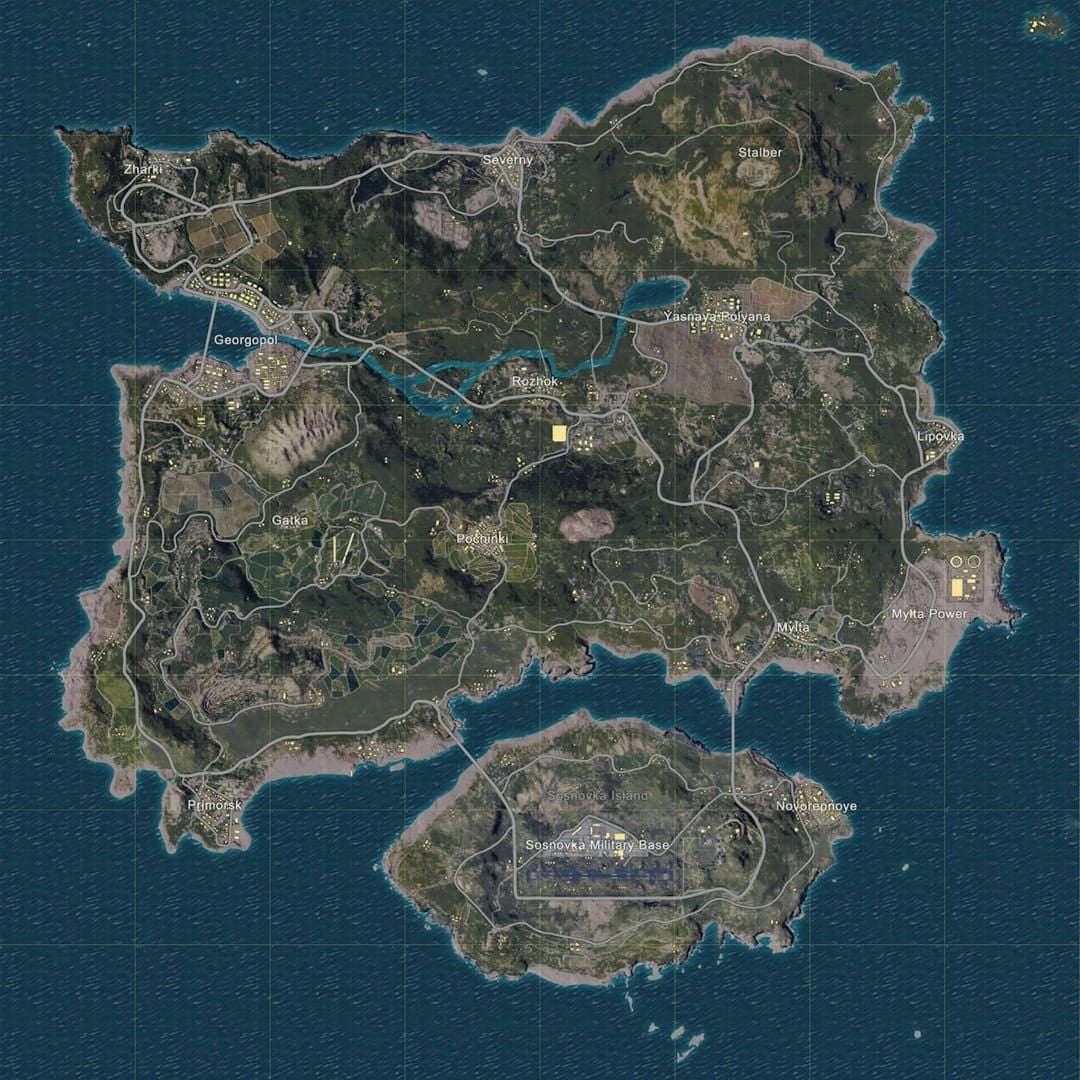
Hot drops: World Tree (dense loot, extreme combat), Vine Temple main/sub halls (high-tier loot, less density) Overgrowth: Vines across streets, flowers at entrances, roots through pavement in Pochinki/Yasnaya Rotations: Guardian Flowers line roads—balance speed vs safety
Weapon Balance
Assault rifle buffs (+2 damage): AKM, M762, ACE32, Honey Badger, Mk47 Groza: +1 damage = fastest-killing auto weapon close-to-medium range Shotgun nerfs: Increased spread, reduced damage across S686, S1897, DBS, S12K, NS2000, M1014
New Mechanics
Bramblewood Scorpion: 40 km/h ground, 72 km/h burrow. 3-hit Claw Combo. Launch Spikes: 3-shot burst, 5 charges, 3s reload. Tail exposed while burrowed = vulnerability.
Lumina Fruit Bud: Plant for full L3 gear + airdrop weapon next match
Flower Wing: Low-altitude glide, upward dash, downward dive with AoE damage
Lashing Vine: Protective ring blocks fire, extends as steerable offensive vine
Guardian Deer: Two-seater mount with flower trail, superior botanical terrain handling
Roaming Plant Boss: Drops L2-3 gear, creates high-risk encounters
Beta Timeline Through January 6, 2026
Beta 1 (Dec 4): Core mechanics stability Beta 2 (Dec 11): Performance optimization, input lag fixes Stable release: January 6, 2026 with Season 7
Expected Pre-Launch Changes
Weapon balance fine-tuning based on time-to-kill data
Performance optimization: 60 FPS stable on 4GB RAM, 120 FPS on 8GB+
Guardian Flower density adjustments per player feedback
Bug fixes prioritized by frequency/severity
Feedback Impact
Developers track weapon usage, kill distributions, survival times. Statistical analysis + qualitative feedback shape final release. Beta testers may receive exclusive titles/cosmetics for participation.
Account Security During Beta
Protection Measures
Two-factor authentication: Essential—prevents access even if credentials stolen Guest account first: Test beta 24-48 hours before linking main account Password strength: Unique combo of upper/lower/numbers/symbols
Phishing Recognition
Fake emails offer beta invites/codes/rewards to harvest credentials. Tencent never requests passwords via email. Manually type official URLs—don't click email links.
Check URLs carefully: pubgmobiIe.com (capital i) vs pubgmobile.com (lowercase L) = phishing.
If Compromised
Change password immediately through official channels
Contact support with login times, purchase history, suspicious activity
Document evidence via screenshots
Dispute unauthorized charges (may trigger suspension pending investigation)
Preparing for Official Release
Strategic Advantages
Beta mastery = competitive edge in Season 7. Learn Guardian Flower placements, Plant Boss routes, high-loot areas before ranked consequences apply.
Map knowledge: Botanical overgrowth creates new cover/sightlines—beta exploration builds spatial awareness Weapon proficiency: Practice buffed AKM/M762 recoil patterns and optimal ranges Rotation timing: Account for Guardian Flower delays—start rotations earlier
Meta Adaptation
AKM/M762 rise to top-tier, potentially displacing M416/SCAR-L. Early adopters gain advantages.
Loadout optimization: Integrate Flower Wing/Lashing Vine into inventory management Team composition: Coordinate Scorpion/Guardian Deer mobility for rotations/flanks
UC Preparation
Season 7 launches with exclusive Royal Pass, limited cosmetics, premium crates. Stock UC before January 6, 2026 for immediate access.
BitTopup offers competitive pricing with instant delivery. Early Royal Pass purchase maximizes mission completion time—delays reduce tier rewards.
FAQ
How do I download PUBG Mobile 4.2 beta officially? Download 1.18GB APK for Android 5.0+, verify SHA256 hash f03c950d072793131d90d613805b35068770fd056ce97d8ed607005647af6d93, enable unknown sources, install com.tencent.igce package. Beta runs on separate servers—progress doesn't transfer to January 6, 2026 stable release.
What are signs of fake APKs? Wrong size (not 1.18GB), incorrect package (not com.tencent.igce), missing certificates, excessive permissions beyond 35 standard categories, pixelated icons, suspicious names promising free UC/hacks. Always verify SHA256 hash and developer certificate.
When does 4.2 release officially? January 6, 2026 with Season 7. Beta started December 4, 2025 (Beta 2 on December 11). Version 4.1 themed mode ends January 5, 2026.
Can I get banned for unofficial APKs? Yes. Modified clients trigger 10-year bans (permanent loss) on first offense. Anti-cheat detects signatures and behaviors instantly.
What's new in 4.2 PrimeWood Genesis? Guardian Flowers (30m range), Scorpion mounts (72 km/h burrow), Flower Wing gliding, Lashing Vine, Guardian Deer. Weapon changes: +2 damage for AKM/M762/ACE32/Honey Badger/Mk47, shotgun nerfs.
How to verify APK authenticity? Check 1.18GB size, com.tencent.igce package, SHA256 hash f03c950d072793131d90d613805b35068770fd056ce97d8ed607005647af6d93, Tencent certificate, 35 permissions. Use signature checker tools or file manager metadata inspection.