

PUBG Mobile 4.2 Beta Primewood Genesis launched December 4, 2025, introducing native 120 FPS support. While Ultra HD locks at 60 FPS, competitive players achieve optimal performance using Smooth graphics with Extreme frame rate, reducing input lag to 28-35ms versus 45-50ms at 90 FPS. January 2026 stable release brings Erangel alterations, new vehicles, and mechanics requiring precise graphics optimization.
Understanding the 4.2 Beta Performance Revolution
The 1.18 GB update creates a critical limitation: Ultra HD and HDR lock at 60 FPS maximum, while Realistic and HD cap at 90 FPS. This forces competitive players to choose between visual quality and performance. For UC currency to access premium content before January 2026 release, PUBG Mobile UC top up through BitTopup provides instant delivery with secure transactions.
Primewood Genesis Game-Changing Features
Corrupted Cities transform Erangel with fog, mutated plants, and vines creating new visibility challenges. Corruption Plant Zones require destroying plants to access Sacred Tree supplies. Bramblewood Scorpion vehicle achieves 72 km/h underground via Burrow mobility, with Spike Bomb AoE, Pincer Strike melee, and Launch Slide eject. Sacred Deer trails flowers while Florawings enables flight with pollen flash stun—fast-paced scenarios where frame time matters.
Technical Specifications Breakdown
Frame time at 120 FPS: 8.3ms vs 60 FPS: 16.7ms. Input lag drops from 45-50ms at 90 FPS to 28-35ms at 120 FPS, improving aim accuracy and recoil control. Trade-off: 120 FPS drains 18-24% battery/hour vs 12-15% at 60 FPS. Thermal management becomes critical as sustained high frame rates throttle performance mid-match.
January 2026 Release Timing
Beta 2 released December 11, 2025; stable release scheduled January 2026. This window lets competitive players master mechanics and optimize settings before broader access. Early adopters testing during December 2025 enter January ranked seasons with measurable reaction time and visual clarity advantages.
Device Compatibility & Hardware Requirements
Requires Android 8.0+ with Vulkan API support (10-15% performance boost vs older rendering).
Hardware Specifications
Minimum: Snapdragon 660+ supports 60 FPS. Adreno 660 GPU reaches 66 FPS on Low Smooth. Helio G85 (AnTuTu 275,547) achieves only 30-40 FPS.
Storage: 20GB+ free space, additional 10GB+ for high-res textures.
RAM: 4GB minimum for Smooth, 6GB for Balanced, 8GB+ for Ultra HD.
Processor Support
Snapdragon:
8 Gen 1+: 120 FPS with thermal stability
888/865: 90-120 FPS depending on thermals
778G/780G: reliable 60 FPS on Smooth
MediaTek:
Dimensity 9000+/9200: 120 FPS
8100/8200: consistent 90 FPS
1200: stable 60 FPS
Helio G-series: 30-40 FPS (casual only)
GPU Optimization
Disable Anti-Aliasing: saves 10-15% GPU usage. Disable Shadows: frees 70% graphics resources. Brightness 125-150%: improves enemy visibility in shadows without overexposing bright zones. These optimizations outweigh raw GPU power for competitive advantage.
Activating Ultra HD 60 FPS Mode
Configuration Steps
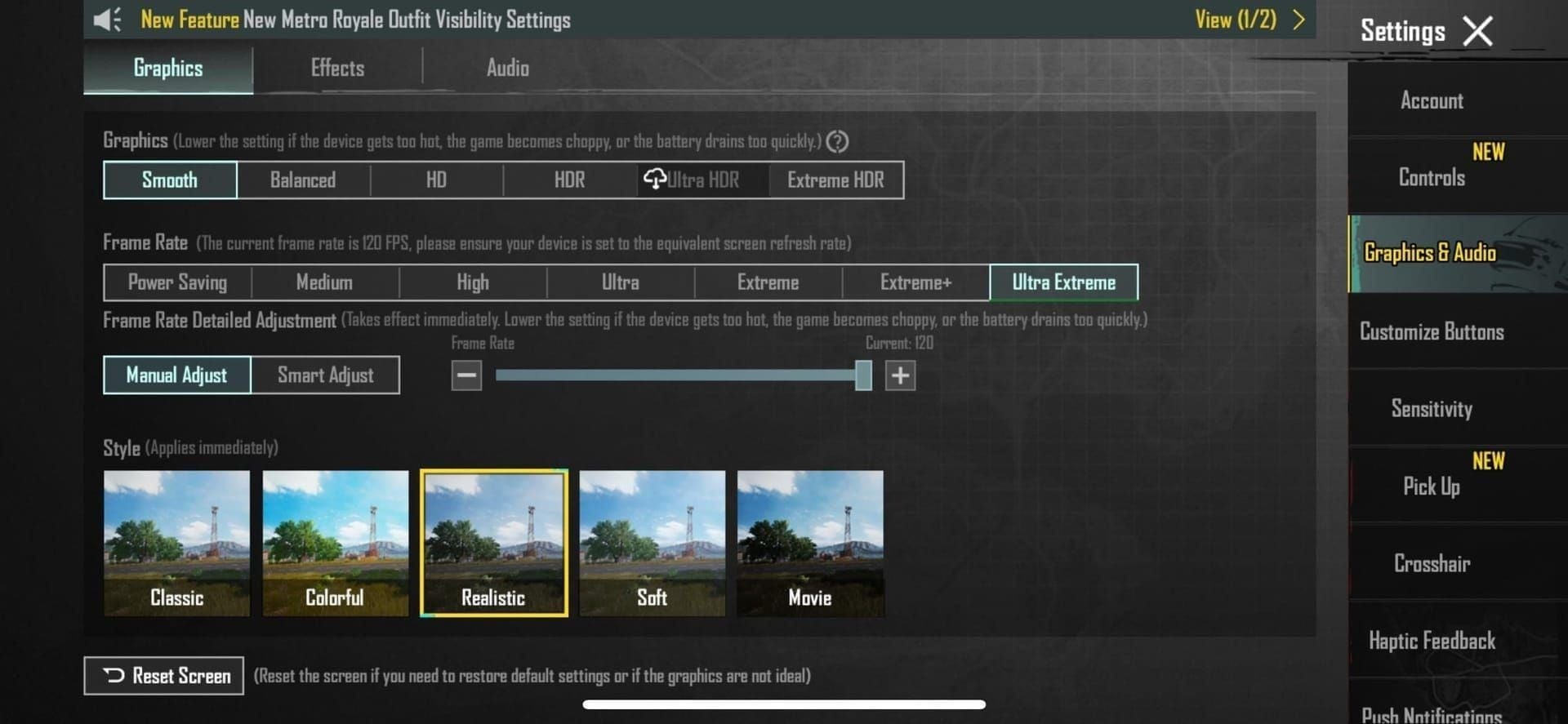
Open Settings > Graphics tab
Set Graphics: Smooth (not Ultra HD)
Set Frame Rate: Extreme (120 FPS on supported devices)
Disable Anti-Aliasing (Advanced Settings)
Disable Shadows (Advanced Settings)
Set Brightness: 125-150%
Enable Vulkan API (Android)
Restart game
This prioritizes competitive performance. Ultra HD locks at 60 FPS—50% frame time disadvantage vs Smooth Extreme at 120 FPS.
Verification in Training Mode
Monitor frame rate during rapid camera movements, explosions, smoke effects. Stable frame rates matter more than peaks—consistent 90 FPS outperforms fluctuating 100-120 FPS. Check thermal performance after 10-15 minutes. If temperature exceeds comfortable levels, reduce to 90 or 60 FPS to prevent throttling.
Common Fixes
Extreme frame rate grayed out: verify device compatibility, clear cache (Settings > Apps > PUBG Mobile > Clear Cache), ensure 20GB+ free storage, close background apps. Persistent issues: reinstall 1.18 GB update, update graphics drivers.
Graphics Settings Comparison
Visual Quality Differences
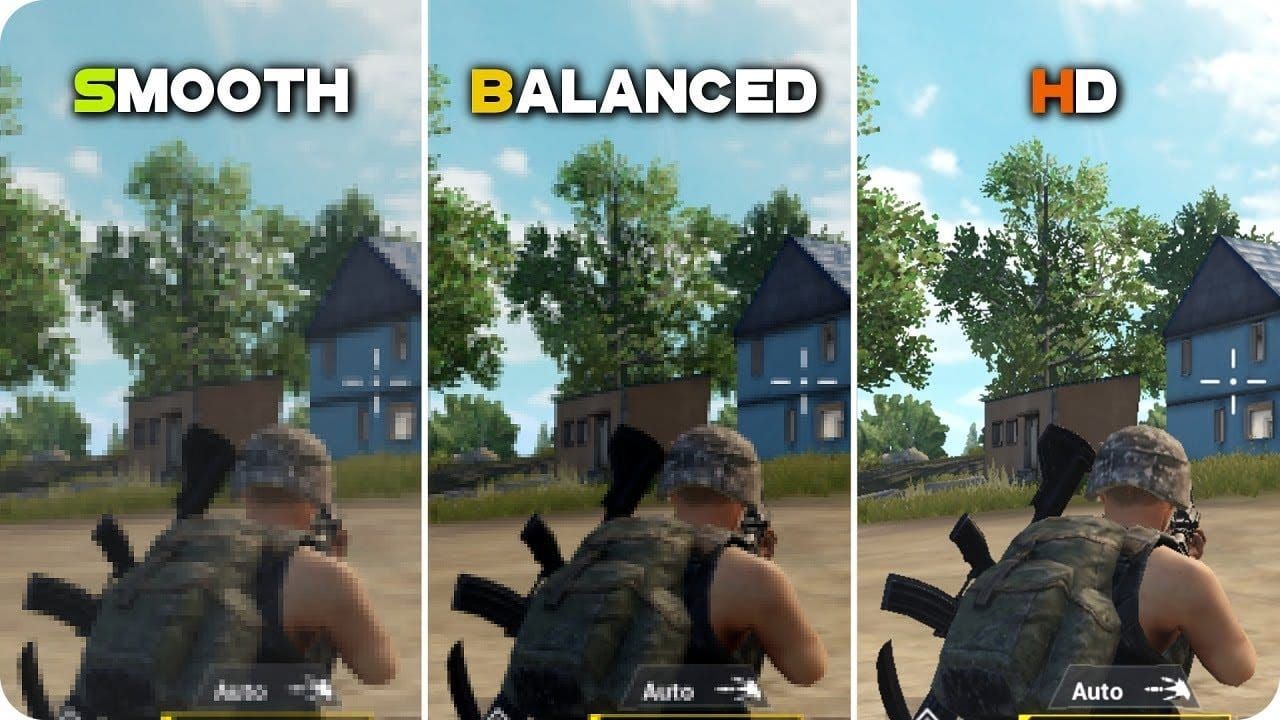
Ultra HD: detailed textures, 60 FPS lock creates input lag.
HDR: enhanced lighting/color, 60 FPS limitation.
Smooth: reduced textures, enables 120 FPS, reveals enemies faster through less clutter—grass renders lower density making prone opponents visible.
Balanced: 90 FPS maximum, rarely optimal.
Frame Rate Stability
Ultra HD: locked 60 FPS = consistent 16.7ms frame times. Smooth Extreme: 120 FPS targets 8.3ms. Devices fluctuating 100-120 FPS experience variable frame times (8.3-10ms) creating micro-stutters disrupting aim. 120 FPS applies to Classic, TDM, Arena modes. Buy PUBG UC recharge online through BitTopup for premium passes complementing optimized settings.
Battery & Thermal Performance
Battery consumption/hour:
Ultra HD 60 FPS: 15-18%
Smooth 120 FPS: 18-24%
Balanced 90 FPS: 16-20%
Thermal: 120 FPS reaches 42-45°C after 20 min, triggering throttling. Ultra HD 60 FPS: 38-40°C, more consistent over longer sessions. External cooling extends high-performance windows 10-15 min. Removing cases improves heat dissipation 15-20%.
Best Competitive Settings
Pro Player Configuration
Tournament standard: Smooth graphics, Extreme frame rate (120 FPS supported/90 FPS mid-range), Anti-Aliasing/Shadows disabled, brightness 125-150%. These emerged through thousands of matches where 15-20ms advantage determines first-shot outcomes.
Maximum Enemy Visibility
Disabled shadows eliminate hiding spots in Corrupted Cities with dense foliage/fog. Smooth graphics reduce grass density, making prone opponents visible at longer ranges. Brightness 125-150% balances shadow visibility without glare. OLED screens: 125-135%, LCD: 140-150%.
Recoil Control & Aim Precision
120 FPS provides visual feedback in 8.3ms intervals vs 16.7ms at 60 FPS, enabling finer recoil compensation. Benefits complex patterns (M762, Beryl M762). 28-35ms total latency approaches human reaction threshold (150-200ms), making controls feel immediate—critical for CQC and quick-peeks.
Device-Specific Configs
Flagship (SD 8 Gen 2+, A16+, Dimensity 9200+): Smooth + Extreme (120 FPS), AA/Shadows off, brightness 125-150%.
Upper mid-range (SD 870/888, A14/A15, Dimensity 8200): Smooth + Ultra (90 FPS), same visual settings.
Mid-range (SD 778G, Dimensity 1200, Helio G96): Smooth + High (60 FPS).
Lower-end: Smooth + Medium (40 FPS) prevents stuttering.
Frame Rate Impact on Gameplay
Input Lag & Response Time
28-35ms at 120 FPS vs 45-50ms at 90 FPS = 15-20ms advantage. Combined with human reaction (150-200ms), represents ~8-10% improvement. In simultaneous encounters, determines first shot. 240Hz+ touch sampling with 120 FPS achieves optimal input-to-display latency.
Recoil Pattern Consistency
Patterns identical across frame rates, but visual feedback frequency affects compensation. 120 FPS: 8.3ms updates enable micro-adjustments. 60 FPS: 16.7ms intervals create larger corrections. Impacts sustained fire beyond 10-15 rounds—M416/AKM show tighter groupings at 120 FPS.
Movement & Peek Advantage
Quick-peek benefits from higher frame rates. 120 FPS: 28-35ms response enables faster return to cover. Jiggle/shoulder-peeking more effective due to tighter input-display coupling—shorter exposure windows while maintaining info gathering.
Practical Examples
Primewood Genesis hot drops (Pochinki, Yasnaya, World Tree): 60 FPS shows delay between aim adjustment and visual confirmation. 120 FPS feels responsive with near-instantaneous corrections. Long-range (200m+) shows less difference, but tracking moving targets benefits from smoother feedback—especially Bramblewood Scorpion's 72 km/h Burrow mobility.
Primewood Genesis Map Optimization
Terrain & Long-Distance Visibility
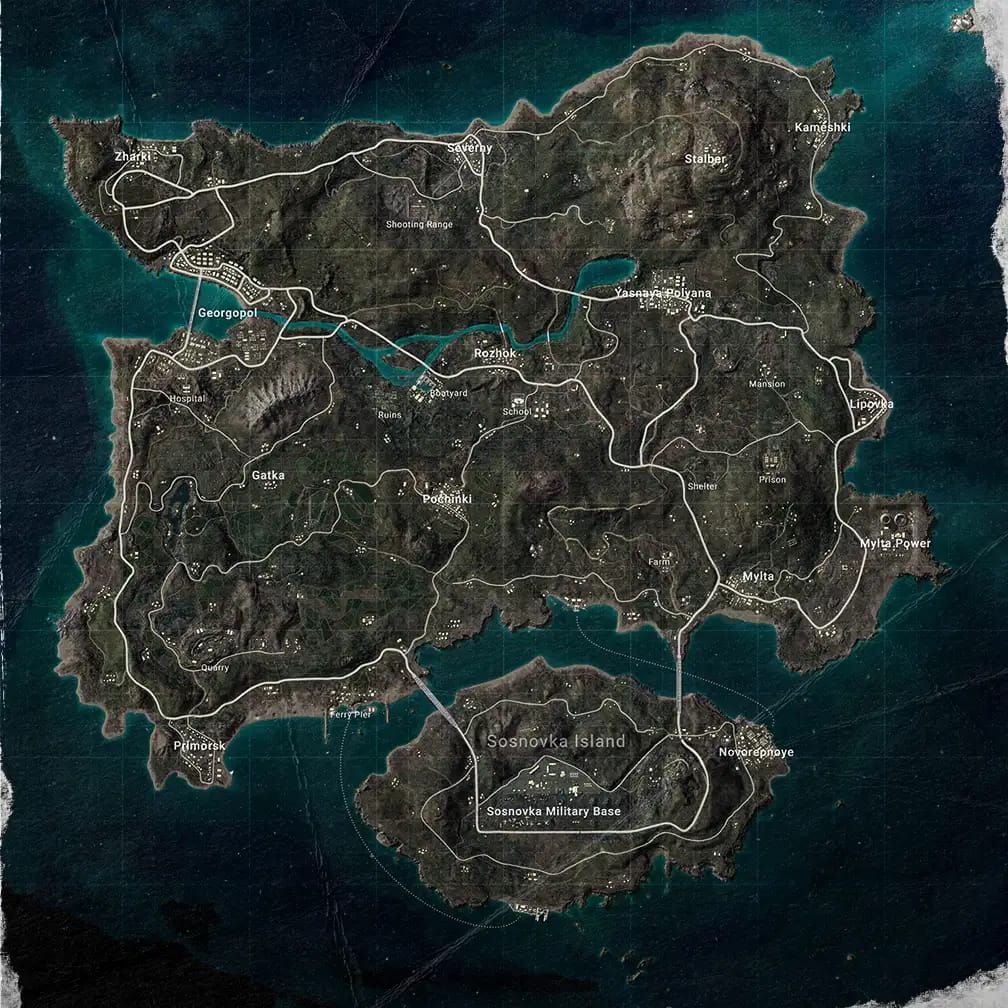
Corruption Plant Zones: Smooth graphics reduce foliage density, improving sight lines. Ultra HD renders full vegetation, creating hiding spots but reducing scanning visibility. Sacred Tree complex geometry stresses GPU—Ultra HD may drop frames during firefights, Smooth maintains stability.
Foliage Density Tactical Advantage
Smooth renders ~40-50% less foliage than Ultra HD, making prone opponents visible at 50-75m where they'd be concealed at higher settings. Creates asymmetric advantage—Smooth users spot Ultra HD users more easily. Tournaments standardize settings to prevent this, but public ranked allows legitimate optimization.
Lighting in Dense Forest
Corrupted Cities fog: disabled shadows + 125-150% brightness cuts through fog, revealing silhouettes at longer ranges. HDR enhances atmosphere but reduces practical visibility. Guardian Flowers (30m range stationary turrets) appear more prominently with optimized brightness—must defeat to unlock sealed buildings with high-tier loot.
Hot Drop Performance
Pochinki/Yasnaya/World Tree concentrate 20-30 players, creating extreme stress. Ultra HD 60 FPS often drops to 45-50 FPS, introducing stuttering. Smooth 120 FPS maintains 90-110 FPS even in chaos. Bramblewood Scorpion's Spike Bomb/Pincer Strike create particle effects stressing GPU—Ultra HD drops frames, Smooth maintains stability.
Troubleshooting Issues
Ultra HD Grayed Out
Device compatibility most common cause. Verify: Snapdragon 845+, A12+, or equivalent with 6GB+ RAM. Check official supported device list. Account level requirements may lock options until level 20 or specific achievements.
Frame Drops & Stuttering
Background apps consuming RAM cause drops. Close social media/browsers/streaming before launch. Enable Do Not Disturb. Thermal throttling after 15-20 min—monitor temperature. If exceeds 42°C, reduce frame rate or implement cooling.
Overheating Prevention
Remove cases: improves dissipation 15-20%. External cooling fans: reduce temps 5-8°C. Avoid direct sunlight. Reduce brightness to 100-125% if issues persist. Lower frame rate to 90/60 FPS during extended sessions. Rotate between devices for cooling periods.
Network Stability
Ultra HD requires stable 10Mbps+ to prevent texture streaming delays. Enable Download Resources to pre-load assets. Use 5GHz WiFi vs 2.4GHz. Mobile data: 4G LTE or 5G with 3+ bars. Test ping before competitive matches.
Device Optimization
Clear cache weekly. Uninstall unused apps—requires 20GB+ free space. Disable automatic updates. Update OS and graphics drivers. Enable developer options: Force GPU rendering and Disable HW overlays (test in training first).
Preparing for January 2026 Release
Beta Testing Benefits
Master Primewood Genesis mechanics before broader access. Learn Vine Manipulation shield, Florawings flight, Lumina Fruit planting during beta creates knowledge advantages persisting weeks post-release. Bramblewood Scorpion's Burrow and Sacred Deer require practice—beta provides consequence-free environment.
Account Optimization
Stockpile UC before January 2026 for immediate premium pass/exclusive item access. BitTopup offers competitive pricing, fast delivery, secure transactions. Complete existing season missions to maximize starting resources. Organize inventory for new items.
Exclusive Items & Early Access
Primewood Genesis themed cosmetics tied to event mechanics. Master Guardian Flowers combat and Lumina Fruit harvesting for exclusive rewards. Stealing Lumina Fruit reveals thief location—risk-reward skilled players exploit. Early Florawings/Vine Manipulation access provides tactical options opponents lack.
Common Misconceptions
Myth: Higher Graphics = Better Performance
Ultra HD's 60 FPS lock creates competitive disadvantages. Misconception from PC gaming culture. Mobile thermal/battery constraints make lower graphics often superior for sustained competitive performance. Ultra HD serves content creation/casual play.
Myth: Pros Use Maximum Graphics
Tournament players overwhelmingly use Smooth + max frame rates. Organizers standardize settings (typically Smooth) for competitive fairness. Streamers sometimes use higher graphics for viewers but switch to competitive configs for serious ranked.
Myth: Frame Rate Doesn't Affect Mobile
Testing shows measurable improvements in aim, recoil, reaction at higher frame rates. 28-35ms at 120 FPS vs 45-50ms at 90 FPS = ~8-10% improvement. Myth persists because casual players don't notice differences during low-intensity gameplay.
Truth: Sweet Spot Balance
Optimal settings balance visual clarity with performance stability. Varies by device, play style, competitive level. Casual: Balanced 60-90 FPS. Competitive: Smooth at max achievable frame rate. Individual testing reveals personal sweet spots.
FAQ
What devices support Ultra HD 60 FPS in 4.2 Beta?
Snapdragon 845+, A12+, or equivalent with 6GB+ RAM support Ultra HD (60 FPS lock). Competitive players use Smooth + Extreme (120 FPS) on SD 8 Gen 1+, A15+, or Dimensity 9000+. Mid-range SD 778G/Dimensity 1200 achieve stable 60 FPS on Smooth.
How do I enable Ultra HD 60 FPS?
Settings > Graphics > select Ultra HD + Ultra frame rate (60 FPS max). For competitive advantage: select Smooth + Extreme (120 FPS), disable AA/Shadows, brightness 125-150%, restart game.
Does Ultra HD 60 FPS give competitive advantage?
No. Ultra HD 60 FPS creates disadvantages vs Smooth 120 FPS. 60 FPS = 45-50ms input lag vs 28-35ms at 120 FPS. Competitive players prioritize Smooth + max frame rates—8.3ms frame time at 120 FPS beats 16.7ms at 60 FPS.
Best graphics settings for competitive play?
Smooth + Extreme (120 FPS flagship/90 FPS mid-range), AA disabled, Shadows disabled, brightness 125-150%. Reduces input lag to 28-35ms, saves 10-15% GPU (AA off), frees 70% resources (Shadows off).
When does 4.2 Primewood Genesis officially release?
Beta 1: December 4, 2025. Beta 2: December 11, 2025. Stable: January 2026. December 2025 window lets competitive players master mechanics before broader January 2026 access.
How much RAM for Ultra HD 60 FPS?
Ultra HD requires 8GB+ RAM. Smooth + Extreme (120 FPS)—competitive optimal—runs on 6GB RAM. 4GB RAM: use Smooth + High (60 FPS). Requires 20GB+ free storage, additional 10GB+ for high-res textures.
Ready to dominate Primewood Genesis? Secure your competitive edge with instant UC top-up at BitTopup—trusted by millions worldwide. Get exclusive items and premium passes before January 2026 release. Top up now and start your Conqueror journey!