MICO Live's cashout window runs exclusively from the 15th-20th each month. You must meet dual thresholds: 35+ streaming hours AND 15+ active days. Missing either by even one hour or day disqualifies you from the entire month's payout, delaying earnings by 30 days.
Understanding the MICO Live Cashout Window
What is the MICO Live Cashout Window?
The cashout window is a fixed six-day period (15th-20th) when MICO processes withdrawals for eligible broadcasters. Eligibility is determined by your streaming activity from the 1st through 14th at 11:59 PM.
Five core requirements apply simultaneously:
35+ streaming hours
15+ active days
25 regular streams
5 Game Lives
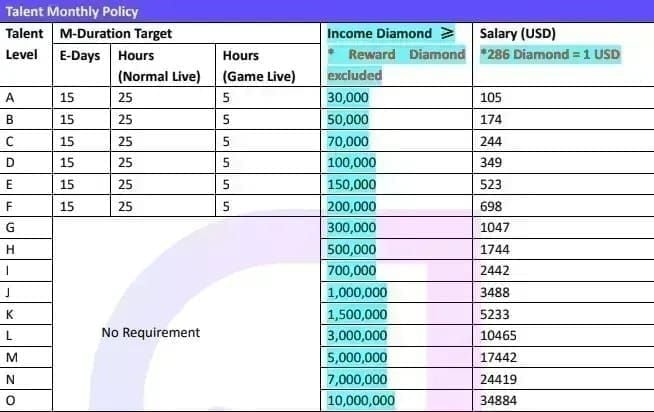
Income Diamond thresholds: 14,300 (verified hosts, ~$50 USD at 286 diamonds per dollar) or 35,700 (non-verified)
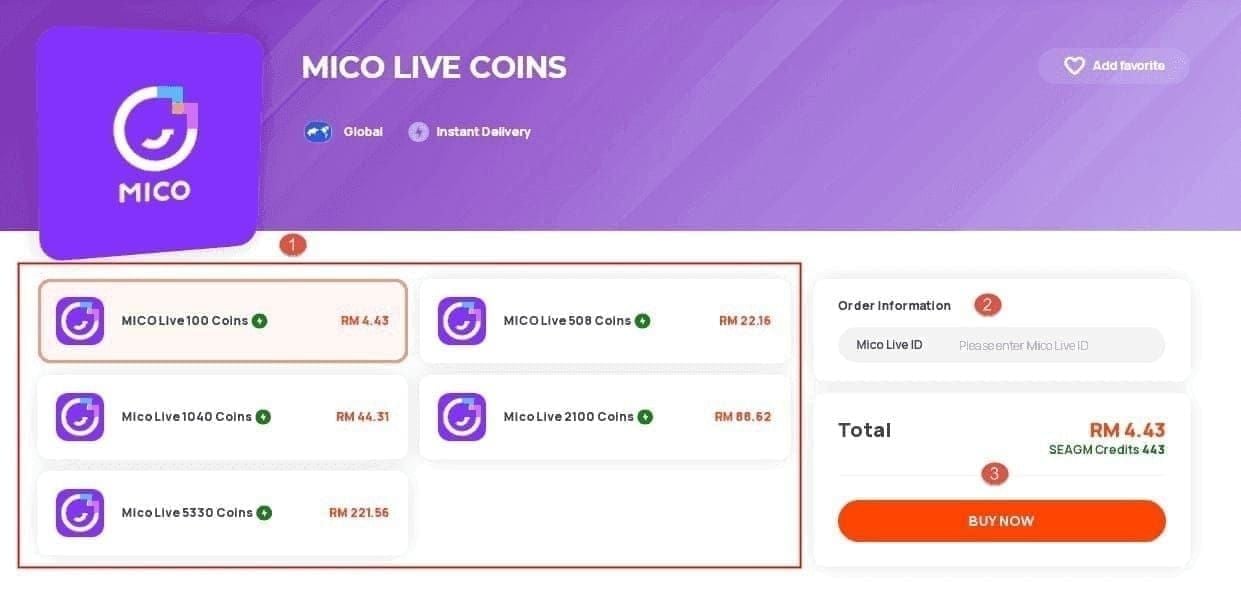
To boost viewer engagement during critical streaming hours, MICO Live coins top up through BitTopup offers instant delivery with competitive pricing.
The Critical 6-Day Payout Period
Processing times by payment method:
GCash: 24-48 hours (fastest option)
PayPal: 2-3 days (2.9% fee + $0.30 per transaction)
Bank transfer: 3 business days (1.5-3% fees)
Eligibility check occurs at 14th 11:59 PM. Any activity after this counts toward next month. Submit withdrawal requests early on the 15th for fastest processing.
Why Missing This Window Delays Earnings by 30 Days
MICO operates on strict monthly cycles with no rollover. 34 hours 59 minutes = disqualified, same as 20 hours. The platform doesn't prorate payments or carry forward partial progress. You either meet all requirements simultaneously or receive nothing.
Missing the 14th deadline means waiting until next month's 15th-20th window—a 45-60 day gap between earning periods.
The Dual Requirements: 35 Hours + 15 Days
35-Hour Streaming Requirement
Cumulative broadcast time across the calendar month. Sessions under 30 minutes don't count toward your total. Recommended minimum: 45-60 minutes to ensure reliable credit.
Sessions with zero viewers for 10+ consecutive minutes receive reduced credit or may be flagged as inactive. The platform prioritizes engaged broadcasting over just leaving a camera running.
Verify hours in Host Center → Performance tab (updates 15-30 minutes after ending broadcast).
15-Day Activity Rule
One completed broadcast per 24-hour period (based on account timezone). Days don't need to be consecutive. You can stream on days 1, 3, 5, 7, 9, 11, 13, 15, 17, 19, 21, 23, 25, 27, 29 to meet the requirement.
The 24-hour period resets at midnight according to your account timezone. Multiple sessions in one day = only 1 active day credit.
Sessions must meet the 30-minute minimum to qualify.
How MICO Verifies Both Requirements
Automated verification at 14th 11:59 PM cross-references streaming hours, active days, regular streams, Game Lives, and Income Diamond balance.
Verified hosts enjoy major advantages:
Lower threshold: 14,300 vs 35,700 diamonds
75% retention rate vs 30-40% for non-verified
Verified hosts need ~19,067 viewer coins to reach $50 minimum
Non-verified need 89,250-119,000 viewer coins
Verification requires: government-issued photo ID, linked bank account, transaction password. Approval takes 2-5 business days. Must maintain fewer than 3 Terms of Service violations.
Common Misconceptions
Myth: Stream 35 hours across 7-10 days to qualify. Reality: Both thresholds are independent. 35 hours across 7 days = 7 active days, failing the 15-day requirement.
Myth: Partial hours don't count. Reality: MICO tracks minutes and seconds. A 2-hour 45-minute session = 2.75 hours. But sessions under 30 minutes = zero credit.
Timezone confusion: Your account timezone (not physical location) determines when activity days begin/end. Check Settings → Account Information.
Calendar Strategy Framework
The Balanced Distribution Method (2-3 Hours Daily)
Most reliable approach: Stream 2-3 hours daily across 16-17 days. This builds a 2-3 hour and 1-2 day safety buffer.
Week 1: 8-10 hours across 4-5 days, 6 regular streams, 1-2 Game Lives Week 2 (by day 14): 16-20 hours across 8-9 days, 12-15 regular streams, 3-4 Game Lives Week 3: 24-30 hours across 12-14 days Week 4: 9-12 additional hours across 3-4 days (confirmation period, not desperate sprint)
For enhanced viewer engagement, buy MICO Live coins instant recharge through BitTopup's secure platform.
Front-Loading vs Back-Loading: Risk Analysis
Front-loading (25-30 hours in weeks 1-2): Provides psychological relief but risky. Technical issues in final week can prevent meeting the 15-day requirement even with 35+ hours.
Back-loading (defer until weeks 3-4): Even riskier. Creates enormous pressure, leads to burnout, lower-quality broadcasts.
Balanced distribution mitigates both risks by maintaining consistent weekly targets.
Building Your Personal MICO Streaming Calendar
Identify highest-energy days and peak viewer engagement periods (typically 7-11 PM)
Mark priority streaming days around these high-value time slots
Designate 2-3 flex days per week as safety buffer
Mark 14th as verification checkpoint and 15th as submission target
Marking Critical Checkpoints
Weekly checkpoints every Sunday:
Week 1 (Day 7): 8-10 hours, 4-5 active days
Week 2 (Day 14): 16-20 hours, 8-9 active days
Week 3 (Day 21): 24-30 hours, 12-14 active days
Mid-month checkpoint (Day 15-16): If only 6-7 active days, you need 8-9 of remaining 14-15 days—more aggressive than balanced approach.
Create visual tracking: Color-code days green (meeting 2-3 hour target), yellow (30-120 minutes), red (missed days).
Daily Hour Allocation
The 2.5 Hour Daily Baseline
Stream 2.5 hours daily across 16 days = 40 total hours (5-hour buffer).
Session structure:
15-min warm-up
90-min core content
30-min wind-down with Q&A
15-min closing routine
Requires 5 Mbps upload speed and 720p+ resolution.
Weekend Power Sessions
Weekends deliver higher viewer traffic. Ideal for 3-4 hour sessions.
Saturday 4-hour + Sunday 3-hour = 7 hours (nearly 20% of monthly requirement in 2 days).
Don't complete 15-20 hours in one weekend—contributes only 2 active days. Optimal: 3-4 hour sessions both days, then 2-hour weekday sessions.
Rest Day Planning
With 16-17 active day target vs 15-day minimum, you can skip 13-15 days monthly. Distribute evenly: 3-4 rest days per week.
Pattern example: Stream Fri-Sun (3 days), rest Mon, stream Tue, rest Wed, stream Thu. Over 4 weeks = 16-17 active days with consistent recovery.
Avoid rest days during final week (Days 25-31) unless you've already exceeded both requirements by Day 24.
Peak Engagement Hours
7-11 PM represents peak viewer activity. A 2.5-hour stream from 7:30-10:00 PM typically generates more gifts than 3 hours from 2:00-5:00 PM.
Timezone considerations: If audience is UTC+8 but you're UTC-5, their 7-11 PM = your 6-10 AM. Broadcast during audience peak hours for better financial results.
Peak hours also improve active day reliability—less likely to hit zero viewers for 10+ minutes scenario that reduces session credit.
15-Day Activity Consistency
What Constitutes a Valid Activity Day
One broadcast of 30+ minutes within a 24-hour period (account timezone). Platform doesn't evaluate quality, viewer count, or diamonds earned—only duration.
24-hour period resets at midnight (account timezone). A broadcast from 11:45 PM to 12:15 AM credits the day with majority of session (earlier day).
Multiple sessions in one day = only 1 active day credit.
Minimum Streaming Duration
30-minute minimum is absolute floor. Practical recommendation: 45-60 minutes.
Sessions under 30 minutes appear in broadcast history but contribute zero to monthly requirements.
Safest approach: Treat 60 minutes as personal minimum. Provides 30-minute buffer against technical issues.
Strategic Day Selection
Distribute 16-17 active days across all four weeks:
Week 1: 4-5 days
Week 2: 4-5 days
Week 3: 4-5 days
Week 4: 3-4 days
Avoid gaps longer than 2-3 consecutive days. Extended absences signal inconsistent broadcaster to algorithm, reducing visibility.
Backup Day Planning
Designate 3-4 backup days monthly—available to stream if needed but not committed.
Position backup days after planned streaming days. If you stream Tue/Thu/Fri/Sun, designate Mon/Wed/Sat as backups.
Track backup day usage. If you've used 2 of 3 backups by Week 3, add extra planned streaming day during Week 4.
Tracking Your Progress
Using MICO Broadcaster Dashboard
Host Center → Performance tab displays cumulative hours, active days, regular streams, Game Lives. Updates 15-30 minutes after broadcast.
Host Center → Earnings shows Income Diamond balance. Updates within 5-10 minutes of receiving gifts.
Dashboard discrepancies: Wait 24 hours before contacting support. Most resolve during nightly data reconciliation.
Manual Calendar Tracking Template
Create monthly calendar with columns:
Date
Planned Stream (Y/N)
Actual Stream (Y/N)
Session Duration
Cumulative Hours
Active Days Count
Notes
Record exact start/end times, not rounded durations. A session from 7:33 PM to 10:18 PM = 2 hours 45 minutes (2.75 hours), not about 3 hours.
Color-coding: Green (meeting 2-3 hour target), yellow (30-120 min), red (missed planned streams), blue (backup days used).
Weekly Checkpoint System
Formal reviews every Sunday evening:
Week 1 (Day 7): 8-10 hours, 4-5 active days. If at 6 hours and 3 days, you're 2-3 hours and 1-2 days behind.
Week 2 (Day 14): 16-20 hours, 8-9 active days. Critical mid-month checkpoint.
Week 3 (Day 21): 24-30 hours, 12-14 active days. If at 28 hours and 13 days, you need only 7 hours across 2 days in final week.
Document results in Weekly Summary: Hours This Week, Cumulative Hours, Days This Week, Cumulative Days, Variance from Target, Adjustment Plan.
Hour Verification
Compare personal records against Performance tab. For discrepancies:
Platform excludes from calculations:
Starting soon mode time
Periods with zero viewers exceeding 10 minutes
Technical interruptions lasting 2-3+ minutes
A 3-hour broadcast might credit as 2.5 hours due to these factors.
For significant discrepancies (30+ minutes), submit support tickets within 48 hours with screenshots, broadcast history, session timestamps.
Critical Mistakes That Disqualify Broadcasters
The 34.9-Hour Trap
34 hours 59 minutes fails just as definitively as 20 hours. No partial credit, no rounding up, no exceptions.
Performance tab displays hours in decimal format. 34.9 hours = 34 hours 54 minutes, not 34 hours 90 minutes. You need 6 minutes to reach 35.0 exactly—stream 15-20 minutes to ensure you exceed with margin.
Protection: Target 37-38 hours instead of exactly 35. This 2-3 hour buffer = just 4-6 extra 30-minute sessions monthly.
14-Day Activity
14 active days = zero payout regardless of hours streamed. Binary logic identical to hour requirement.
Often stems from front-loading: 4-5 hours daily in weeks 1-2, accumulating 25-30 hours quickly, then reducing frequency. Result: 40 hours across only 12 days—exceeding hours by 14% while falling 20% short on days.
Prevention: Monitor both metrics equally during weekly checkpoints.
Timezone Miscalculations
If account timezone is UTC+8 but you're in UTC-5, your Day 1 begins at 11:00 AM local time (midnight UTC+8).
A broadcast from 10:00 AM to 12:00 PM local time spans two calendar days in UTC+8: 30 minutes on previous day, 90 minutes on Day 1.
This compounds monthly. You might believe you've streamed 15 different days locally but only 13-14 days per account timezone.
Verification: Check Settings → Account Information before starting streaming month.
Technical Issues
Zero credit scenarios despite broadcasting:
Streams failing to reach 30 minutes due to platform instability
Sessions terminated for Terms of Service violations
Broadcasts flagged as inappropriate
Streams with sustained zero viewership
Internet instability is most common. Multiple disconnections might register as several short sessions (each under 30 minutes) rather than one continuous session.
Minimum specs: 5 Mbps upload speed, 720p+ resolution, stable connectivity.
Emergency Recovery Strategies
Week 4 Hour Shortage
25 hours by Day 22: Need 10 hours across 8-9 days—achievable through 2.5-hour daily sessions.
20 hours by Day 22: Need 15 hours across 8-9 days—demanding but possible through 3-4 hour daily sessions.
Under 20 hours by Day 25: Recovery extremely challenging. Needing 15+ hours across 5-6 days requires 2.5-3 hour daily sessions with zero missed days and no technical issues.
Emergency recovery must also meet 15-day requirement simultaneously. 25 hours but only 10 active days by Day 22 = need 10 hours across 5 days during Week 4, leaving zero margin for error.
Marathon Streaming
Marathon sessions (5+ hours) rapidly advance hour count but carry risks:
Physical/mental fatigue reduces engagement quality
Viewer engagement declines after 3-4 hours
Longer sessions increase technical failure probability
Platform doesn't limit session length, but sessions exceeding 4 hours show diminishing returns.
If necessary: Structure with breaks. Stream 2 hours, take 15-min break (end broadcast), start new 2-hour session. Creates two separate sessions, provides recovery time, reduces technical risk.
When to Accept a Lost Month
Certain scenarios make qualification mathematically impossible or strategically inadvisable.
Day 27 with 22 hours and 11 active days: Need 13 hours across 4 days (3.25 hours daily) while ensuring those 4 days push you to 15 total. Requires perfect execution with zero error margin.
Accepting a lost month allows redirecting energy toward planning successful following month. Use remaining days to experiment with content, test streaming times, develop robust calendar strategy.
Financial consideration: If at 25 hours, 12 days, but only 8,000 Income Diamonds (verified threshold is 14,300), you face triple deficit: 10 hours, 3 days, 6,300 diamonds. Even meeting hour/day requirements, insufficient diamonds still disqualifies.
Boosting Engagement with BitTopup
Strategic diamond purchases during critical sessions can accelerate progress toward Income Diamond threshold. When approaching 14th checkpoint with sufficient hours/days but marginal diamond balance, self-gifting or coordinating with loyal viewers can push you over threshold.
BitTopup offers secure, instant MICO Live coin purchases with competitive pricing and fast delivery—reliable for last-minute diamond acquisition.
Cost-benefit calculation: If 2,000 diamonds short of 14,300 verified threshold (~$7), purchasing coins to self-gift might be economically rational to unlock $50 payout. If 10,000 diamonds short ($35), economics become less favorable.
Advanced Multi-Month Planning
Creating a 3-Month Rolling Calendar
Map streaming schedules for current month, next month, and following month simultaneously. Extended planning horizon identifies potential conflicts (holidays, personal commitments) and allows proactive adjustments.
Mark fixed commitments across all three months
Identify target streaming days (16-17 active days) while accommodating commitments
If December includes week-long vacation, plan 18-19 active days during remaining three weeks
Rolling calendar reveals patterns. If you consistently struggle during third week of each month, investigate cause and make strategic adjustments.
Vacation Planning
One-week vacation (7 consecutive days) leaves 23-24 days available. Meeting 15-day requirement across 23 available days requires streaming 65% of available days.
Strategy:
Two weeks before vacation: 10-11 active days, 22-25 hours
Week following vacation: 5-6 active days, 13-15 hours
Communicate vacation plans to audience 2-3 weeks in advance. Viewer expectations impact Income Diamond accumulation—audiences understanding your absence are more likely to send gifts during pre/post-vacation streams.
Holiday Month Adjustments
December, July, and holiday-heavy months require adjusted strategies due to reduced viewer availability.
If December 20-31 represents low-engagement period, intensify schedule during December 1-19: target 13-14 active days and 28-30 hours, leaving only 2-3 active days and 5-7 hours needed during holidays.
Holiday-themed content can boost engagement. Plan high-value streams strategically during first two weeks to build Income Diamond buffer before holiday disruptions.
Building Sustainable Long-Term Habits
Establish fixed streaming days and times: I stream Tuesday, Thursday, Friday, Sunday from 7:30-10:00 PM. Creates predictability that builds viewer habits and simplifies planning.
Consistency improves platform algorithm favorability. MICO's recommendation systems prioritize broadcasters with reliable schedules over erratic patterns.
Long-term sustainability: Streaming 2.5 hours daily, 16 days monthly = ~40 hours monthly (part-time job equivalent). Maintain proper sleep, nutrition, stress management to prevent burnout.
Sustainable pace maintained for 12+ months generates more total income than aggressive pace leading to burnout after 3-4 months.
Preparing for the 15th-20th Window
Week 4 Verification
On Day 28-29, conduct comprehensive verification before Day 14 11:59 PM cutoff.
Host Center → Performance tab:
Streaming hours exceed 35 (target 37-38)
Active days exceed 15 (target 16-17)
Regular streams exceed 25
Game Lives exceed 5
Host Center → Earnings:
Income Diamonds exceed 14,300 (verified) or 35,700 (non-verified)
If any metric falls short, calculate exactly what's needed and schedule final sessions.
Document verification with screenshots of all dashboard sections. Include timestamps. Provides evidence for support tickets if discrepancies emerge.
Payment Information Double-Check
Verify all payment information is current and accurate:
GCash: Linked phone number active, account in good standing PayPal: Email address correct, account can receive payments Bank transfer: Account numbers, routing numbers, account holder names match MICO verification documents exactly
Mismatched information causes withdrawal delays or failures. Single transposed digit = failed transfer, pushing payment to following month.
Verify transaction password is functional. Password resets take 24-48 hours—initiate before the 15th if needed.
What to Expect During Cashout Window
On the 15th, withdrawal option becomes active in Host Center → Earnings. Submit as early as possible on 15th to maximize processing time.
After submitting, platform displays Processing status:
GCash: Updates to Completed within 24-48 hours
PayPal: 2-3 days
Bank transfer: 3 business days
If status remains Processing beyond typical timeframe (5+ days), contact support with withdrawal request ID and submission timestamp.
Post-Payout: Starting Next Month's Strategy
Review previous month's performance on 21st-25th:
Which weeks went smoothly?
When did you struggle?
Did you meet requirements comfortably or barely qualify?
Final Income Diamond total relative to threshold?
Use insights to refine next month's calendar.
Most important: Begin streaming during Week 1 of new month. Broadcasters starting strong (4-5 active days, 8-10 hours in Week 1) create momentum and buffer making entire month manageable.
FAQ
What if I reach exactly 35 hours and 15 days but Income Diamonds are below threshold?
You won't qualify. All requirements must be satisfied simultaneously: 35+ hours, 15+ days, 25 regular streams, 5 Game Lives, and Income Diamond threshold. Meeting four of five = same disqualification as meeting zero.
Can I stream 35 hours across just 10 days and still qualify?
No. Both thresholds are independent. 35 hours across 10 days satisfies hours but fails the 15-day requirement. Optimal strategy: Distribute 35+ hours across 16-17 days.
What timezone does MICO use for the 14th 11:59 PM cutoff?
Your account timezone setting (Settings → Account Information). This determines when 24-hour activity days begin/end and when monthly eligibility check occurs. International broadcasters should set account timezone to match primary audience's location.
If I miss the 15th-20th window, can I withdraw next month?
Yes, but only if you meet all requirements again during next month. MICO doesn't carry forward previous month's progress—each month is independent. March earnings remain in account but become accessible only when you next qualify.
Do sessions under 30 minutes count toward anything?
Sessions under 30 minutes contribute zero toward monthly requirements (hours, active days, regular streams). However, Income Diamonds earned during the session count toward threshold.
How can I verify streaming hours are counted correctly?
Compare personal records against Host Center → Performance tab 24 hours after broadcast. Discrepancies of 5-10 minutes are common. Differences exceeding 15 minutes warrant investigation. Submit support tickets within 48 hours with timestamps and screenshots for significant discrepancies (30+ minutes).
Maximize MICO Live earnings during critical streaming hours! Visit BitTopup now to purchase MICO diamonds instantly and boost viewer engagement when every hour counts toward your 35-hour goal. Secure, fast, and trusted by thousands of MICO broadcasters worldwide.