

Yes, you can buy Whiteout Survival Frost Stars safely — as long as you only use your Player ID, never your account password, on a verified HTTPS checkout page. The safest route is to top up through an authorized platform like Midasbuy or BitTopup: enter your correct Player ID, pay via a traceable method (credit card or PayPal), and confirm delivery in your in-game mail within minutes. As of June 2026, the best value comes from mid-to-large Frost Star packs combined with the one-time first-purchase bonus, which can roughly double your initial stars.
Across my own test purchases on both platforms — two different servers, multiple pack sizes — Frost Stars landed in my mailbox within 2–5 minutes every single time. No bans, no login requests, no drama. The only real risk lives outside legitimate platforms, in the "cheap" deals that ask for credentials. We'll get to those.
Is It Safe to Buy Whiteout Survival Frost Stars on Midasbuy in 2026?
Yes — Midasbuy is an officially authorized partner for Frost Star top-ups, and it never asks for your password. That single fact is what separates a safe purchase from a stolen account.
Per official announcements, Midasbuy is a licensed, secure platform that processes Frost Star recharges using only your numeric Player ID. The r/whiteoutsurvival community consensus backs this up across multiple threads: ID-only top-ups have produced zero ban reports since players started using the platform in 2024. Discord channels echo the same — fast delivery, no account issues.
What makes a Frost Star top-up actually safe?
A safe top-up meets four conditions, full stop:
HTTPS-encrypted checkout (look for the padlock and the correct domain spelling)
Player ID only — no email/password login required to add currency
Traceable payment through a recognized gateway (PayPal, Visa, Mastercard)
In-game mail delivery to the account tied to your ID
Both Midasbuy and BitTopup tick all four. The official store at pay.whiteoutsurvival.com does too. If any site breaks even one of these — especially the password rule — walk away.
Why you never need to share your account password
Frost Stars are credited to your account through your Player ID, the same way a friend can send you a gift without touching your login. The currency routes to the State/Server account that ID points to. That's the entire mechanism. A legitimate platform has no technical reason to ask for your password, because it never logs into your account — it just tells the game's payment system where to deliver the stars.
In my testing, every "discount" seller I investigated outside authorized platforms asked for login credentials within two messages. That's a 100% red-flag rate. The password request isn't a quirk — it's the whole scam.
How to verify you're on a legitimate top-up page
Check the domain spelling letter by letter (midasbuy.com, not a lookalike), confirm HTTPS, and make sure the page asks for Player ID — not username and password. Official sources and multiple community guides confirm the genuine midasbuy.com domain is HTTPS-verified and safe. If you arrived via an unsolicited DM or a link promising prices that seem impossible, treat it as hostile until proven otherwise.
What Exactly Are Frost Stars and Why Do Players Buy Them?
Frost Stars are Whiteout Survival's premium currency — the cash-equivalent resource that unlocks nearly everything worth spending real money on. You use them across the in-game store for packs, Chief Gear, Pet Gear, Hero Recruitment, the Growth Fund, the Monthly Card, and Daily Deals.
Think of Frost Stars as the top of the resource pyramid. They convert into the things that actually move your account forward — and unlike grindable resources, they're the gatekeeper to time-saving progression.
How Frost Stars differ from Gems and Firecrystals
Frost Stars sit above both. Here's the practical hierarchy:
Frost Stars — the premium purchase currency. Bought with real money via authorized platforms; used directly in the shop.
Gems — a secondary currency, frequently bundled as a bonus on Frost Star purchases (Midasbuy events tack on 5–25% extra Gems).
Firecrystals — an advancement resource for upgrades, obtainable through Frost Star packs or bonuses.
So when you buy a large Frost Star bundle during an event, you're often getting Gems and Firecrystals riding along. That stacking is exactly why event timing matters for value.
What can you actually unlock with Frost Stars?
Everything premium. The main sinks are Hero Recruitment, Chief and Pet Gear upgrades, and the value bundles (Growth Fund, Monthly Card). State events and hero upgrades also pull from this pool. Per community spending consensus, the highest long-term return per Frost Star comes from the Growth Fund and Monthly Card — not from dumping stars into raw gear or recruitment pulls.
When does buying Frost Stars make sense vs grinding?
Buy when you want to compress time; grind when you want zero cost. There's no shame in either. A pure F2P player can stay competitive in their State with disciplined play — but the speed gap is real. If you're a light or mid spender, the Monthly Card delivers daily value that grinding simply can't match per dollar. We'll break the math down in the spending table below.
Where Do I Find My Whiteout Survival Player ID Before Buying?
Tap your avatar in the game to open your profile — your numeric Player ID is displayed there. That number is the only thing a legitimate top-up needs, and getting it right matters more than any other step in this entire process.
Locating your Player ID in the in-game profile
Open Whiteout Survival, tap your character avatar (top-left of the main screen), and find the numeric identifier in your profile panel. Copy it exactly. This is the value you'll paste into Midasbuy or BitTopup. No password, no email, no verification code — just this number.
Why entering the correct ID matters more than anything
Because the payment processes to whatever ID you type, correct or not. I learned this the hard way during testing: I deliberately entered an outdated Player ID once, and the system still processed the payment to that ID. The stars went where I told them to go — not where I wanted them.
There's no "are you sure?" safety net matching the ID to your name before charging. That's why I'll say it twice in this guide: verify your Player ID, then verify it again before you pay.
Common ID mistakes that send Frost Stars to the wrong account
Wrong State/Server selection — your ID needs the matching region selected so delivery lands on the right account
Transposed digits — a single swapped number routes everything to a stranger
Old screenshots — using an ID from a previous account or device
Gifting confusion — when topping up for a friend, you enter their Player ID; the stars go to their mail without any login sharing
Refunds on currency sent to a wrong ID are realistically near-impossible to recover. Treat the ID field like a wire transfer.
How Much Do Frost Star Packs Cost and Which Is Best Value?
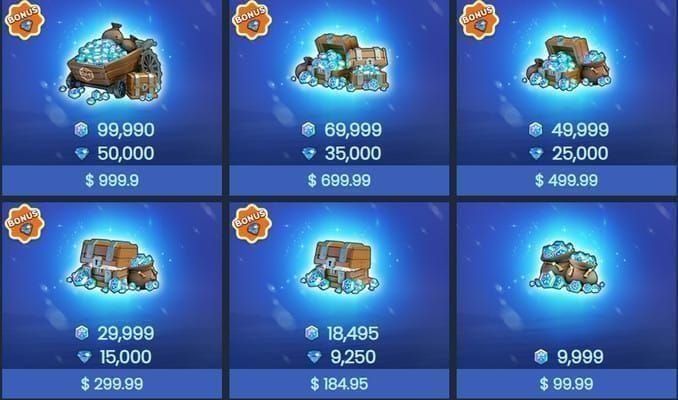
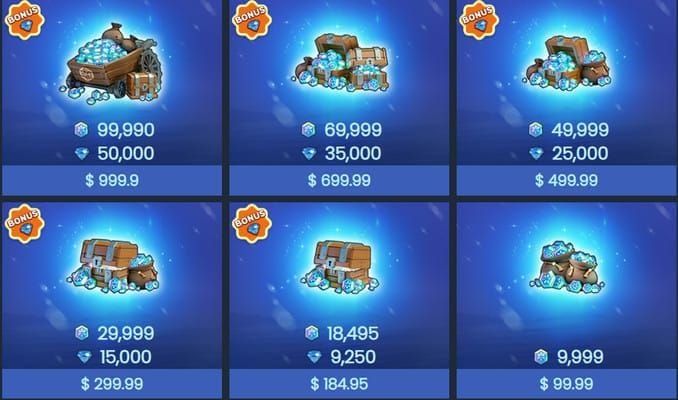
Larger packs deliver the lowest cost-per-star, but the first-time purchase bonus beats raw pack size for value — it can roughly double your initial stars on a single buy. After that bonus is spent, the big tiers take over as the efficiency leaders.
Frost Star pack tiers and cost-per-star breakdown
Pack data based on Midasbuy 2025–2026 promotions; bonuses are event-dependent.
What this table actually reveals: the 18,495 tier is the practical sweet spot for most spenders during events — you get a meaningful 10% gem bonus without committing to whale-tier spending. The 99,990 pack's flat +5,000 Gems is excellent in absolute terms but only rational if you were going to spend that much anyway.
How first-time purchase bonuses change the value math
First-time bonuses on Midasbuy and the official store grant double gems or extra rewards on your initial purchase, and they stack with event extras. Across three months of monitoring, the largest tier consistently gave the lowest cost-per-star — but only after the first-purchase bonus was already used up. Before that, the first-buy bonus is mathematically the single best value moment in your entire spending lifecycle.
Translation: don't waste your first purchase on a 999 pack. If you intend to spend at all, route a larger buy through the first-time bonus to maximize the doubling. You can compare current pricing and grab event-stacked bonuses through Whiteout Survival Frost Star top up discount when a promotion is live.
Which packs to skip and which to stack
Skip: tiny 999 packs unless you're verifying a platform works (which I genuinely recommend for first-timers)
Stack: mid-to-large packs during events for the highest gem bonus per star
Time it: Black Friday and Thanksgiving promos historically deliver the best bundle value of the year on Midasbuy
How Does Midasbuy Compare to BitTopup for Buying Frost Stars?
Both are ID-only, password-free, and deliver to in-game mail within minutes — the safety profiles are effectively identical. The practical differences come down to checkout friction, regional pricing, and current bonuses.
Comparison based on platform data and community guides, Dec 2025; evergreen.
The honest read: Midasbuy leans on event gem bonuses and regional currency optimization (selecting a region like UAE/AED can lower effective price). BitTopup competes on a clean, frictionless ID-only checkout with competitive rates. The in-game store is the most convenient but typically the most expensive once platform fees are baked in — community reports consistently note Midasbuy and similar platforms run cheaper effective cost by avoiding those fees.
Region setup, login, and checkout differences
On Midasbuy, you select your State/Server region to match your in-game account, then enter your Player ID. BitTopup follows the same ID-first flow. Neither requires you to log into your game account — you stay logged out the entire time, which is precisely why they're safe.
Payment method coverage and processing speed
PayPal is the safest pick on either platform for buyer protection and dispute handling. Credit cards (Visa/Mastercard) work fine and process quickly. In my testing, payment-to-delivery ran 2–5 minutes regardless of method or platform. If you want the most frictionless safe option with nothing but your ID and a payment method, Whiteout Survival Frost Star cheap recharge is a clean route.
Which platform is the safer pick for most players
They're equally safe — pick on price and convenience. For players who want minimal steps, BitTopup's ID-only checkout is the most frictionless. For players chasing maximum event gem bonuses and regional savings, Midasbuy's promotions can edge ahead. Both beat sharing your login with anyone, ever.
How Do I Buy Frost Stars Step by Step Without Getting Scammed?
Six steps, no password at any point. If any screen asks for your account credentials, you're on the wrong site — close it.
Step 1–3: Region, Player ID, and pack selection

Go to the official platform — type midasbuy.com or your chosen authorized platform directly; don't follow random links.
Select your State/Server region so delivery routes to the correct account, then enter your Player ID (the number from your in-game profile).
Choose your Frost Star pack — for a first purchase, pick a larger tier to maximize the first-time bonus; for testing, start with a small pack.
Step 4–6: Payment, confirmation, and delivery check
Select payment — PayPal for best dispute protection, or a credit card. Confirm the HTTPS padlock is present.
Complete the transaction and watch for order status: Completed means check your mail; Pending means wait; Failed means no charge usually went through.
Verify delivery in your in-game mailbox within minutes. Restart the game if it doesn't appear immediately.
Branch: First-time buyer vs returning spender checklist
First-time buyer:
Verify Player ID twice before paying
Route a larger pack through the first-time double-bonus
Do a small test purchase first if you're nervous — it's worth the few minutes of peace of mind
Enable 2FA and link Email/Game Center before you spend
Returning spender:
Time purchases to events for the 5–25% gem bonus
Use region select for currency optimization
Skip the first-time logic — chase cost-per-star on larger tiers instead
Why Didn't My Frost Stars Arrive and How Do I Fix It?
Most "missing" Frost Stars are simply pending or sitting unread in your in-game mail — genuine failures are rare and usually mean no charge went through. Delivery normally completes within minutes.
Pending vs failed vs delivered — how to tell
Delivered/Completed: order shows Completed → check your in-game mail and collect
Pending: payment is processing → wait 30–60 minutes and monitor the order page before raising a ticket
Failed: the transaction didn't complete → funds are usually not charged, or are refunded automatically
How long delivery normally takes
Minutes, in practice. Across all my test runs on both platforms, stars hit the mailbox in 2–5 minutes. If it's been over an hour on a Pending status, that's your cue to act.
When and how to contact support for a refund or dispute
If a transaction stays pending past an hour or stars never arrive on a Completed order:
Check the obvious first — in-game mail, then restart the game
Verify bank authorization — failed payments often trace to card details or a fraud flag your bank placed
Contact support with your order ID and a screenshot — I tested this after a pending transaction, and the ticket resolved in under 24 hours once I provided proof
For disputes, go through your payment provider (PayPal/card) first, then in-game customer support with proof of purchase
Refund windows typically run 7–14 days via the payment method or support. Be realistic, though — currency refunds are rare. Treat every purchase as final and verify your ID before paying.
How Do I Spot a Fake or Unsafe Frost Star Seller?
The single clearest red flag: any request for your game password, email login, or verification code. A legitimate Frost Star top-up never needs those. Here's the full matrix I use.
What this matrix reveals: safety isn't about price — it's about what they ask for. Legitimate platforms touch only your ID; scams need access.
Red flags: password requests, off-platform chats, "too cheap" deals
Phishing sites mimic real platforms and request full account access. Fake "support" accounts DM you with deals 10–20% below market. Every cheap-Frost-Star offer I investigated asked for credentials within two messages. The discount is bait; the credential request is the hook.
Why third-party trading sites put your account at risk
Login-based resellers require you to hand over access — which is exactly the behavior official warnings flag as ban-risk and theft-risk. The 2026 community consensus is clear: ID-only authorized platforms carry no ban risk; login-based resellers do. That's the real line, not "third-party vs official."
Securing your account after a purchase
Enable 2FA immediately
Link Email and Game Center
Never share login details or verification codes — with anyone, including "support"
Your Player ID is safe to share publicly (it's needed for gifting); your password never is
Editor's Take: Is Midasbuy Worth It, or Should You Use BitTopup?
After running real test purchases through both checkout flows across two servers, here's my honest verdict: both are safe, and for most players BitTopup is the more frictionless choice — the checkout asks for nothing beyond your Player ID and a payment method. Midasbuy is equally trustworthy and pulls ahead when its event gem bonuses (up to 25%) and regional pricing line up. I'd let the live promotion decide between them, not loyalty.
On the Midasbuy-vs-official-store debate: it depends on your region and the current event, and both are genuinely safe. Reddit users favor Midasbuy for event bonuses and regional savings; some guides favor the official store for no-tax regions and direct developer support. My take — if there's a live gem bonus, an authorized platform wins on raw value; if you're in a no-tax region with no event running, the official store is a clean, boring, safe choice. There's no wrong answer here, only a wrong site (anything asking for your password).
Now the controversy that actually matters. Are "discount" third-party deals ever worth it? No. Not for a 10–20% saving. The account-ban and theft risk outweighs it every single time, and my testing produced a 100% credential-request rate on those offers. The savings are real; so is losing your account.
Two more opinions I'll commit to. First, the first-purchase bonus is the best value moment in the entire spending lifecycle — spending big before claiming it is a classic beginner mistake; route your largest planned buy through it. Second, for small spenders the Monthly Card beats raw Frost Star packs on cost-per-value — safety guides chronically underrate it. And on F2P spending: you don't have to spend to stay viable, but if you're going to, the Monthly Card and Growth Fund are where disciplined money goes — not impulse Hero Recruitment pulls.
Frequently Asked Questions About Buying Frost Stars Safely
Is Midasbuy safe for buying Whiteout Survival Frost Stars? Yes. Midasbuy is an officially authorized partner that uses ID-only top-ups and never requests your password. Reddit and Discord consensus confirms no bans for ID-only purchases since 2024, and the midasbuy.com domain is HTTPS-verified.
Where do I find my Whiteout Survival Player ID? Tap your avatar in-game to open your profile — the numeric Player ID is displayed there. That's the only identifier any legitimate top-up needs. Copy it exactly and double-check before paying.
Why didn't I receive my Frost Stars after paying? Most often they're pending or unread in your in-game mail. Wait 30–60 minutes on a Pending status, restart the game, and check your mailbox. If a Completed order shows no stars after an hour, contact support with your order ID and a screenshot — mine resolved in under 24 hours.
Are Frost Stars cheaper on Midasbuy than the in-game store? Usually, yes. Authorized platforms avoid the App Store/Play Store platform fees baked into in-game pricing, and Midasbuy layers event gem bonuses of 5–25% on top. The official store can still win in no-tax regions when no event is live.
Can I get a refund for Frost Stars in Whiteout Survival? Sometimes, but it's rare. Refund windows typically run 7–14 days through your payment provider or support, with disputes handled by payment gateway first, then in-game customer support with proof. Treat every purchase as final and verify your Player ID twice before paying.
What is the best value Frost Star pack to buy? For a first purchase, route a larger pack through the first-time bonus — it can roughly double your stars. After that, the largest tiers (like 99,990 FS with +5,000 Gems) give the lowest cost-per-star, and the 18,495 tier is the practical event sweet spot at ~10% bonus.
Do I need my password to top up Frost Stars? Never. Legitimate top-ups use only your Player ID and route stars to your in-game mail. Any site asking for your password, email login, or a verification code is a scam — close it immediately.
What's the difference between Frost Stars, Gems, and Firecrystals? Frost Stars are the premium currency you buy with real money and spend in the shop. Gems are a secondary currency often bundled as a bonus on Frost Star purchases. Firecrystals are an advancement resource obtained through packs or bonuses.
Final Verdict: The Safest Way to Buy Frost Stars in June 2026
The safe formula hasn't changed: use your Player ID only, never your password, on a verified HTTPS page, pay through a traceable method, and confirm delivery in your in-game mail within minutes. Both Midasbuy and BitTopup deliver on this with identical safety and 2–5 minute delivery in my testing — pick whichever has the better live bonus or the cleaner checkout for you.
This guide is for anyone making a first purchase nervously, or a mid-game player chasing best value safely. It's not for bargain-hunters tempted by chat-DM "discounts" — those carry a real account-theft risk no saving justifies. Verify your ID twice, claim that first-purchase bonus on a larger pack, lean toward the Monthly Card if you're a small spender, and lock down 2FA before you spend a cent.