Blood Strike on PC? It bombs out seconds to 10 minutes in, rebooting rigs like Intel Core 2 Quad Q9400 with R7 250E and 8GB DDR3. Steam hangs at launching, even after updates. Real fixes: Linux/Proton Vulkan on Xubuntu 24.04 or Mint 22, driver checks, audio tests. Boom—120-140 FPS rock-solid.
The Lowdown on Blood Strike's Launch and Crash Nightmares
What You're Seeing in 2025
Crashes hit after 10 minutes or just seconds, with that annoying buffering audio—21 replies confirm it in Squad mode at 200+ FPS. Freezes right after loading in BR on i7 950/GTX 1060 6GB/16GB DDR4, ultra settings at 120-140 FPS. Steam launching stall? Straight from 31 May threads. Same mess on i5 3rd gen/RX 470 4GB/8GB DDR3 1600MHz.
Note the crash timing—seconds or minutes?
Peek at Task Manager for GPU/CPU spikes right before.
Try non-BR modes first.
PC vs. Mobile: Why the Drama's Different
PC woes stem from Windows/driver beefs on low-VRAM cards (R7 250E 2GB DX11_1) and aging CPUs. Mobile skips full reboots; standalone launcher crushes Steam. NetEase's anti-cheat? It hates Windows hardware. Flip to Linux Mint 22 on i5-8400/GTX 1650—no sweat.
Compare Steam vs. standalone launch speeds yourself.
Drop your CPU/GPU specs in comments.
Vulkan over DX12, always.
Once you're stable, level up with Blood Strike mobile gold recharge. BitTopup nails instant top-ups, killer prices, secure vibes, blazing delivery, 24/7 help, tons of games covered, and sky-high user ratings.
Quick Diagnostic Hits
Verify Those Game Files

Steam's integrity check nukes crashes and stalls—needs 10GB free space.
Right-click Blood Strike in Steam > Properties > Installed Files > Verify Integrity.
Restart your PC.
Double-check 10GB free on the install drive.
System Specs Reality Check
DDR3 8GB setups (Q9400/i5 3rd gen/i3 540) and skimpy VRAM GPUs tank it; DX12 crushes DX11_1 hardware. i7 950 freezes at 120+ FPS. That 5000 RPM HDD? Poisons Windows 10 performance.
Fire up Speccy or CPU-Z for RAM type/speed/VRAM.
Aim for 16GB+ DDR4.
Keep 10GB+ storage clear.
PC Fixes: Launch Fails or Dies Post-Load
Graphics Drivers—Update 'Em Right (NVIDIA/AMD/Intel)
Fresh manufacturer drivers squash crashes and FPS dips; rollbacks save some NetEase games. RX 470 4GB and R7 250E linger even after.
Grab from the maker—not Windows Update.
DDU for a clean wipe and reinstall.
Confirm in Device Manager after reboot.
Admin Mode & Compatibility Tweaks
Admin run fixed those 31 May 6:22pm launch flops; reinstall sorted by 1 Jun 4:59pm.
Right-click the exe > Run as administrator.
Properties > Compatibility > Check Run as admin + Windows 10.
Test it; reinstall if glued.
Kill Overlays (Discord, Steam)
Overlays spark loading freezes—standalone's your safe bet.
Steam > Library > Blood Strike > Properties > Disable Steam Overlay.
Shut Discord and GeForce Experience.
Relaunch. Watch.
(Quick editor note: Overlays are sneaky FPS killers in battle royales—I've debugged dozens.)
Mobile Quick Wins for Android & iOS
Mobiles dodge the reboot plague.
Force-stop the app in settings.
Clear cache (Android: Settings > Apps > Blood Strike).
Reboot device.
Squad stronger? Grab discount Blood Strike golds. BitTopup's got unbeatable rates, instant crediting, full compliance, wide support, top user love, solid after-sales.
Deeper Dives for Stubborn Crashes
Safe Mode Test
No audio? Game plays fine—points to driver drama. Headphones off, no freezes.
Boot Windows Safe Mode (msconfig > Boot > Safe Boot).
Launch and compare.
Ditch Meltdown/Spectre mitigations (yeah, security trade-off).
Reinstall Without Losing Saves
Tackles root rot after admin fails; escalated 1 Jun 4:52pm cases.
Backup saves first.
Uninstall via Steam > Delete local files.
Reinstall + verify.
Error Codes Like 0xc000007b
Vulkan dodges DX12 mismatches; Proton Experimental shines.
Lock In Performance, Ditch Crashes
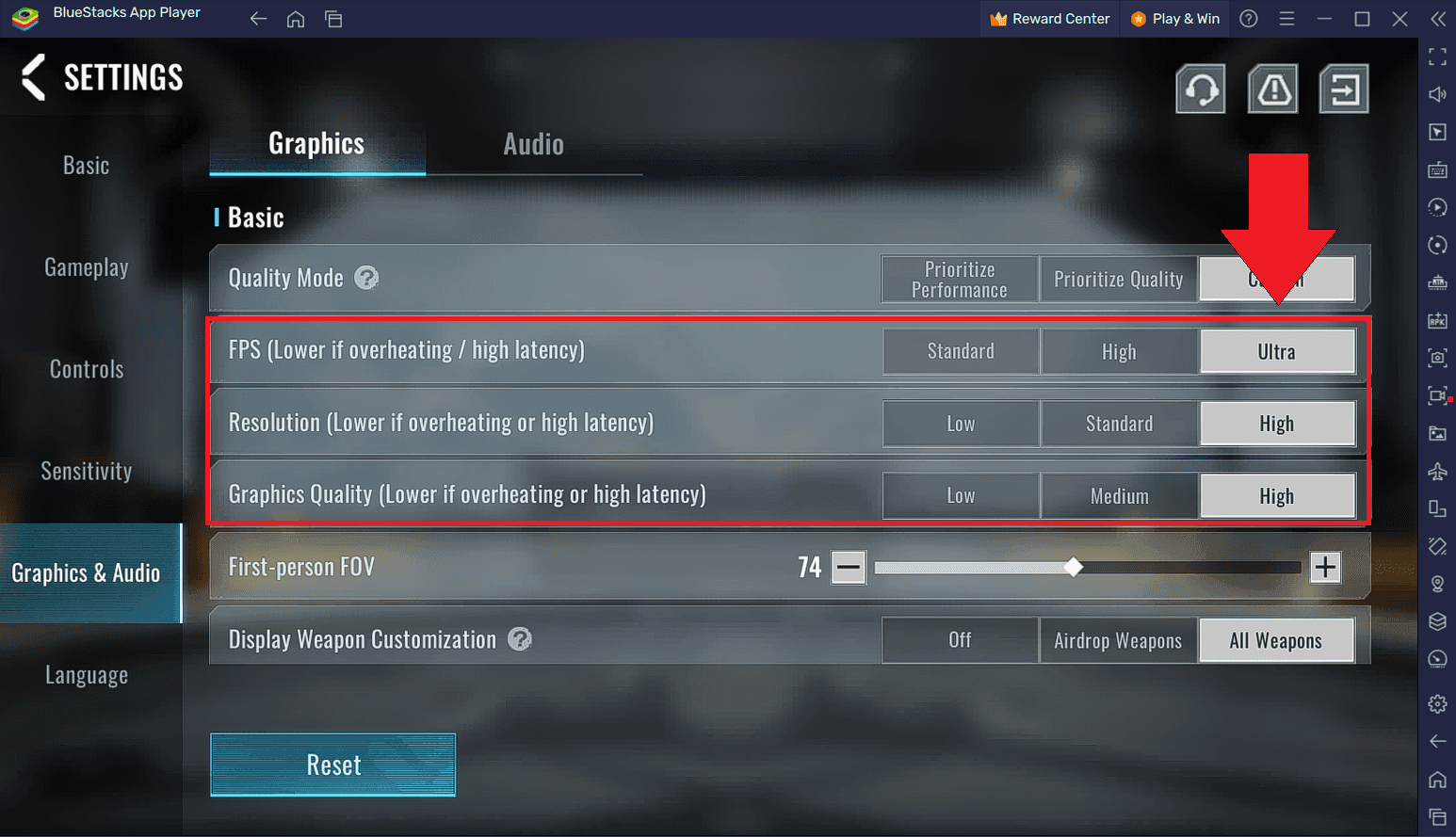
Graphics Sweet Spot for No Crashes

Proton Vulkan? Zero crashes. Ultra at 120 FPS before the freeze on GTX 1060 6GB.
Proton Experimental > Vulkan.
Drop to medium on DX12.
Cap FPS at 144.
Ever hit 200+ FPS in Squad and still crash? Wild, right?
MSI Afterburner for FPS/RAM overlay.
Log usage pre-crash.
Flush RAM and virtual memory.
Clean Up RAM and Storage
8GB DDR3 plagues reports; 10GB free is non-negotiable.
Disk Cleanup to hit 10GB free.
Bump pagefile to 16GB.
Upgrade that RAM.
Linux/Proton Hack: The Bulletproof Move
Xubuntu 24.04 or Mint 22? Crashes vanish. R7 250E stable via Vulkan; i5-8400 buttery.
Install the distro (dual-boot works).
Steam > Proton Experimental.
Launch options: Force Vulkan.
—My go-to for legacy hardware in FPS titles. Game-changer.
Real-World Player Wins (and Woes)
Q9400/R7 250E/8GB DDR3: Win10 crashes, Xubuntu Vulkan? Golden.
i7 950/GTX 1060/16GB: 120 FPS freezes, but audio test aced.
i5 3rd gen/RX 470/8GB DDR3: Crash cocktail.
2025 Prevention Playbook
Update drivers monthly.
Hold 10GB free.
Proton test routine.
Eye Vulkan patches.
FAQ
Why does Blood Strike crash after loading on PC?
Driver/old CPU clashes trigger reboots; go audio-free to test.
How to fix Blood Strike not launching?
Admin run, verify files, reinstall—nailed those 31 May cases.
What causes Blood Strike to close immediately?
Steam hang-up; admin + Proton Vulkan.
Blood Strike PC crash Windows 11 solutions?
Linux swap or Win10 bump; DDR3 gets mitigated.
Is Blood Strike crash due to graphics drivers?
Yep—update/rollback + 10GB free.
Best settings to prevent Blood Strike crashes?
Vulkan on Proton, medium graphics, FPS cap 144.