

Learn how to purchase BIGO Diamonds on BitTopup—from finding your 8-10 digit BIGO ID to receiving diamonds within 3 minutes. Access packages from 100 to 40,000 diamonds at 40% off official pricing, with secure payments via PayPal, credit cards, and digital wallets.
Understanding BIGO Diamonds
What Are BIGO Diamonds
BIGO Diamonds are the premium virtual currency in BIGO Live for purchasing virtual gifts for streamers and accessing exclusive features. They're stored in your account wallet until spent and convert directly into gifts that streamers receive as Beans.
Diamonds vs. Beans
BIGO Live uses two currencies: Diamonds (purchasable by viewers) and Beans (earnings for broadcasters). Conversion rate: 210 Beans = $1 USD. When you send diamond-purchased gifts, broadcasters receive equivalent Beans value.
Why You Need Diamonds
Diamonds unlock:
Animated virtual gifts during live streams
Premium chat privileges
Exclusive broadcaster content
Enhanced visibility in popular streams
VIP status through consistent gifting
For reliable top-ups, BIGO Diamonds quick top-up on BitTopup starts at $1.98 for 100 diamonds with 40% savings.
How Diamonds Enhance Experience
Strategic diamond use transforms passive viewing into active participation. High-value gifts trigger special effects, capture chatroom attention, and earn VIP status with benefits like priority chat and exclusive badges. During events and competitions, diamonds support broadcasters in rankings and contests.
Why Choose BitTopup
Security and Reliability
BitTopup features HTTPS encryption and PCI-DSS compliance. 98% of orders process within 3 minutes—PayPal in 2-5 seconds, credit cards in 3-8 seconds. Platform never requests your BIGO password, only your public 8-10 digit ID.
Competitive Pricing
BitTopup offers 40% discounts across all packages:
100 Diamonds: $1.98 (vs. $2.77)
200 Diamonds: $3.96 (vs. $5.54)
500 Diamonds: $9.90 (vs. $13.85)
1,000 Diamonds: $19.79 (vs. $27.71)
10,000 Diamonds: $197.92 (vs. $277.09)
40,000 Diamonds: $791.68 (vs. $1,108.35)
Cost: $0.0198 per diamond vs. $0.0314 through official channels. Daily account limit: 4,000 diamonds for security.
Fast Delivery
Automated delivery credits diamonds within 3 minutes. Check Me > Wallet after refreshing. If delayed beyond 5 minutes, log out and back in. For 10+ minute delays, clear app cache or contact support@bigo.tv with BIGO ID, amount, date, and payment screenshot.
User-Friendly Interface
Four-step process: enter BIGO ID, select package, choose payment, complete checkout. No complex registration. Supports PayPal, Visa, Mastercard, American Express, Discover, Apple Pay, Google Pay, and cryptocurrency.
Pre-Purchase Checklist
Locating Your BIGO ID
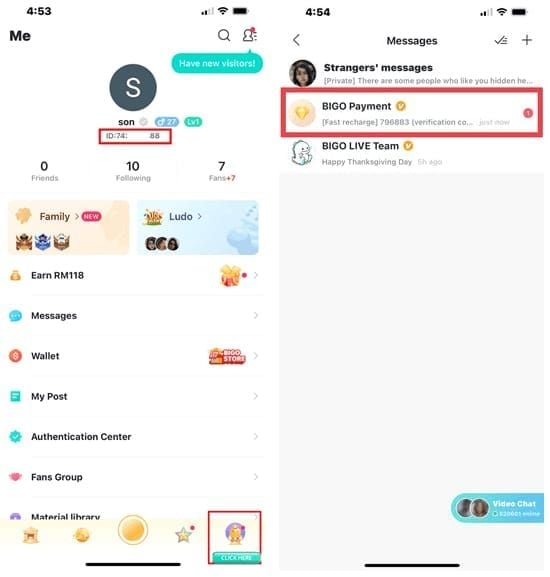
Your BIGO ID is an 8-10 digit number. To find it:
Open BIGO LIVE app
Tap Me icon (bottom navigation)
Find numeric ID under your nickname
Example: 901216366—purely numeric, no letters. Drop any ID: prefix when entering on BitTopup.
Verify Account Status
Run BIGO LIVE app version 6.37 or higher (check Settings > About)
Confirm Wallet access under Me
Turn off VPN before purchasing
Check Current Balance
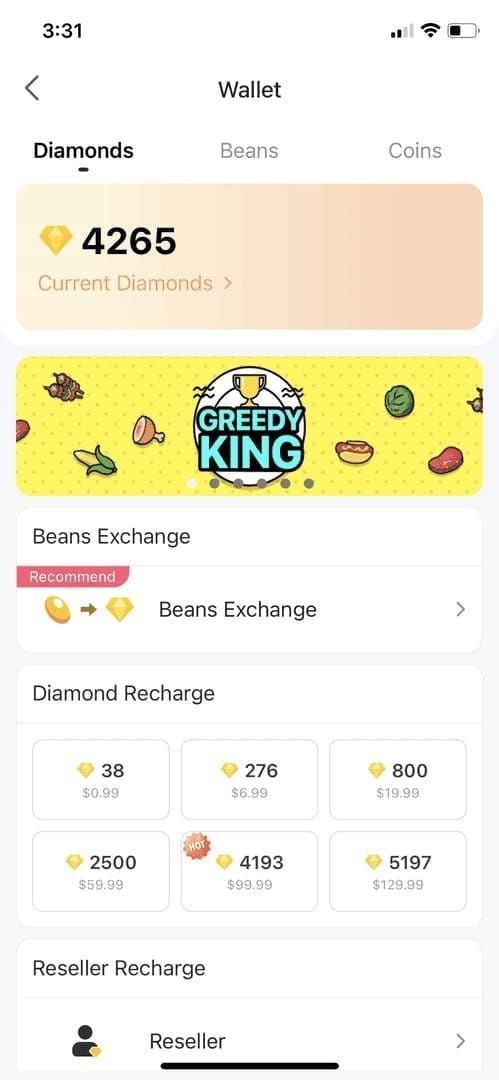
Navigate to Me > Wallet to see existing diamond count. This establishes baseline for verifying new diamonds after purchase.
Complete Top-Up Process
Step 1: Enter BIGO Live ID
On BitTopup's BIGO diamond page, input your 8-10 digit numeric ID exactly as shown in app—no spaces or extra characters. Double-check each digit. Incorrect ID is the most common mistake, sending diamonds to wrong accounts.
Step 2: Select Diamond Package
Choose from six packages with 40% savings:
100 Diamonds: $1.98
200 Diamonds: $3.96
500 Diamonds: $9.90
1,000 Diamonds: $19.79
10,000 Diamonds: $197.92
40,000 Diamonds: $791.68
First-time offer: 56 diamonds for $1. Remember the 4,000 daily limit.
Top up BIGO Live Diamonds with instant processing and multiple payment options.
Step 3: Choose Payment Method
Eight payment options available:
Fastest: PayPal (2-5 seconds)
Credit cards: Visa, Mastercard, Amex, Discover (3-8 seconds)
Mobile: Apple Pay (iOS 13.0+), Google Pay (Android 8.0+)
Crypto: Blockchain transactions
All methods use encrypted transmission.
Step 4: Complete and Verify

After payment confirmation:
Open BIGO LIVE app
Go to Me > Wallet
Refresh within 3-10 minutes
Verify new diamond balance
Save transaction receipt for records.
Maximizing Value
First-Purchase Bonuses
New users: 56 diamonds for $1 (97% savings)
Referral program: 200 bonus diamonds when 5 friends complete purchases
Seasonal Promotions
Mid-Year Gala (July 16-22, 2025): 30% bonus diamonds
Black Friday (November 28, 2025): 35-50% off
Strategic Timing
Pro tip: Combine promotional bonuses with 40% base discounts. Example: 10,000 diamonds during 30% bonus event = 13,000 diamonds for $197.92. Black Friday 50% pricing could drop to $98.96 (82% total savings).
Security Best Practices
Account Protection
Enable 2FA: Me > Settings > Account Security
Never share BIGO password with any platform
Legitimate services only need public BIGO ID
Payment Security
Confirm HTTPS padlock in browser
Look for PCI-DSS compliance badges
Bookmark official BitTopup URL after first purchase
Transaction Records
Save confirmation emails and receipts
Screenshot balance before/after purchases
Document for support if needed
Troubleshooting
Delayed Delivery
5 minutes: Log out and back into BIGO LIVE app 10+ minutes: Clear app cache through device settings Still missing: Contact support@bigo.tv with BIGO ID, incorrect ID (if applicable), amount, date, and payment screenshot
Payment Failures
Common causes:
Insufficient funds
Expired cards
Regional restrictions
Bank fraud flags
Solution: Verify payment instrument, contact bank to authorize international transactions.
Incorrect ID Entry
Contact support@bigo.tv immediately with correct ID, incorrect ID used, amount, date, and screenshot. Recovery depends on whether recipient account spent diamonds. Prevention: verify ID before confirming purchase.
App Compatibility
Update to BIGO LIVE 6.37 or higher
Restart device after updating
Check official app stores for updates
Purchase Limits
Daily Account Limits
BIGO enforces 4,000 diamond daily limit per account for security. Resets at midnight in your registered timezone. Plan large purchases across multiple days.
Per-Transaction Maximums
BitTopup caps orders at 40,000 diamonds. For higher amounts, complete multiple transactions.
Regional Availability
Some payment methods have geographic restrictions. Cryptocurrency often works when traditional methods don't. Verify payment method supports your location before checkout.
FAQ
What are BIGO Diamonds used for? Purchase virtual gifts for streamers, unlock premium features, and enable special chat privileges. They're the primary method for supporting creators and enhancing interactive viewing.
How long does delivery take on BitTopup? 98% of orders process within 3 minutes. PayPal: 2-5 seconds, credit cards: 3-8 seconds. Diamonds appear in Me > Wallet after refreshing. Delays beyond 10 minutes warrant cache clearing or support contact.
How do I find my BIGO ID? Open BIGO LIVE app, tap Me icon, locate 8-10 digit number under your nickname. Enter only numbers on BitTopup, drop ID: prefix. Example: 901216366.
What payment methods does BitTopup accept? PayPal, Visa, Mastercard, American Express, Discover, Apple Pay (iOS 13.0+), Google Pay (Android 8.0+), and cryptocurrency. PayPal processes fastest at 2-5 seconds.
Is there a purchase limit? BitTopup allows 40,000 diamonds per order. BIGO enforces 4,000 diamond daily account limit. Plan large purchases across multiple days or transactions.
What if diamonds don't arrive? Wait 5 minutes, log out/in to BIGO LIVE. After 10 minutes, clear app cache. For continued issues, contact support@bigo.tv with BIGO ID, amount, date, and payment screenshot.
Ready to enhance your BIGO Live experience? Visit BitTopup now to top up BIGO Diamonds instantly with secure payments and fast delivery!