

When BIGO diamonds don't appear after recharge, 95% resolve within 5 minutes through simple troubleshooting. This guide provides a proven 30-minute checklist covering instant refresh techniques to advanced fixes, region-specific delivery timelines, and when to escalate to support.
Normal Diamond Delivery Timeframes (2026)
Most delivery concerns stem from unrealistic speed expectations. Understanding normal timeframes helps distinguish standard delays from actual problems.
For faster processing and transparent tracking, consider BIGO Live diamonds top up through BitTopup.
Standard Processing Times
Asian users: 2-3 minutes
European/American users: 5-10 minutes
95% resolution rate: Within 5 minutes (official channels, stable network)
Regional differences reflect server proximity and payment gateway routing, not platform prioritization.
Delivery Speed Factors
Network connectivity: Minimum 1 Mbps required, 5+ Mbps optimal for synchronization.
App version: BIGO LIVE 5.0+ includes improved sync protocols. iOS 17+ users report fewer issues.
VPN/proxy services: Cause 10-20% of delivery problems by interfering with geographic verification.
Peak vs Off-Peak Hours
Peak traffic (6-11 PM local): Adds 20-30% to processing times
Asia: 3 min → 4-5 min
Europe/Americas: 5-10 min → 7-13 min
Off-peak (2-6 AM): Often under 2 minutes even for Western users.
Payment Method Impact
Fastest: Credit cards, digital wallets (seconds authorization) Slower: Bank transfers (15-30 min verification) Two-factor authentication: Reduces security delays by 80-95%
30-Minute Fix Checklist
Follow this sequence in order of likelihood and ease.
Minutes 0-5: Initial Verification
Confirm BIGO ID: Check Me tab for 8-12 digit code. Incorrect ID causes 40-70% of missing diamond reports.
Check transaction history: Me > Wallet > History. Missing entry = payment never reached BIGO servers.
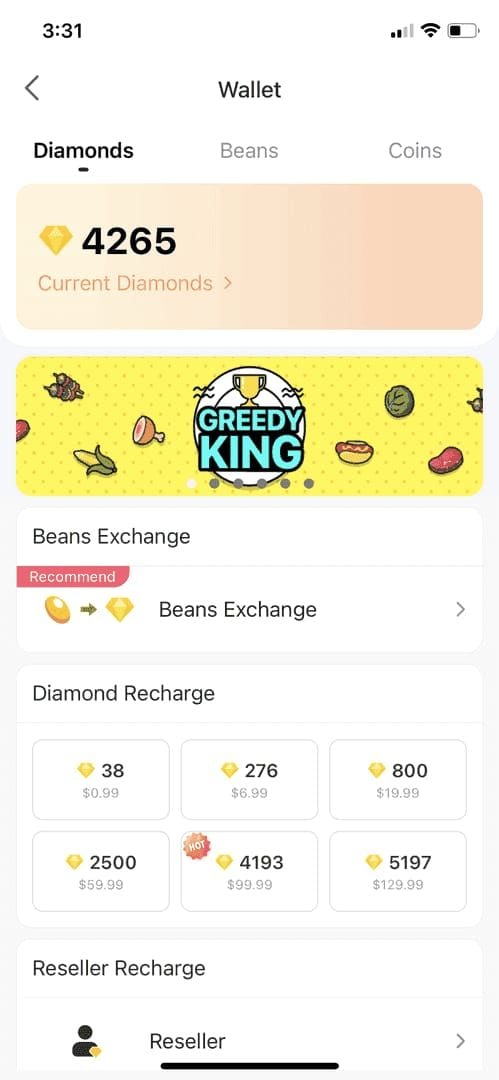
Manual wallet refresh: Swipe down 3-5 times, wait 60-90 seconds between attempts. Fixes 50-95% of sync issues.
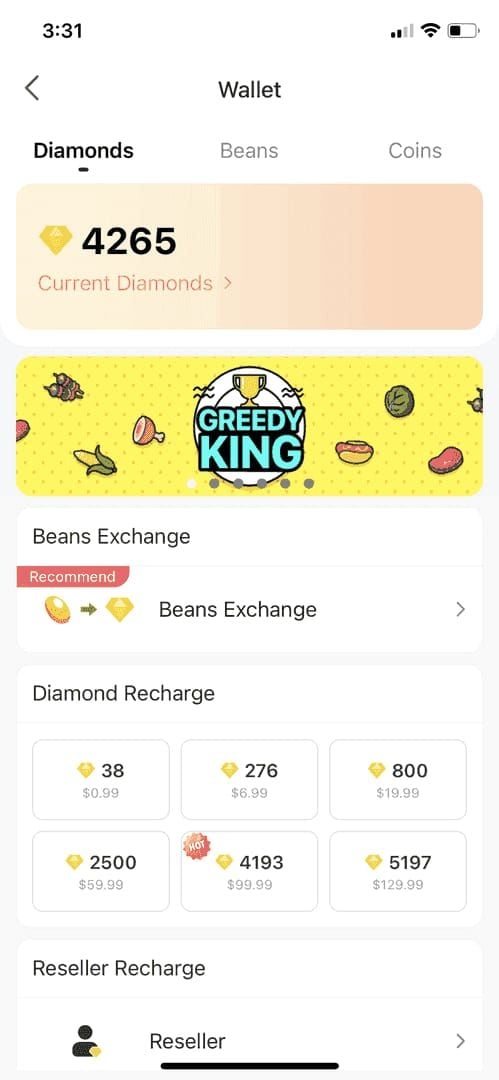
Verify payment confirmation: Check bank/payment provider for authorization holds, pending charges, or declined transactions.
Minutes 5-10: App-Level Fixes
Force-close app:
iOS: Swipe up, remove from recent apps
Android: Recent apps > swipe away or Settings > Apps > Force Stop
Wait 30 seconds after reopening before checking balance.
Switch networks: Toggle between Wi-Fi and mobile data. Resolves 80% of network sync failures.
Test network speed: Ensure 1+ Mbps minimum.
Minutes 10-20: Account & Network
Clear app cache:
Android: Settings > Apps > BIGO Live > Storage > Clear Cache
iOS: Settings > General > iPhone Storage > Offload App > Reinstall
Disable VPN/proxy: Even if purchase completed with VPN, these can block return communication.
Configure DNS: Use 8.8.8.8 (Google) or 1.1.1.1 (Cloudflare).
Minutes 20-30: Advanced Diagnostics
Restart device: Wait 30 seconds before powering back on.
Log out/in: Forces full account data refresh. Verify login credentials first.
Check verification status: Incomplete verification triggers security holds (7-14 days for first purchases).
Update app: Version 5.0+ includes critical payment improvements.
Basic Troubleshooting (Try First)
Force Close & Reopen
Complete closure clears corrupted session data. Minimizing ≠ closing.
iPhone X+: Swipe up, pause, swipe BIGO upward iPhone 8-: Double-click home, swipe away Android: Recent apps > swipe or Settings > Force Stop
Allow 30-60 seconds for initialization before checking balance.
Check Connection Stability
Unstable connections cause incomplete sync. Test with other apps/sites.
Speed test: 1+ Mbps minimum, 5+ Mbps optimal Mobile data: Often more stable than public Wi-Fi Airplane mode cycle: Enable 10 seconds, disable
Verify Payment Status
Completed ≠ funds transferred. Check for:
Authorization holds (24-72 hours)
Declined transactions
Pending/processing status
Contact payment provider if charge shows completed but no diamonds after 30 min.
Manual Balance Refresh
Pull down wallet screen 3-5 times, wait 60-90 seconds between attempts.
Don't rapid-refresh—overwhelms sync protocol. Watch for spinning indicator to complete.
Try refreshing from both wallet view and transaction history view.
Intermediate Solutions
Clear Cache & Data
Resolves 70-80% of Android display glitches.
Android: Settings > Apps > BIGO Live > Storage > Clear Cache > Force Stop iOS: Settings > General > iPhone Storage > Offload App > Reinstall
Update App Version
Version 5.0+ required for current payment protocols. Updates release every 2-4 weeks.
Enable automatic updates. iOS 17+ provides additional stability.
Restart device after updating.
Log Out/In
Forces full server data refresh. Verify credentials before logging out.
Wait 30 seconds between logout/login. Allow 60-90 seconds for sync after login.
Check Transaction History
Me > Wallet > History reveals if purchase registered.
Completed: Server-side delay Pending: Gateway processing (15-30 min) Missing: Payment never reached BIGO
Advanced Troubleshooting
Reinstall App
Removes corrupted files cache clearing can't address.
Screenshot BIGO ID first. Uninstall > restart device > reinstall > wait 2-3 min for sync.
Switch Networks
Forces new server connections bypassing routing/DNS issues. Resolves 80% of network failures.
Wi-Fi → mobile data or vice versa. Avoid public Wi-Fi.
Verify Account Status
Incomplete verification triggers holds for first purchases or unusual amounts.
Complete phone/email verification. Enable 2FA (reduces delays 80-95%).
Identity verification: 24-48 hours for manual review.
Check Payment Authorization
Authorization holds last 24-72 hours. Funds reserved but not transferred.
Check payment account for pending/processing/authorization hold status.
Bank transfers require manual approval in banking app.
Common Causes
Server Sync Delays
Peak hours (6-11 PM) add 20-30% processing time. Major events extend delays further.
Multiple sync steps: payment confirmation → verification → balance update → client notification.
95% resolution drops to 85% during peak, most resolve within 15 min.
Payment Gateway Bottlenecks
Sync failures cause 40% of missing reports. Payment completes but confirmation fails to reach BIGO.
Credit cards fastest, bank transfers slowest. Gateway maintenance disrupts service 1-2 hours.
Incomplete Verification
First-time purchasers face additional requirements. Unverified phone/email adds 24-48 hours.
Unusual patterns (3x+ typical amount, new location) trigger fraud detection.
2FA reduces delays 80-95%.
Regional Differences
Asia: 2-3 min (optimized infrastructure) Europe/Americas: 5-10 min (longer routing)
Currency conversion adds 5-15 min. Local regulations extend processing in some markets.
Bank Authorization Holds
Holds reserve funds without transferring (24-72 hours). Weekend/holiday purchases extend to Monday-Tuesday.
Pre-paid cards: 48-96 hours processing.
When to Contact Support
30-Minute Rule
Wait 30 min after completing troubleshooting. 95% resolve within this timeframe.
Peak hours/events: Extend to 60 min. Weekend/holidays: 2-4 hours.
For reliable delivery with dedicated support, try buy BIGO diamonds recharge online through BitTopup.
Immediate Contact Situations
Transaction shows failed but bank confirms charge
Multiple failed attempts with charges
Error messages about restrictions/holds
Payment provider confirms transfer but no diamonds after 30 min
Prepare This Information
BIGO ID (8-12 digits from Me tab)
Transaction ID from purchase confirmation
Payment receipt showing completed charge
Screenshots: transaction history, balance, error messages
Device type, OS version, app version
Troubleshooting steps attempted
Documentation Tips
Screenshot wallet, transaction history, payment confirmation with transaction ID/amount/date/status.
Create timeline: purchase time → payment confirmation → troubleshooting steps → current status.
Opening Support Ticket
In-App Access
Me > Feedback > Recharge Problem
Fill required fields:
BIGO ID
Transaction details
Concise description: Purchased 210 diamonds at 3:45 PM Jan 15, bank confirmed, not received after 45 min
Attach 3-5 screenshots: transaction history, payment confirmation, current balance.
Required Information
BIGO ID: Mandatory 8-12 digit code
Transaction ID: 15-25 character alphanumeric code
Payment method: Type + last 4 digits
Amount: Monetary charge + diamond quantity
Response Times
Initial acknowledgment: 24 hours
Substantive review: 24-48 hours (complex cases 48-72 hours)
Credit application: 1-3 business days after verification
Support timezone: GMT+8
Following Up
Wait 48 hours before follow-up. Reply to original ticket email or use ticket number.
Provide new information only. Don't open duplicate tickets.
Prevention Best Practices
Reliable Payment Methods
Use: Credit cards, established digital wallets (fastest processing) Avoid: Pre-paid cards, new payment accounts (trigger fraud verification)
Verify payment method linked/verified before purchase. Use local currency when possible.
Strong Connection
5+ Mbps stable Wi-Fi or mobile data. Don't switch networks during purchase.
Disable VPN/proxy. Stay on confirmation screen until success notification.
Complete Verification
Verify phone/email before first purchase or 3x+ larger amounts.
Enable 2FA (reduces delays 80-95%). Update account info after phone/email/location changes.
Why BitTopup
Specialized game currency delivery with optimized payment infrastructure. Transparent real-time tracking.
Faster support response (specialized expertise). Competitive pricing with promotions.
FAQ
How long for diamonds to appear?
2-3 min (Asia), 5-10 min (Europe/Americas). Peak hours add 20-30%. Contact support after 30 min troubleshooting.
Why no diamonds after payment confirmation?
Payment confirmation ≠ BIGO received funds. Sync failures cause 40% of reports. Try manual refresh, cache clear, network switch. Contact support after 30 min.
What if no diamonds within 24 hours?
Contact support: Me > Feedback > Recharge Problem. Include transaction ID, payment receipt, BIGO ID. Review within 24-48 hours, credit within 1-3 business days.
Can I get refund?
Yes, after support investigation. Provide transaction ID, payment receipt, BIGO ID. Processing 5-10 business days. Support may credit diamonds directly.
Does clearing cache help?
Resolves 70-80% of Android display glitches. iOS: use offload function. Works for sync issues, not payment failures. Combine with other steps.
When to contact support?
After 30 min if standard troubleshooting fails. Immediately if transaction shows failed but bank confirms charge, or error messages about restrictions/holds.