

Your Apple Gift Card balance only appears after you've redeemed the card to your Apple ID — there's no way to check an unredeemed card's value without applying it first. Once redeemed, you can verify your Apple Account credit through five official channels: iPhone/iPad Settings, the App Store app, Apple's website, phone support, or the checkout screen. All five are free, take under two minutes, and work exclusively for US Apple ID accounts.
Why This Matters Before Spring 2026 Purchases
Most people discover their balance is lower than expected mid-checkout — frustrating when you're grabbing a limited-time App Store sale or locking in an Apple Arcade subscription before a price increase. Spring 2026 brings the usual wave of App Store promotions, in-app currency bundles, and iCloud+ discounts. Knowing your exact credit beforehand lets you plan instead of scramble.
Two things trip up a lot of users:
Apple Gift Card balance ≠ Apple Cash. Apple Cash lives in the Wallet app, funded through Apple Pay transfers or the Apple Card. Apple Account credit (from Gift Cards) shows up in the App Store and Settings. If you're looking in the wrong place, the balance isn't missing — you're just checking the wrong wallet.
Unredeemed cards show no balance anywhere. You must redeem the 16-digit alphanumeric code first. Only then does the credit appear.
Method 1: iPhone or iPad Settings — Fastest for Daily Use
Settings → tap your name → Payment & Shipping → View Account. Your balance appears right there. Works on iOS 16 and higher.
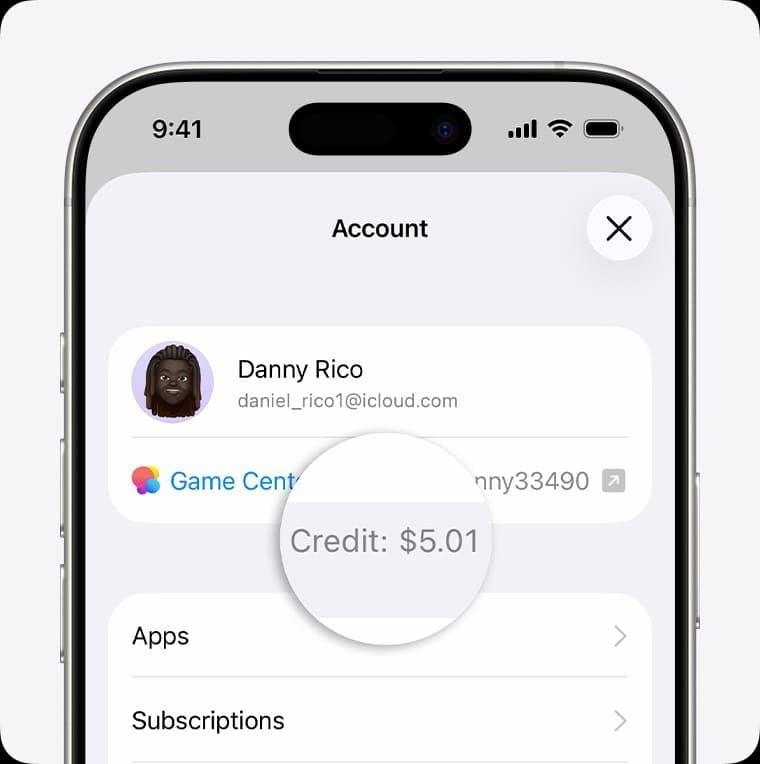
This is the method to reach for first — no separate app needed, balance is real-time, and sync across devices on the same Apple ID takes under five seconds.
Balance not showing? Sign out of your Apple ID (Settings → [Your Name] → Sign Out), then sign back in. This forces a fresh sync and fixes the majority of balance missing complaints. Don't bother restarting the device — sign out/in is the targeted fix.
Method 2: App Store App — Best for Pre-Purchase Confirmation
Tap the profile icon in the top-right corner of the App Store. Your Apple Account balance appears directly below your name. No extra taps.
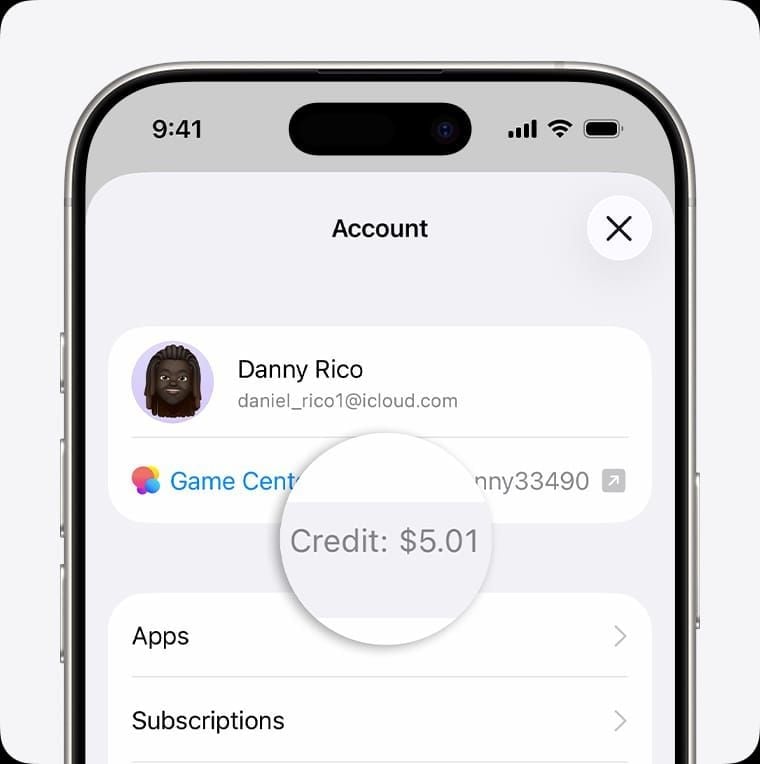
This shines when you're already browsing and want to confirm you have enough credit before committing. The figure shown here is exactly what you'll see at checkout — if it says $15.00, that's what's available.
One nuance: the balance display is region-specific. If your Apple ID is set to a non-US region, you won't see a dollar-denominated balance even after redeeming a US card. Region mismatch is the single most common configuration error — more on that in the troubleshooting section below.
Method 3: Apple's Official Website — No Device Required
Visit appleid.apple.com or secure.store.apple.com/shop/giftcard/balance, sign in, and your account credit appears in the account summary.
Use this when your iPhone isn't nearby — a work computer, a friend's laptop, any browser. No app install needed.
For users who want to buy Apple Gift Card digital code online and immediately verify the credit landed, this web method is ideal: redeem on your phone, confirm the updated balance on your computer simultaneously.
Method 4: Call Apple Support — When You Can't Access Any Device
Call 1-800-275-2273 (1-800-MY-APPLE). A representative verifies your balance after confirming your identity. Have your Apple ID email ready and expect security questions or two-factor authentication.
This isn't a quick-check method — wait times vary, and early weekday mornings (before 10 AM Eastern) tend to be faster. It's the safety net for lost phones, broken screens, or accessibility needs.
Critical: Apple Support will never call you to ask for your gift card code or balance details. If you get that call, hang up. It's a scam.
Method 5: Check Balance at Point of Purchase
Every App Store checkout screen shows your available Apple Account credit before you confirm the transaction — a live balance check built into the purchase flow.
The limitation is obvious: you need to be actively buying something. But if you're purchasing anyway, it's the most contextually useful check. You'll see exactly how much of your balance applies and whether your card on file covers the remainder.
Apple Account balance is always applied first. So if your balance is $8.00 and the app costs $12.99, checkout shows $8.00 from balance and $4.99 charged to your card.
Quick Comparison: Which Method Fits Your Situation?
| App Store App | iPhone, iPad, or Mac | ~20 seconds | Pre-purchase confirmation | | Apple Website | Any browser | ~1 minute | No device available | | Phone Support | Any phone | 5–20 minutes | Lost device, accessibility | | Point of Purchase | iPhone, iPad, or Mac | During checkout | Live check while buying |
For gaming purchases: App Store method wins — you're already in the store, balance is visible before you tap Buy.
For subscription renewals: Settings is cleanest — check balance, then navigate directly to subscriptions.
Just received a gifted card: Redeem first via App Store → profile → Redeem Gift Card or Code, then use any method above to confirm the credit landed.
Common Problems and Fixes
Balance not showing after redemption — almost always one of three causes:
Sync delay: Wait 30 seconds, refresh, or sign out/in to your Apple ID in Settings.
Wrong Apple ID used during redemption: Contact Apple Support — credit transfer isn't guaranteed but sometimes possible.
Account under review: Happens when multiple codes are redeemed in rapid succession. Apple's fraud detection flags this. Wait 24–48 hours, then redeem remaining cards gradually.
Balance shows $0.00 after confirmed redemption — before assuming fraud, check your purchase history (App Store → profile → Purchase History). If no purchases appear and the balance is still zero, call 1-800-275-2273 immediately with your redemption confirmation.
Already redeemed error on an unused card — either the card was redeemed to a different Apple ID you own (check all your accounts), or the card was compromised before you received it. Contact Apple Support and report to the retailer if purchased in-store.
Invalid code errors — usually typos. The 16-digit code uses alphanumeric characters where 0/O and 1/I are easy to confuse. If the code is definitely correct and still rejected, confirm your Apple ID region is set to United States — US cards cannot be redeemed on non-US accounts.
The Scam Landscape in 2026 — Don't Skip This
Most balance-check guides ignore this entirely. They shouldn't.
Searching Apple Gift Card balance check surfaces dozens of third-party sites claiming to verify your card's value before redemption. These are traps. Entering your 16-digit code on any non-Apple website hands it directly to whoever runs the site. Recovery is nearly impossible.
The only legitimate balance-check websites are appleid.apple.com and secure.store.apple.com. Bookmark them directly.
Phone scams follow a different pattern: callers impersonate Apple Support, claim your account is flagged, then ask you to verify your balance by reading the code aloud. Gift card fraud losses hit $212 million in 2026, with 26% of received cards reportedly carrying zero balance due to tampering or prior compromise.
The rule is simple: Apple will never call you to ask for a gift card code. Neither will the IRS, government agencies, or utility companies — any such demand is a scam.
To protect yourself:
Buy physical cards from behind the counter, not display racks where packaging can be tampered with
Photograph the front, back, and receipt before scratching the PIN
Enable two-factor authentication on your Apple ID
Report suspected fraud to 1-800-275-2273
Putting Your Verified Balance to Work This Spring
Once you've confirmed your balance, a few categories offer solid value in the App Store this spring:
Apple Arcade — one of the best per-dollar uses of gift card credit; a single month covers dozens of premium games with no additional in-app purchases
iCloud+ — starts at $0.99/month for 50GB, efficient if you're backing up multiple devices
Apple Music — individual plan at $10.99/month, straightforward to activate with account credit
In-app currency bundles — major mobile titles often run spring bonus offers; having your balance confirmed means you can move fast when a limited bundle drops
If your balance is running low ahead of a planned purchase, you can purchase Apple Gift Card instant delivery to top up your US Apple account without waiting for physical shipping.
Frequently Asked Questions
Can I check my Apple Gift Card balance without redeeming it first? No. There's no official method to check an unredeemed card's value. The balance only becomes visible after the 16-digit code is redeemed to your Apple ID — applies to both physical and digital cards.
Does Apple Gift Card balance expire in the US? No. Under the US Federal Gift Card Consumer Protection Act, Apple Gift Cards carry a minimum 5-year no-expiration guarantee. In practice, Apple states the balance persists indefinitely on your account, even across device resets, as long as you use the same Apple ID.
Can I split a purchase between my gift card balance and another payment method? Yes. Apple automatically applies your account balance first, then charges the remainder to your default payment method. No configuration needed — it happens automatically at checkout.
Why does my balance look different in the App Store versus Settings? It shouldn't — both pull from the same Apple Account balance. If you see a discrepancy, it's almost certainly a sync delay. Sign out and back into your Apple ID to force a refresh. If it persists, contact Apple Support.
How do I see my spending history to understand why my balance dropped? App Store → tap your profile icon → tap your Apple ID email → Purchase History. Every transaction is listed with the payment method used. Cross-reference this against your expected balance to spot any unexpected charges.
What's the difference between Apple Gift Card balance and Apple Cash? Apple Gift Card credit (Apple Account balance) lives in the App Store and Settings, spendable only on Apple digital products and services. Apple Cash is a separate balance in the Wallet app, funded through peer-to-peer transfers or the Apple Card, usable like a debit card for broader purchases. They don't combine or interact — check the right place for each.