

Quick Answer: YoHo glitches in 2026 stem from version conflicts, network instability, and account-level purchase restrictions. Key fixes: update to version 5.40.50 (February 27, 2026), disable VPN to clear Error E001, toggle airplane mode for Error E003, and space coin purchases 15+ minutes apart. New accounts under 30 days face a 6,250-coin transaction cap. Best top-up windows: Gold Rush Event (January 28–February 12) and Ramadan Event (March 1–30).
What Causes YoHo Voice Chat Glitches in 2026?
Problems range from audio dropouts and mic failures to coin holds and app crashes. Three major Android updates shipped in early 2026 — version 5.39.50 (January 19), 5.40.00 (February 8), and 5.40.50 (February 27), all requiring Android 7.0+. Rapid release cycles mean some devices receive patches before full stability testing, which is why glitches often appear right after an update.
Most common issues reported:
Audio cutting out mid-room during peak hours
Microphone not activating despite correct permissions
Black screen on launch after updates
Error E001 (VPN Detected) blocking coin purchases
Error E003 (Network Timeout) from payment gateway failures
Coins not received after successful payment
Room loading stuck at 99% from server region mismatches
Glitches come from three layers: device-side (outdated OS, corrupted cache), network-side (speeds below 3 Mbps download / 1 Mbps upload), and server-side (regional routing failures causing loading errors or gift-sending delays).
Fix YoHo Audio Issues: No Sound, Cutting Out & Echo
No Sound Fix
Force-close YoHo, wait 10 seconds, reopen
Check device volume and in-app audio settings simultaneously
Verify connection meets 3 Mbps download minimum
Clear cache: Settings → Apps → YoHo → Storage → Clear Cache

Toggle airplane mode 10 seconds to reset the network stack
Voice Cutting Out Mid-Room
Almost always bandwidth or latency — not an app bug. Run a speed test before entering a room. If upload drops below 1 Mbps, switch between Wi-Fi and mobile data. Closing background streaming apps or downloads restores stable audio within 30 seconds.
Echo & Feedback Loop
Caused by audio looping between speaker output and mic input. Switch to headphones to physically separate them. If echo persists with headphones, it's a server-side audio processing delay — force-close and rejoin to reset the audio stream.
Microphone Not Working
Settings → Privacy → Microphone → confirm YoHo has permission enabled
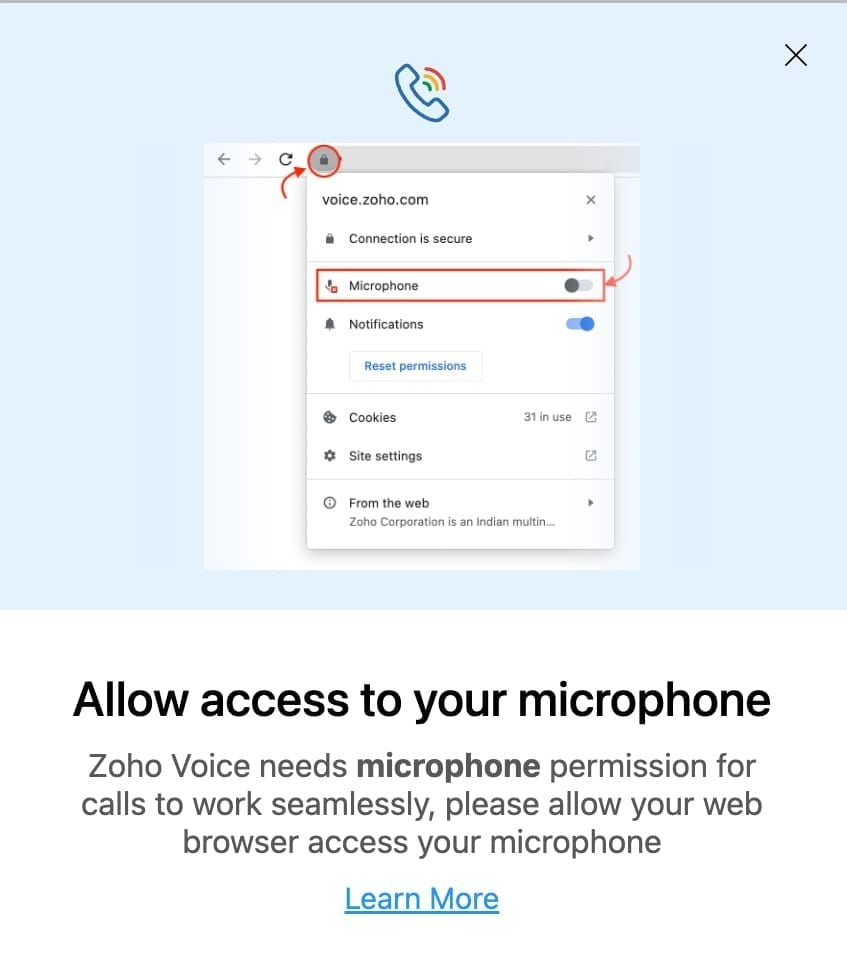
Force-close, wait 10 seconds, reopen and retry mic seat
Clear app cache (resolves permission cache conflicts on Android 7.0+)
On shared devices, confirm no other app is holding the microphone
Update to 5.40.50 — includes audio driver compatibility improvements for Android
Fix YoHo App Crashes, Black Screen & Loading Bugs
Why it crashes: Running versions below 5.39.50, insufficient RAM (under 3GB), or corrupted cache from interrupted updates.
Black Screen on Launch
Force-close and clear cache immediately
Restart your device completely
Uninstall and reinstall version 5.40.50
Confirm Android version is 7.0 or higher — older OS versions are no longer supported
Stuck at 99% Loading
This indicates a server region routing failure. Toggle airplane mode 10 seconds, relaunch. If it recurs consistently, it's server-side and resolves within 1–2 hours without user action.
Fix YoHo Connection Errors E001 & E003
Error E001 (VPN Detected): Disable your VPN entirely before launching YoHo — applies to built-in device VPNs and third-party apps running in the background.
Error E003 (Network Timeout): Toggle airplane mode 10 seconds, reconnect, retry. If it repeats, switch between Wi-Fi and mobile data to change gateway routing.
Minimum network requirements:
3 Mbps download / 1 Mbps upload for standard rooms
5 Mbps download recommended for rooms with 10+ active mic seats and simultaneous gift animations
YoHo Coins Not Received After Top-Up
Processing Times by Payment Method
Credit card: 3–7 minutes (85% of cases)
Bank transfer: 15–30 minutes minimum
Accounts under 7 days old: 24–72 hour hold on purchases exceeding $20
Purchases over $50: 7–14 day review hold regardless of account age
Recovery Steps
Wait the full processing window before assuming failure
Check coin balance in the top-right corner of the app
Navigate to Settings → Payment History to confirm transaction status
Force-close, wait 10 seconds, reopen — balance sometimes updates after session refresh
Still missing after 30 minutes (credit card) or 2 hours (bank transfer)? Contact YoHo support with your transaction ID
Prevent Top-Up Failures
The most critical step: verify your User ID before every purchase. Your YoHo User ID is an 8–12 digit number — tap the account icon top-right → Profile → Server Name → Gravity icon. Wrong ID = coins sent to another account with no automatic recovery.
For reliable top-ups with fast delivery and competitive pricing, buy YoHo coins online cheap through BitTopup — especially useful when you need coins before an event window closes.
Best Times to Top Up YoHo Coins in 2026
What Coins Unlock
Coins expand your YoHo experience directly. The 7,000-coin package unlocks 7 premium voice filters. Coins power virtual gift sending, which drives leaderboard rankings and host privileges.
Available packages: 1,200 / 2,400 / 6,250 / 12,500 / 37,500 / 65,000 / 130,000 coins

— each tier unlocking progressively more gifting and room interaction options.
High-Value Top-Up Windows
Gold Rush Event (January 28–February 12, 2026): 1.5x coin multiplier daily from 7–9 PM — the single highest-value window of Q1
Ramadan Event (March 1–30, 2026): 70% diamond discounts across the full month — best sustained discount period of the year
Topping up outside these windows means full price for the same coins. Timing purchases to these events delivers 30–70% more value per dollar.
To make sure your coins arrive before event windows close, top up YoHo group voice chat diamonds via BitTopup for fast, reliable delivery backed by high user ratings and responsive customer service.
Purchase Limits to Know
New accounts under 30 days: 6,250-coin cap per transaction
Daily cap: 10,000 diamonds, maximum 3 attempts per 24-hour period
Accounts under 90 days or fewer than 5 prior transactions: additional holds on larger packages
Multiple recharges within 15 minutes: extends holds to 72 hours
Pro tip: Space purchases 15+ minutes apart and complete your profile with verified email and phone to reduce hold frequency.
How to Top Up YoHo Coins via BitTopup
Step-by-Step
Find your User ID: tap account icon top-right → Profile → Server Name → Gravity icon
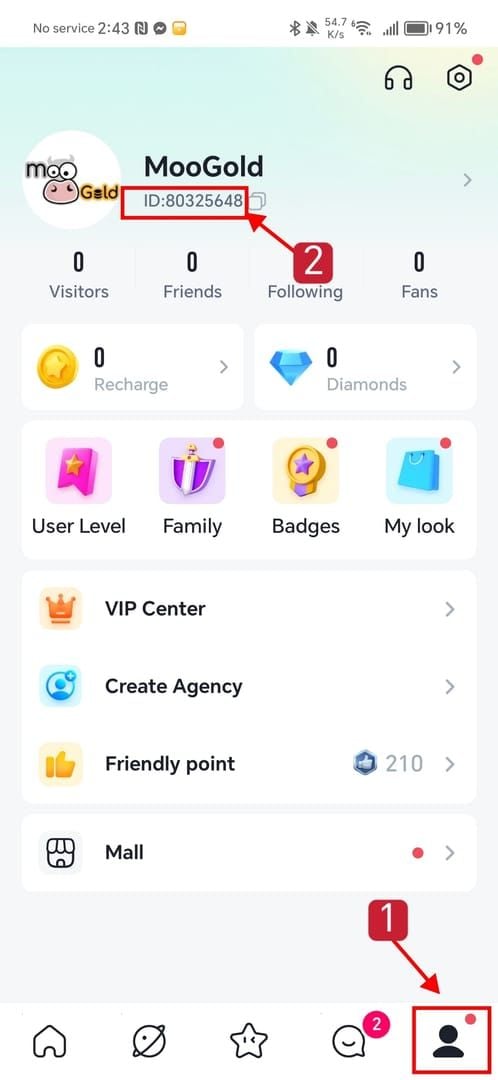
Visit BitTopup and select your YoHo coin package
Enter your 8–12 digit User ID — double-check before confirming
Complete payment; credit card orders process in 3–7 minutes
Check in-app coin balance top-right after the processing window
Before purchases over $50: Enable 2FA in YoHo security settings — this reduces account risk scores and prevents holds. Accounts with incomplete profiles get flagged more frequently for review.
Preventive Habits to Stop Glitches Recurring
Update promptly — version 5.40.50 (February 27, 2026) has the most current stability fixes
Keep Android at 7.0 or higher
Check coin balance and payment history weekly to catch discrepancies early
Maintain speeds above 3 Mbps download / 1 Mbps upload
When to clear cache: Black screen on launch, audio permission conflicts, balance display errors. Don't clear cache right before an important session — the app rebuilds on next launch, causing a brief slowdown.
Pro tip: Wait 48–72 hours after a major version release before updating if your current version is stable. Version 5.40.00 (February 8) introduced audio routing issues patched in 5.40.50 — users who waited avoided the instability entirely.
Self-Fix vs. Contact Support
Handle yourself (under 10 minutes):
Audio cutting out, echo, black screen from cache corruption
Error E001 or E003 during top-up
Balance not displaying after purchase
Contact YoHo support:
Coins confirmed paid but absent after 2+ hours
Review hold exceeding 14 days
Purchases over $50 under extended review with no resolution timeline
Room access permanently blocked without explanation
For effective support tickets, include: User ID (8–12 digit format), exact error code, app version, device OS version, and a Payment History screenshot. This eliminates back-and-forth and speeds up resolution.
Frequently Asked Questions
Q: Why is my YoHo voice chat not working in 2026? Most likely an outdated app version, speeds below 3 Mbps download / 1 Mbps upload, or corrupted cache. Update to 5.40.50, clear cache, and run a speed test first.
Q: My YoHo coins didn't arrive after top-up — what do I do? Wait the full window: 3–7 minutes (credit card), 15–30 minutes (bank transfer). Force-close and reopen to refresh balance. Still missing after 2 hours? Contact support with your transaction ID and User ID.
Q: Why does YoHo keep crashing? Running versions below 5.39.50, under 3GB RAM, or corrupted cache. Update to 5.40.50, clear cache, confirm Android 7.0+.
Q: When's the best time to top up for bonuses? Gold Rush Event (January 28–February 12, 2026): 1.5x multiplier daily 7–9 PM. Ramadan Event (March 1–30, 2026): 70% diamond discounts. These are the two best windows of early 2026.
Q: Does clearing YoHo cache fix glitches? It fixes black screen, audio permission conflicts, and balance display errors. It won't fix network issues, server-side errors, or account holds. Use it as a targeted fix, not a universal one.
Q: Why did my top-up get put on hold? Accounts under 7 days: 24–72 hour hold on purchases over $20. Purchases over $50: 7–14 day review hold. Multiple recharges within 15 minutes extend holds to 72 hours. Space purchases 15+ minutes apart and verify your email and phone number to reduce holds.