

Searching for Yalla Ludo Global 6.1 update bugs fixes March 2026? Here's the direct answer: there's no officially versioned 6.1 release. The actual current versions are 1.4.9.1 (February 13, 2026) and 1.4.9.0 (February 9, 2026). The bugs players are reporting — purchase failures, account freezes, login resets, lag, dice complaints — are real and documented. This guide gives you a per-bug status tracker, a diamond safety advisory, and fixes you can apply right now.
What Players Are Calling 6.1 Is Actually the 1.4.9.x Cycle
Version 1.4.9.0 shipped February 9, 2026, with a heavy feature load:
VIP Room Upgrade system — new room tiers with higher betting stakes
Free Monthly Rewards — daily claim loop tied to calendar cycles
Royal Privileges — expanded Royal Level progression (building on Royal Level 2 from v1.4.6.1)
Nameplate optimization — now records unlock history and sharing activity
Kill count display added to Ludo and Jackaroo match results
Version 1.4.9.1 followed four days later as a rapid hotfix — which itself signals the dev team knew 1.4.9.0 was unstable.
Feature-heavy updates always carry higher bug risk. The VIP Room and Monthly Rewards systems both touch the diamond and gold economy directly. When currency-adjacent systems ship alongside UI overhauls, edge cases multiply fast. The 53 documented account freeze reports on iPhone XS almost certainly trace to the new VIP logic conflicting with older device memory handling.
The 7 Bugs Players Are Actually Hitting Post-1.4.9.x
Source confidence matters here — I'll flag each one, because treating community rumors like patch notes is how bad advice spreads.
Bug #1: In-App Purchase Failure — Diamonds Never Arrive
Card charged, bank SMS received, diamonds missing. This is the most damaging bug in practical terms. Officially acknowledged by Yalla Ludo support with a documented escalation path.
Severity: High | Status: Workaround available (official)
Bug #2: Account Freezes + Payment Safety Warning on iPhone XS
53 community-documented cases, predominantly on iPhone XS. Linked to the new VIP Room system conflicting with older iOS device profiles.
Severity: High | Status: Partially improved in 1.4.9.1 — not fully resolved
Bug #3: Game Lag and Rendering Glitches Mid-Match
Board stuttering, piece movement delays, occasional visual desync. Cross-platform. Likely a performance regression from the kill-count display adding render overhead.
Severity: Medium | Status: No official fix — workarounds available
Bug #4: Login Resets Across Facebook, Apple ID, and Phone Auth
Session persistence breaks after the update — players log in and temporarily see blank profiles. Account data is intact server-side; the client-side auth handshake is failing intermittently. Disrupts tournament entry timing and daily reward windows.
Severity: Medium | Status: Official workaround confirmed (reinstall + VPN)
Bug #5: Daily Login Bonus Not Credited
The new Monthly Rewards system has an edge case: if you close the app before the rewards UI fully renders, the claim doesn't register. The system apparently needs the screen to fully load before it logs the credit.
Severity: Low-Medium | Status: Workaround available — screenshot the rewards screen before closing
Bug #6: Dice Roll Fairness Complaints (Contested)
A significant portion of the community claims dice favor paying players or high-level accounts. Developers have explicitly denied this, affirming pure randomness and active cheat monitoring. No independent audit exists. This is a genuine conflict — real frustration, unconfirmed mechanism.
Severity: Disputed | Status: Developer-denied, no fix issued
Bug #7: VIP Room Access Denied After Purchase
Diamonds deducted, room tier doesn't unlock. Financially the highest-stakes bug, since VIP upgrades involve larger amounts.
Severity: High | Status: Report immediately via support with invoice + Game ID
Bug Status Tracker
Source transparency: Purchase failure and login bugs are officially acknowledged. Account freeze reports are community-observed (53 cases). VIP Room access error is community-reported, not yet officially confirmed. Dice fairness is developer-denied. These are not equally verified — and I'm not presenting them as if they are.
Step-by-Step Fixes
Fix 1: Update First
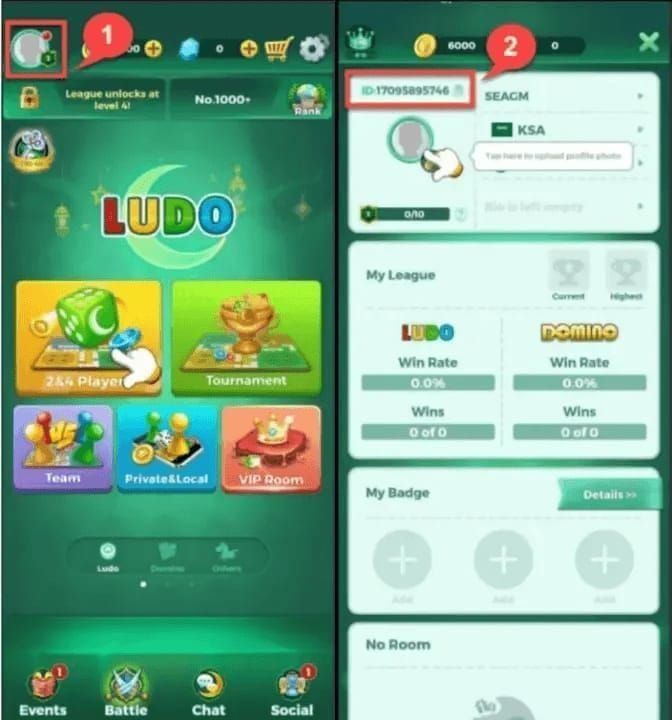
Confirm you're on version 1.4.9.1 before troubleshooting anything else. Running 1.4.9.0 while trying to fix stability issues is wasted effort. App size is 385.9 MB — plan your connection accordingly.
Fix 2: Purchase Failure — Official Escalation
Go to Settings > Support > Payment Issue inside the app
Use the official support link: http://t.ly/3i4C
If unresolved, email yallaludo@yalla.live with:
Invoice/receipt
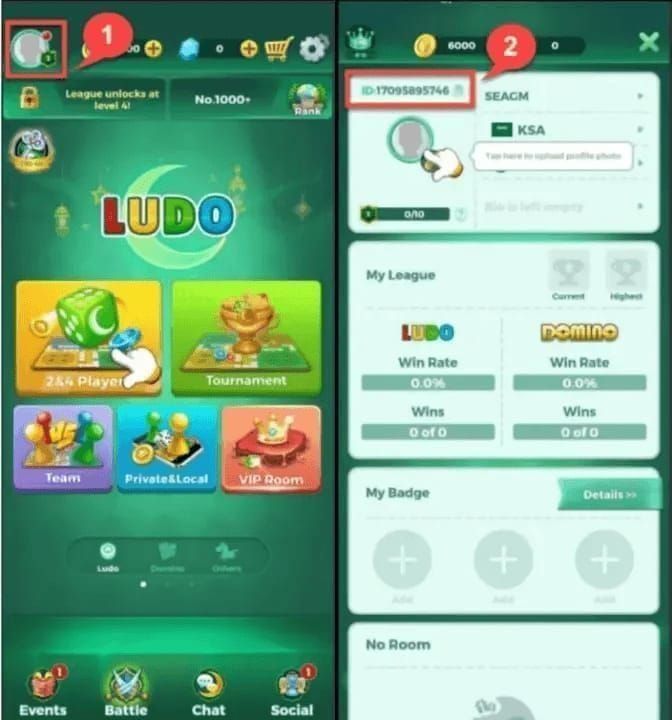
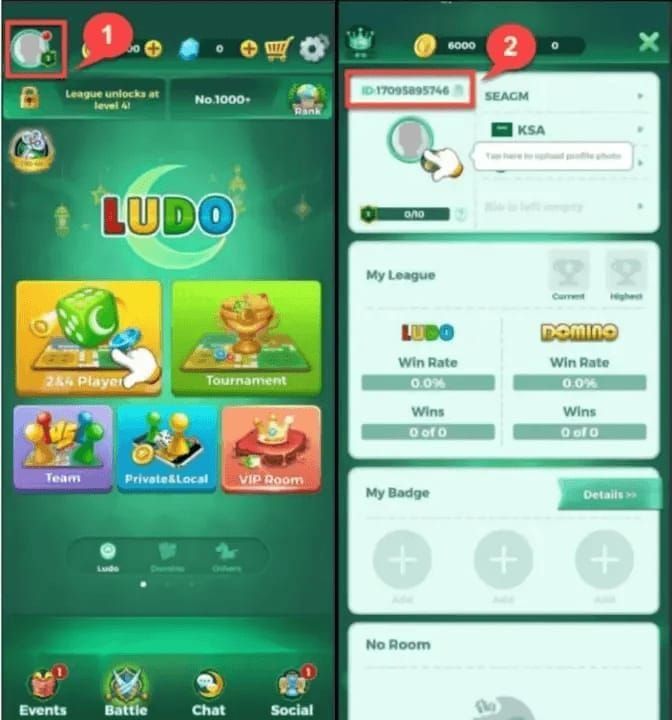
11-digit Game ID (tap profile icon upper-left, copy the ID starting with 7)
Bank SMS screenshot confirming the charge
Community reports show delays up to 7 days — but updating to 1.4.9.1 first significantly shortens this.
Fix 3: Login Reset — Reinstall + Network Switch
Fully uninstall the app (account data is server-side — nothing is lost)
Reinstall from the official store
If the issue persists, try a VPN or switch between WiFi and mobile data before logging in
Submit your Game ID via in-app feedback if sessions still won't stabilize
Fix 4: Daily Bonus — Screenshot Protocol
Don't close the app immediately after logging in. Let the Monthly Rewards screen fully render, then screenshot the credited reward before navigating away. That screenshot is your evidence for a support claim if the bonus doesn't appear in your balance.
Fix 5: VIP Room Access Bug
Screenshot your diamond balance before and after the purchase
Note the exact transaction time
Submit via Settings > Support with your Game ID and transaction details
Don't attempt the purchase again — duplicate charges have been reported
Fix 6: Account Freeze on iPhone XS
Force-close all background apps before launching Yalla Ludo. Ensure iOS is fully updated. If the freeze persists: log out, wait 5 minutes, reconnect on stable WiFi, then log back in.
Fix 7: Game Lag
No official patch yet. Close background apps, use WiFi over mobile data, and avoid high-stakes rooms during peak hours (typically 8–11 PM local time). The lag is cosmetic in most cases — actual game state is server-authoritative.
Diamond Safety: What to Avoid Right Now
High-risk spending — avoid until resolved:
VIP Room Upgrades (access-denial bug means you may pay and not receive the tier)
Large purchases during known peak instability hours
Any purchase on iPhone XS until the freeze issue is fully confirmed resolved
Currently safe:
Standard Ludo and Jackaroo room entry fees
Cosmetic purchases (stickers, nameplates) — don't interact with the bugged VIP system
Gold purchases — gold economy appears unaffected
Fortune Store lucky draws — no deduction-without-delivery reports here
Before any significant spend: screenshot your current diamond balance. After the transaction, screenshot again immediately. If diamonds are deducted without delivery, you have timestamped before/after evidence. Always include your 11-digit Game ID in support submissions — without it, resolution takes significantly longer.
When you're ready to recharge safely, players looking to buy Yalla Ludo diamonds cheap online should confirm they're on version 1.4.9.1 and that the VIP Room access bug is resolved before topping up.
March 2026 Events: Why Diamond Timing Matters
Most bug-fix articles ignore this entirely. The Ramadan 2026 event runs late February through early March 2026 — 6 distinct activities, a Ramadan Tent mechanic, and a 100,000-diamond grand prize with Top-1,000 ranking rewards. The March 2026 tournament runs simultaneously.
Smart Ramadan diamond strategy:
Days 1–2: Tent setup activities — low diamond cost, high structural value
Days 3–5: Gift-sending phase — this is where spend accelerates
Days 6–7: Lucky box props — highest variance, highest reward ceiling
Budgeting formula: (10 matches/day × your room tier cost × event days) + 20% buffer. Reserve 25–30% of your total budget for the final week when rankings crystallize. Don't burn entry-fee diamonds on spin mechanics early — that's the mistake that leaves players short when it actually matters.
Gift cards expire June 3, 2026, so there's no panic-spend pressure. But event-specific rewards have hard deadlines.
For players planning their Ramadan and tournament budget, this is the right moment to top up Yalla Ludo Global diamonds fast — 98% of top-ups deliver within 30 seconds, with a maximum wait of 30 minutes, which matters when you're mid-event.
In-app diamond pricing for budget planning:
The 16,000 and 53,700 tiers offer the best per-diamond value — worth knowing if you're budgeting for the full Ramadan run.
How to Report Bugs to Yalla Ludo Support
Most players don't follow the full submission process, which is why their tickets take longer.
In-app:
Tap profile icon (upper left)
Settings > Support
Select the relevant category (Payment Issue, Account Issue, Gameplay Bug)
Include: Game ID, device model, OS version, exact incident time, screenshots
Email escalation: yallaludo@yalla.live — use this when in-app submission gets no response within 48 hours. Subject line format:[BugReport][YourGameID][IssueType] routes faster than generic subjects.
The dev team responds faster to reports framed around economic impact than cosmetic bugs. If a gameplay bug is costing you diamonds or blocking purchases, say so explicitly.
The Version Naming Issue Worth Understanding
No current top-ranking result addresses this: 6.1 doesn't exist in the official App Store versioning. Yalla Ludo Global uses a 1.x.x.x scheme. The confusion likely comes from in-game UI displays or regional marketing materials using different numbering.
Practically: searching for 6.1 patch notes on the App Store or official site returns nothing. Search 1.4.9.1 or 1.4.9.0 instead. When submitting bug reports, use the actual version from Settings > About — support teams route tickets by version number, and submitting 6.1 causes processing delays.
Frequently Asked Questions
Will Yalla Ludo refund diamonds lost due to bugs? Handled case-by-case — no blanket refund policy exists. The correct path: Settings > Support > Payment Issue, then escalate to yallaludo@yalla.live with invoice and Game ID. Timestamped before/after screenshots significantly improve success rate.
How long do bug fixes usually take? The 1.4.9.0-to-1.4.9.1 hotfix took 4 days — fastest observed turnaround. Complex bugs affecting VIP systems or account auth typically take 1–3 weeks for a full patch. Community workarounds usually surface within 48–72 hours of a bug going widespread.
Are these bugs device-specific? Account freeze and payment warning: specifically documented on iPhone XS. Game lag: cross-platform. Login reset: reported across Android and iOS on multiple device generations. VIP Room access bug: device-agnostic — it's a server-side logic issue.
Is 1.4.9.x available on both Android and iOS? Yes. Supports iOS 13.0+, iPadOS 13.0+, macOS 13.0+ (M1 or later), and visionOS 1.0+. Android follows standard Play Store rollout. App is 385.9 MB, rated 4.3–4.4/5 across 2,000–26,000 ratings depending on platform snapshot.
Safest way to enter a tournament right now? Use stable WiFi. Screenshot your diamond balance before paying the entry fee. If the fee is deducted but you're not placed in a match, fully close the app, wait 60 seconds, relaunch — server state usually resolves within that window. If not, submit a support ticket immediately with the timestamp.
Should I wait to spend diamonds until all bugs are fixed? Not necessarily. Cosmetics, standard room entry, and gold purchases are currently safe. Specifically avoid VIP Room Upgrades and large purchases on iPhone XS. For Ramadan, early-phase activities (tent setup, daily tasks at ~15 min/day) have low diamond requirements and are safe to engage with now.
Bug status reflects community reports and official documentation as of early March 2026. Verify current patch status via in-app announcements before significant diamond purchases. Updated within 72 hours of any new patch release.