

The single best move for Tango Coins buyers right now is the $49.99 web package — 9,100 Coins at 182 Coins per dollar, which is 40% more than the same spend through the app. Stack that with a Level 25+ VIP discount and an active event refund, and community testing shows you can push effective yield to roughly 283 Coins per dollar. That's more than double what in-app buyers get. Here's exactly how.
Why April 2026 Is a High-Value Window
Three independent discount systems are simultaneously accessible, and they compound rather than cancel. Most buyers use one. Experienced gifters use all three.
Layer 1 — Web Bonus: Buying through tango.me instead of the app store automatically applies a 40% Coin bonus. No code, no opt-in.
Layer 2 — VIP Discount: Level 10+ gets 5–10% off; Level 25+ unlocks 15–20% off the 13,500 Coin package at web checkout.
Layer 3 — Event Refunds: Active leaderboard events return 30–75% of spent Coins to top-ranking participants, up to defined caps.
The part most guides miss: these layers interact. The web bonus inflates your base Coin count before the refund percentage is calculated — higher base means a larger absolute refund.
What Makes April Different
Web package pricing stabilized January 29, 2026, locking in the 182 Coins/$ rate at $49.99. Community observation also flags days 20–28 of each month as a flash sale window — timing your top-up there has historically aligned with additional promotional pricing.
There's also an unconfirmed but widely circulated report of a 15–25% in-app price increase expected in Q2 2026. Treat it as a planning signal, not a certainty. If it lands, pre-buying web packages now locks in the current rate.
Confirmed vs Community-Observed (Transparency Notice)
Officially confirmed: VIP tier thresholds, weekly Coin bonuses, 2 Coins = 1 Diamond conversion, Coins don't expire or transfer
Community-observed (high confidence): 40% web bonus, 182 Coins/$ at $49.99, Level 25+ discount percentages, flash sale timing
Unconfirmed: Q2 2026 in-app price increase
Layer 1 — Web Top-Up Bonus
Skip the app store and you immediately get 40% more Coins. This isn't a promotion — it's the standard web rate. Tango bypasses Apple and Google's 30% platform fees when you pay directly, and passes the savings on as Coins.
In-App vs Web: The Numbers
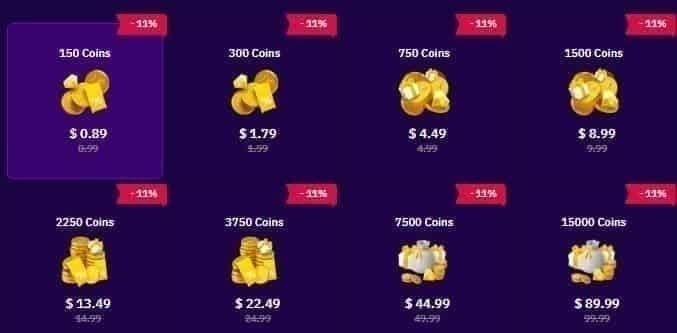
The $199.99 in-app package is the worst value on the platform — 67.5 Coins per dollar. Even the $0.99–$9.99 tiers only manage 120–121 Coins/$ in-app. Web wins at every tier, but the gap is most dramatic at $49.99.
How to Access the Web Portal
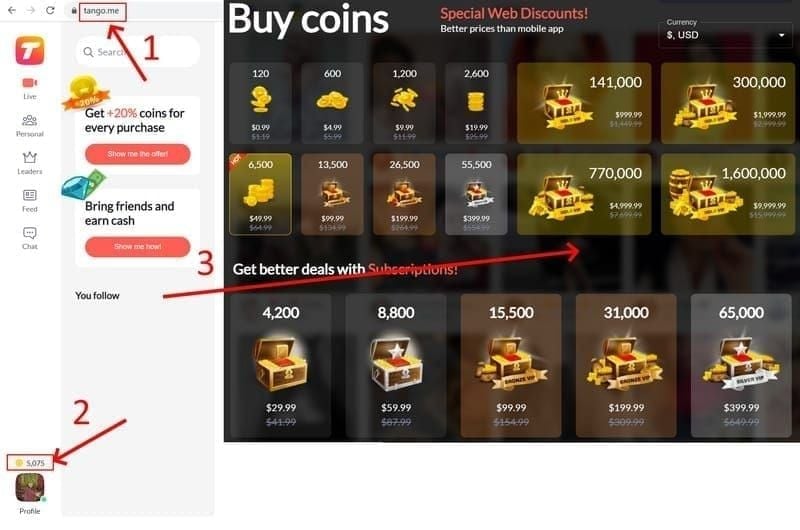
Go to tango.me in any browser (desktop or mobile both work)
Log in with your Tango credentials
Navigate to Coin Balance in your profile
Select your package — the 40% bonus applies automatically
Complete payment via card or supported method
No special code needed. The bonus is structural.
Topping Up via a Third-Party Portal
Verified third-party services use your Tango UID rather than your password — which is the correct security model.
Open Tango and go to your profile
Copy your numeric UID (not your username)
Enter the UID on the recharge platform
Confirm the displayed username matches yours before paying
Coins typically arrive within 15–30 minutes
For the Tango coins cheapest top up deal April 2026, BitTopup uses this UID-only method. Community reports confirm these top-ups count fully toward VIP thresholds and leaderboard eligibility.
Red flags: Any platform asking for your password — leave immediately. Rates advertised above 182 Coins/$ are a scam signal; that's the current ceiling at the $49.99 web tier.
The Real Annual Cost of Using the App
At $49.99 web vs in-app, you get 2,600 extra Coins per purchase. One purchase per month over a year: 31,200 Coins left on the table. At 400 Coins per 10–15 minute private chat session, that's 78 extra sessions annually — just from switching channels.
Layer 2 — VIP Discounts
VIP discounts are real but conditional. They only become meaningful at Level 25+, and reaching that tier requires sustained monthly spend.
VIP Tier Structure
Important: daily login bonuses (20–50 Coins/day, ~900–1,200/month) don't count toward VIP thresholds. Only real-money purchases accumulate VIP points at 1 point per $1 spent.
Which Tier Actually Matters
Level 10+ gives 5–10% off — useful, not transformative. The real inflection point is Level 25+, where 15–20% off the 13,500 Coin package at web checkout is confirmed by community testing. That discount stacked on the 40% web bonus is where the math gets genuinely interesting.
For buyers spending under $600/month, the VIP Gold weekly bonus (~800 Coins/month) represents roughly 0.7% ROI on your spend. Inferior to simply optimizing package selection. Pursue VIP tiers for leaderboard access and streamer relationship perks — not purely for Coin economics.
Bundle Trap: $199.99 vs Four $49.99 Packages
Four $49.99 web packages ($199.96 total) yields 36,400 Coins. A single $199.99 web package yields 18,900. Same spend, nearly double the Coins. The large package looks convenient and destroys value.
Layer 3 — Event Refunds
Event refunds are the highest-leverage layer — and the most timing-sensitive. Miss the eligibility window and you get nothing.
How Refunds Work
Tango's leaderboard events refund a percentage of Coins spent during the event window back to top-ranking participants. The refund is based on Coins spent during the event, not your balance. Coins held before the event started don't count toward your refund calculation.
Ramadan 2026 Refund Structure (Template for April Events)
The Ramadan 2026 event ran sunset February 18 to sunset March 19, 2026. Its structure is the template for similar April events:
Community observation noted 12–18% lower leaderboard thresholds during Ramadan vs standard months — less total spend required to reach competitive positions. Watch for similar reductions in April event windows.
Eligibility Rules
✅ Coins purchased and spent during the active event window count
✅ Web top-up and third-party UID top-up Coins both qualify
❌ Coins purchased before the event goes live don't count, even if spent after launch
❌ Free login bonus Coins don't count toward leaderboard spend totals
That last point is the timing trap that costs buyers real money. Top up at 11:58 PM, event launches at midnight — those Coins are ineligible even if you spend them immediately after.
Do Refunded Coins Stack with Web Bonus Coins?
Yes — this is the compounding effect that makes the strategy work. When you buy 9,100 Coins via web (including the 40% bonus) and spend them during an event, your refund calculates on the full 9,100, not the 6,500 base. At 30% refund: 2,730 Coins back vs 1,950. That's 780 extra Coins just from using the web channel.
The Stacking Strategy: Order of Operations
Step 1: Confirm your VIP level before purchasing. If you're close to Level 25, consider whether a small additional spend to hit that threshold unlocks the 15–20% discount on your main purchase.
Step 2: Wait for event launch confirmation before topping up. Don't pre-load Coins in anticipation — only Coins purchased after the event goes live are refund-eligible.
Step 3: Top up via web immediately after event launch. This captures the 40% bonus on Coins that are now event-eligible.
Step 4: Apply VIP discount at checkout if your tier qualifies. The discount reduces your dollar cost, so you're getting more Coins per dollar before the 40% bonus even applies.
Step 5: Pace your spend strategically. Community testing on Ramadan-style events suggests 8,000–12,000 Coins on days 1–2 to establish leaderboard position, then 1,500–3,000 Coins every 2–3 days to maintain rank. Front-loading or back-loading both underperform this approach.
Mistakes That Break the Stack
Buying the $199.99 package. At 94.5 Coins/$ web (or 67.5 in-app), it's the worst value at any tier. Four $49.99 web packages cost $199.96 and yield 36,400 Coins vs 18,900. No scenario where the large bundle wins.
Topping up in-app during an event. You get 130 Coins/$ instead of 182, and your refund base is 28% smaller. Over $200 in event spend, that's roughly 10,000 fewer Coins.
Pre-loading before event launch. Feels efficient, is actually disqualifying.
Ignoring flash sale timing. Community observation places flash sales on days 20–28 of each month. Timing your April web top-up in that window has historically aligned with additional value.
Stacking vs Not Stacking at $49.99
The 50% refund scenario requires Top 3 leaderboard placement, which demands sustained competitive spend.
Best Package by Budget: April 2026
The $5–$20 tier is the one exception where in-app is acceptable — convenience outweighs the Coin difference at low spend. Above $20/month, web is unambiguously better.
Practical Strategies by Buyer Type
Casual gifters ($10–$25): Collect daily login bonuses (900–1,200 free Coins/month) to test streamers before spending real money. The $19.99 in-app is acceptable here. But if you can stretch to $49.99 web, you get 9,100 Coins vs 2,600 — a 6,500 Coin difference that fundamentally changes what you can gift.
Regular supporters ($25–$50): The $49.99 web package is your anchor. One purchase per month at 182 Coins/$ beats any in-app combination. If you're supporting a specific streamer, the 499 Coins/month fan subscription (with 20% off, ~400 Coins net) is worth layering in for relationship perks.
Power buyers ($50–$100+): Stack multiples of the $49.99 web package. Never buy the $199.99 bundle. If you're spending $100+/month, you're approaching VIP Gold territory — but don't chase that tier purely for the 800 monthly bonus Coins. The ROI is ~0.7% of spend, which is worse than just optimizing your package selection. For event timing, the Tango Live recharge web bonus discount stack via BitTopup lets you capture web-rate Coins quickly after event launch — important when leaderboard positions fill fast in the first 24–48 hours.
When NOT to top up: Don't spend in the final 48 hours of an event unless you have a realistic path to a refund tier. Don't buy in-app during any active event. And don't buy large bundles to save time — four $49.99 web purchases take four minutes and yield nearly double the Coins.
FAQ
What's the best Tango Coin package for value in April 2026? The $49.99 web package at 182 Coins/$. Four of these ($199.96 total) yield 36,400 Coins — nearly double the 18,900 from a single $199.99 web package at the same spend.
Can I stack VIP discounts with event refunds simultaneously? Yes. VIP discounts reduce your purchase cost at checkout; event refunds return a percentage of Coins spent during the event. Different mechanics, don't cancel each other. The web 40% bonus inflates your Coin count first, VIP reduces your dollar cost, and the event refund calculates on total Coins spent — all three compound.
Website or app — which is cheaper? Website, always — unless you need Coins in under 15 minutes and can't access a browser. The app store's 30% platform fee gets passed to buyers as fewer Coins. Over $50/month in spend, the annual difference runs into tens of thousands of Coins.
How does the event Coin refund work? Refunds are calculated on Coins spent during the active event window and returned to top leaderboard finishers at close. Rates: 30% (Top 10) to 75% (Top 1), capped at 50,000 and 150,000 Coins respectively. Coins purchased before the event launches are ineligible even if spent after it starts — the most common and costly mistake.
How long do refunded Coins take to appear? Typically 24–48 hours after event close. If they haven't arrived after 30 minutes past the expected window, force-close Tango, restart your device, and relogin. Persistent issues: contact Tango support with your transaction reference.
Does the web bonus apply to every package size? Yes, but the Coins-per-dollar rate still varies by tier. The $49.99 web package delivers the best rate at 182 Coins/$. The $199.99 web package only yields 94.5 Coins/$ — significantly worse despite also receiving a bonus. Always check the per-dollar rate, not just the bonus percentage.
Web over app. $49.99 over $199.99. Event timing over convenience. Buyers combining all three layers are getting 34–60% more value than in-app buyers at identical spend levels. The mechanics take less than five minutes to set up correctly — the gap is too large to leave on the table.