

PUBG Mobile 4.2 (January 2026) introduced a critical scope sensitivity bug affecting 6x and 8x scopes on 90Hz+ displays with high FPS. Players experience crosshair drift exceeding two body widths at 50m during ADS, making mid-to-long range combat nearly impossible. The fix: specific ADS sensitivity adjustments (6x: 15-25%, 8x: 12%) combined with gyroscope recalibration (6x: 100-120%, 8x: 90%). Pro players use importable sensitivity codes like 7435-8846-3421-0303-0728 to instantly restore control, achieving 70% burst accuracy benchmarks after 5-7 days of 15-minute training sessions.
Understanding the 4.2 Scope Sensitivity Bug
The bug manifests as uncontrollable crosshair movement when using 6x and 8x scopes, particularly on 90Hz+ refresh rate displays. Players report ADS crosshair drifting more than two body widths at 50m when controlling recoil on assault rifles with 8x scopes—making precision shooting functionally impossible.
This emerged immediately after the January 2026 4.2 release. The bug specifically affects high-magnification optics while leaving red dots and 2x scopes largely unaffected. Players maintaining UC balances for competitive advantages can PUBG Mobile UC top up through BitTopup's secure platform to access premium training resources and weapon skins that help identify these control issues more clearly.
Core Issue: Sensitivity Multiplier Changes
The root cause stems from altered sensitivity multiplier calculations for scopes above 4x magnification. Previous versions applied linear sensitivity scaling, but 4.2 introduced non-linear response curves that disproportionately affect 6x and 8x scopes. When players set graphics to Ultra Extreme 90fps or use Extreme 60fps on high-refresh displays, input processing creates acceleration spikes during sustained ADS movement.
This wasn't documented in official patch notes, making it particularly frustrating for competitive players relying on muscle memory developed over months. The sensitivity acceleration creates inconsistent response patterns—slow initial movement suddenly accelerates beyond player intent, causing overshooting during target tracking.
How the Bug Affects 6x and 8x Scopes
The 6x scope experiences moderate sensitivity inflation, requiring ADS sensitivity reductions to 15-25% from previous optimal ranges of 30-40%. The 8x scope suffers more severe issues, demanding dramatic reductions to 12% ADS sensitivity compared to pre-4.2 settings of 20-30%.
During testing, equipping an 8x scope on an assault rifle and firing 10-round bursts at 50m targets reveals the extent: without adjustments, players struggle to maintain even 30% accuracy, compared to the 70% burst accuracy benchmark achievable with corrected settings. Gyroscope integration compounds these issues, as default gyroscope sensitivity values now conflict with altered ADS mechanics.
Technical Breakdown
The bug appears linked to frame rate and display refresh rate interactions. Devices running 90Hz+ displays process input samples at higher frequencies, and 4.2's sensitivity calculations don't properly normalize these increased sample rates for high-magnification scopes. This creates effective sensitivity multiplication—the game interprets rapid input samples as more aggressive movement intent than players provide.
Additionally, the relationship between camera sensitivity and scope sensitivity changed. Previously, scope sensitivity operated as an independent multiplier. In 4.2, scope sensitivity inherits partial values from camera sensitivity settings, creating compounding effects. Players with 120% camera sensitivity experience more severe 6x/8x issues than those using 100% camera settings, even with identical scope sensitivity values.
Diagnosing If You're Affected
Before implementing fixes, confirm you're experiencing the actual bug rather than general aim inconsistency. Training Ground code 7307-1085-6780-4282-435 provides an optimized environment for diagnostic testing.
Training Ground Scope Control Test
Enter Training Ground using code 7307-1085-6780-4282-435
Equip any assault rifle (M416 recommended)
Attach an 8x scope and position exactly 50m from a stationary target
Fire a 10-round burst while attempting to maintain center-mass aim
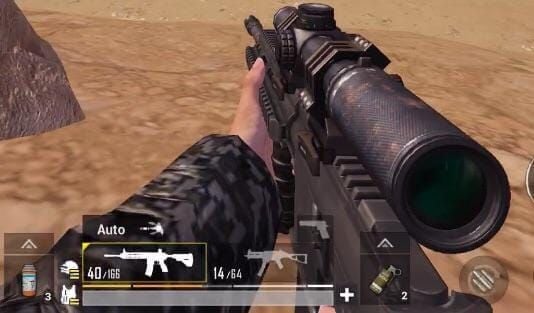
Count hits—fewer than 5 hits indicates you're affected
This isolates scope control from other variables like network latency or device performance. Repeat with a 6x scope using single shots. The benchmark for 6x is 6+ hits out of 10 single shots at 50m. If you're falling below these thresholds despite previous proficiency, the bug is affecting your gameplay.
Device-Specific Symptoms
iOS devices exhibit slightly different bug manifestations than Android due to OS-level input handling differences. iOS sensitivity code 7478-5115-3389-3888-855 addresses iOS-specific quirks, while Android sensitivity code 7462-2496-3022-3831-210 compensates for Android's input processing. iPad users require dedicated code 7478-5115-3389-3888-854 due to larger screen dimensions affecting touch input scaling.
Android devices with game mode optimizations may experience compounded sensitivity issues. Samsung devices running Game Booster may require additional 2-3% reductions in 8x ADS sensitivity beyond standard Android recommendations.
Why Your ADS Feels Uncontrollable
Sensitivity Acceleration and Non-Linear Response Curves
Pre-4.2 versions used linear sensitivity scaling: doubling swipe speed doubled crosshair movement proportionally. Version 4.2 introduced acceleration curves for 6x and 8x scopes, where initial slow movements maintain expected sensitivity, but faster inputs trigger exponential sensitivity increases. This creates unpredictable control—gentle adjustments work normally, but rapid corrections overshoot dramatically.
The acceleration threshold appears calibrated for 60Hz displays at 60fps. When players use 90Hz displays or enable Ultra Extreme 90fps graphics, acceleration triggers at lower input velocities, making even moderate-speed adjustments feel hypersensitive.
Camera and Scope Sensitivity Relationship
Camera sensitivity now partially influences scope sensitivity calculations despite being separate settings. With camera sensitivity at 120% and 8x ADS at 12%, effective 8x sensitivity becomes approximately 14.4% due to camera sensitivity multiplier inheritance. This hidden interaction wasn't present in previous versions.
This creates counterintuitive scenarios where lowering camera sensitivity can improve scope control even without changing scope sensitivity values. Players using 150% Free Look sensitivity for quick third-person scanning inadvertently amplify their scope sensitivity issues.
Gyroscope Interference
Gyroscope scope sensitivity operates independently but combines additively with touch ADS sensitivity during gameplay. The bug affects both input methods, but gyroscope users experience compounded issues because they're managing two sensitivity sources simultaneously. When gyroscope 8x sensitivity remains at default 200%+ values while ADS sensitivity is bugged, combined input becomes completely unmanageable.
The fix requires reducing gyroscope scope sensitivity to 90% for 8x and 100-120% for 6x—dramatic reductions from typical 200-300% values. Players who buy PUBG UC recharge online through BitTopup can access premium training modes and sensitivity testing tools that help calibrate these dual-input systems more efficiently.
The Pro Player Fix: Exact Sensitivity Settings
Professional players developed standardized sensitivity configurations that compensate for the 4.2 bug while maintaining competitive performance. These settings achieve 70% burst accuracy benchmarks at 50m with 8x scopes.
Baseline Sensitivity Values for 6x Scope
Optimal 6x ADS sensitivity range: 15-25%, with most competitive players settling at 18-20%. This represents a 40-50% reduction from pre-4.2 optimal values. Pair with 6x gyroscope sensitivity of 100-120%—players favoring gyroscope-heavy aiming should use 100-110%, while touch-dominant players can push toward 120%.
For context: Red Dot ADS sensitivity should remain at 50% and 2x ADS at 35%, creating progressive sensitivity reduction as magnification increases. 3x scope uses 25% ADS sensitivity, and 4x scope operates at 25-30%.
Optimal 8x Scope Sensitivity Settings
The 8x scope demands the most aggressive adjustment: 12% ADS sensitivity across all playstyles. This universal value works because the bug's severity at 8x magnification overwhelms individual preference variations. Combine with 90% gyroscope sensitivity for 8x—any higher creates uncontrollable combined input during recoil compensation.
Testing confirms 8x ADS below 10% creates sluggish response unsuitable for tracking moving targets, while values above 15% reintroduce uncontrollable drift. The 12% value represents optimal balance, allowing 5+ hits out of 10 single shots at 50m on stationary targets and maintaining tracking capability on moving targets at 75-100m.
Complete Settings Configuration
Camera Sensitivity:
Third-person camera: 120%
Free Look: 150%
ADS Sensitivity (Touch):
Red Dot: 50%
2x: 35%
3x: 25%
4x: 25-30%
6x: 15-25%
8x: 12%
Gyroscope Sensitivity:
No Scope: 300-400%
Red Dot: 365-400%
2x: 300-320%
3x: 275%
4x: 275%
6x: 100-120%
8x: 90%
Graphics Settings:
Extreme 60fps or Ultra Extreme 90fps
Brightness: 120-150%
Sensitivity Code Breakdown
Rather than manually entering each value, use these pre-configured sensitivity codes:
Universal Fix Code: 7435-8846-3421-0303-0728 (baseline fix for most players using standard 4-finger layouts)
4-Finger Claw Optimized: 7275-1794-4178-8556-303 (8x ADS at 10% for slightly more responsive long-range control)
6-Finger Claw Optimized: 6960-4887-1407-8797-709 (8x ADS at 8%, 6x ADS at 12% for increased precision with additional finger positions)
Platform-Specific Codes:
Android: 7462-2496-3022-3831-210
iOS: 7478-5115-3389-3888-855
iPad: 7478-5115-3389-3888-854
Step-by-Step Guide: Implementing the Fix
Backing Up Current Settings
Launch PUBG Mobile and tap gear icon in top-right corner
Navigate to Sensitivity tab
Tap Cloud icon to generate your current sensitivity code
Screenshot or write down this code—it's your backup
Save this backup code outside the game
Applying Pro Player Sensitivity Values
From Sensitivity tab, tap Cloud icon
Select Import or Download
Enter sensitivity code: 7435-8846-3421-0303-0728 (or platform-specific code)
Tap Confirm to apply
Verify import: 8x ADS should show 12%, 6x ADS should be 15-25%, gyroscope 8x should read 90%

Fine-Tuning for Your Playstyle
After importing the base fix, spend 15-minute sessions in Training Ground code 7307-1085-6780-4282-435 testing the settings:
If 8x feels too slow: Increase to 13-14% maximum If 8x feels too fast: Decrease to 10-11% If 6x feels uncomfortable: Adjust within 15-25% range in 2% increments
Device performance affects optimal values. High-end devices with consistent 90fps can use upper ranges (6x at 25%, 8x at 12%), while mid-range devices maintaining 60fps may benefit from slightly lower values (6x at 18%, 8x at 11%).
Advanced Calibration: Weapon-Specific Optimization
DMR-Specific Sensitivity Adjustments
DMRs like Mini14, SKS, and SLR benefit from slightly higher 6x sensitivity (20-25% range) because DMR engagements emphasize rapid target acquisition over sustained spray control. Semi-automatic fire pattern allows recovery time between shots, making higher sensitivity's quick target switching advantageous.
For 8x on DMRs, maintain 12% baseline but consider 13% if you primarily take single shots at 100m+ ranges. The SLR's heavy recoil still demands 12% or lower, while Mini14's minimal recoil can handle 13-14%.
Bolt-Action Sniper Settings
Bolt-action snipers require different optimization because you're taking single shots with scope-out time between rounds. 8x sensitivity can increase to 13-15% for bolt-actions, as you're not managing continuous recoil—you need responsive target acquisition for follow-up shots.
Kar98k benefits from 14% 8x ADS sensitivity, providing enough speed to track moving targets at 150-200m while maintaining precision for headshots. AWM works well at 13% 8x ADS—slightly lower sensitivity aids micro-adjustments for extreme-range shots beyond 300m.
AR Scope Sensitivity for Spray Control
Assault rifles with 6x or 8x scopes demand strictest adherence to low sensitivity values. M416's moderate recoil pattern works optimally with 6x at 18-20% and 8x at 12%. Beryl M762's aggressive recoil requires lower end: 6x at 15-18% and 8x at 11-12%.
When using M416 for mid-range spray (50-100m with 6x), 20% sensitivity provides adequate tracking speed while keeping vertical recoil manageable. For Beryl, prioritize control over speed—the weapon's high damage output rewards accuracy more than rapid target switching.
Training Routine: Mastering New Settings
New sensitivity settings require dedicated practice to rebuild muscle memory. Adaptation period typically spans 5-7 days with focused 15-minute daily training sessions.
Training Ground Drills
Use Training Ground code 7307-1085-6780-4282-435:
Drill 1: Static Target Accuracy (5 minutes)
Position at 50m from stationary targets
Fire 10-round bursts with 8x-equipped M416
Goal: 7+ hits per burst (70% accuracy benchmark)
Drill 2: Distance Variation (5 minutes)
Practice at 30m, 50m, 75m, and 100m ranges
5 bursts at each distance with 6x scope
Focus on adjusting hold-over for bullet drop while maintaining recoil control
Drill 3: Moving Target Tracking (5 minutes)
Engage moving targets at 50-75m
Practice leading targets and maintaining smooth tracking
Goal: 5+ hits per 10-shot magazine
Recoil Control Practice
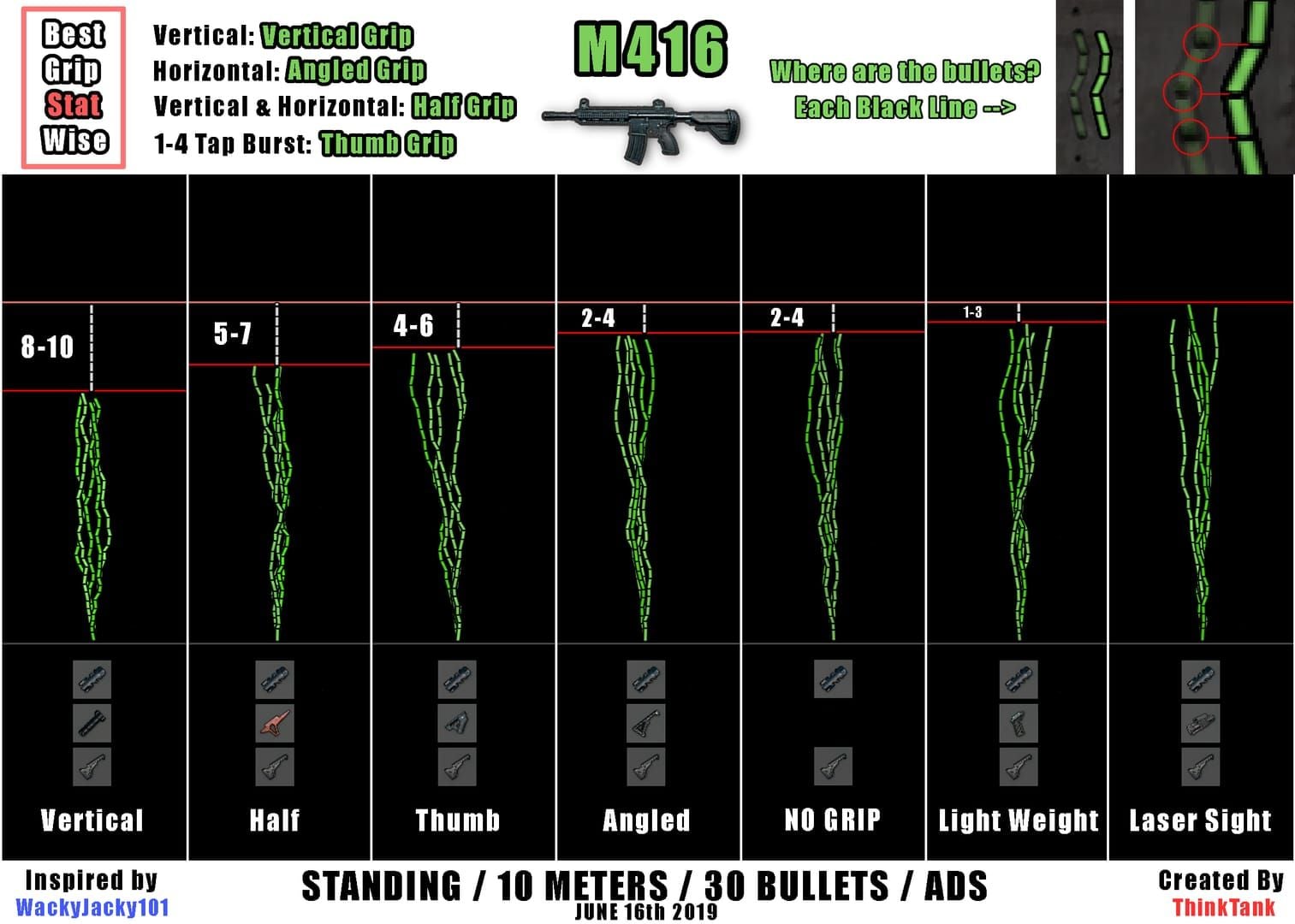
The reduced sensitivity changes recoil compensation mechanics. Previously, you might have swiped 2cm downward to control M416 recoil with 8x at 25% sensitivity. With 12% sensitivity, same recoil requires approximately 4cm downward swipe—double the physical movement for same on-screen result.
Practice by firing full magazines into walls, observing bullet impact pattern. Adjust downward swipe distance until achieving tight vertical grouping. Muscle memory adaptation takes 5-7 days of consistent practice—expect improvement within 2-3 days.
Real Match Application
Days 1-2: Play casual matches, avoiding hot drops to reduce combat stress while adjusting Days 3-4: Engage in mid-range fights (50-100m) specifically to practice scope control under pressure Days 5-7: Return to normal playstyle, consciously noting scope control improvements
Track performance metrics: knockdown rate at 50m+, average damage per match, and survival time in final circles. Players typically see 15-25% improvement in long-range knockdown rates after completing full adaptation period.
Troubleshooting Persistent Issues
Device Performance Optimization
Inconsistent frame rates create variable input response that feels like sensitivity problems. Ensure your device maintains stable frame rates:
Close background applications before launching PUBG Mobile
Enable performance mode or game mode in device settings
Reduce graphics quality if experiencing frame drops below 55fps
Clear cache and temporary files
Temperature throttling affects high-end devices during extended sessions. If your device feels warm, performance mode may be reducing clock speeds to manage heat, causing frame rate instability. Use device cooling accessories or take breaks.
Alternative Sensitivity for Different Grip Styles
Two-finger players experience different control dynamics than claw grip users. If using two-finger (thumbs only):
Increase 6x ADS to 22-25% to compensate for limited thumb range of motion
Keep 8x at 12% but increase gyroscope 8x to 95-100% for gyro-assisted fine aiming
Raise camera sensitivity to 130-140% for faster pre-aim positioning
Three-finger hybrid grips benefit from sensitivity values between two-finger and four-finger recommendations. Start with 6x at 20% and 8x at 12%, then adjust based on which fingers you use for aiming versus shooting.
Gyroscope Recalibration
Gyroscope drift or calibration errors can create perceived sensitivity issues. Recalibrate your device gyroscope:
Place device on flat, stable surface
In PUBG Mobile settings, find Gyroscope options
Select Reset or Recalibrate (if available)
If no in-game option exists, restart device on flat surface to allow OS-level gyroscope recalibration
Preventing Future Sensitivity Issues
Creating Backup Sensitivity Codes
Before installing any major update:
Generate and save your current sensitivity code
Record date and version number with the code
Store codes in cloud note-taking app or password manager
Create multiple backups if you use different sensitivity profiles
This allows instant rollback if an update introduces new sensitivity issues.
Monitoring Patch Notes
Official patch notes often omit subtle control changes. Supplement official sources by monitoring community discussions within 24-48 hours of update releases. Look for keywords like sensitivity adjustments, control optimization, input improvements, or scope mechanics changes.
Building Adaptable Muscle Memory
Rather than developing rigid muscle memory tied to specific sensitivity values, practice adaptable aiming techniques:
Focus on smooth, consistent motion patterns rather than memorized swipe distances
Develop visual target tracking skills that work across sensitivity ranges
Practice rapid sensitivity adaptation by intentionally using varied settings in training
This reduces adaptation time when updates force sensitivity changes. Players with adaptable muscle memory typically achieve competency with new settings in 2-3 days versus 5-7 days for rigid muscle memory.
Maximizing Your Competitive Edge
Complementary Control Layout Optimizations
Your control layout interacts with sensitivity settings to determine overall aiming performance. Ensure fire button placement allows full range of motion for aiming fingers without requiring repositioning during combat.
For 4-finger claw, position ADS and fire buttons where index fingers rest naturally. For 6-finger layouts, distribute functions across all fingers to prevent any single finger from handling multiple simultaneous inputs.
Graphics Settings That Affect Aiming
Graphics settings impact frame rate stability, which directly affects input response consistency:
Prioritize frame rate over visual quality—use Smooth graphics with Extreme or Ultra Extreme frame rate
Disable shadows and effects that cause frame rate fluctuations
Set render distance to Medium unless you need long-range visual spotting
Enable anti-aliasing only if your device maintains 60fps+ with it active
Brightness settings of 120-150% improve target visibility against varied backgrounds, reducing visual search time before aiming.
Network Optimization
Network latency creates input lag that compounds sensitivity issues. Optimize your connection:
Use 5GHz WiFi instead of 2.4GHz when available
Position yourself within strong signal range of router
Close bandwidth-intensive background applications
Consider wired connections via USB-to-Ethernet adapters for mobile devices
Latency above 80ms creates noticeable delay between input and visual feedback, causing overcorrection that triggers sensitivity acceleration. Maintain sub-60ms latency.
Maintaining Peak Performance with BitTopup
Competitive performance requires access to premium resources, weapon skins with clear iron sights, and Royal Pass rewards. BitTopup offers secure, fast UC top-ups with competitive pricing and excellent customer service, ensuring you maintain access to all performance-enhancing in-game content without interruption.
Regular UC availability allows immediate purchase of new weapon skins when released, giving you time to practice with optimal visual configurations before competitive matches.
FAQ
Why does my 6x scope feel too fast in PUBG Mobile 4.2?
The 4.2 update introduced non-linear sensitivity acceleration for 6x scopes, particularly on 90Hz+ displays. Fix by reducing 6x ADS sensitivity to 15-25% and 6x gyroscope sensitivity to 100-120%, or import sensitivity code 7435-8846-3421-0303-0728.
What sensitivity settings do pro players use for 8x scope?
Pro players use 8x ADS sensitivity at 12% with 8x gyroscope sensitivity at 90%. This represents a 40-50% reduction from pre-4.2 values but restores 70% burst accuracy benchmark at 50m. Platform-specific codes: Android 7462-2496-3022-3831-210, iOS 7478-5115-3389-3888-855.
How do I import sensitivity codes in PUBG Mobile 4.2?
Tap gear icon → Sensitivity tab → Cloud icon → Import → enter code (7435-8846-3421-0303-0728) → Confirm. Verify 8x ADS shows 12% and 6x ADS shows 15-25%.
Does gyroscope affect scope sensitivity in PUBG Mobile?
Yes, gyroscope and touch ADS sensitivity combine additively. The 4.2 bug affects both, requiring coordinated reductions: 8x gyroscope to 90% and 6x gyroscope to 100-120%. Using default gyroscope values (200%+) with bugged ADS sensitivity creates uncontrollable combined input.
How to test scope sensitivity in training ground?
Use Training Ground code 7307-1085-6780-4282-435, equip 8x scope on M416, position 50m from targets, fire 10-round bursts. Benchmark: 7+ hits per burst (70% accuracy). For 6x testing, use single shots with 6+ hits out of 10 benchmark.
What's the difference between camera and scope sensitivity?
Camera sensitivity controls third-person view movement, while scope sensitivity controls crosshair movement during ADS. In 4.2, scope sensitivity partially inherits camera sensitivity values. Keep camera sensitivity at 120% and reduce scope sensitivity (6x: 15-25%, 8x: 12%) to compensate.
Master your aim and dominate every match! Top up your PUBG Mobile UC instantly at BitTopup for exclusive in-game items, Royal Pass upgrades, and premium crates. Secure, fast, and trusted by millions of players worldwide. Get your UC now and elevate your gameplay!