

Quick Answer: 90% of missing MICO coins trace to incorrect UID entry or region mismatch. Verify your UID digit-by-digit before payment, confirm account region matches payment method, and wait 5-30 minutes before troubleshooting. Most issues resolve through systematic verification of transaction details and proper documentation.
Why MICO Coins Go Missing: 3 Root Causes
UID Entry Errors: #1 Delivery Failure Reason
Your MICO UID is the permanent numeric identifier under your profile nickname. Unlike usernames that change freely, this number stays fixed. One mistyped digit sends coins to a different user's account with no recovery option.
Payment platforms deliver to the exact UID entered. Transpose two digits or copy an incomplete string, and coins arrive at that wrong account within 5-30 minutes. Your bank confirms the charge, but your wallet shows nothing.
Virtual currency operates under final sale policies—no refunds. Pre-payment verification is your only defense.
Region/Server Mismatch: Wrong Server Delivery
MICO's regional servers create distinct coin economies. Global region yields 110 coins per dollar, MENA provides 143 coins per dollar—a 30% difference. Southeast Asia uses separate calculations at 43 coins per 100 rupees.
Region detection uses IP address, payment method origin country, and verification documents. Conflicts from VPNs or foreign payment methods route coins to wrong regional servers.
Cross-region purchases fail silently. Payment processes, coins credit to your UID on the detected region's server, but your actual account on a different server receives nothing.
Account Status Issues: Suspended Accounts Block Delivery
Restricted or suspended accounts block incoming coins regardless of payment success. Security systems prevent balance modifications on flagged accounts.
Restrictions stem from guideline violations, suspicious activity, or incomplete verification. These often activate without notification. Payment processors complete transactions normally since they verify payment methods, not MICO account status.
Check account status before top-up. Navigate to profile wallet history to confirm recent activity appears normally.
60-Second UID Verification Checklist
Locate Your MICO UID in 4 Steps
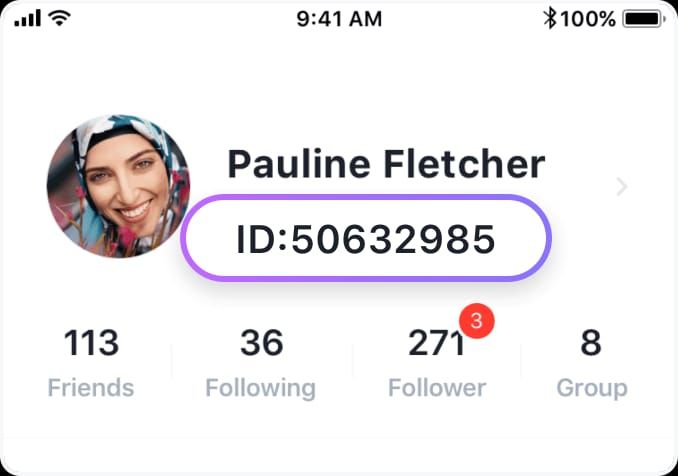
Open MICO Live, tap profile icon (bottom right)
UID appears as numeric string under username
Long-press UID until context menu appears
Tap Copy to transfer to clipboard
UID is continuous digits without spaces or special characters. Screenshot this for documentation.
Copy-Paste Method Prevents Typos
After copying UID, open notes app
Paste UID into new note and review
Navigate to top-up platform, paste UID into account ID field
Screenshot both MICO profile and payment form
Compare screenshots digit-by-digit before payment
Store screenshots with payment receipt for complete documentation.
UID vs Username: Not Interchangeable
Usernames modify freely through settings. UID never changes—it's the immutable identifier for backend systems.
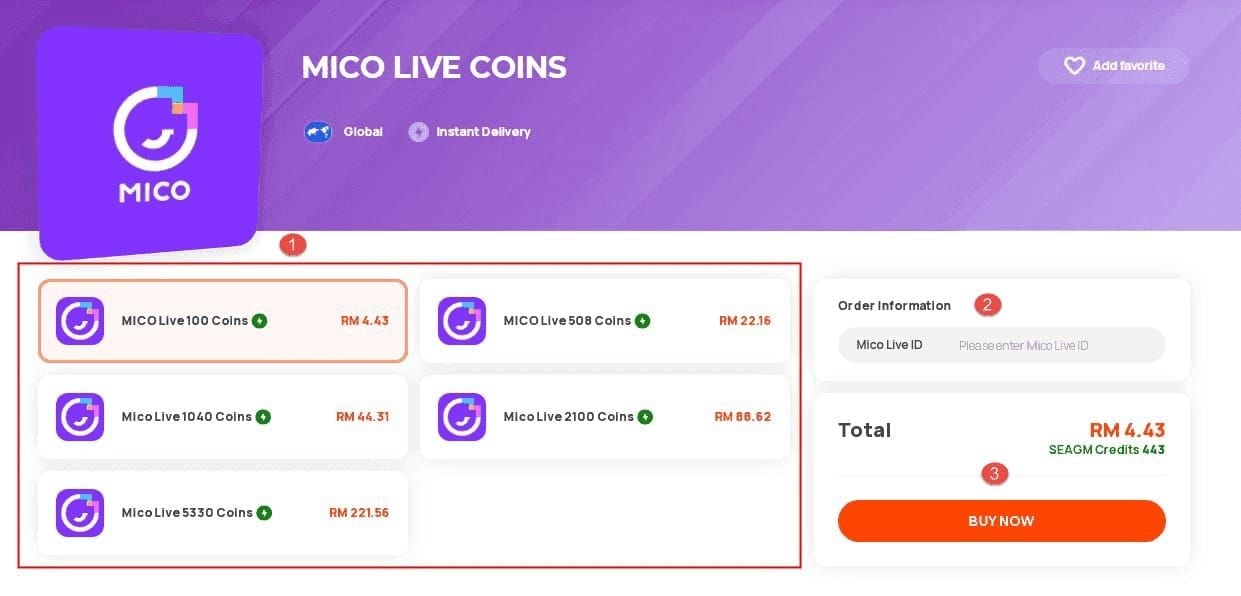
Top-up platforms require UIDs because they remain constant. When forms request MICO ID or Account ID, they need the numeric UID, not your username.
Region Lock: Server and Payment Method Matching
What is MICO Region Lock
Region lock ties your account to a specific geographic server determining coin pricing, features, and payment compatibility. Creates separate user pools for different markets.
Account creation assigns region based on IP address, phone country code, and verification documents. This becomes permanent unless you complete formal region change.
Top-ups must match account region. Global region accounts can't receive coins from MENA payment channels, even with correct UID.
Identify Your Current Server Region
Tap profile icon (top-left)
Navigate to Account Settings
Select Region to view assignment
Cross-reference with payment method's country. US payment card purchasing for MENA account creates mismatch causing delivery failures.
Cross-Region Limitations
Payment processors may decline when payment country doesn't match selected region. Successful payments may enter 24-48 hour verification while fraud systems confirm legitimacy.
Some platforms restrict region selection based on IP. Travelers or VPN users encounter forced assignments conflicting with actual account region. For reliable cross-region purchases, MICO Live coins top up online offers region verification before processing.
Changing account region requires government ID, proof of residence (last 3 months), and SMS verification. Completes in 24-48 hours but temporarily limits purchases.
Missing Coins Troubleshooting Protocol
Step 1: Verify Transaction Completion
Check payment method for completed charge. Credit cards show pending/posted charges, digital wallets display transaction history with timestamps.
Payment receipts contain: transaction ID, timestamp, amount, merchant name. Screenshot immediately.
Delivery times by payment type:
Card/Wallet: 95% within 5 min, 100% within 30 min
Cryptocurrency: Up to 30 min for blockchain confirmations
PayPal/Digital Wallets: Instant to 15 min
Bank Transfers: 1-4 hours
Peak Period (7-11 PM): Add 15-30 min
Step 2: Check Account Login and Region
Verify correct account by checking follower counts or wallet history. Users with multiple accounts sometimes purchase on secondary account, then check primary.
Navigate to Profile > Wallet > History for all coin transactions with timestamps. Recent top-ups appear within minutes. If payment receipt shows completion but wallet history has no matching entry, coins likely credited to different account or region.

Step 3: Clear Cache and Force Refresh
Display sync issues prevent updated balances from appearing despite successful delivery. Logout/login resolves 60% of cases where delivery completed but interface didn't refresh.
Complete cycle:
Account settings > Log Out
Force quit app (iOS) or clear from recent apps (Android)
Reopen and log in
Check wallet immediately
If coins still missing, wait full delivery window before proceeding.
Step 4: Wait Payment Processor Delay Window
Set 30-minute timer after payment confirmation. Avoid clearing cache repeatedly—excessive refreshing interferes with delivery.
Step 5: Review Account Restrictions
Check for restriction notifications in settings or recent MICO emails.
Common triggers:
Incomplete identity verification
Community guideline violations
Suspicious activity flags
Chargeback history
Restrictions require resolution before coins credit. Contact MICO support directly. Additional purchases while restricted compound the problem.
Common Top-Up Mistakes
Mistake #1: Outdated App Versions
Legacy versions contain outdated payment integration failing to communicate with current servers. Update notifications sometimes don't display.
Check app version against current release in app store. Update before every top-up—takes 2-3 minutes, prevents compatibility failures.
Mistake #2: Switching Accounts Mid-Transaction
Logging out during active purchase or switching accounts while payment processes creates orphaned transactions. Payment completes to account active at checkout initiation.
Complete entire process—UID entry through delivery confirmation—on single account without interruption. Avoid checking other accounts during the 5-30 minute delivery window.
Multi-account users should log which account received which purchase with timestamps and transaction IDs.
Mistake #3: Currency/Payment Method Incompatibility
Payment currency must align with selected package pricing. USD package with EUR payment triggers conversion that may fail or create pricing mismatches.
Select packages priced in your payment method's native currency to avoid conversion failures.
When to Contact Support vs Self-Resolve
Self-Resolve in Under 5 Minutes
Coins missing within 30 min: Wait full delivery window
App not showing updated balance: Logout/login cycle
Uncertain about UID: Verify through profile
Region confusion: Check settings vs purchase region
Payment showing pending: Wait for processor settlement
Red Flags Requiring Immediate Support
Payment confirmed but no delivery after 4 hours
Coins to wrong account with verified correct UID
Account restriction preventing delivery
Payment charged twice for single purchase
Error messages during delivery
Documentation to Prepare
Payment Receipt: Transaction ID, timestamp, amount, merchant
UID Verification: MICO profile screenshot showing UID
Payment Form: Top-up platform showing entered UID
Wallet History: No matching delivery shown
Account Region: Settings screenshot
Timeline: Written summary of purchase initiation, payment confirmation, troubleshooting start
Email to contact@micous.com with subject including UID and transaction ID. Initial response in 2-8 hours, full investigation in 24-72 hours. Follow up every 48 hours.
Complete documentation resolves 90% of cases.
Why BitTopup Eliminates 80% of UID/Region Problems
Built-In UID Verification Before Payment
BitTopup validates UID against MICO servers before processing payment. Real-time verification catches typos, incomplete UIDs, and non-existent accounts before money changes hands.
System displays account verification status immediately after UID entry. Users see confirmation or error notifications prompting correction.
Automatic Region Detection
Analyzes account's assigned region and presents compatible packages. Prevents cross-region attempts failing from server mismatch.
Cross-references IP address, payment method, and account region to identify conflicts before checkout. Warning messages alert to potential mismatches.
Transaction Tracking Dashboard
Real-time status showing:
Payment confirmation timestamp
Delivery initiation status
Estimated completion time
Progress updates
Completed delivery confirmation
Access through BitTopup account for centralized monitoring. Dashboard displays status updates explaining delays.
Fast delivery, secure processing, and excellent customer service make BitTopup reliable for buy MICO Live coins instant recharge.
Prevention: 7 Pre-Purchase Checks
Complete before payment:
UID Accuracy: Copy from profile, paste to notes, compare digit-by-digit with form
Account Login: Verify correct account via follower count
Region Match: Settings region matches top-up platform selection
Account Status: No restriction notifications
App Version: Update to latest
Payment Method: Currency matches package pricing
Documentation: Screenshot profile UID and top-up form
Takes under 3 minutes, prevents 90% of failures.
Network Stability Requirements
Complete transactions on reliable WiFi or strong cellular. Avoid moving vehicles, crowded venues, or intermittent signal areas.
If connection drops during checkout, wait 30 minutes before retry. Immediate attempts may create duplicates if original completed despite failure.
Payment Method Best Practices
Choose methods with established transaction history on your account. First-time methods trigger fraud verification extending delivery 1-4 hours.
Delivery speed:
Card: 95% within 5 min (fastest)
Digital wallets: Within 15 min
Bank transfers: 1-4 hours
Cryptocurrency: Up to 30 min
Avoid methods with chargeback history. Chargebacks on MICO trigger permanent device bans within 24-48 hours.
Advanced Troubleshooting
Payment Gateway Timeout
Gateways cancel transactions if MICO servers don't acknowledge within timeout windows. Network congestion or maintenance causes these.
Modern systems include automatic retry logic reattempting delivery after timeout. Operates silently, potentially delivering 1-2 hours after original attempt.
Check payment method for multiple authorization attempts. Multiple attempts indicate retry activated—wait 4 hours before escalating.
App Permission Settings
MICO requires specific permissions to complete purchases and receive delivery notifications.
Verify enabled:
Network Access: Communication with payment servers
Notifications: Delivery confirmation alerts
Storage: Caching transaction data
iOS: Settings > MICO > Permissions. Android: Settings > Apps > MICO > Permissions.
Temporarily disable VPNs, ad blockers, and firewalls during transactions.
Device-Specific Issues
iOS processes through Apple App Store payment system with separate transaction records. Synchronization delays between Apple's confirmation and MICO's delivery create extended waits.
Android through Google Play has different timeout thresholds and refund policies.
Purchasing on iOS then checking on Android may show delays during cross-platform sync. Wait 15 minutes after purchase before switching devices.
Ensure 500MB+ free storage before top-ups to prevent storage-related interruptions.
FAQ
How long does MICO coin top-up take? Card/wallet: 95% within 5 min, 100% within 30 min. Cryptocurrency: up to 30 min. Bank transfers: 1-4 hours. Peak periods (7-11 PM) add 15-30 min.
Where's my MICO UID? Open MICO Live, tap profile icon (bottom right). UID is numeric string under username. Long-press and select Copy.
What's region mismatch? Account's server region (global, MENA, Southeast Asia) doesn't match purchase region. Global yields 110 coins/dollar, MENA 143 coins/dollar. Wrong region coins won't deliver even with correct UID.
Can I get refund if coins don't arrive? Virtual currency has no standard refunds. Recovery requires documentation (payment receipt, transaction ID, UID screenshots) to contact@micous.com. Support investigates in 24-72 hours. 90% of documented cases resolve through delivery, not refund.
Payment successful but no coins—why? Payment to incorrect UID (wrong account got coins), region mismatch (different server), or account restrictions blocking delivery. Verify entered UID matches profile digit-by-digit, confirm regions match, check for restriction notifications.
How to verify account before top-up? Copy UID from profile to notes for comparison, check region in Settings > Account Settings > Region, confirm no restrictions, verify correct account login via follower count, update app to latest version, screenshot profile showing UID. Takes under 3 minutes, prevents 90% of failures.
Tired of top-up headaches? BitTopup's verified UID system ensures MICO coins arrive instantly—every time. Zero mismatch risk, real-time tracking, automatic region verification. Fast delivery, competitive pricing, excellent service. Top up now on BitTopup →