

Resolve Likee payment failures including Codapay errors, PayPal checkout issues, and region mismatches. Learn proven fixes for missing diamonds, understand delivery timelines (5-30 min repeat purchases, 24-48 hrs first-time), and master device-specific solutions for iOS/Android.
Understanding Likee.video/pay Payment System in 2026
Likee.video/pay is the official gateway for purchasing diamonds—the platform's premium currency for virtual gifts, effects, and creator support. When you buy diamonds, the request routes through integrated gateway partners that verify your 10-digit User ID, validate credentials, and process via encrypted channels. First-time top-ups need 24-48 hours (80% within 24 hrs, 90% within 48 hrs). Repeat purchases process in 5-30 minutes.
For persistent failures, likee.video/pay top up diamonds through BitTopup offers alternative checkout bypassing common gateway errors.
What is Likee.video/pay and How Does It Work?
The system operates as multi-layered infrastructure connecting users with regional processors. Flow: Select package → System generates transaction ID → Gateway authenticates → Funds transfer → Diamond delivery. Each step includes verification checkpoints that trigger errors on data mismatches.
Wallet sync runs every 15-30 minutes—diamonds update at intervals, not instantly. This explains delayed appearance after payment confirmation.
The Likee Diamond Economy: Coins vs Diamonds Explained
Likee uses dual currency: Diamonds (purchasable with real money) and Coins (earned through platform activities). You can't buy coins—only earn them. Diamonds convert to coins for gifting at platform rates. Conversion is one-way: diamonds become coins, but coins never revert to diamonds or cash.
Diamond balance appears in Profile > Diamond icon, showing total and transaction history. Visual indicators: clock (pending), red X (failed), green checkmark (completed).

Official Payment Channels and Gateway Partners
Likee integrates multiple gateways serving Malaysia, Singapore, Indonesia, Thailand, Vietnam, Philippines, Pakistan, Bangladesh. Primary partners process region-specific methods: digital wallets, carrier billing, credit cards, bank transfers.
Codapay handles Southeast Asian transactions. PayPal processes in 2-5 minutes off-peak. PIX completes under 60 seconds with zero fees. Google Play order IDs: GPA.####-####-####-#####. Apple: M + 9-10 digits.
Common Payment Processing Times
Processing speeds vary by purchase history, time, and method. First-time buyers face extended verification. Peak hours (6-10 PM) extend times 50-100% vs baseline. Off-peak (2-6 AM) averages 5-10 minutes.
New accounts face restrictions first 30 days: one purchase/day, 100-500 diamond limit. Unverified accounts capped at 5,000-10,000 diamonds monthly. Q2 2026 updates enable 40% faster delivery.
Complete Codapay Error Troubleshooting Guide
Codapay errors account for substantial Likee payment failures, particularly in mobile wallet/carrier billing regions. Stem from authentication failures, regional restrictions, or gateway disruptions.
Most Common Codapay Error Codes
Payment verification failures: System can't authenticate credentials. Caused by expired cards, insufficient wallet balance, or mismatched billing info.
Transaction timeout: Gateway didn't receive confirmation within processing window. Network instability, slow provider responses, or server delays trigger these.
Region restriction: Account region doesn't match payment method's supported territories. Codapay enforces strict geographical validation.
Step-by-Step Codapay Checkout Failure Fixes
Completely disable VPN/proxy. Wait 10-15 minutes before retry—system needs time to recognize genuine IP.
Force close Likee. Android: swipe up, locate Likee, swipe off-screen. iOS: swipe up (or double-click home), flick away. Wait 30-60 seconds before reopening.
Clear cache. Android: Settings > Apps > Likee > Storage > Clear Cache. iOS: Settings > General > iPhone Storage > Likee > Offload App.
Refresh network: enable airplane mode 10 seconds, disable. Forces re-establishment, resolves DNS caching issues.
Payment Verification Failed: Authentication Solutions
Verify payment credentials match exactly across platforms. Check registered name, billing address, payment details align with bank/wallet records.
Enable two-factor authentication: Settings > Account > Security. Strengthens verification, resolves authentication errors.
Ensure device meets minimums: iOS 12.0+, Android 6.0+, 1GB free storage, stable 1-2 Mbps internet. Outdated OS lacks required security protocols.
Android: disable battery optimization for Likee via Settings > Battery > Likee > Don't optimize. Battery-saving interrupts payment processes.
Codapay Regional Availability and Restrictions
Codapay operates with strict regional licensing. Attempting purchases while traveling or using location-masking triggers automatic blocks.
Account region is permanently set at registration, can't be changed. Creates conflicts when relocating—account region stays fixed while location changes.
Payment methods must originate from same region as registration. Malaysian account can't process Singapore card through Codapay.
Fixing PayPal Checkout Errors on Likee
PayPal integration provides convenience but introduces specific errors related to verification, currency conversion, and regional policies.
Why PayPal Transactions Fail
Failures occur from insufficient verification. PayPal requires confirmed email, linked bank/card, completed identity verification before authorizing digital goods payments.
Currency conversion mismatches cause rejections when PayPal's primary currency differs from Likee transaction currency. System may fail automatic conversions.
Session timeout when users spend excessive time on PayPal login. Likee checkout expires after set duration, invalidating transaction even if PayPal succeeds.
For repeated Likee PayPal checkout error fix issues, BitTopup provides alternative processing accepting PayPal without integration complications.
PayPal Account Verification Requirements
Account must reach verified status. Requires linking bank/card, confirming email, and in some regions, uploading ID.
Check limitations by logging into PayPal website, reviewing account status. Unverified/limited accounts face restrictions preventing digital goods purchases.
Ensure sufficient funds or valid backup funding. PayPal draws from balance first, then linked methods. If both fail, transaction rejects.
Currency Conversion Issues
PayPal's conversion fees and rates add hidden costs causing failures when final amount exceeds available balance/credit limit. Conversion happens at PayPal's rates, differing from Likee's displayed price.
Select preferred currency in PayPal settings before purchasing. Matching Likee's regional currency minimizes conversion steps.
Some regions have PayPal policy restrictions on digital goods due to local regulations, resulting in generic error messages.
Alternative Solutions When PayPal Doesn't Work
Switch to direct credit card processing through other gateways. Bypasses PayPal's verification layers.
Digital wallets like regional mobile payments process faster. Integrate deeper with local banking infrastructure.
Gift card redemption: More > Wallet > select region > Higift > enter code > Submit. Adds diamonds without payment gateway.
Solving Region Mismatch and Geo-Blocking Issues
Region mismatch errors stem from permanent account settings rather than temporary glitches. Understanding regional architecture identifies viable solutions.
What Causes Likee Region Mismatch Errors?
Likee assigns account region during registration based on IP address, device location, phone country code. Setting becomes permanently embedded, controls payment methods, content, features.
Errors trigger when system detects inconsistencies between registered region and current transaction location. VPN, international travel, or relocation create conflicts.
UID mismatches cause 60-70% of delivery failures, often confused with region errors. Incorrect 10-digit User ID routes diamonds to wrong account.
How to Check Your Current Likee Account Region
Region isn't directly displayed but inferred from available payment methods and content restrictions. Navigate to diamond purchase screen—options reflect regional configuration.
Currency in wallet indicates region: Malaysian (MYR), Singapore (SGD), Indonesian (IDR). Immutable, tied to regional assignment.
Check profile: open app, tap profile icon, select View Profile, examine 10-digit ID below username.
Legal Methods to Resolve Regional Payment Restrictions
No legitimate method exists to change account region post-registration. Platform's licensing agreements require fixed regions for territorial compliance.
Creating new account in current region provides only permanent solution. Requires abandoning existing progress, followers, purchase history.
Using payment methods matching original region works when traveling temporarily. Maintain card/wallet from registration country.
Account Region vs Payment Method Region Conflicts
Most common: users trying locally-issued payment methods while traveling. US account attempting European card triggers automatic rejection.
International credit cards with global acceptance sometimes bypass restrictions, but success varies by issuer and gateway configurations.
Third-party platforms like BitTopup eliminate conflicts by handling payment in own infrastructure, delivering diamonds regardless of geographical mismatches.
Diamonds Not Showing: Complete Resolution Guide
Missing diamonds after successful payment is most anxiety-inducing issue. Understanding normal timelines vs genuine failures prevents premature panic.
Normal Processing Times vs Delayed Transactions
First-time purchases require 24-48 hours for payment history establishment and verification. Security measure against fraud/chargebacks.
Repeat purchases from established accounts: 5-30 minutes under normal conditions. System recognizes payment pattern, applies reduced verification.
Peak hours (6-10 PM) experience 50-100% longer processing due to server load. Expect delays beyond standard timeframes.
How to Check Your Likee Transaction History
Access via Profile > Wallet > Transaction Log. Displays all attempts with status: clock (pending), red X (failed), green checkmark (completed).
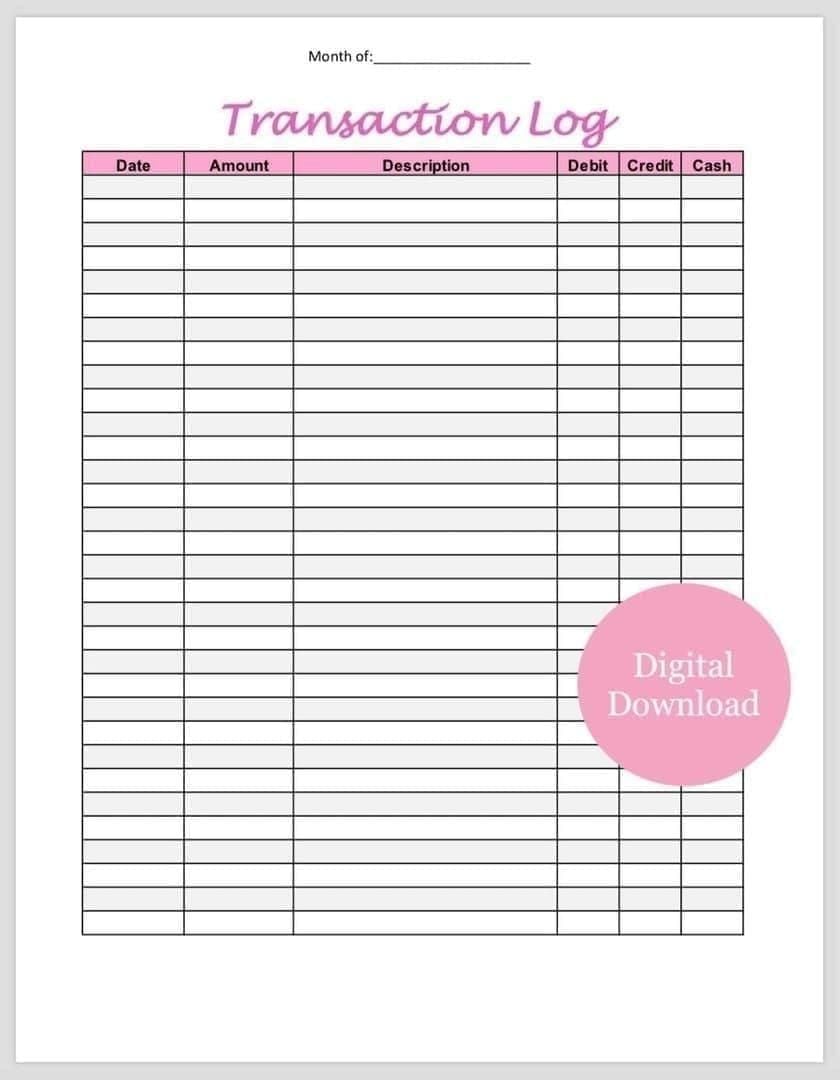
Each entry includes timestamp, diamond quantity, payment amount, status. Pending shows estimated completion times.
Cross-reference with payment confirmations from bank/PayPal/wallet. If provider shows successful charge but Likee displays no transaction, indicates gateway communication failure.
Force Refresh Methods for Diamond Balance Updates
Manually refresh: Profile > Diamond icon, pull down screen to trigger sync. Forces app to query server vs displaying cached data.
Log out and back in to reset session. Settings > Account > Log Out, wait 30-60 seconds, log back in. Clears cached data, retrieves fresh info.
Force close app, wait 30-60 seconds before reopening. Terminates background processes, establishes new server connection.
Enable airplane mode 10 seconds, disable to refresh network. Resolves sync failures preventing wallet updates.
When to Contact Support for Missing Diamonds
Contact if diamonds don't appear within 48 hours (first-time) or 2 hours (repeat off-peak). Exceeds normal windows, indicates genuine issues.
Gather: transaction ID from payment provider, exact timestamp, diamond package amount, payment method, 10-digit User ID. Accelerates support response.
Screenshot payment confirmation and transaction log showing missing purchase. Visual evidence helps teams identify issue source.
Device-Specific Payment Troubleshooting
Payment errors often trace to device configurations, app versions, OS limitations. Platform-specific identification enables targeted fixes.
iOS App Payment Issues and App Store Integration
iOS in-app purchases route through Apple's infrastructure, adding verification layer. Apple ID payment settings must be current and verified.
Update iOS to 12.0+ minimum—older versions lack required security protocols. Check Settings > General > Software Update.
Verify Apple ID payment: Settings > [Your Name] > Payment & Shipping. Ensure card hasn't expired, billing address matches, no warnings appear.
Offload Likee: Settings > General > iPhone Storage > Likee > Offload App. Preserves data while clearing corrupted files. Reinstall after.
Android Payment Problems and Google Play Solutions
Android faces fragmented experiences due to manufacturer customizations and varying Google Play Services versions. Update Play Services to latest via Play Store.
Clear Play Store cache separately: Settings > Apps > Google Play Store > Storage > Clear Cache. Resolves authentication issues.
Check minimums: Android 6.0+, 1GB free storage. Insufficient storage prevents temporary payment files, causing silent failures.
Disable battery optimization for Likee and Google Play Services. Battery-saving interrupts background payment processes.
Web Browser Checkout vs Mobile App Differences
Browser purchases through Likee.video/pay offer different payment methods vs mobile in-app. Browsers access direct gateway integrations; apps route through Apple/Google.
Clear browser cache/cookies before web purchases. Corrupted session data prevents new checkout initialization.
Disable browser extensions blocking scripts/modifying content. Payment gateways require specific JavaScript; ad blockers interfere.
Use incognito/private mode to eliminate cached data and extension interference simultaneously.
Clearing Cache and Data for Payment Error Fixes
Android cache: Settings > Apps > Likee > Storage > Clear Cache. Removes temporary files without deleting credentials/settings.
Thorough troubleshooting: Settings > Apps > Likee > Storage > Clear Data. Resets to factory state, requires re-login.
iOS: Offload App preserves documents/data. For complete reset, delete app entirely, reinstall from App Store.
Schedule clearing during off-peak (2-6 AM) for faster re-download and smoother sync.
Network and Technical Requirements for Successful Payments
Network stability and technical configs significantly impact success rates. Many payment errors stem from connectivity vs gateway/account problems.
Internet Connection Stability and Payment Success Rates
Minimum: 1-2 Mbps, but 5+ Mbps dramatically improves success by reducing timeout risks.
Unstable connections fluctuating between WiFi/mobile data mid-transaction cause frequent failures. Lock to single network type before purchasing.
Test stability via speed test before buying. Connections showing high packet loss or latency spikes >200ms will likely fail.
Public WiFi with captive portals/content filtering often blocks gateway domains. Use mobile data or trusted home networks.
VPN Impact on Likee Payment Processing
VPNs create region mismatch appearance by masking location. Gateways detect VPN via IP databases, automatically reject transactions.
Completely disable VPN before purchasing, wait 10-15 minutes for system to recognize genuine IP. Simply disconnecting isn't sufficient—force-close app, reopen after deactivation.
Some smart VPN apps continue routing despite appearing disabled. Fully uninstall if experiencing persistent region errors.
Corporate/school networks routing through proxies create similar issues. Use personal mobile data.
Firewall and Security Software Interference
Aggressive firewall settings block gateway communication ports. Temporarily disable during purchases to test if security causes failures.
Antivirus with web protection flags gateways as suspicious. Add Likee and payment partners to whitelist.
DNS-level ad blockers block tracking domains gateways use for fraud detection. Blocks appear as generic connection errors.
Optimal Browser Settings for Likee Checkout
Enable JavaScript, cookies, pop-ups for Likee.video/pay domain. Gateways require all three; blocking any element causes failures.
Accept third-party cookies for payment sessions. Gateway partners operate on different domains, requiring cross-domain acceptance.
Update browser to latest version for modern payment security protocol compatibility. Outdated browsers lack TLS 1.2+ encryption support.
Safe and Reliable Alternative: BitTopup for Likee Diamonds
BitTopup eliminates common payment errors plaguing direct Likee purchases via streamlined, multi-region infrastructure designed for digital goods.
Why BitTopup Eliminates Common Payment Errors
Processes payments through own gateway infrastructure, isolating transactions from Likee's regional restrictions and payment limitations. Prevents region mismatch errors.
Accepts diverse methods (PayPal, credit cards, digital wallets, regional systems) without verification complications. Authentication happens within BitTopup's optimized system.
Bypasses peak-hour congestion affecting direct purchases. Dedicated servers handle verification independently, deliver via API integration operating separately from user-facing systems.
BitTopup Multi-Region Support and Universal Access
Serves Malaysia, Singapore, Indonesia, Thailand, Vietnam, Philippines, Pakistan, Bangladesh, beyond without requiring account region matching. Likee region becomes irrelevant.
Accepts payment methods from any supported region regardless of Likee account location. Malaysian account can use Singapore card through BitTopup; direct checkout would reject.
Currency conversion happens transparently at competitive rates. See final price in preferred currency before confirming, eliminating surprise fees.
Instant Diamond Delivery Without Verification Delays
Delivers diamonds in 5-30 minutes for most transactions, matching Likee's repeat speeds even for first-time buyers. Established API relationship enables faster processing.
First-time BitTopup users avoid 24-48 hour delays Likee imposes on new direct purchasers. Merchant account status provides pre-verified transaction privileges.
Transaction success rate exceeds direct channels—BitTopup handles verification, fraud detection, gateway communication through optimized digital goods systems.
Step-by-Step Guide to Top Up Likee via BitTopup
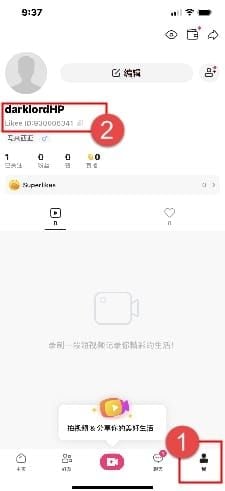
Locate 10-digit User ID: Open Likee, tap profile icon, select View Profile, copy ID below username. Or tap bottom-right avatar, tap profile picture, find ID under nickname.
Visit BitTopup's Likee diamond page, select desired package. Displays prices in multiple currencies with transparent rates, no hidden fees.
Enter 10-digit User ID in account field. Double-check accuracy—UID mismatches cause 60-70% of delivery failures. Select payment method.
Complete payment through secure checkout. Platform processes payment, initiates delivery. Check Likee wallet after 5-30 minutes: Profile > Diamond icon, pull down to refresh.
Prevention Tips and Best Practices for Future Transactions
Proactive measures prevent most errors before occurring. Implementing best practices ensures smoother transactions, reduces troubleshooting.
Account Verification Checklist Before First Purchase
Complete email verification through settings. Verified emails strengthen credibility, reduce fraud triggers delaying transactions.
Enable two-factor authentication: Settings > Account > Security. Signals strong authentication, reduces verification requirements.
Ensure profile contains accurate info including picture and bio. Incomplete profiles trigger additional fraud checks.
Verify device meets minimums: iOS 12.0+/Android 6.0+, 1GB free storage, stable 1-2 Mbps internet.
Payment Method Selection Based on Your Region
Choose methods originating from same region as account registration. Regional alignment eliminates most common rejection source.
Digital wallets process faster than credit cards due to streamlined authentication. PIX completes under 60 seconds, zero fees. PayPal requires 2-5 minutes off-peak.
Avoid international methods for first purchase. Establish history with region-matched methods first, then experiment with cross-border options.
Security Measures to Protect Your Likee Account
Never share 10-digit User ID publicly or with untrusted parties. While necessary for third-party top-ups, sharing indiscriminately enables unauthorized gift sending depleting diamonds.
Monitor transaction log regularly: Profile > Wallet > Transaction Log. Unfamiliar transactions indicate compromise requiring immediate password change.
Use strong, unique passwords differing from other platforms. Password reuse enables credential stuffing attacks when other platforms breach.
When to Use Official Channels vs Trusted Third-Party Platforms
Official channels work best when account region, current location, payment method all align perfectly. Users in registration country with local methods experience smoothest direct purchase.
Third-party platforms like BitTopup excel when regional mismatches exist, when needing faster processing than first-time direct purchases, or when official methods repeatedly fail despite troubleshooting.
Evaluate urgency vs processing times. For immediate needs (live streams, time-sensitive events), BitTopup's 5-30 minute delivery beats potential 24-48 hour first-time direct wait.
Getting Help: Support Channels and Refund Processes
When self-service fails, understanding support channels and refund procedures ensures effective escalation and fund recovery.
How to Document Payment Issues for Support Tickets
Screenshot error messages exactly as appearing, including codes/reference numbers. Technical details help identify specific failure points.
Record complete timeline: purchase initiation, payment confirmation, expected delivery, current status. Precise timestamps enable transaction tracing.
Collect payment confirmation from bank/PayPal/wallet showing successful charge. Include transaction IDs, authorization codes, merchant names.
Note 10-digit User ID, account region, payment method, diamond package amount, device type (iOS/Android version).
Expected Response Times from Likee Customer Service
Initial automated responses arrive within minutes, acknowledging receipt and providing case number. Don't indicate actual support engagement.
Human responses typically within 24-48 hours for standard issues. Complex cases involving gateway failures/regional restrictions may require 3-5 business days.
Peak support periods around major events/promotions extend times 50-100%. Submit during off-peak (weekdays, non-holidays) for faster responses.
Refund Eligibility and Processing Timelines
Refunds apply when payment processed but diamonds never delivered beyond maximum windows (48 hours first-time, 2 hours repeat off-peak).
Digital wallet refunds: 1-2 business days once approved. Credit cards: 3-5 days. Carrier billing: 7-10 days due to intermediary processing.
Refund requests require payment proof and confirmation diamonds weren't delivered. Support verifies transaction status before approving to prevent double-crediting.
Escalation Procedures for Unresolved Payment Problems
If initial responses don't resolve within 5 business days, reply to existing ticket requesting escalation to senior support. Reference case number, summarize previous communication.
Document all interactions: response dates, agent names, solutions attempted. Proves exhausted standard channels if further escalation necessary.
For significant amounts or repeated failures, explicitly request manager review. Higher-tier support has additional tools and authorization for custom solutions.
Frequently Asked Questions
Why is my Likee payment not going through? UID mismatches (60-70% of cases), VPN blocking regional verification, or insufficient verification for first-time purchases. Disable VPN completely, verify 10-digit User ID accuracy, ensure payment method matches account region. First-time: 24-48 hours. Repeat: 5-30 minutes.
How long does it take for Likee diamonds to show up? First-time: 24-48 hours (80% within 24 hrs). Repeat: 5-30 minutes. Peak hours (6-10 PM) extend 50-100%. Off-peak (2-6 AM) averages 5-10 minutes. Wallet syncs every 15-30 minutes—manual refresh via Profile > Diamond icon may be needed.
What does region mismatch mean on Likee? Account's registered region (set at signup) conflicts with current location, payment method origin, or VPN-masked IP. Likee permanently assigns regions at registration, doesn't allow changes. Use payment methods from registration country or consider BitTopup bypassing regional restrictions.
Can I get a refund if Likee diamonds don't arrive? Yes, when payment processed but diamonds not delivered beyond maximum windows (48 hours first-time, 2 hours repeat off-peak). Digital wallet: 1-2 days. Credit cards: 3-5 days. Carrier billing: 7-10 days. Contact support with payment confirmation and transaction ID.
How do I fix PayPal checkout error on Likee? Verify PayPal account fully verified with confirmed email, linked bank/card, completed ID verification. Ensure sufficient balance or valid backup funding. Check PayPal currency matches Likee transaction currency. If issues persist, BitTopup accepts PayPal without integration complications.
What is the safest way to buy Likee diamonds? Official Likee channels when account region, location, payment method align perfectly. For regional mismatches or faster processing, BitTopup offers secure transactions with competitive pricing, instant delivery (5-30 min), multi-region support, excellent service. Always verify correct 10-digit User ID.
Skip payment errors entirely! Top up Likee diamonds safely through BitTopup with instant delivery, multi-region support, zero checkout failures. Get diamonds in under 2 minutes at BitTopup's secure platform.