

When Likee Diamonds don't appear after Google Play purchase, issues stem from server sync delays, cache conflicts, or verification holds. Most transactions complete within 5-30 minutes, though verification may extend to 24-48 hours. This guide covers troubleshooting including cache clearing, account verification, wallet checks, and support ticket submission.
Why Likee Diamonds Don't Appear Immediately
Likee Diamonds not received after Google Play purchase is a common issue. The delivery mechanism involves multiple verification layers between Google Wallet, Likee's payment servers, and your account—each introducing potential delays.
Official processing times indicate Diamonds credit under 30 minutes for standard transactions. Real-world conditions often extend this to 24-48 hours due to payment verification, network latency, and security checks.
For guaranteed instant delivery, Likee Diamonds top up online at BitTopup provides streamlined alternatives with competitive pricing and secure processing.
Standard Diamond Delivery Process
Google Play purchases follow multi-stage verification:
Google Wallet processes payment authorization
Communicates with Likee's payment gateway
Likee's servers credit your account
Syncs across distributed network
Normal processing takes 1-7 days officially, though most users see delivery under 5 minutes. Network conditions significantly impact speed—stable WiFi or mobile data ensures uninterrupted communication. Switching networks during transactions can interrupt verification, causing 24-48 hour delays.
Common Causes of Delayed Credits (2026)
Payment verification holds: Google's fraud detection flags unusual patterns or new payment methods, initiating 24-48 hour verification. Document uploads clear restrictions within the same window.
Account verification status: Unverified accounts experience longer reviews. Confirm green verification badges in Settings > Account (phone/Facebook verification plus date of birth).
Cache conflicts: Outdated app versions lack compatibility with current payment protocols. Require manual intervention through cache clearing or updates.
Sync Delays vs Purchase Failures
Sync delays: Payment processes successfully but balance updates lag. Google Play shows completed transaction, funds deduct, but Diamonds don't appear. Typically self-resolve.
Purchase failures: Google Play shows no record or pending indefinitely. No fund deduction, or temporary charges reverse within 24-48 hours automatically.
Sync delays need patience and basic troubleshooting. Failures require immediate support tickets with transaction documentation.
Network and Server Factors
VPN usage: Creates geographic mismatches triggering verification. Disable VPN during purchases.
Server queues: Peak times (promotional events, weekends) extend processing. Rarely exceed several hours.
Duplicate transactions: Cancel duplicates in Google Play to prevent processing conflicts.
Step 1: Verify Google Play Purchase Receipt
Confirm payment processed before troubleshooting. Locate your 10-digit Likee ID: Profile > View or Edit Profile > User ID.
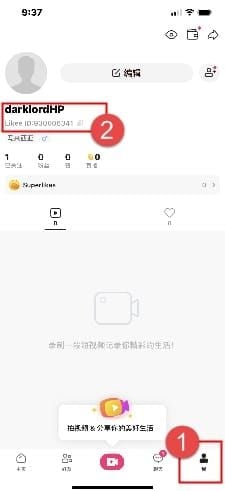
Access Purchase History (Android)
Open Google Play Store, tap profile icon
Select Payments & subscriptions > Budget & history
Filter by Likee or search timeframe
Completed = Charged, processing = Pending
Tap transactions for full details: order number, timestamp, payment method, itemized breakdown. Screenshot for support tickets.
Transaction ID and Order Number
Transaction ID: String starting with GPA in expanded details. Google's internal tracking.
Order number: Likee's purchase record system.
Email confirmations from Google Play provide alternative access. Check inbox for Your Google Play Order Receipt.
Confirm Payment Deduction
Check payment method's transaction history. Credit/debit cards and digital wallets show charges from Google Play or Google Payment.
Bank statements take 1-3 business days. Pending charges indicate authorization occurred, finalize within 24-48 hours.
No deduction or pending charge = purchase failed during authorization. Requires different troubleshooting.
Valid Receipt Contents
Complete receipts include:
App name (Likee)
Diamond package (e.g., 100 Diamonds)
Price in local currency
Transaction date/time
Order number
Transaction ID
Charged or Complete status
Payment method should match intended source. Discrepancies suggest purchase through different Google account.
Step 2: The 24-Hour Automatic Sync Fix
Temporary failures resolve in 24-48 hours for most delayed deliveries. This allows automated sync systems to reconcile records, verify payment, and credit purchases without manual intervention.
How Server Synchronization Works
Likee uses distributed architecture where payment data flows through multiple verification nodes. Each confirms transaction legitimacy, checks fraud indicators, validates account status.
Sync cycles run every 15-30 minutes during normal operations. Your purchase enters queue when Google Play confirms payment, waits for next cycle. High volumes extend queue times.
Balance updates propagate across global servers after initial crediting. Geographic variations occur due to regional sync schedules. Refreshing app forces manual sync check.
Why Most Diamonds Appear Within 24 Hours
24-hour threshold encompasses multiple sync cycles. Over 80% of missing Diamonds appear within this timeframe without intervention.
First-time purchasers, new payment methods, or large packages trigger enhanced security reviews extending beyond standard windows. Weekend/holiday purchases experience longer delays due to reduced staffing.
During Waiting Period
Check balance periodically: Profile icon > Diamond icon. Avoid duplicate purchases—creates processing conflicts.
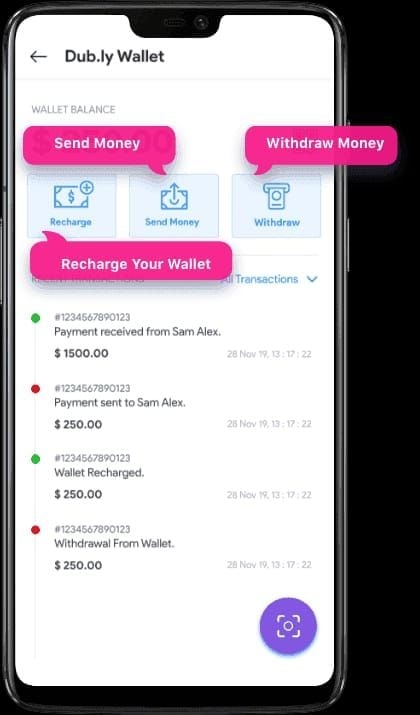
Review Wallet > History for Processing or Pending status. Indicates transaction registered, awaits crediting.
Maintain stable network connectivity. Periodic app launches while connected allow sync completion.
When 24 Hours Indicates Problems
48+ hours without delivery despite confirmed payment requires active troubleshooting. Suggests technical barriers, not queue backlog.
Persistent Pending in Wallet History after 48 hours = crediting errors. Often stems from account verification issues or mismatched details.
Complete absence from Wallet History despite valid receipts = purchase never transmitted to Likee's servers. Requires support ticket.
Step 3: Manual Troubleshooting Methods
When automatic sync fails, manual intervention through cache clearing, re-authentication, and updates resolves technical barriers.
Alternative: buy Likee Diamonds recharge instant at BitTopup for streamlined purchasing with guaranteed delivery.
Clear App Cache (Android)
Settings > Apps > Likee > Storage > Clear Cache. Removes corrupted transaction data. Doesn't delete account info.

Restart app, navigate through profile, Wallet, Diamond balance. Forces fresh data request from servers.
For persistent issues: Clear Data resets app to installation state. Requires re-login—confirm you remember credentials first.
Complete Re-Login
Settings > Account > Log Out. Close app completely via recent apps list. Wait 30-60 seconds.
Log in with verified credentials (phone, Facebook, email). Re-authentication rebuilds session data including Diamond balance.
Confirm green verification badges in Settings > Account. Refresh verification if incomplete.
App Reinstallation
Before uninstalling, confirm verified login credentials. Screenshot User ID from Profile > View or Edit Profile.
iOS: Settings > General > iPhone Storage > Likee > Offload App. Removes app, preserves data.
After reinstalling, log in and check Settings > Account for green verification. Navigate to Diamond balance.
Check for Updates
Open Google Play Store, search Likee. Outdated versions lack payment protocol compatibility.
Update to latest version. Updates include payment improvements, sync bug fixes, enhanced Google Play compatibility.
Restart device after updating. Launch Likee—updates often trigger automatic sync delivering pending purchases.
Step 4: Request Credit for Missing Diamonds
When troubleshooting fails after 48 hours, submit support ticket for manual investigation. Proper documentation accelerates resolution.
Required Documentation
Google Play receipt: Transaction ID, order number, purchase date, Diamond package, payment amount. Screenshot complete details.
Likee balance proof: Screenshot showing Diamonds haven't credited, User ID visible. Include Wallet History showing transaction absence or pending status.
Account info: 10-digit Likee ID, registered email/phone, exact purchase date/time.
Official Support Contact Methods
In-app: Settings > Help > Submit Ticket. Automatically attaches account info.
Select Payment Issues or Diamond Purchase Problems. Choose specific subcategory for specialized routing.
In-app submission provides faster routing and better tracking vs email.
Effective Credit Request Message
Structure with clear sections:
Transaction details: Transaction ID: GPA.xxxx, Order Number: [number], purchased 500 Diamonds on [date] at [time].
Problem description: Payment processed successfully but Diamonds haven't appeared after 48 hours.
Troubleshooting attempted: Cleared cache, updated app, logged out/in, waited 48 hours. Diamonds still missing.
Resolution requested: Please credit 500 Diamonds or explain if additional verification needed.
Response Times
Initial automated response within minutes. Human review within 24-48 hours on business days.
Monitor registered email for responses. Check spam folders.
If 72 hours without substantive response, reply with polite follow-up including ticket reference and transaction ID.
Google Play Refund Policies
Google Play provides consumer protection when purchases fail to deliver.
Refund Eligibility
Automatic eligibility within 48 hours for non-delivered digital content. Extends beyond 48 hours for technical failures, fraud, unauthorized purchases.
Purchases 7+ days old face stricter scrutiny but qualify with clear non-delivery documentation.
Refund Request Process
Purchase history > select transaction > Request a refund or Report a problem. Select I didn't receive the item.
Provide detailed explanation: Likee User ID, confirmation Diamonds never appeared, troubleshooting attempted. Attach screenshots.
Google reviews within 24-48 hours. Approved refunds return to original payment method in 3-5 business days.
How Refunds Affect Account
Refund doesn't automatically remove Diamonds if they eventually credit. Creates potential for receiving both.
Some users report temporary restrictions after refunds, particularly if Diamonds credited before refund completion. May require verification.
Communicate with both Google Play and Likee support for transparency.
Why Credits Beat Refunds
Credits preserve purchase intent while resolving issues. Process faster—Likee manually adds Diamonds immediately upon verifying receipt.
Avoids account flags from refund requests. Maintains clean standing for future purchases.
Support often provides bonus Diamonds as goodwill. Doesn't occur with standard refunds.
Common Mistakes Preventing Diamond Delivery
Wrong Account Login
Multiple accounts cause purchases to credit unintended profiles. Verify User ID in Profile settings matches intended account before purchasing.
Google Play associates purchases with active Google account, not necessarily intended Likee account.
Network Disconnections
Unstable connections dropping during final confirmation create incomplete transactions. Google Play shows pending, Likee never receives notification.
Maintain stable WiFi/mobile data throughout entire process. Avoid switching networks or poor signal areas.
If disconnection occurs, wait for restoration before retrying. Check purchase history to verify completion.
VPN Usage
VPNs mask location, creating mismatches triggering fraud prevention holds.
Disable VPN during payment method linking and purchases. Re-enable after completion.
Use payment methods registered in same country as Likee account.
Insufficient Google Play Balance
Insufficient funds create errors not clearly communicated. Purchase initiates but fails during processing.
Verify balance covers full amount including taxes. Fully fund through Google Play balance or use alternative payment for entire amount.
Preventing Future Issues: Best Practices
Pre-Purchase Verification Checklist
Confirm green verification badges: Settings > Account (phone, Facebook, date of birth)
Update app to latest version via Google Play Store
Check current balance and Wallet History for pending transactions
Optimal Network Conditions
Connect to stable WiFi with strong signal
Avoid public WiFi with restrictive firewalls
Mobile data: strong signal (3+ bars, LTE/4G/5G), sufficient allowance
Disable battery-saving modes restricting background data
Why BitTopup Offers Better Reliability
BitTopup specializes in gaming currency with infrastructure optimized for virtual goods delivery. 24/7 customer support with gaming payment specialists understanding Likee's system.
Competitive pricing beats Google Play rates via bulk agreements and partnerships. More Diamonds per dollar with superior delivery reliability.
Keep Purchase Records
Screenshot every confirmation screen immediately. Provides instant proof without navigating purchase history.
Maintain dedicated folder for gaming receipts. Organized records accelerate support resolution.
Note Likee User ID in password manager for easy reference during support communications.
FAQ
How long for Diamonds to appear after Google Play purchase?
5-30 minutes for most transactions. Verification may extend to 24-48 hours for first-time purchasers or flagged transactions. If missing after 48 hours with valid receipt, troubleshoot or contact support.
Where's my Google Play receipt for Likee purchase?
Google Play Store > profile icon > Payments & subscriptions > Budget & history. Locate Likee transaction, tap for complete details. Or check email receipts at Google account's registered address.
What info needed to report missing Diamonds?
Google Play transaction ID, order number, purchase date/time, Diamond package, payment amount, 10-digit Likee User ID. Screenshots of receipt and current balance showing missing Diamonds.
Can I get refund if Diamonds don't appear?
Yes, Google Play refunds undelivered digital content within 48 hours, extended for technical failures. However, requesting credits through Likee support often resolves faster and may include bonus credits.
Does clearing cache help with missing Diamonds?
Yes, removes corrupted local data preventing sync. Android: Settings > Apps > Likee > Storage > Clear Cache. iOS: Settings > General > iPhone Storage > Offload App. Resets app data, forces fresh server communication.
Why aren't Diamonds showing after payment?
Common causes: server sync delays (normal 24-48 hours), cache conflicts, account verification holds, network disconnections during transaction, wrong account login. Verify Google Play receipt confirms payment, wait 24 hours or troubleshoot manually.
Tired of sync delays? Get instant delivery with BitTopup—trusted platform for Likee Diamonds with guaranteed delivery, lower prices, 24/7 support. No delays, no guesswork. Purchase securely at BitTopup today!