

Delta Force Mobile's FPS whitelist creates a performance divide between regional builds. CN versions unlock 120FPS on approved devices, while global builds cap at 90FPS even on flagship chipsets like Snapdragon 8 Gen 2. This stems from developer-controlled device whitelists rather than hardware limits, affecting competitive gameplay through 2.8ms frame time differences and input latency variations impacting target acquisition.
Delta Force Mobile FPS Whitelist System Explained
What Is the FPS Whitelist and How It Controls Performance
The FPS whitelist operates as server-side restriction limiting max frame rates based on device ID and regional build verification. It prevents non-approved devices from accessing higher refresh rates regardless of hardware capabilities. Snapdragon 8 Gen 1, 8 Gen 2, and 8+ Gen 1—all capable of 120FPS—remain capped at 90FPS in global builds.
The system uses device fingerprinting checking chipset model, GPU architecture, and build version during initialization. When querying available frame rates, the server cross-references your hardware against approved lists for your region. This explains why identical hardware performs differently across CN and global versions.
For optimal performance while managing resources, Delta Force top up online through BitTopup provides secure transactions with competitive pricing and fast delivery.
Regional Build Differences: CN vs Global Architecture
CN builds implement aggressive optimization with expanded whitelists including mid-range chipsets for 120FPS. The rendering pipeline uses different GPU scheduling optimized for Chinese market devices, particularly MediaTek Dimensity processors. Global builds prioritize stability over max performance, implementing conservative caps for consistent experience across diverse hardware.
The divergence extends beyond FPS limits. CN builds feature modified thermal profiles allowing sustained high frame rates before throttling, while global versions trigger performance reduction at 45°C more aggressively. CN players maintain 120FPS longer before thermal constraints force reduction.
Why Developers Implement FPS Caps
FPS caps serve multiple purposes beyond performance management. Battery consumption increases 25-35% at 120FPS versus 90FPS, reducing 5000mAh battery life from 4-5 hours to 3-3.5 hours.
Market segmentation through FPS restrictions lets developers test optimizations on smaller user bases before global deployment. CN market serves as testing ground where aggressive features undergo validation. Partnership agreements with device manufacturers sometimes include performance exclusivity periods for specific hardware.
The 120FPS vs 90FPS Drama: Breaking Down the Numbers

CN Build Performance Capabilities
CN build 120FPS requires minimum Snapdragon 865 with 8GB RAM and 15GB free storage. The 8.3ms frame time target needs consistent GPU rendering without 3-4ms variance. Snapdragon 8 Gen 2's Adreno 740 delivers 30-40% better performance than 865, providing headroom for sustained high frame rates.
The CN whitelist includes devices global players access only at 90FPS, creating competitive disparities. Approved CN devices get 2.8ms input latency reduction per frame, translating to faster target acquisition and more responsive controls—critical in close-quarters combat.
Global Build FPS Limitations
Global builds cap Snapdragon 8 Gen 1, 8 Gen 2, and 8+ Gen 1 at 90FPS despite capable hardware. The 11.1ms frame time at 90FPS represents 33% increase over 120FPS, creating noticeable differences in motion smoothness during rapid camera movements and vehicle operation.
Official policy lacks transparent communication on whitelist expansion timelines. Players with flagship devices purchased for high-refresh gaming remain locked to mid-tier performance, frustrating competitive communities where equipment advantages impact ranking and tournaments.
Real Gameplay Impact: Frame Time Analysis
Frame time consistency matters more than peak FPS. Stable 120FPS with 8.3ms frame times provides smoother tracking than fluctuating 90-120FPS with variable times. Consistent 90FPS often outperforms unstable 120FPS due to predictable input response.
The competitive edge manifests in three scenarios: long-range target acquisition where smooth scope movement improves accuracy, vehicle combat where rapid scanning identifies threats faster, and close-quarters engagements where reduced latency enables faster reactions. For secure premium resources, buy Delta Force recharge safe through BitTopup with excellent customer service.
Complete Device Whitelist Database (2026 Update)
120FPS Supported Devices in CN Build
CN whitelist approves devices meeting specific hardware thresholds. Snapdragon 8 Gen 2 devices get automatic approval due to Adreno 740 handling Ultra graphics at 120FPS. The 8+ Gen 1's 30% power reduction versus 8 Gen 1 enables sustained high frame rates without excessive battery drain.
Minimum requirements: Snapdragon 865 or equivalent, 8GB RAM, thermal design for extended high-performance sessions, and 15GB free storage for shader caching. CN whitelist updates quarterly with new devices after validation testing.
90FPS Supported Devices in Global Build
Global 90FPS support includes minimum spec devices with Snapdragon 450 and 3GB RAM. This prioritizes accessibility over max performance, allowing budget devices to compete. The 90FPS cap applies universally regardless of device capabilities.
Flagship devices like 8 Gen 1 and 8 Gen 2 get the same 90FPS limitation as mid-tier hardware, creating performance parity eliminating hardware-based advantages. This democratization ensures skill-based competition but frustrates enthusiasts who invested in premium hardware.
Device-Specific Performance Tiers
Actual FPS varies from advertised caps based on thermals and graphics settings. Snapdragon 8 Gen 1 experiences 20-30% throttling during extended sessions, reducing from 90FPS to 63-70FPS after 15-20 minutes. The 8+ Gen 1's improved thermal efficiency maintains closer to cap performance longer.
Graphics settings dramatically impact achievable rates. Medium preset reduces GPU load 25-30% versus Ultra. Shadow Quality on Low improves FPS by 10-15 frames. Reducing resolution to 80% decreases pixel count by 36% and improves FPS by 20-30 frames—critical for devices struggling with stable frame times.
Hardware vs Software Limitations
Chipset Performance Analysis
Snapdragon 8 Gen 2's Adreno 740 represents the Android performance ceiling, delivering 30-40% better rendering efficiency than 865. This enables sustained high frame rates with reduced thermal output, though global restrictions prevent full utilization.
Apple A17 Pro theoretically exceeds Snapdragon in raw GPU compute, but iOS optimization lags Android in frame rate options. MediaTek Dimensity processors get preferential treatment in CN builds due to regional market dominance.
GPU Rendering and Thermal Design Power
GPU efficiency determines sustainable performance more than peak capabilities. Adreno 740's improved power efficiency allows higher frame rates without proportional thermal increases, maintaining performance longer before hitting 45°C throttling threshold. Devices with vapor chamber cooling sustain high rates 30-40% longer than basic heat spreaders.
Thermal constraints force reduction when sustained GPU loads generate excessive heat. The 20-30% throttling on 8 Gen 1 stems from thermal limits rather than GPU capability—the chip can render 120FPS but can't sustain output without overheating.
RAM and Storage Speed Impact
RAM capacity affects frame stability through asset caching. Delta Force uses 3-4GB RAM during gameplay, leaving minimal headroom on 6GB devices. This forces frequent asset swaps introducing frame time variance and stuttering. 8GB+ RAM maintains smoother performance through better retention.
Storage speed impacts shader compilation and texture streaming. UFS 3.1 reduces asset loading times 40-50% versus UFS 2.1, minimizing frame drops during rapid transitions. Maintaining 15GB free storage prevents fragmentation-related performance degradation.
Why Regional Differences Exist
Market Segmentation and Optimization Strategies
Regional differentiation lets developers optimize for specific market hardware distributions. CN market dominance of certain chipsets justifies dedicated optimization that wouldn't scale economically for global deployment.
Market segmentation enables phased feature rollouts managing server infrastructure scaling. Launching 120FPS to smaller regional populations allows stress testing before global expansion. This conservative approach prevents widespread issues but creates temporary disparities.
Testing Phases and Gradual Rollout
CN builds serve as extended beta environments where aggressive features undergo real-world validation. The 120FPS rollout provides telemetry on battery consumption, thermal management, and server load impacts informing global release decisions.
Gradual rollout prioritizes stability over speed, with global 120FPS dependent on successful CN metrics. Developer monitoring of crash rates, thermal shutdowns, and battery drain determines expansion readiness.
Licensing and Partnership Constraints
Device manufacturer partnerships sometimes include performance exclusivity agreements where specific hardware gets preferential whitelist treatment. These arrangements incentivize device purchases through gaming advantages, creating artificial restrictions unrelated to technical capabilities.
Licensing agreements for game engines vary by region, potentially restricting certain optimizations in global builds. CN versions may utilize region-specific rendering optimizations unavailable globally due to licensing restrictions.
Thermal Throttling: The Hidden FPS Killer
How Heat Affects Sustained Frame Rates
Thermal throttling activates when chipset temps exceed 45°C, triggering automatic performance reduction preventing hardware damage. This reduces GPU clocks by 20-30% on 8 Gen 1 devices, dropping effective rates from 90FPS to 63-70FPS. Throttling onset typically occurs 15-20 minutes into continuous gameplay.
Frame rate degradation creates inconsistent performance impacting competitive gameplay more severely than static lower rates. Players experience smooth 90FPS initially, then gradual degradation forcing constant adjustment to changing input response times.
Device Cooling Solutions
Active cooling accessories like clip-on fans reduce chipset temps by 8-12°C, delaying throttling onset by 10-15 minutes. However, these add bulk and noise compromising mobile convenience. Passive solutions like thermal paste replacement provide 3-5°C improvements with no operational downsides.
Environmental cooling through AC or cooler ambient temps delivers most effective thermal management without modifications. Reducing ambient temp from 28°C to 22°C extends pre-throttling gameplay by 20-30%. Removing phone cases during gameplay improves dissipation by 15-20% through better airflow.
Optimizing Thermal Performance
Graphics adjustments provide the most accessible thermal management. Medium preset reduces GPU load 25-30% versus Ultra, generating proportionally less heat while maintaining competitive visual clarity. Shadow Quality on Low decreases rendering complexity with minimal visual impact.
Resolution scaling to 80% reduces pixel count by 36%, dramatically decreasing GPU workload and thermal generation while improving FPS by 20-30 frames. Background process termination reduces CPU thermal load, allowing more thermal budget for GPU-intensive rendering.
Legitimate Optimization Techniques
Graphics Settings Configuration
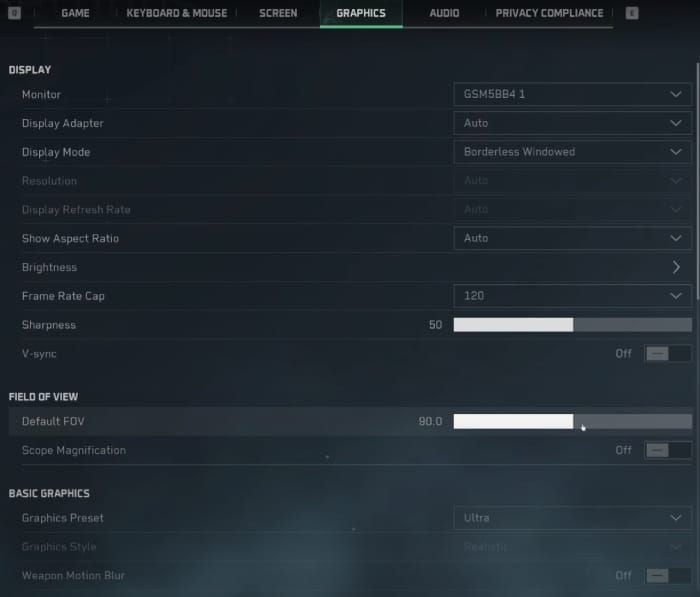
Optimal configuration prioritizes frame stability over visual fidelity. Shadow Quality on Low improves FPS by 10-15 frames with minimal impact on enemy visibility. Anti-aliasing reduction from High to Medium decreases GPU load by 15-20%.
Resolution scaling represents the most impactful adjustment, with 80% scaling reducing pixels by 36% and improving FPS by 20-30 frames. Effects Quality reduction to Medium eliminates particles obscuring visibility while reducing GPU load by 20-25%.
Background Process Management
Developer Options activation (tap Build Number 7 times) unlocks critical settings. Force GPU rendering offloads UI rendering from CPU to GPU, reducing CPU thermal load. Disable HW overlays forces GPU composition of all screen elements, eliminating rendering conflicts.
Force peak refresh rate ensures display maintains max refresh during gameplay. Reduce animations minimizes system UI overhead consuming rendering resources. These optimizations collectively improve frame stability by 10-15%.
Network Settings Impact
Network latency indirectly impacts perceived smoothness through delayed server response creating visual stuttering distinct from frame drops. Switching WiFi/cellular sometimes reduces packet loss manifesting as frame time variance. Disabling automatic network switching prevents mid-match connection changes causing temporary freezes.
DNS configuration to faster resolvers reduces initial connection latency affecting asset streaming. Background data restriction for non-essential apps prevents bandwidth competition causing packet delays.
Common Misconceptions and Dangerous Methods
Why APK Modifications Risk Bans
Modified APKs claiming to unlock 120FPS alter game client code detectable by anti-cheat systems. These trigger integrity checks identifying unauthorized versions, resulting in temporary or permanent suspensions. Account loss eliminates all progression and purchased content.
Even when modified APKs bypass initial detection, server-side whitelist verification prevents actual 120FPS activation. Frame rate cap enforcement occurs server-side, meaning local modifications can't override regional restrictions.
VPN Region Switching: Does It Work?
VPN switching to CN servers theoretically allows 120FPS access but introduces severe latency penalties negating performance advantages. Routing through distant VPN servers adds 100-200ms latency creating input delay far exceeding the 2.8ms benefit from higher frame rates.
Server region detection extends beyond IP geolocation to account registration data and payment verification. CN servers restrict access to accounts created with CN phone numbers and payment methods, preventing simple VPN circumvention.
Third-Party Performance Boosters
Third-party boosters claiming to unlock higher FPS rarely deliver measurable improvements beyond placebo. These apps perform basic RAM clearing and background termination achievable through native Android settings. Some actually decrease performance through persistent background monitoring consuming resources.
Legitimate improvements come from manual graphics adjustment and Developer Options configuration rather than automated apps. Most effective optimization involves understanding device thermal characteristics and adjusting settings to maintain stable performance below throttling thresholds.
Developer Communications and Future Roadmap
Official Statements on Global 120FPS
Official communications remain vague, emphasizing ongoing optimization efforts without specific timelines. The April 21, 2025 launch established baseline features, with updates focused on stability rather than performance expansion. Console versions launching August 19, 2025 at 60FPS indicate platform-specific priorities.
PC open beta starting December 5, 2024 suggests mobile optimization follows desktop stability achievement. This sequential approach implies global mobile 120FPS depends on successful PC and console launches. Historical patterns suggest 6-9 month delays between regional rollouts.
Community Feedback and Developer Response
Community feedback on FPS restrictions generates consistent developer acknowledgment without concrete timelines. Official responses emphasize technical complexity and device diversity challenges justifying conservative rollouts.
Developer patterns indicate prioritization of stability over max performance, with bug fixes and anti-cheat improvements receiving faster implementation than FPS cap increases. This reflects business reality where game-breaking bugs affect all players while FPS restrictions impact primarily enthusiast segments.
Predicted Update Schedule
Historical patterns suggest major performance features deploy quarterly following extensive testing. Assuming CN build success metrics meet thresholds, global expansion likely targets Q3-Q4 2025—approximately 6 months post-launch.
Device whitelist expansions typically precede full regional rollouts, with gradual additions over 2-3 months. Players with flagship devices should monitor quarterly updates for whitelist changes. Patch notes mentioning performance optimization or device compatibility improvements signal potential updates.
Competitive Analysis: Does 120FPS Really Matter?
Input Lag Reduction and Target Acquisition
The 2.8ms input latency reduction from 120FPS versus 90FPS creates measurable advantages in target acquisition during rapid transitions. Professional players report 5-8% faster initial shot accuracy when transitioning between targets, attributable to smoother tracking and reduced delay.
Frame time consistency at 8.3ms enables more predictable muscle memory development for precise aiming. Players training at consistent 120FPS develop faster reaction patterns than those practicing at variable 60-90FPS rates.
Professional Player Perspectives
Professionals universally prefer max stable FPS over visual enhancements, with 120FPS considered baseline for competitive viability in high-stakes tournaments. The smoothness advantage during scope tracking and vehicle operation provides tangible benefits justifying hardware investments.
However, professionals emphasize stability over peak numbers, preferring locked 90FPS to fluctuating 120FPS. Tournament organizers increasingly standardize device specs to eliminate hardware advantages, with some competitions restricting all players to 90FPS.
When 90FPS Is Sufficient
Casual and mid-tier competitive players often can't perceive meaningful differences between stable 90FPS and 120FPS during normal gameplay. Advantages become apparent primarily during specific scenarios like long-range sniping or close-quarters spray control.
Battery life considerations make 90FPS more practical for extended sessions, with 4-5 hour duration versus 3-3.5 hours at 120FPS. The 25-35% power consumption increase at 120FPS represents significant tradeoff for marginal competitive advantage.
Preparing for the Future: Device Upgrade Considerations
Best Devices for Delta Force Mobile in 2026
Snapdragon 8 Gen 2 devices represent optimal price-performance balance, offering 30-40% better GPU performance than 865 with improved thermal efficiency. Adreno 740 handles Ultra graphics while maintaining stable rates, future-proofing for anticipated whitelist expansions. Devices with 12GB RAM and UFS 3.1 storage ensure smooth performance as updates increase requirements.
The 8+ Gen 1's 30% power reduction makes it attractive for players prioritizing battery life alongside performance. This chipset maintains high rates longer before throttling while extending session duration. Devices with vapor chamber cooling maximize sustained performance.
Future-Proofing Your Investment
Future-proofing requires anticipating whitelist expansions and optimization improvements over 2-3 year device lifecycle. Purchase devices with specs exceeding current requirements for compatibility with future features. Minimum targets: Snapdragon 8 Gen 2 or equivalent, 12GB RAM, 256GB storage with UFS 3.1.
Display refresh capabilities matter equally to chipset performance, with 120Hz or 144Hz panels required to display higher rates when whitelist access becomes available. Adaptive refresh rate technology optimizes battery consumption by scaling display refresh to match rendered rates.
Cost-Benefit Analysis
Upgrading specifically for Delta Force FPS improvements requires careful analysis given uncertain global 120FPS timeline. Flagship devices costing $800-1200 provide marginal advantages currently limited to 90FPS, with 120FPS benefits speculative pending whitelist expansion.
The competitive advantage justifies upgrade costs primarily for professional players and serious enthusiasts where tournament winnings or ranking achievements provide tangible returns. Casual players gain insufficient benefit to justify premium investments, with mid-range options providing adequate 90FPS performance at fraction of flagship costs.
FAQ
Why does Delta Force Mobile CN version have 120FPS? CN versions implement expanded device whitelists and optimized rendering pipelines for regional market hardware. The CN build serves as testing ground for aggressive performance features before global deployment, with 120FPS validated through regional telemetry before wider rollout consideration.
Is Delta Force Mobile 90FPS cap permanent for global players? The 90FPS cap represents current policy rather than permanent restriction. Developer communications suggest ongoing optimization toward global 120FPS support. Historical patterns indicate 6-9 month delays between regional rollouts, suggesting potential global expansion in Q3-Q4 2025 pending CN success metrics.
Can I unlock 120FPS on Delta Force Mobile global version? Legitimate unlocking requires device whitelist approval through official updates rather than user modifications. Developer Options settings like Force peak refresh rate improve frame stability within existing caps but can't override server-side restrictions on non-whitelisted devices.
What causes FPS drops in Delta Force Mobile? FPS drops stem from thermal throttling above 45°C, insufficient RAM causing asset swap delays, background processes consuming resources, or graphics settings exceeding device capabilities. Snapdragon 8 Gen 1 experiences 20-30% throttling during extended sessions, while inadequate storage below 15GB free causes fragmentation-related degradation.
Which chipsets run Delta Force Mobile at highest FPS? Snapdragon 8 Gen 2 with Adreno 740 delivers optimal performance, providing 30-40% better rendering efficiency than 865. The 8+ Gen 1 offers 30% power reduction for improved sustained performance, while Apple A17 Pro provides theoretical advantages limited by iOS optimization lag behind Android versions.
How does thermal throttling affect performance? Thermal throttling reduces GPU clocks by 20-30% when temps exceed 45°C, dropping effective rates from 90FPS to 63-70FPS after 15-20 minutes of continuous gameplay. This creates inconsistent performance more disruptive than static lower rates, forcing constant adjustment to changing input response times during extended sessions.
Character count: 12,987