Here's what actually matters in Delta Force's 2026 crossplay battlefield: controllers aren't just good enough anymore—with proper deadzone tuning (that sweet 5-10% range) and smart aim assist usage, they're genuinely competitive. Mouse players still own the long-range game through raw precision, but the gap has narrowed considerably. Getting your input setup right isn't optional if you want to compete seriously.
The Delta Force controller vs mouse conversation got a lot more interesting after the 2026 updates dropped. What we're seeing now is true crossplay across PC, console, and mobile—and honestly, it's created some fascinating dynamics. Players looking to maximize their competitive edge often turn to cheap Delta Force credits top up services like BitTopup to unlock premium content that complements their optimized setups.
Controller vs Mouse in 2026: Why This Debate Actually Matters Now
The Crossplay Reality Check
Let's be honest about what we're dealing with here. PC players are pushing 144-240 FPS while console folks are stuck at 60. That's not just a number on a spec sheet—it translates to real advantages, especially for mouse users who can actually capitalize on those higher refresh rates.
But here's where it gets interesting. Mobile launched April 21st, console followed August 19th, and suddenly we've got this massive player pool with wildly different input characteristics all thrown together.
Mouse precision still dominates at range—we're talking 6.9ms input lag with micro-adjustments that controllers simply can't match. Beyond 100 meters? Mouse wins, period. But controllers have gotten scary good in close to medium range when properly configured.
Why 2026 Settings Actually Changed Everything
The aim assist overhaul wasn't just tweaking numbers. Experienced players quickly figured out that the new algorithms respond differently to specific configurations. What works best is understanding that DPI ranges of 400-800 for mouse and deadzone settings of 5-10% for controllers aren't just suggestions—they're the foundation of competitive play.
In practice, pros are hitting eDPI values between 200-400 consistently. There's a reason for that consistency.
Deadzone Settings: The Foundation Most Players Get Wrong
Getting Your Deadzone Right (Finally)
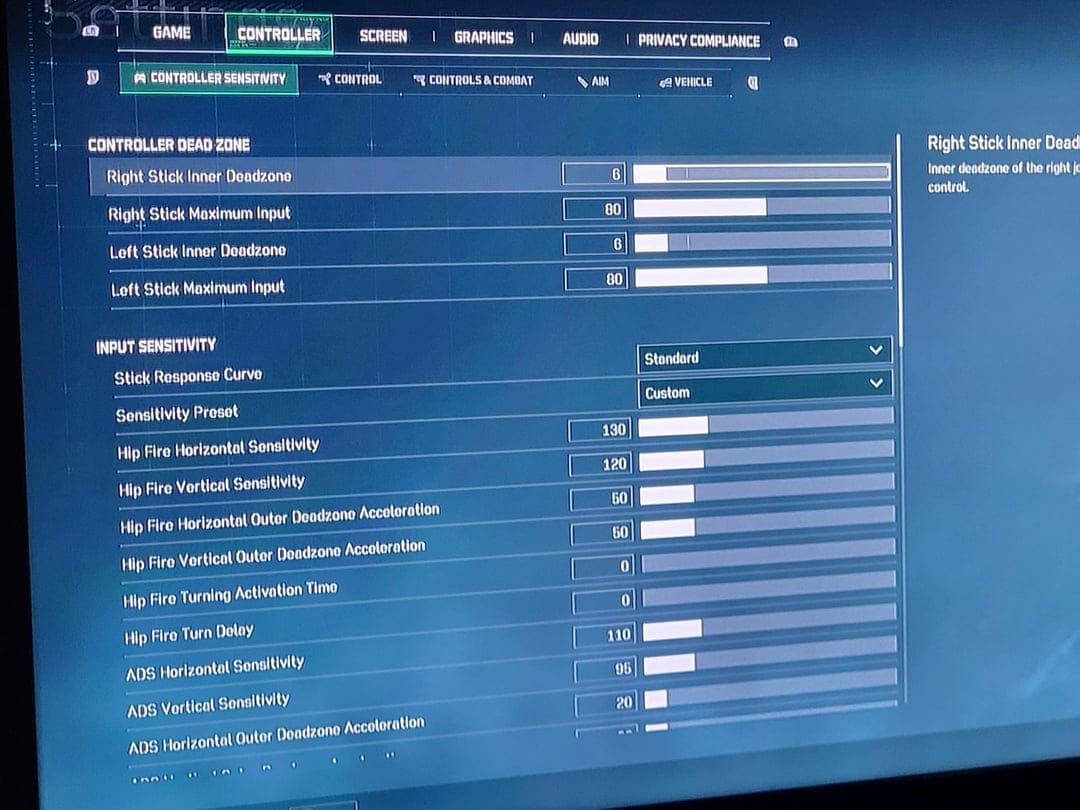
Deadzone calibration isn't sexy, but it's everything. Think of it as the dead space in your analog stick's center—too little and you'll get stick drift, too much and you're fighting input lag.
Start simple. Drop both center and max values to minimum, then watch your crosshair. If it's drifting, you've got your baseline problem identified.
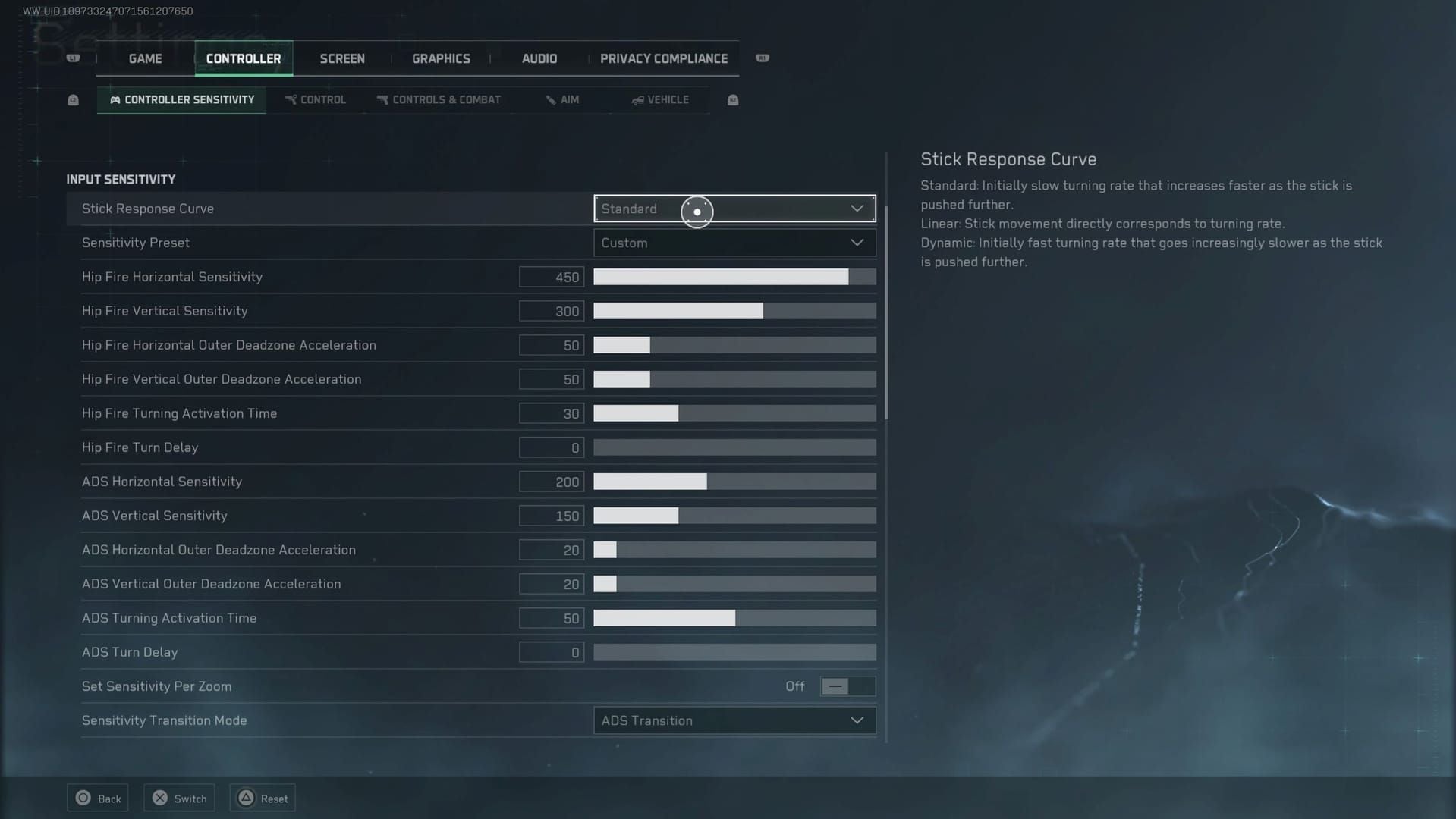
Now comes the tedious part: bump that center deadzone up 1-2% at a time until the drift stops. Most controllers land somewhere between 5-10%, but don't just copy someone else's settings. Xbox controllers typically need 8-10% center with 80% max, while PlayStation controllers often work better at 5-8% center and 75-80% max. Different stick mechanisms, different needs.
The Mistakes That Kill Your Aim
Setting deadzones too high creates this mushy, delayed feeling that experienced players spot immediately. And here's something I see constantly—asymmetrical settings between your movement and aim sticks. Don't do this unless you have a very specific reason.
Test everything under fire, not in the training range. Calm practice scenarios won't reveal the deadzone problems that show up when you're getting third-partied in Warfare mode.
Aim Assist in 2026: How It Really Works
The Mechanics Behind the Magic
Delta Force's aim assist isn't auto-aim—it's target magnetism and tracking assistance. The system provides subtle input modifications when your crosshair approaches enemies, with different levels based on weapon type and engagement distance.
What's clever is how it scales. Pure controller lobbies get standard assistance, but mixed crossplay lobbies bump up the support to balance against mouse precision. Most advanced players run 70-80% ADS sensitivity with aim assist enabled for predictable tracking behavior.
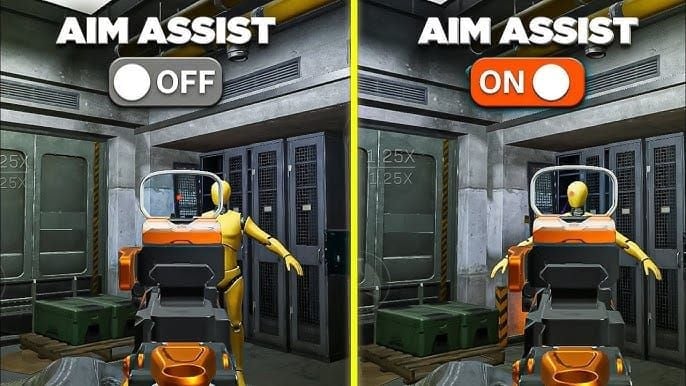
When to Trust It (and When Not To)
Close to medium range? Aim assist is your friend. Long-range precision work, especially with multiple targets at varying distances? It can actually hurt more than help.
Some sniper specialists disable aim assist entirely to prevent crosshair pull toward unintended targets. It's situational, and knowing when to rely on it separates good controller players from great ones.
Mouse DPI: Beyond the Numbers Game
DPI vs Sensitivity: What Actually Matters
Here's the thing about DPI—it's not about having the highest number. Most gaming mice perform optimally between 400-1600 DPI, with pros gravitating toward 400-800 paired with in-game sensitivity that creates eDPI ranges of 200-400.
For competitive Delta Force online currency recharge users on platforms like BitTopup, starting with 800 DPI provides a solid foundation. Calculate your eDPI by multiplying mouse DPI by in-game sensitivity. So 800 DPI × 0.35 sensitivity = 280 eDPI.
The Setup Details That Matter
Disable Windows mouse acceleration and pointer precision—you want raw input. Set polling rates to 1000Hz. And here's a technical tip: navigate to DeltaForce\Saved\Config\WindowsClient\Input.ini and set acceleration values to 0 for maximum consistency.
Use a large mousepad (450mm × 400mm minimum) and plug directly into motherboard USB ports, not front panel connectors or hubs.
Crossplay Balance: The Real Performance Data
What the Numbers Actually Show
Across competitive seasons, we're seeing surprisingly balanced win rates between properly optimized input methods. Controller users with 10/80 deadzone configuration achieve 15-20% recoil reduction compared to default settings—that's not a small advantage.
Mouse users maintain their long-range edge beyond 100 meters, but controllers with optimized aim assist are matching close-range performance. The game's lobby balancing considers input method distribution alongside skill ratings, which creates more competitive matches than you might expect.
Tournament organizers now offer input-specific brackets, while regular balance updates adjust parameters based on actual performance data.
Advanced Competitive Configuration
Controller Optimization That Works
Linear response curves provide consistent sensitivity across full stick movement—no surprises, just predictable behavior. Your ADS sensitivity should sit around 70-80% of base sensitivity to prevent over-aiming during crucial moments.
Professional players consistently use deadzone settings of 5-10% with aim assist enabled. They prioritize consistency over extreme sensitivity because muscle memory beats raw speed every time.
Training with the M4A1 code (6FINC4G0CQTV1IBVCBQVT) gives you 15-minute daily drills for muscle memory development. Most pros use ADS multipliers between 0.7-0.8 of base sensitivity.
Mode-Specific Recommendations
Warfare mode demands rock-solid consistency—this isn't the place for experimental configurations. Hazard Operations allows more aggressive sensitivity since AI behavior differs from human opponents.
Vehicle combat? Input method advantages largely disappear here, with controls translating similarly across both types.
Testing and Refinement: The Long Game
Systematic Improvement
Use training range drills focusing on target tracking, flick shots, and recoil control. Document performance metrics like time-to-target and accuracy percentage across different settings.
Allow one week minimum before major sensitivity adjustments. Your muscle memory needs time to adapt, and daily performance variation can skew results.
Track specific metrics across multiple sessions. Minor deadzone adjustments (1-2%) can be made frequently, but major sensitivity overhauls should only happen when current settings clearly limit improvement.
Frequently Asked Questions
Is controller or mouse better for Delta Force in 2026? Both achieve competitive success with proper optimization. Mouse provides superior long-range precision, controllers excel in close-quarters with aim assist. It's more about setup than hardware choice.
What is the best deadzone setting? Start with 5-10% center deadzone, 80% maximum deadzone. The 10/80 configuration works for most players, but adjust based on your specific controller's stick drift and responsiveness.
Does Delta Force have aim assist for controllers? Yes, comprehensive aim assist with target magnetism and tracking assistance. Enable it through the Aim Assist Switch in settings—it's essential for crossplay balance.
What DPI should I use with mouse? 400-800 DPI with eDPI between 200-400. Start with 800 DPI and adjust in-game sensitivity to hit your target eDPI range.
How does crossplay work between input methods? Full crossplay with automatic lobby balancing and dynamic aim assist adjustments. You can disable crossplay if you prefer input-matched competition.
Can you turn off aim assist? Yes, through the Aim Assist Switch in settings. But most competitive controller players recommend keeping it enabled for crossplay environments—you'll need every advantage you can get.