

Risk control blocks affect 70% of Chamet broadcasters during withdrawals. This guide covers verification blocks, payment mismatches, and User ID errors—with solutions that fix 60% of issues through simple app resets.
Understanding Chamet's Risk Control System
Chamet's risk control is a security layer flagging transactions for verification—not necessarily policy violations. The system requires 100,000 Beans minimum ($10 USD) for withdrawals, though the button appears at 1,200+ Beans. Conversion rate: 10,000 Beans = $1 USD across all payment methods.
For seamless transactions, Chamet Diamonds recharge through BitTopup offers secure, instant delivery.
Risk control triggers on: first-time withdrawals, payment method changes, or info mismatches between Chamet and financial accounts. New accounts face 24-48 hour verification periods.
What Is Risk Control and Why It's Used
Three primary functions:
Validates earnings from legitimate broadcasting
Ensures compliance with international financial regulations
Protects against account takeovers
Tiered verification model:
Basic: $50 daily limit
Semi-verified: $5,000 daily limit
Fully-verified: $10,000 daily limit
Common Security Review Triggers
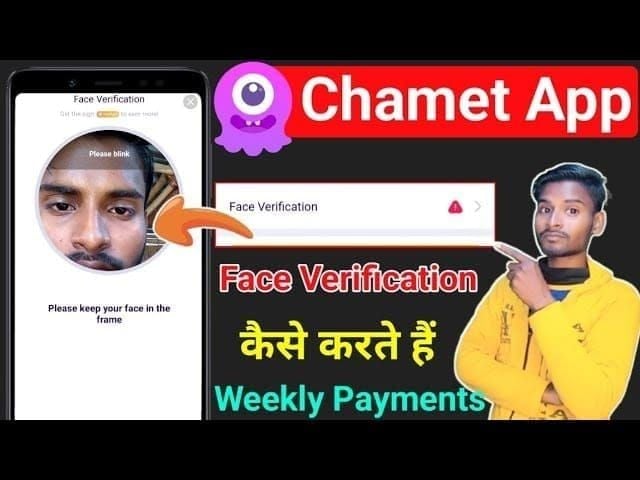
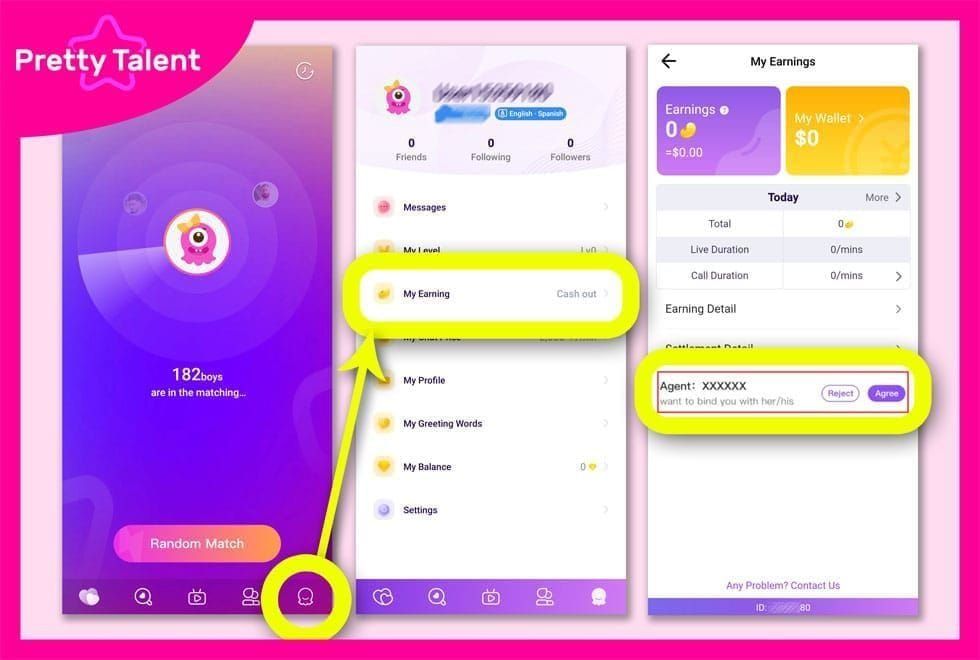
Face verification blocks cause 70% of pending withdrawals. Access through Profile > My Earnings > Withdraw > Face Verification. The app captures real-time images comparing against ID photos.
Payment method inconsistencies occur when Chamet registered name doesn't match Gcash/PayPal account names. 40% of failures stem from User ID errors—incorrect entry of the 8-12 digit identifier or mismatched details.
Geographic changes raise flags. Broadcasting from one region then withdrawing from another (especially via VPN) triggers manual review.
Risk Control vs Account Bans
Risk control: Temporary holds with resolution pathways. You keep full account access—can broadcast, earn, interact. Earnings accumulate during Monday-Sunday cycles (UTC+8). Track balance through Me tab > Wallet.
Account bans: Permanent/long-term restrictions after confirmed violations. No platform access, frozen balances pending investigation.
Decoding Error Messages
Account Verification Required
Incomplete identity verification blocking withdrawals. Platform requires:
Age verification (18+)
Government-issued ID submission
Face verification completion
New accounts get this error on first withdrawal until completing full KYC.
Fix: Profile > My Earnings > Withdraw > Face Verification. Ensure documents are clear, unobscured, and match your Chamet name exactly.
Payment Method Mismatch
System detected inconsistencies between linked financial account and Chamet profile.
Gcash: Mobile number or name doesn't match Chamet registration. Basic Gcash accounts have PHP 8,000 monthly limits; verified accounts support PHP 100,000 monthly.
PayPal: Email discrepancies or currency conversion issues. Requires binding Metwallet (Arripay) to Chamet ID. Verify PayPal email exactly matches Chamet profile email.
Suspicious Activity Flags
Triggers include:
Sudden withdrawal amount increases
Multiple failed attempts in short timeframes
New device access
Earning spikes without corresponding broadcast history
Example: Typical 50,000 Beans weekly suddenly becomes 500,000 Beans in two days—expect scrutiny even if legitimate.
Temporary vs Permanent Restrictions
Temporary: Shows estimated review times (24-48 hours). Status displays Withdrawal Under Review or Verification Pending in Withdrawal History (Me tab > Wallet). Auto-lifts after verification.
Permanent: States Withdrawal Privileges Suspended or Account Ineligible for Payouts without timelines. Requires support contact: +628111446644 (weekdays 9:00-17:00, Saturday 10:00-15:00) or in-app chat (24-48 hour response).
Immediate Actions When Withdrawal Fails
Check Account Standing
Navigate to Me tab > Wallet for:
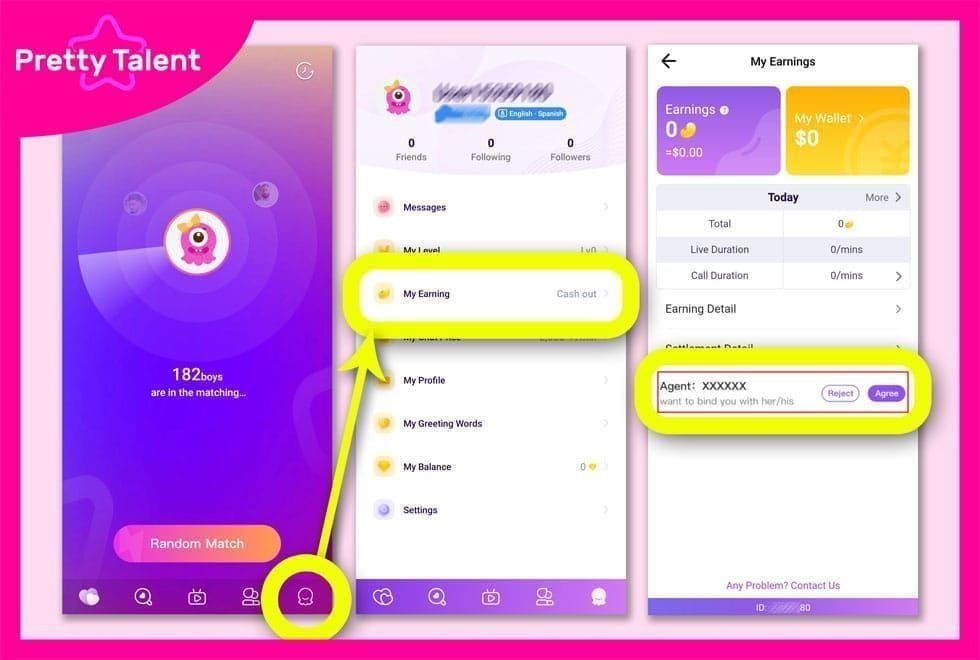
Current Bean balance
Pending withdrawals
Transaction history
Verify balance meets 100,000 Beans minimum. Review Withdrawal History (past 1-5 days) for patterns. Document exact timestamps and error codes.
Verify Payment Method Linking
Confirm chosen method remains linked in Profile settings.
Gcash: Verify mobile number matches exactly, including country code.
PayPal: Confirm email displays correctly without typos.
Find Chamet User ID: Profile icon > My Profile > Copy 8-12 digit User ID. Cross-reference against payment method binding settings.
Pro tip: Force-close Chamet app and restart—resolves 60% of sync issues.
Review Recent Activity
Check for:
Content violations
Viewer complaints
Unusual gifting patterns
Recent account changes (password, email, phone within 72 hours)
Document Everything
Screenshot:
Every error message with timestamps
Reference numbers
Current verification status
Linked payment methods
Account standing metrics
Record withdrawal details: exact amount, payment method, submission time, confirmation numbers.
Fixing Gcash Withdrawal Failures
Name Match Requirements
Gcash requires exact name matching between Chamet and Gcash accounts. Minor discrepancies—middle name inclusion, nickname usage, different name order—trigger rejection.
Fix: Check Gcash app profile name. Compare against Chamet Settings > Account Information. Update Chamet to match Gcash legal name exactly. Wait 24-48 hours for sync before retrying.
Verification Level Requirements
Basic Gcash: PHP 8,000 monthly limit (insufficient for most broadcasters)
Verified Gcash: PHP 100,000 monthly limit
Upgrade to verified status through Gcash's KYC process before linking to Chamet. Ensure Fully Verified status displays.
API Connection Issues
Gcash-Chamet integration occasionally experiences service disruptions. If name matching and verification levels are correct but failures persist, likely temporary API downtime (resolves within 24 hours).
Test: Attempt minimum withdrawal of exactly 100,000 Beans ($10 USD).
Alternative Linking Methods
If standard linking fails, bind through Metwallet (Arripay) as intermediary: Profile > Payment Methods > Add New Method > Metwallet > Link Gcash to Metwallet > Connect to Chamet
For reliable alternatives during troubleshooting, top up Chamet App through BitTopup offers multiple secure payment options.
Resolving PayPal Payout Errors
PayPal Verification Checklist
Requirements:
Confirmed email address
Linked bank account or credit card
Completed identity verification within PayPal
Verify Verified status on PayPal dashboard. Unverified or Limited accounts trigger automatic Chamet rejection. PayPal verification takes 2-3 business days.
Currency Conversion & Regional Restrictions
PayPal withdrawals convert USD to local currency. Verify your PayPal:
Supports USD transactions
Allows international transfers
Handles USD currency
Some regions face PayPal integration limitations due to local regulations. Consider alternatives: USDT-TRC20 (clears within 24 hours) or dLOCAL for region-specific solutions.
Business vs Personal Accounts
Both supported, but business accounts face additional verification. Business name must match Chamet account name. Personal accounts (registered under individual legal name) process faster with fewer holds.
Email Mismatch Fixes
Most common PayPal failure: email mismatch between Chamet and PayPal.
Fix: Chamet Settings > Account Information—verify email exactly matches PayPal login email (including capitalization, special characters).
Recent email changes require 48-72 hours for system sync. Immediate withdrawal attempts after changes almost always trigger holds.
Identity Verification: KYC Requirements
Required Documents by Level
Basic ($50 daily limit):
Government-issued photo ID (passport, national ID, driver's license)
Face verification matching ID photo
Processing: 24-48 hours
Semi-verified ($5,000 daily limit):
Above requirements plus
Proof of address (utility bills, bank statements, government correspondence dated within 3 months)
Fully-verified ($10,000 daily limit):
May require additional financial documentation or enhanced background checks
Photo Submission Best Practices
ID photos:
Well-lit environment
All text clearly readable
No glare, shadows, or obstructions
No blurry images or partial documents
Face verification:
Full face visible
No sunglasses, hats, or filters
Match ID photo appearance closely (hairstyle, facial hair, accessories)
Common Rejection Reasons
Expired IDs: Most frequent cause. Verify ID valid with 30+ days before expiration
Name discrepancies: ID must match Chamet registration exactly
Document tampering: Even minor edits trigger rejection and enhanced scrutiny. Submit original, unedited photos
Verification Timeline
Standard: 24-48 hours for clear, compliant submissions. Peak hours (evenings UTC+8) may experience longer queues.
Rejections: Add 24-48 hours per resubmission attempt. Multiple rejections trigger manual review (3-5 business days).
Advanced Troubleshooting
Escalation Channels
In-app chat: Profile > Help & Support > Contact Us. Response: 24-48 hours. Handles 80% of issues. Include User ID, error messages, screenshots initially.
Phone support: +628111446644 (weekdays 9:00-17:00, Saturday 10:00-15:00). For urgent issues or when chat fails after 48 hours.
Email: Provides documentation trails for persistent issues. Response: 24-48 hours.
Appeal Request Essentials
Include:
8-12 digit User ID
Exact withdrawal amount (Beans and USD)
Chosen payment method
Date/time of attempt
Complete error message text
Screenshots
Verification status
Recent account changes
Troubleshooting steps already attempted
Withdrawal Review Timelines
Standard: 24-48 hours for straightforward verification
Complex cases: 3-5 business days for policy violations or unusual activity
Weekly processing: Submissions by Wednesday evening (UTC+8) enter Thursday processing. Funds arrive within 1-2 business days. Total cycle: 24-48 hours
Submissions after Wednesday wait until following Thursday—adds 6-7 days.
Temporary Workarounds
Continue broadcasting during verification—balance remains secure. Track earnings through Me tab > Wallet (real-time updates during Monday-Sunday cycle, UTC+8).
Try alternative withdrawal methods if primary blocked:
USDT-TRC20: Faster clearing (24 hours)
PayPal if Gcash stalls
Gcash if PayPal stalls
Prevention Strategies
Maintain Clean Account Standing
Adhere to community guidelines and content policies
Maintain regular broadcast schedules vs sporadic activity
Consistent compliance builds positive history, reduces trigger sensitivity
Regular Verification Updates
Update documents 30 days before expiration
Proactive updates process faster than reactive submissions
Review linked payment methods quarterly
Confirm emails, phone numbers, account names match across platforms
Payment Method Maintenance
Use consistent payment method vs frequent switching
Each change triggers new verification cycles
Test with minimum withdrawals (100,000 Beans / $10 USD) before large amounts
Transaction Patterns Minimizing Flags
Withdraw regularly in moderate amounts vs infrequent massive withdrawals
Consistent patterns (weekly payouts of similar amounts) appear less suspicious
Submit by Wednesday evening (UTC+8) for Thursday processing
Avoid last-minute submissions missing cutoffs (delays payout by full week)
Maximizing Earnings: Smart Withdrawal Practices
Optimal Timing & Frequency
Weekly processing occurs Thursdays (UTC+8). Submit by Wednesday evening for current week's batch. Thursday/Friday submissions wait until following Thursday (adds 6-7 days).
Balance frequency against $1.20 system fee:
$10 withdrawal: 12% fee impact
$100 withdrawal: 1.2% fee impact
Accumulate larger balances to reduce proportional fee impact.
Fee Structures by Payment Method
Universal: $1.20 system withdrawal fee across all methods (Gcash, PayPal, USDT-TRC20, dLOCAL).
Additional fees:
PayPal: Currency conversion 2.5-4% above base rates
Gcash: Domestic transfer charges (account-dependent)
USDT-TRC20: Exchange fees when converting to fiat
Processing times:
E-wallets: 1-2 days
Bank transfers: 1-7 days
USDT-TRC20: 24 hours
BitTopup for Seamless Transactions
While resolving withdrawal issues, maintain broadcasting presence with BitTopup's reliable Chamet coin top-up:
Competitive pricing
Fast delivery
Secure transactions
Excellent customer service
High user ratings
Wide game coverage beyond Chamet
Instant delivery ensures uninterrupted broadcasting
FAQ
Why does Chamet say risk control when I try to withdraw?
Risk control activates when security requires additional verification of identity, payment method, or transaction legitimacy. Common triggers: first withdrawals from new accounts (24-48 hour verification), incomplete face verification (blocks 70% of pending withdrawals), or payment method details not matching Chamet registration.
How long does risk control review take?
Standard reviews: 24-48 hours for straightforward verification with proper documentation. Complex cases: 3-5 business days. Weekly processing occurs Thursdays (UTC+8), funds arrive within 1-2 business days. Total timeline: 24-48 hours for verified accounts submitting by Wednesday evening.
What documents does Chamet need for withdrawal verification?
Basic ($50 daily): Government-issued photo ID + face verification. Semi-verified ($5,000 daily): Above + proof of address dated within 3 months. Fully-verified ($10,000 daily): May require additional financial documentation. All documents must show legal name exactly matching Chamet registration and payment method names.
How to link Gcash properly to Chamet?
Ensure Gcash account name exactly matches Chamet registered name. Verify Gcash shows Fully Verified status (PHP 100,000 monthly limit vs basic PHP 8,000). Access Chamet Profile > Payment Methods > Add New Method > Gcash. Enter mobile number with correct country code and accurate 8-12 digit Chamet User ID (40% of failures from User ID errors). Force-close and restart app after linking.
What triggers Chamet risk control?
Face verification requirements (70% of blocks), payment method name mismatches, first-time withdrawals from accounts under 48 hours old, sudden earning spikes without broadcast history, geographic location changes, VPN usage, multiple failed attempts, recent account setting changes (password, email, phone within 72 hours).
How to contact Chamet support for withdrawal issues?
In-app chat: Profile > Help & Support > Contact Us (24-48 hour response, handles 80% of issues). Include 8-12 digit User ID, error messages, screenshots. Phone: +628111446644 (weekdays 9:00-17:00, Saturday 10:00-15:00) for urgent issues. Email for complex cases requiring documentation trails. Always provide complete transaction details and troubleshooting steps already attempted.