

This BIGO recharge FAQ covers diamond purchase fees, refund policies, and delivery times. Learn exact fee structures, the 7-day refund window with 7-14 day processing, and why 95% of transactions complete within 3 minutes.
Understanding BIGO Recharge: What You Need to Know
BIGO Diamonds are the premium currency in BIGO Live for sending virtual gifts, unlocking features, and enhancing streams. Broadcasters convert gifts to earnings at 210 Beans = $1 USD, with minimum withdrawal at 6700 Beans ($31.90).
Standard packages range from 60 Diamonds ($1) to 33,000 Diamonds ($499.99), capped at 40,000 per transaction. BIGO top up with local payment through BitTopup offers competitive pricing and regional flexibility that beats in-app rates.
Third-party platforms skip app store commissions. While in-app purchases include platform cuts, web-based recharges offer better value. Example: 100 Diamonds cost $1.96 via web vs $3.99 in-app—over 50% savings.
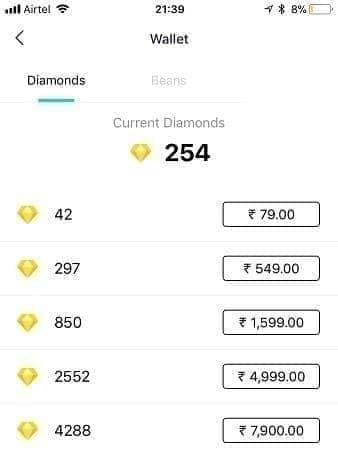
What BIGO Diamonds Are and Why You Need Them
Diamonds power user engagement on BIGO Live. Spend them on virtual gifts (simple emojis to elaborate animations) during streams to show appreciation, gain chat visibility, and join platform events.
The diamond economy creates direct financial relationships. When you send diamond-purchased gifts, broadcasters receive Beans convertible to real currency. This incentivizes quality content while letting you support streamers meaningfully.
Diamonds unlock premium features: special chat effects, profile customization, priority visibility. Strategic purchases during events like Mid-Year Gala (July 16-22, 30% off) or Black Friday (20-50% off) maximize spending power.
How BIGO Recharge Works Through BitTopup
BitTopup's five-step process:
Select BIGO Live diamond product and package
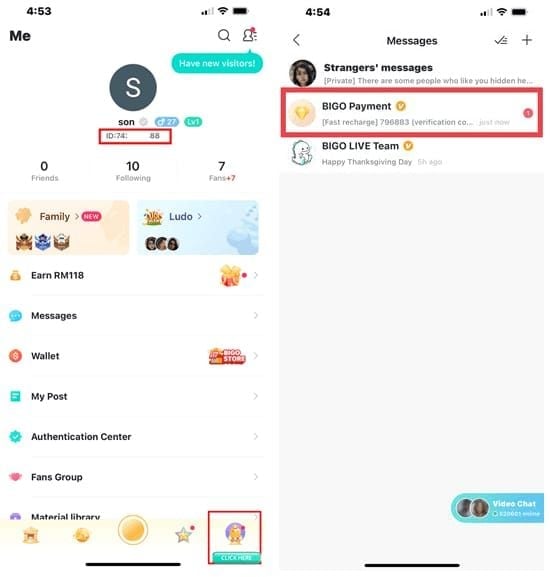
Enter your numeric Bigo ID (Me > nickname, format: 901216366)
Process payment via secure SSL/PCI DSS gateways
Automatic delivery (95% within 3 minutes, virtually all under 5 minutes)
Verify in Me > Wallet
No password required—maintains security throughout. BitTopup avoids the 30% Apple cut and 15-30% Google commission, delivering more diamonds per dollar. Supports multiple regional payment methods.
Official vs Third-Party Recharge
Official in-app routes payments through Apple App Store or Google Play, applying their platform fees. Apple takes 30%, Google takes 15-30%. These fees inflate prices—210 Diamonds cost $3.99 in North America plus tax.
Third-party authorized platforms operate outside app stores, eliminating commissions. This enables significantly lower pricing on identical quantities. Web-based purchases also provide greater payment flexibility.
Security remains equivalent: SSL encryption, secure gateways, no-password delivery. Verify platform authorization and review security protocols before purchasing.
BIGO Recharge Fees Breakdown
Understanding complete fee structures—base prices, platform fees, payment processing, regional factors—empowers informed decisions maximizing diamond value.
Standard Fee Structure
Base pricing tiers:
60 Diamonds: $1
210 Diamonds: $3.99 (North America + tax)
660 Diamonds: $10
3,300 Diamonds: $50
6,600 Diamonds: $70
33,000 Diamonds: $499.99
Per-diamond cost decreases with volume—33,000 package offers ~17% better value than 60-diamond increments. Transaction cap: 40,000 diamonds.
iOS purchases incur Apple's 30% commission. Android faces Google's 15-30% cut. This explains why 100 Diamonds cost $3.99 in-app vs $1.96 web-based—103% price difference for identical goods.
Payment Processing Fees
PayPal:
Domestic: 2.9% + $0.30
International: 4.4%
Currency conversion: 3-4% extra
Credit Cards:
Merchant fees: 2.5-3.5%
International: 1-3% extra
Currency conversion: 1-3%
Bank Transfers:
Processing: 0.5-1.5%
Time: 1-3 business days
Limited regional availability
Purchase BIGO Diamonds safely through platforms with transparent fees and competitive processing rates.
Hidden Costs
Currency Conversion: 3-5% markups above mid-market rates when purchasing in non-native currency.
Regional Taxes: 5-25% based on location. North America has state-specific sales tax; Europe has 17-27% VAT.
Dynamic Pricing: Regional adjustments based on local markets—identical packages cost different amounts across countries.
Membership Fees: Some platforms charge monthly fees or require minimum commitments, increasing per-diamond costs.
Regional Variations
Geographic location impacts final costs. BIGO implements market-specific pricing considering local purchasing power. A 210 Diamond package at $3.99 in North America might range $2.99-$5.99 elsewhere.
Currency conversion adds complexity. Real-time exchange fluctuations vary costs daily. Processors apply rates 2-4% above interbank rates.
Minimize conversion costs by matching payment currency to platform pricing or using local currency options. Monitor exchange rates for bulk purchases.
Diamond Delivery Time
Understanding typical timeframes, delays, and tracking helps set expectations and identify when intervention's needed.
Instant Delivery
95% of transactions complete within 3 minutes, virtually all under 5 minutes. This speed comes from automated API integration between payment processors and BIGO servers.
Requirements: active account, exact Bigo ID match, normal server operation. When aligned, automated systems credit diamonds immediately upon payment confirmation.
No human intervention for standard transactions. Payment triggers automatic API call updating balance real-time. Verify by refreshing Me > Wallet.

Processing Times by Payment Method
Credit/Debit Cards:
Authorization: 10-30 seconds
Confirmation: Immediate-2 minutes
Total: 1-3 minutes
Digital Wallets:
Authorization: 5-15 seconds
Confirmation: Immediate-1 minute
Total: 1-2 minutes
Bank Transfers:
Authorization: Instant-24 hours
Confirmation: 1-3 business days
Total: 1-3 business days
Cryptocurrency:
Authorization: 10-60 minutes
Confirmation: After blockchain confirmations
Total: 15 minutes-2 hours
Cards and digital wallets align with the 95% within 3 minutes benchmark. Bank transfers trade speed for lower fees.
Delay Factors
Network Issues: Unstable connections interrupt gateway-server communication. Switch between Wi-Fi and mobile data.
VPN Interference: Active VPNs trigger security reviews. Disable before recharging.
Account Verification: First purchases or large transactions need identity verification (15-30 minutes). Enable 2FA to reduce future verification.
Server Maintenance: Rare scheduled maintenance delays delivery 30 minutes-2 hours. Platform announces in advance.
Incorrect Bigo ID: Invalid IDs route to manual review (2-24 hours). Double-check numeric ID before payment.
Tracking Order Status
In-App History: Me > Wallet > Transaction History shows 90-day logs with timestamps and status. Completed = delivered, Processing = pending.
Confirmation Emails: Automated emails contain transaction IDs, amounts, timeframes. Official records for disputes.
Platform Dashboards: Third-party platforms offer real-time order tracking with processing stages.
Wallet Refresh: Most direct verification—Me > Wallet refresh. If balance unchanged after 5 minutes, troubleshoot.
For delays, gather transaction ID, payment confirmation, Bigo ID. Contact support via Me > Settings > Help & Feedback > Recharge Problem or feedback@bigo.tv.
Refund Policy
BIGO's refund policy balances user protection with fraud prevention through clear eligibility criteria and processes.
Eligibility Criteria
Qualifying:
Payment processed, diamonds never delivered
Duplicate charges
Unauthorized transactions
Technical errors (wrong quantities)
Accidental purchases within 7-day window
Non-Qualifying:
Diamonds already spent
Buyer's remorse after delivery
Account suspension post-purchase
Terms violations
Purchases older than 7 days
7-day window starts from transaction timestamp. Requests after this face automatic rejection. Diamonds must remain unspent—once used, non-refundable.
Refund Request Process
1. Gather Documentation:
Transaction ID
Numeric Bigo ID (Me > nickname)
Payment receipt
Screenshots showing issue
Transaction date/time
2. Access Support:
In-app: Me > Settings > Help & Feedback > Recharge Problem
Email: feedback@bigo.tv
Phone: +65 63519330 (urgent)
3. Submit Request:
State refund reason clearly
Provide all documentation
Specify amount and quantity
Include preferred refund method
4. Await Response:
Review within 24-48 hours
Additional info requests may extend timeframe
Maintain email access
5. Provide Additional Info:
Respond promptly to verification
Supply supplementary documentation
Delays extend processing
6. Receive Decision:
Approval/denial via email
Approved refunds enter processing
Denials include explanation and appeal options
Processing Timeframes
Credit/Debit Cards:
Initiation: 1-2 business days
Bank processing: 5-10 business days
Total: 7-14 days
PayPal:
Initiation: 1-2 business days
PayPal processing: 3-5 business days
Total: 7-14 days
Bank Transfers:
Initiation: 2-3 business days
Bank processing: 7-14 business days
Total: 7-14 days
Standard 7-14 day window varies by banking institution and international transfers. Monitor payment accounts during this period.
Refunds match original price, though currency fluctuations may cause slight variations. Processor fees generally non-refundable.
Non-Refundable Cases
Spent Diamonds: Used for gifts/features = immediately non-refundable. Real-time usage tracking.
Expired Window: Requests after 7 days = automatic rejection.
Terms Violations: Suspended/banned accounts forfeit refund rights.
Third-Party Recharges: Purchases for another's account—recipient must request refund.
Promotional Purchases: Special pricing may carry no-refund conditions stated at purchase.
Common Problems & Solutions
Most issues follow predictable patterns with established fixes. Simple troubleshooting resolves 82% without support.
Payment Declined Fixes
Insufficient Funds: Verify balance covers amount plus fees/taxes.
Card Security Blocks: Banks flag international/digital purchases. Authorize BIGO transactions with issuer.
Incorrect Details: Double-check card number, expiration, CVV, billing address.
Regional Restrictions: Verify payment provider allows international/digital transactions.
Daily Limits: Large purchases may exceed caps. Increase limits or split transactions.
VPN Interference: Disable VPN before payment.
Diamonds Not Received
Step 1 - Refresh Wallet: Me > Wallet, pull down. Resolves 60% of display issues.
Step 2 - Clear Cache: Fixes 82% of glitches. iOS: reinstall app. Android: Settings > Apps > BIGO Live > Storage > Clear Cache.
Step 3 - Switch Network: Toggle Wi-Fi/mobile data.
Step 4 - Verify Account: Confirm logged into account matching purchase Bigo ID.
Step 5 - Check Status: Me > Wallet > Transaction History. Completed = delivered despite display issues.
Step 6 - Wait: Allow 5 minutes. Network congestion can extend slightly.
Step 7 - Contact Support: After 30 minutes, contact via Me > Settings > Help & Feedback with transaction ID and Bigo ID.
Account Verification Issues
Identity Verification: Large purchases may need photo ID, payment verification. Respond promptly.
2FA Setup: Enable via Me > Settings > Security. Reduces future verification frequency.
Email Verification: Confirm email via verification link.
Phone Verification: Link verified number for stronger security.
Account Age: New accounts face stricter verification. 30+ day accounts encounter fewer requirements.
Wrong Account Recharged
Immediate Steps (Within 24 Hours):
Don't spend diamonds
Contact feedback@bigo.tv immediately
Provide incorrect and intended Bigo IDs
Include transaction ID and confirmation
Request transfer or refund/repurchase
Resolution Options:
Transfer unspent diamonds to correct account
Refund to payment method, repurchase for correct account
Credit to correct account
Prevention:
Save correct Bigo ID in secure notes
Verify ID shows correct username before payment
Use copy-paste exclusively
Double-check all digits
Wrong recharges become irreversible once spent. Immediate reporting critical.
Error Codes
Payment Processing:
1001: Gateway timeout—retry
1002: Invalid payment method—verify details
1003: Declined by issuer—contact bank
1004: Insufficient funds—add funds
Account-Related:
2001: Invalid Bigo ID—verify accuracy
2002: Account suspended—resolve status
2003: Verification required—complete process
2004: Region restriction—location mismatch
System:
3001: Server maintenance—retry later
3002: Transaction limit exceeded—wait 24 hours
3003: Network failed—check connectivity
3004: App outdated—update to latest
Note error codes for support contact—enables faster diagnosis.
Security & Safety
Protecting account and financial data requires understanding threats and implementing protective measures.
Protecting Account Info
Password Management:
Unique, complex passwords (letters, numbers, symbols)
No reuse across platforms
Change every 90 days or after suspected compromise
Never share with anyone
Two-Factor Authentication:
Enable via Me > Settings > Security
Use authenticator apps over SMS
Store backup codes securely
Verify 2FA prompts match your logins
Bigo ID Privacy:
Share only with trusted platforms
Never provide password with Bigo ID
Verify platform legitimacy first
Monitor transaction history
Session Security:
Log out from shared/public devices
Clear cache/cookies after web purchases
Avoid saving payment info on public computers
Use private browsing for sensitive transactions
Legitimate platforms never request passwords—only numeric Bigo ID.
Recognizing Legitimate Platforms
Legitimate Indicators:
SSL encryption (HTTPS + padlock)
PCI DSS compliance certifications
Clear contact info (support email/phone)
Transparent pricing, no hidden fees
Professional design, proper grammar
Established reviews/ratings
No password requirements
Fraud Warning Signs:
Password requests
Prices significantly below market
Poor design, spelling errors
No contact info
Pressure tactics
Unsolicited special deals
Payments lacking buyer protection
BitTopup demonstrates legitimacy through transparent pricing, secure processing, no-password delivery, established support.
Payment Security
Method Selection:
Credit cards over debit (fraud protection)
Digital wallets with buyer protection
Avoid wire transfers/crypto for unfamiliar platforms
Enable transaction notifications
Transaction Verification:
Review summary before confirmation
Verify diamond quantity matches package
Confirm Bigo ID accuracy
Screenshot confirmations
Financial Monitoring:
Check statements within 48 hours
Report unauthorized charges immediately
Maintain 90-day transaction records
Set fraud alerts with institution
Secure Connections:
Use trusted networks
Avoid public Wi-Fi
Disable VPN (prevents gateway conflicts)
Ensure current device security
Suspected Fraud Response
Immediate Actions:
Change BIGO password
Enable 2FA if inactive
Freeze affected payment methods
Report to payment provider
Document with screenshots
Platform Reporting:
Contact feedback@bigo.tv with details
Report to consumer protection agencies
Warn community forums
File regulatory complaints
Account Recovery:
Request transaction history review
Dispute unauthorized charges with bank
Provide fraud documentation
Follow up until resolved
Future Prevention:
Audit security settings
Revoke third-party app permissions
Monitor logs weekly
Update security practices
Act within 24 hours—maximizes recovery success.
Pro Tips for Hassle-Free Recharge
Expert practices minimize errors, maximize value, streamline purchases.
Double-Check Bigo ID
Verification Process:
Open Me section
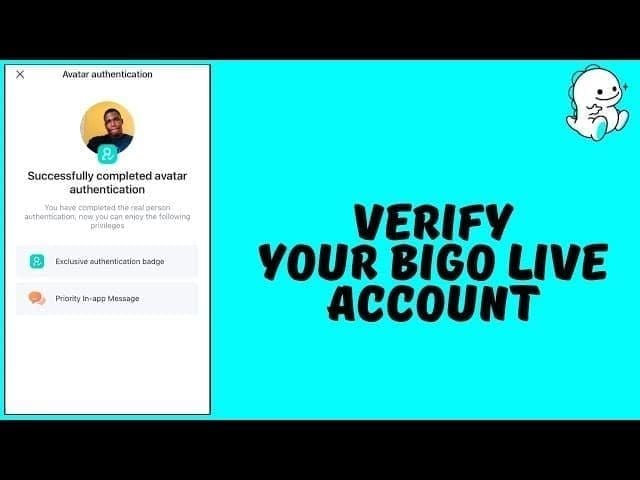
Locate numeric ID beneath nickname (format: 901216366)
Copy directly (no manual transcription)
Paste into platform ID field
Verify match exactly
Cross-reference username if shown
Common Errors:
Transposing digits
Including spaces/special characters
Confusing similar numbers (0/O, 1/l)
Using username instead of numeric ID
Copying partial strings
Prevention:
Save ID in password manager
Use copy-paste exclusively
Verify username displays correctly
Screenshot Me profile for reference
Create verification checklist
Wrong recharges irreversible once spent—worth 30 seconds verification.
Choose Right Payment Method
Speed Priority:
Cards: 1-3 minutes
Digital wallets: 1-2 minutes
Best for: Urgent, event-time purchases
Cost Priority:
Bank transfers: Lowest fees, 1-3 days
Digital wallets: Moderate fees, fast
Best for: Large purchases
Security Priority:
Credit cards: Best fraud protection
Established wallets: Buyer protection
Best for: First-time, unfamiliar vendors
Convenience Priority:
Saved methods: One-click
Digital wallets: No card entry
Best for: Repeat, mobile purchases
Keep Transaction Records
Essential Documentation:
Transaction ID
Payment receipt (date, time, amount)
Purchase confirmation screenshot
Bigo ID used
Diamond quantity
Platform used
Organization:
Dedicated email folder
Spreadsheet tracking
Cloud storage for screenshots
Calendar entries for large purchases
Retention:
Minimum 90 days (matches BIGO logs)
Extended for tax documentation
Permanent for disputes
Applications:
Dispute resolution
Spending analysis
Tax documentation
Promotional timing patterns
5 minutes invested saves hours during problems.
Repeat Purchase Best Practices
Timing:
Monitor promotional calendars (Mid-Year Gala July 16-22, Black Friday)
Purchase during 20-50% discount events
Avoid urgent purchases
Volume Strategy:
Calculate per-diamond cost across sizes
Balance bulk discounts vs immediate needs
Consider 40,000 transaction cap
Platform Loyalty:
Establish reliable platform relationship
Benefit from repeat customer priority
Streamline via saved payments
Budget Management:
Set monthly diamond budgets
Track spending patterns
Identify cost-per-entertainment-hour metrics
Security Maintenance:
Update passwords/security regularly
Review history weekly
Maintain current contact info
Repeat purchasers report 40% time savings, 25% cost reductions through strategic timing and volume optimization.
FAQ
How much are recharge fees?
Fees vary by method. In-app: 30% Apple or 15-30% Google cuts make 100 Diamonds $3.99. Web platforms: $1.96 for same quantity. Payment processors add 2.9-4.4% (PayPal) or 2.5-3.5% (cards). Regional taxes: 5-25%. Third-party platforms often offer better value.
How long does delivery take?
95% complete within 3 minutes, virtually all under 5 minutes. Cards/wallets: 1-3 minutes. Bank transfers: 1-3 days. Delays from VPN, network issues, verification. If no diamonds after 30 minutes, refresh Me > Wallet, clear cache, or contact support.
Can I get refunds?
Yes, within 7 days for unspent diamonds when delivery failed, duplicate charges, or unauthorized transactions. Spent diamonds = non-refundable. Approved refunds process in 7-14 days to original payment. Submit via Me > Settings > Help & Feedback or feedback@bigo.tv with transaction ID and Bigo ID. After 7 days = automatic rejection.
What if recharge failed but money deducted?
Verify charge posted (not pending). Refresh Me > Wallet, clear cache (82% effective). Switch Wi-Fi/mobile data. Check 90-day transaction logs. If no diamonds after 30 minutes, contact feedback@bigo.tv with transaction ID, Bigo ID, payment proof.
Why aren't diamonds showing?
Usually display sync, not delivery failure. Refresh Me > Wallet. Clear cache (reinstall iOS, clear storage Android). Verify correct account. Disable VPN. Wait full 5 minutes. Check Transaction History for Completed status.
How do I verify order status?
Check Me > Wallet > Transaction History (90-day logs). Completed = delivered, Processing = pending. Review confirmation emails for transaction IDs. Third-party platforms offer tracking dashboards. If unclear after 30 minutes, contact Me > Settings > Help & Feedback with transaction ID and Bigo ID.
Ready to recharge with confidence? Visit BitTopup for transparent pricing, instant delivery, 24/7 support. Get BIGO diamonds in minutes—start your secure recharge today!